

はじめに
この記事ではDatabricks-to-Databricks共有プロトコルを用いたDelta Sharingにおけるデータガバナンスに関して記載しています。Delta Sharingそのものに関する詳細な説明は公式ドキュメントをご確認ください。
想定する読者
DatabricksでDelta Sharingを用いた際のデータガバナンスに関して知りたい方
Databricks-to-Databricks共有プロトコル
概要
Unity Catalogが有効化されているDatabricksのワークスペース間でデータを共有する方法としてDatabricks-to-Databricks共有プロトコルが存在します。共有されるデータはshareと呼ばれる形でメタストアレベルにて管理されます。shareを提供するエンティティをprovider、享受するエンティティをrecipientと呼びます。shareはread-onlyとなるため、recipient側で共有データに対して書き込みや更新といったアクションを取ることができません。同じメタストアを持つワークスペースであればデフォルトでデータが共有されるためDelta Sharingを使用する必要はありません。この場合(メタストアが同じ場合)のデータガバナンスはグループ、タグポリシー、Workspace-catalog bindingなどを用いてACLを構築します。
データガバナンスにおける課題
Dleta Sharingを用いた際にデータガバナンスの観点で課題となる点が以下の点になります。
-
アクセス制御
- ユーザーやグループといったエンティティではなく、メタストアレベル間でのデータ共有となるためrecipient側でどのエンティティにどののデータへのアクセスを許可するかのACLの設定が必要となる
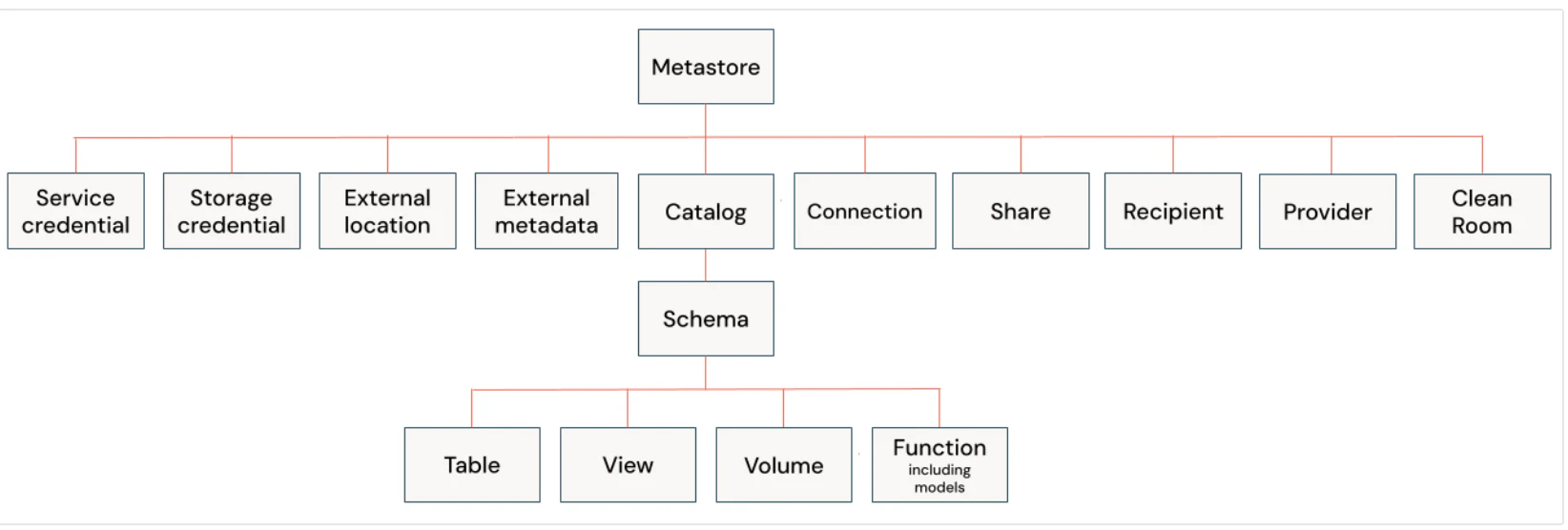
引用元:databrikcs: Unity Catalog privileges and securable objects
-
shareはメタストアレベルで管理されるため、あるshareへのアクセスが可能なユーザー(
USE SHAREが付与されたユーザー)は他のすべてのshareにもアクセスができてしまう -
FGACが機能しない。行の制御やカラムマスクが設定されたテーブルを共有できなかったり、
is_member()、is_account_group_member()といった関数を使用したダイナミックビューの共有ができない
- ユーザーやグループといったエンティティではなく、メタストアレベル間でのデータ共有となるためrecipient側でどのエンティティにどののデータへのアクセスを許可するかのACLの設定が必要となる
-
メタデータ管理
- タグやデータリネージなどのメタデータが共有されない
この本記事では1つ目のアクセス制御の課題に対してどのような手法を取ることが可能かを記載しています。
Situation
架空の会社Lumeo (ルミオ)を用いて上記のアクセス制御に関する課題を解決する方法を提示してみます。
Lumeoは異なる2つのメタストアと紐づくDatabricksワークスペースを管理しています。1つのワークスーペースにはDelta Sharigを管理するグループ(ap-northeast-1-ds-provider-admins)とマーケティング部門(marketing_dept)が存在します。もう1つのワークスペースではDelta Sharigを管理するグループ(ap-northeast-1-ds-recipient-admins)、ファイナンス部門(finance_dept)、会計部門(account_dept)、営業部門(sales_dept)が存在します。
今回管理グループはファイナンス部門、会計部門、営業部門からマーケティング部門が管理するアセット(テーブル)の情報を取得したいという要望を受け付けました。ACL(どのデータをどの部門と共有するかの設定)はshareを享受するワークスペースの管理グループに任せず、マーケティング部門が決めるものとします。
登場するエンティティ
provider(shareを作成&共有する)
- group
- 管理グループ
- ap-northeast-1-ds-provider-admins
Who ?: Delta Sharing管理グループ
Delta Sharingに関する以下の権限を保持
CREATE SHARE, USE SHARE, SET SHARE PERMISSION, CREATE RECIPIENT
- ap-northeast-1-ds-provider-admins
- 一般グループ
- marketing_dept
Who ?: マーケティング部門
- marketing_dept
- 管理グループ
recipient(shareを享受する)
- group
- 管理グループ
- ap-northeast-1-ds-recipient-admins
Who ?: Delta Sharing管理グループ
What ? : Delta Sharingに関する以下の権限を保持
CREATE CATALOG, USE PROVIDER
- ap-northeast-1-ds-recipient-admins
- 一般グループ
- finance_dept
Who ?: ファイナンス部門 - account_dept
Who ?: 会計部門 - sales_dept
Who ?: 営業部門
- finance_dept
- 管理グループ
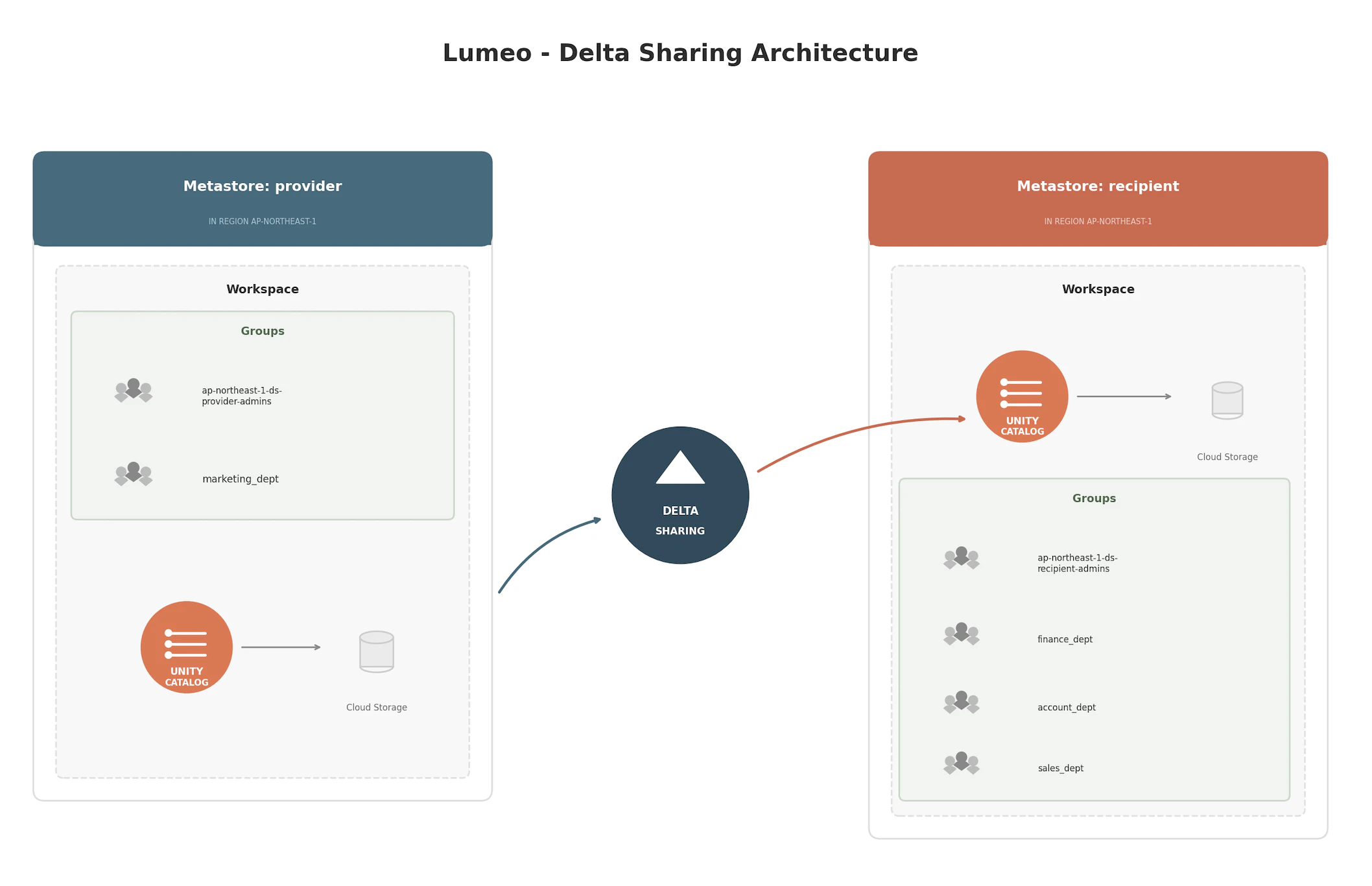
画像:LumeoでのDelta Sharing構成図
共有データ
- スキーマ:
marketing_dpet.project_aに存在するすべてのアセット

スキーマには以下のアセットが含まれています。
-
テーブル
-
campaigns: マーケティングキャンペーン情報を保持する。営業部門、ファイナンス部門、会計部門がこの情報を取得したい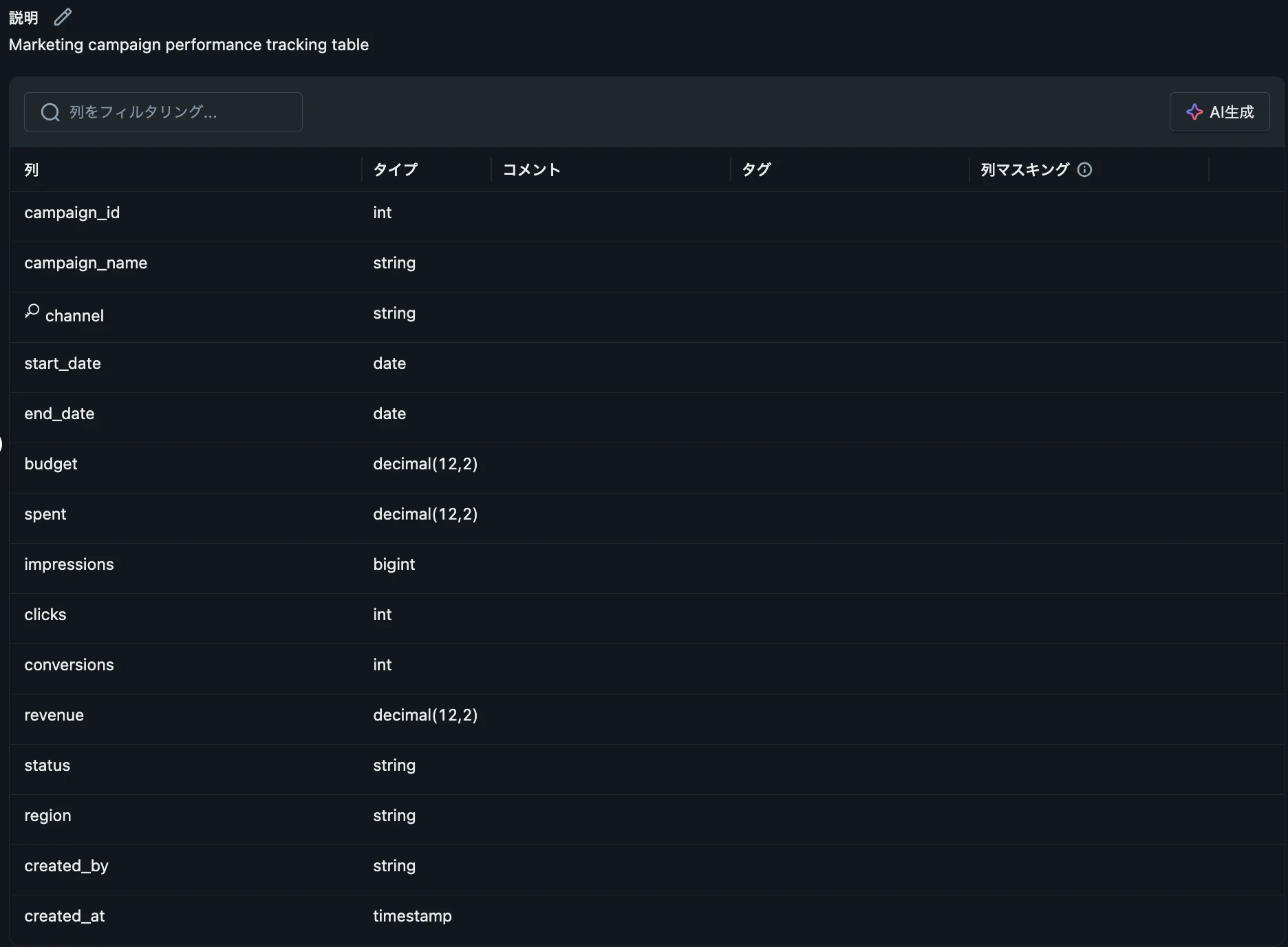

-
campaign_contacts:マーケティングキャンペーンでリーチした顧客情報を保持する。一部カラムがPIIとなっていて、これらのカラムはマスキングをした状態で管理グループを除くユーザー(グループ)に共有をしたい。営業部門、ファイナンス部門がこの情報を取得したい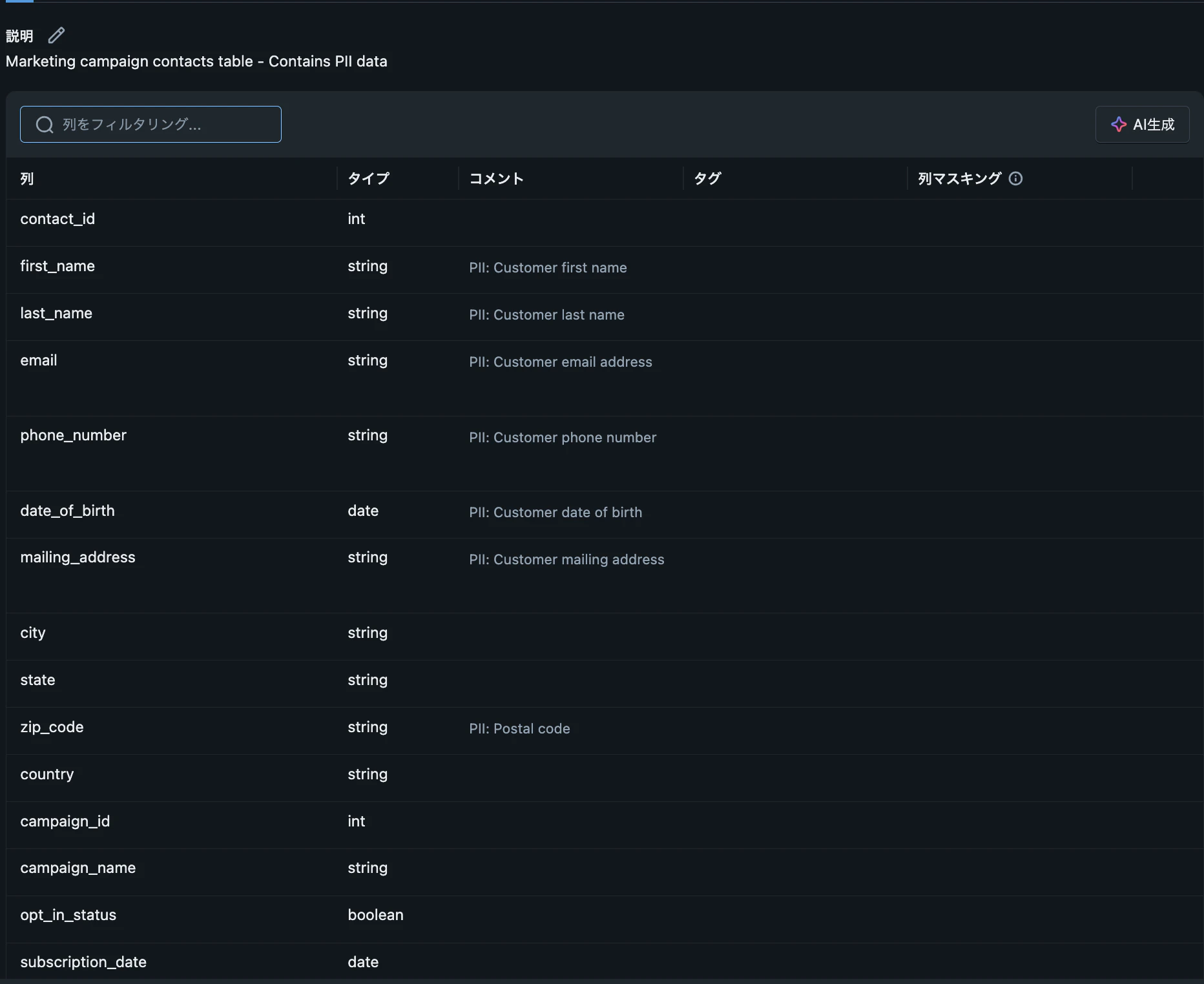

-
-
ボリューム
-
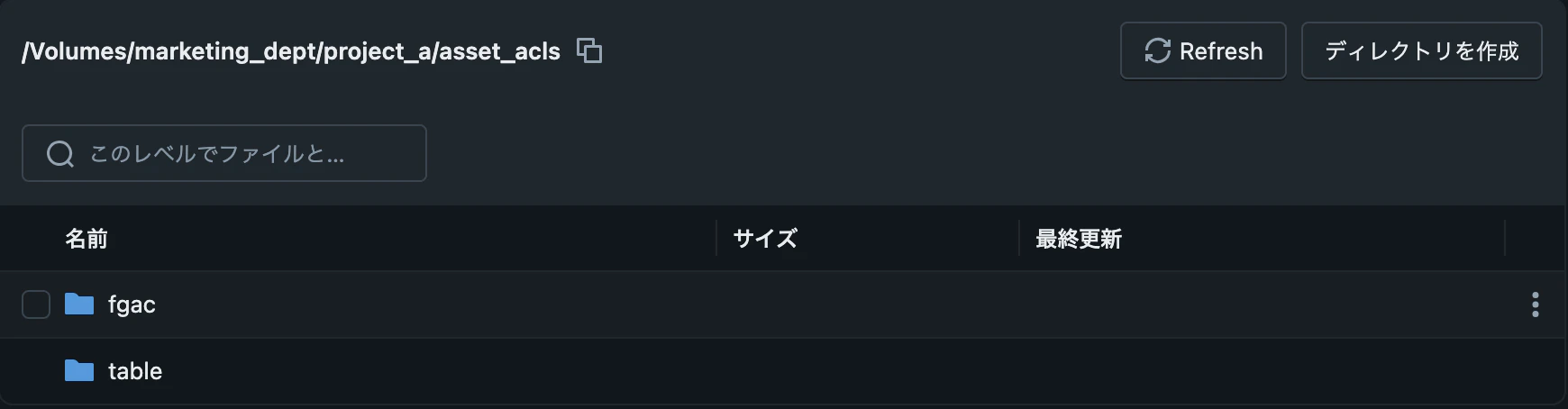
asset_acls: ACLを定義したファイルを保持している- fgac: Fine-grained access controlを定義
- table: テーブルに対してのACLを定義
-
Providerで実行するステップ
Delta Sharingの設定
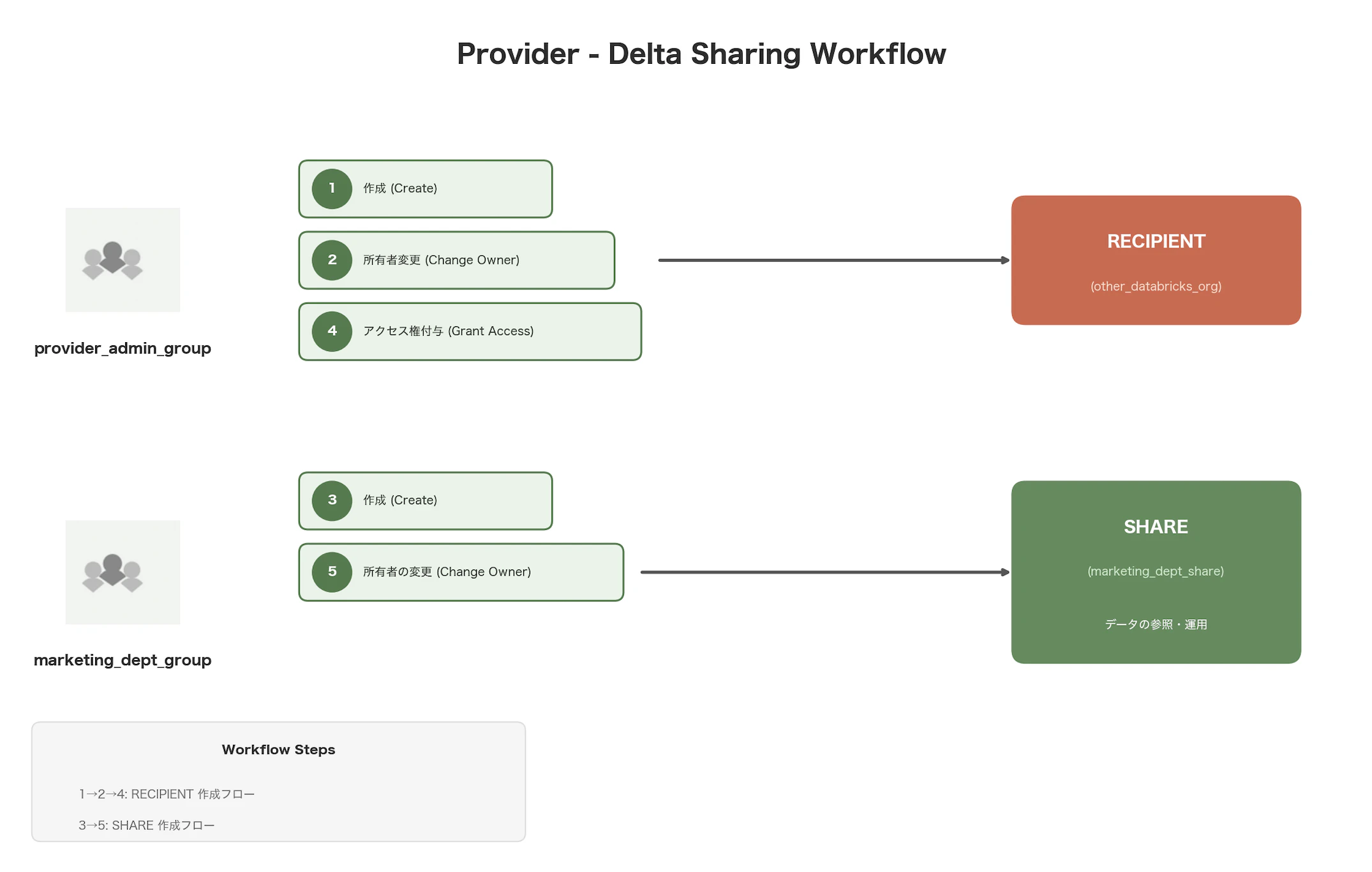
実行ユーザー:ap-northeast-1-ds-provider-adminsに所属するユーザーが下記のステップを行います
-
RECIPIENTを作成する-
RECIPIENTをother_databricks_orgとして定義する -
<メタストアID>には共有先のメタストアIDを指定する。recipient(共有先)のワークスペースにて、以下のSQLを実行することで取得可能/* メタストアIDを取得する */ select current_metastore();
CREATE RECIPIENT IF NOT EXISTS other_databricks_org USING ID "<メタストアID>"; -
-
RECIPIENTの所有者をap-northeast-1-ds-provider-adminsに変更するALTER RECIPIENT other_databricks_org SET OWNER TO `ap-northeast-1-ds-provider-admins`; -
SHAREを作成するCREATE SHARE IF NOT EXISTS marketing_dept_share COMMENT 'This is marketing department share'; -
RECIPIENTに対してSHAREへのアクセス権を付与するGRANT SELECT ON SHARE marketing_dept_share TO RECIPIENT other_databricks_org; -
SHAREの所有者をmarketing_deptに変更する
目的:マークティング部門が所有者となることでSHAREに対して、任意のデータを追加できるようにするALTER SHARE marketing_dept_share SET OWNER TO `marketing_dept`;
SHAREへの共有データの追加
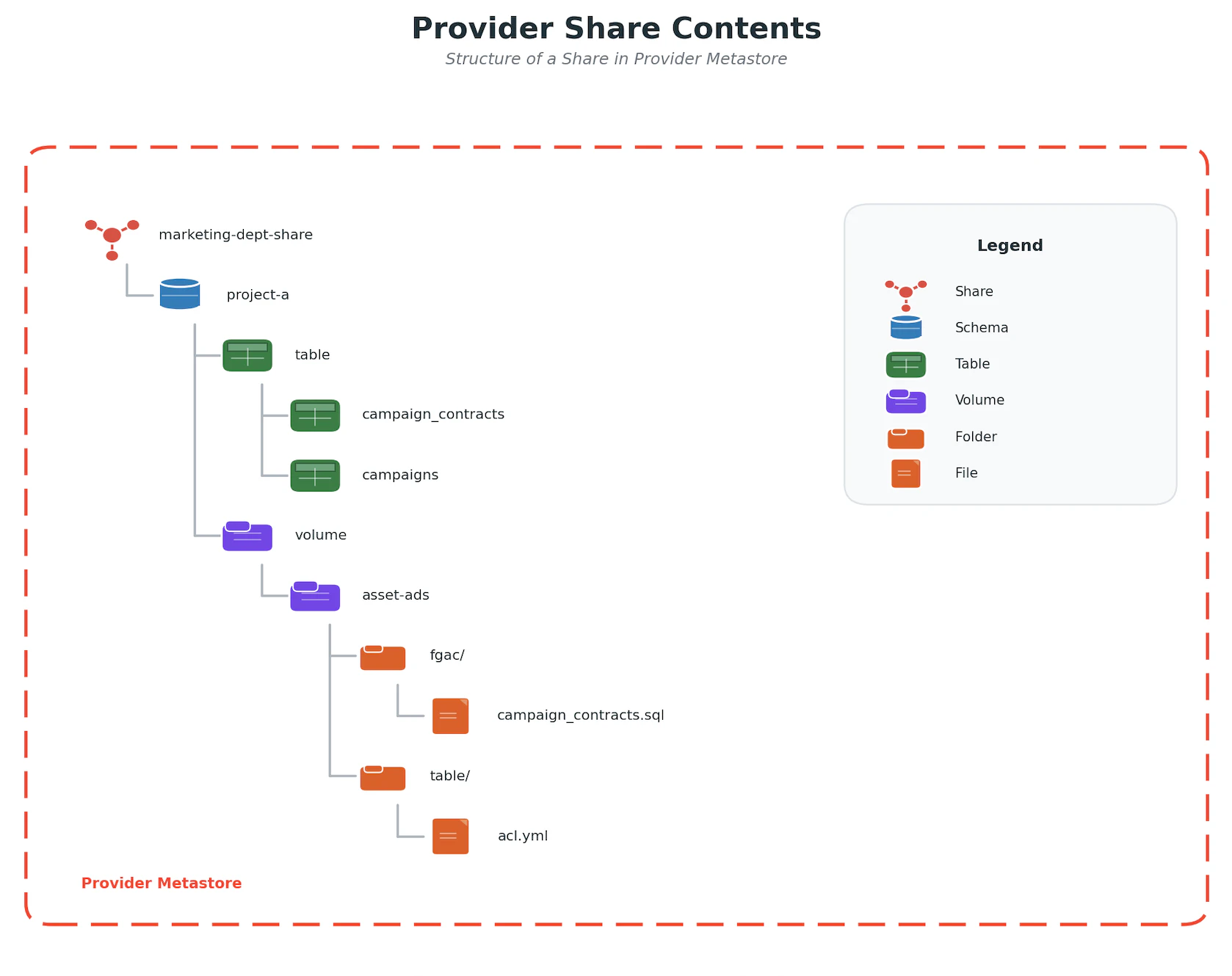
実行ユーザー:marketing_deptに所属するユーザーが下記のステップを行います
-
marketing_dept_shareに対してスキーマ(marketing_dept.project_a)を追加するALTER SHARE marketing_dept_share ADD SCHEMA marketing_dept.project_a; -
ACLを追加する
Volumeを経由してACLの設定ファイルを共有します。recipient側のadminsグループがこのファイルを読み取りアクセス権の付与を行います。
以下のテーブルレベルでのアクセス制御を設定します。
-
campaignsには営業部門、ファイナンス部門、会計部門のみがアクセス -
campaign_contactsには営業部門、ファイナンス部門のみがアクセス
Table アクセス権を付与するGroup campaigns sales_dept, finance_dept, account_dept campaign_contacts sales_dept, finance_dept 2-1. ACL設定ファイルの作成
table_acl.ymlという名前の以下の内容のファイルを作成します# ACL設定ファイル # 各テーブルへのアクセス権を付与するグループを定義します # 形式 # table: # テーブル名: # group: # - グループ名 # テーブル名: # group: # - グループ名 table: campaigns: group: - sales_dept - finance_dept - account_dept campaign_contacts: group: - sales_dept - finance_dept2-2. 設定ファイルのVolumeへの追加
Volumemarketing_dept.project_a.asset_aclsにtable_acl.yml追加します。mkdir /Volumes/marketing_dept/project_a/asset_acls/table/ cp table_acl.yml /Volumes/marketing_dept/project_a/asset_acls/table/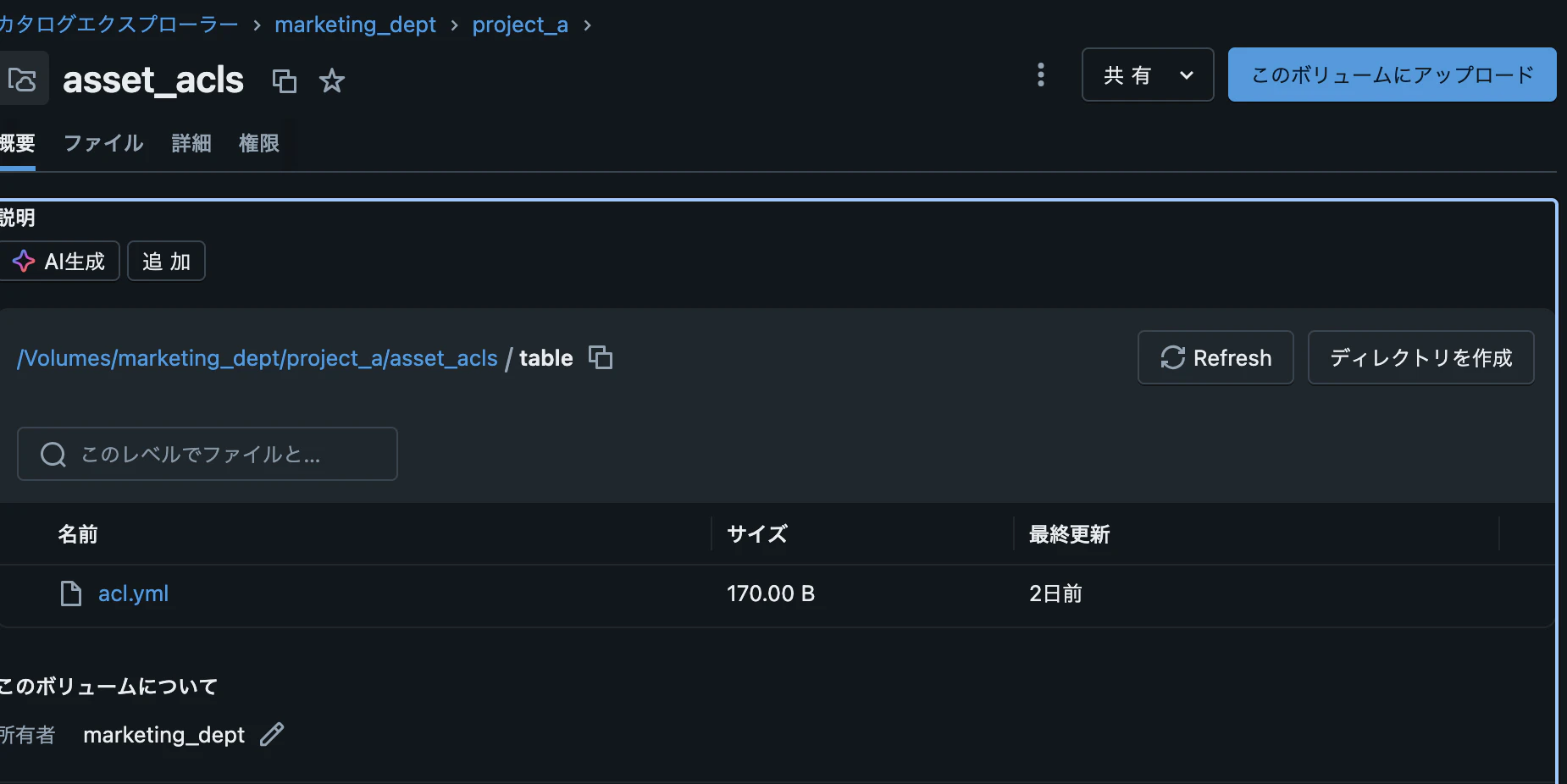
-
-
FGACの設定を追加する
Volumeを経由してFGACの設定ファイルを共有します。共有された後recipient側のadminsグループ(ap-northeast-1-ds-recipient-admins)がこのファイルを読み取りFGACの付与を行います3-1.
campaign_contacts.sqlという名前で以下の内容のファイルを作成します。このファイルではPIIとなるカラムのデータをマスキングする処理を記載していますSELECT contact_id, CASE WHEN is_member('sales_dept') THEN first_name ELSE '******' END AS first_name, CASE WHEN is_member('sales_dept') THEN last_name ELSE '******' END AS last_name, CASE WHEN is_member('sales_dept') THEN email ELSE '******' END AS email, CASE WHEN is_member('sales_dept') THEN phone_number ELSE '******' END AS phone_number, CASE WHEN is_member('sales_dept') THEN date_of_birth ELSE '******' END AS date_of_birth, CASE WHEN is_member('sales_dept') THEN mailing_address ELSE '******' END AS mailing_address, city, state, CASE WHEN is_member('sales_dept') THEN zip_code ELSE '******' END AS zip_code, country, campaign_id, campaign_name, opt_in_status, subscription_date, last_contacted, lead_source, customer_segment, created_at FROM campaign_contacts;3-2. 設定ファイルのVolumeへの追加
Volumemarketing_dept.project_a.asset_aclsに上記のcampaign_contacts.sql追加しますmkdir /Volumes/marketing_dept/project_a/asset_acls/fgac/ cp campaign_contacts.sql /Volumes/marketing_dept/project_a/asset_acls/fgac/
Recipientで実行するステップ
Delta Sharingの設定
実行ユーザー:ap-northeast-1-ds-recipient-adminsに所属するユーザーが下記のステップを行います
- providerから共有されたshare:
marketing_dept_shareをマウントするカタログを作成
マウントするカタログmarketing_dept_shareは管理グループのみ利用するもので、一般グループは利用しません。
-
設定内容
- マウント先のカタログ名:
marketing_dept_share_raw - providerの名前:
databricks_org - shareの名前:
marketing_dept_share
- マウント先のカタログ名:
-
実行するSQLステートメント
CREATE CATALOG IF NOT EXISTS marketing_dept_share_raw USING SHARE `databricks_org`.`marketing_dept_share`;
-
マウント先のカタログ
marketing_dept_share_rawの所有者を管理グループap-northeast-1-ds-recipient-adminsに変更- 実行するSQLステートメント
ALTER CATALOG marketing_dept_share_raw SET OWNER TO `ap-northeast-1-ds-recipient-admins`; -
マウント先のカタログ
marketing_dept_share_rawのスキーマを管理グループap-northeast-1-ds-recipient-adminsに変更今回は共有するスキーマが1つのみですが、将来的に数が増える場合や共有する数が多い場合に備えて所有者変更を自動化する下記のスクリプトを実行します
- 実行するスクリプト
from databricks.sdk import WorkspaceClient
from databricks.sdk.service.catalog import SchemaInfo


def update_schema_owner(
    wc_client: WorkspaceClient,
    owner_name: str,
    catalog_name: str
) -> None:
    """
    Updates the owner of all schemas in the specified catalog.
    Parameters:
        wc_client: The WorkspaceClient object
        owner_name: The name of the new owner.
        catalog_name: The name of the catalog.

    Returns:
        None
    """
    try:
        schemas: list[SchemaInfo] = wc_client.schemas.list(catalog_name=catalog_name)
        for schema in schemas:
            if schema.name == "information_schema":
                continue
            sql = f"""ALTER SCHEMA `{catalog_name}`.`{schema.name}` SET OWNER TO `{owner_name}`;"""

            print(f"""Run SQL: {sql}""")
            spark.sql(sql)
    except Exception as e:
        print(f"An error occurred: {e}")
# recipient admin groups名 recipient_admins = "ap-northeast-1-ds-recipient-admins" # shareをマウントするカタログ名 mounted_catalog = "marketing_dept_share_raw" w = WorkspaceClient() update_schema_owner(w, recipient_admins, mounted_catalog) >>> Run SQL: ALTER SCHEMA `marketing_dept_share_raw`.`project_a` SET OWNER TO `ap-northeast-1-ds-recipient-admins`; -
マウント先のカタログ
marketing_dept_share_rawのテーブルを管理グループap-northeast-1-ds-recipient-adminsに変更スキーマの所有者変更と同じくテーブルの所有者を自動化する下記のスクリプトを実行します
from databricks.sdk import WorkspaceClient
from databricks.sdk.service.catalog import SchemaInfo


def update_table_owner(
    wc_client: WorkspaceClient,
    owner_name: str,
    catalog_name: str
) -> None:
    """
    Updates the owner of all tables in the specified catalog.
    Parameters:
        wc_client: The WorkspaceClient object
        owner_name: The name of the new owner.
        catalog_name: The name of the catalog.

    Returns:
        None
    """

    schema_list: list[str] = []

    try:
        schemas: list[SchemaInfo] = wc_client.schemas.list(catalog_name=catalog_name)
    except Exception as e:
        print("An error occurred: {e}")

    for schema in schemas:
        if schema.name == "information_schema":
            continue
        schema_list.append(schema.name)

    try:
        for schema in schema_list:
            tables = w.tables.list(
                catalog_name=catalog_name,
                schema_name=schema
            )
        for table in tables:
            sql = f"""ALTER TABLE `{table.catalog_name}`.`{table.schema_name}`.`{table.name}` SET OWNER TO `{owner_name}`;"""
            print(f"""Run SQL: {sql}""")
            spark.sql(sql)

    except Exception as e:
        print(f"An error occurred: {e}")
w = WorkspaceClient() # recipient admin groups名 recipient_admins = "ap-northeast-1-ds-recipient-admins" # shareをマウントするカタログ名 mounted_catalog = "marketing_dept_share_raw" update_table_owner(w, recipient_admins, mounted_catalog) >>> Run SQL: ALTER TABLE `marketing_dept_share_raw`.`project_a`.`campaign_contacts` SET OWNER TO `ap-northeast-1-ds-recipient-admins`; >>> Run SQL: ALTER TABLE `marketing_dept_share_raw`.`project_a`.`campaigns` SET OWNER TO `ap-northeast-1-ds-recipient-admins`; -
マウント先のカタログ
marketing_dept_share_rawのボリュームを管理グループap-northeast-1-ds-recipient-adminsに変更スキーマの所有者変更と同じくボリュームの所有者を自動化する下記のスクリプトを実行します。
from databricks.sdk import WorkspaceClient
from databricks.sdk.service.catalog import SchemaInfo, VolumeInfo


def update_volume_owner(
    wc_client: WorkspaceClient,
    owner_name: str,
    catalog_name: str
) -> None:
    """
    Updates the owner of all volumes in the specified catalog.
    Parameters:
        wc_client: The WorkspaceClient object
        owner_name: The name of the new owner.
        catalog_name: The name of the catalog.

    Returns:
        None
    """

    schema_list: list[str] = []

    try:
        schemas: list[SchemaInfo] = wc_client.schemas.list(catalog_name=catalog_name)
    except Exception as e:
        print("An error occurred: {e}")

    for schema in schemas:
        if schema.name == "information_schema":
            continue
        schema_list.append(schema.name)


    try:
        for schema in schema_list:
            volumes = w.volumes.list(
                catalog_name=catalog_name,
                schema_name=schema
            )
        for volume in volumes:
            sql = f"""ALTER VOLUME `{volume.catalog_name}`.`{volume.schema_name}`.`{volume.name}` SET OWNER TO `{owner_name}`;"""
            print(f"""Run SQL: {sql}""")
            spark.sql(sql)

    except Exception as e:
        print(f"An error occurred: {e}")
w = WorkspaceClient() # recipient admin groups名 recipient_admins = "ap-northeast-1-ds-recipient-admins" # shareをマウントするカタログ名 mounted_catalog = "marketing_dept_share_raw" update_volume_owner(w, recipient_admins, mounted_catalog) >>> Run SQL: ALTER VOLUME `marketing_dept_share_raw`.`project_a`.`asset_acls` SET OWNER TO `ap-northeast-1-ds-recipient-admins`;


ACLの設定
一般グループが利用する派生カタログ(marketing_dept_share)を作成し、上記で設定したマウント先のカタログmarketing_dept_share_rawに存在するテーブルから派生カタログ(marketing_dept_share)にビューを作成します。またこれらのビューに対してACLを適用します。
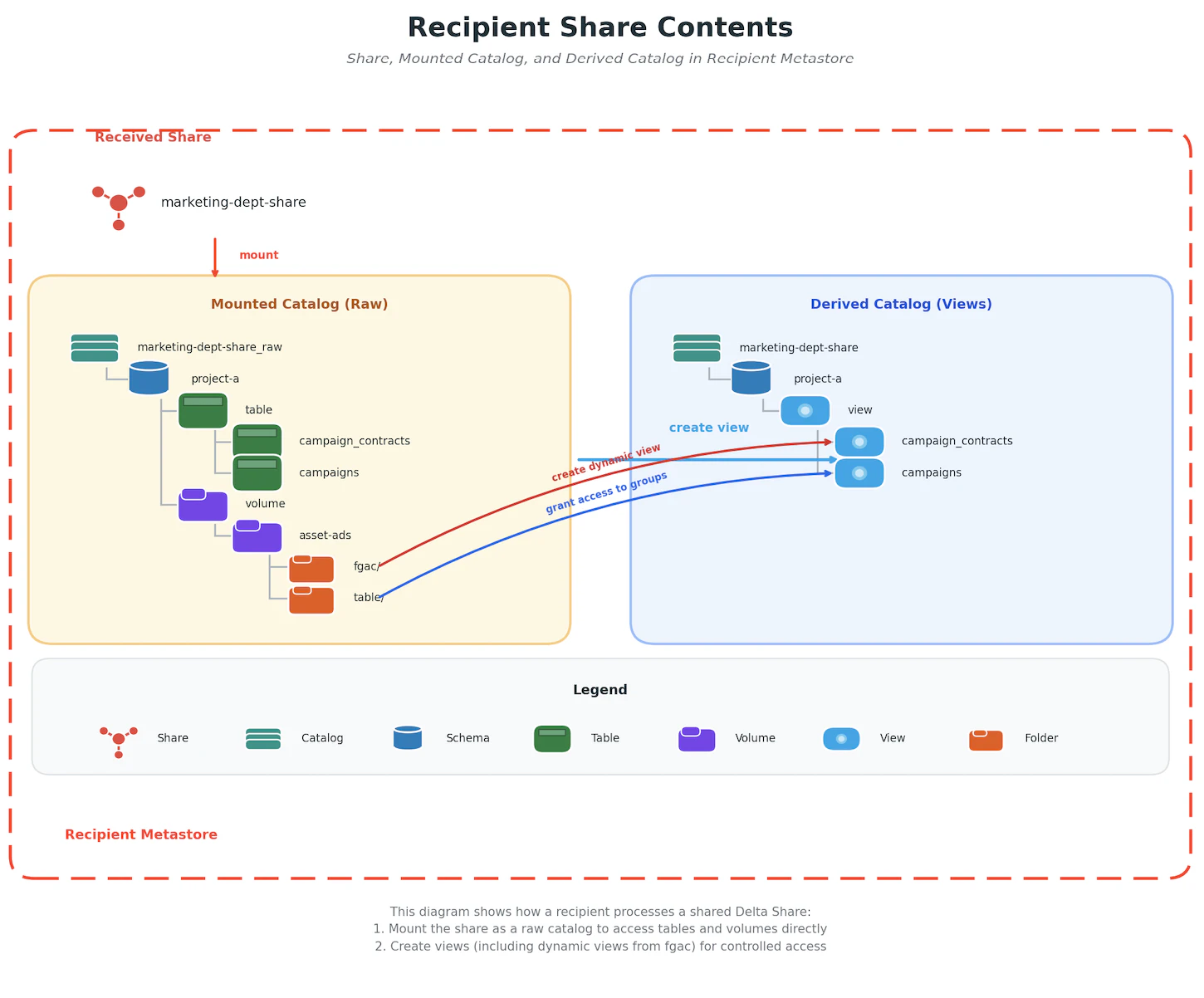
作成するビュー
- 通常のビュー:
campaigns - ダイナミックビュー(FGACを適用):
campaign_contacts
実行ユーザー:管理グループ ap-northeast-1-ds-recipient-adminsに所属するユーザーが下記のステップを行います
-
カタログの作成
CREATE CATALOG IF NOT EXISTS `marketing_dept_share`; -
カタログ所有者の変更
ALTER CATALOG marketing_dept_share SET OWNER TO `ap-northeast-1-ds-recipient-admins`; -
スキーマの作成
CREATE SCHEMA IF NOT EXISTS `marketing_dept_share`.`project_a`; -
スキーマ所有者の変更
Delta Sharingの設定で実行した関数(update_schema_owner)を利用します
```Python
# recipient admin groups名
recipient_admins = "ap-northeast-1-ds-recipient-admins"
# カタログ名
mounted_catalog = "marketing_dept_share"
w  = WorkspaceClient()
update_schema_owner(w, recipient_admins, mounted_catalog)


>>> Run SQL: ALTER SCHEMA `marketing_dept_share`.`project_a` SET OWNER TO `ap-northeast-1-ds-recipient-admins`;
```
-
作成するビューとダイナミックビュー名を取得する
from databricks.sdk import WorkspaceClient


def get_shared_table_list(
    wc_client: WorkspaceClient,
    catalog_name: str,
    schema_name: str,
)-> set[str]:
    """
    Returns a set of table names in the specified catalog and schema that are shared via Delta Sharing.

    Parameters:
        wc_client: The WorkspaceClient object
        catalog_name: The name of the catalog.
        schema_name: The name of the schema.

    Returns:
        table_list: A set of table names that are shared via Delta Sharing.
    """

    table_list = set()
    try:
        tables = wc_client.tables.list(
            catalog_name=catalog_name,
            schema_name=schema_name
        )
        for table in tables:
            table_list.add(table.name)
    except Exception as e:
        print(f"An error occurred: {e}")

    return table_list


def get_dynamic_view_list(
    wc_client: WorkspaceClient,
    volume_path: str
)-> set[str]:
    """
    Returns a set of dynamic view names in the specified volume path.

    Parameters:
        wc_client: The WorkspaceClient object
        volume_path: The path to the volume.

    Returns:
        view_list: A set of dynamic view names.
    """

    view_list = set()
    try:
        for file in wc_client.files.list_directory_contents(volume_path):
            view_list.add(file.name.split(".sql")[0])

    except Exception as e:
        print(f"Error: {e}")

    return view_list


def get_views_and_dynamic_view_list(
    wc_client: WorkspaceClient,
    catalog_name: str,
    schema_name: str,
    volume_path: str
) -> tuple[set[str], set[str]]:
    """
    Returns a tuple of sets containing the names of tables and views in the specified catalog and schema.

    Parameters:
        wc_client: The WorkspaceClient object
        catalog_name: The name of the catalog.
        schema_name: The name of the schema.
        volume_path: The path to the volume.
    Returns:
        view_list: A set of view names.
        dynamic_view_list: A set of dynamic view names
    """

    table_list = get_shared_table_list(w, catalog_name, schema_name)
    dynamic_view_list = get_dynamic_view_list(w, volume_path)

    view_list = table_list.difference(dynamic_view_list)
    return view_list, dynamic_view_list
mounted_catalog = "marketing_dept_share_raw" schema = "project_a" # FGAC設定ファイルが存在するボリュームパスを指定する fgac_path = f"/Volumes/{mounted_catalog}/{schema}/asset_acls/fgac/" w = WorkspaceClient() view_list, dynamic_view_list = get_views_and_dynamic_view_list(w, mounted_catalog, schema, fgac_path) print(f"List of views: {view_list}") print(f"List of dynamic views: {dynamic_view_list}") >>> List of views: {'campaigns'} >>> List of dynamic views: {'campaign_contacts'} -
ビューを作成する
Delta Sharingをマウント先のカタログ
marketing_dept_share_rawに存在するテーブルproject_a.campaignsからカタログmarketing_dept_shareにproject_a.campaignsを作成しますdef create_view( source_catalog_name: str, dest_catalog_name: str, schema_name: str, view_list: set[str] ) -> None: """ Creates a view in the destination catalog and schema for each view in the view list. Parameters: source_catalog_name: The name of the source catalog. dest_catalog_name: The name of the destination catalog. schema_name: The name of the schema. view_list: A set of view names. Returns: None """ for view in view_list: sql = f"CREATE VIEW IF NOT EXISTS {dest_catalog_name}.{schema_name}.{view} AS SELECT * FROM {source_catalog_name}.{schema_name}.{view};" print(f"RUN SQL: {sql}") try: spark.sql(sql) except Exception as e: print(f"Error: {e}")create_view(mounted_catalog, derived_catalog, schema, view_list) >>> RUN SQL: CREATE VIEW IF NOT EXISTS marketing_dept_share.project_a.campaigns AS SELECT * FROM marketing_dept_share_raw.project_a.campaigns; -
ダイナミックビューを作成する
Delta Sharingをマウント先のカタログ
marketing_dept_share_rawのボリュームasset_aclsに存在するファイル(/Volumes/marketing_dept_share_raw/project_a/asset_acls/fgac/campaign_contacts.sql)からカタログmarketing_dept_shareにproject_a.campaign_contactsを作成しますdef create_dynamic_view( source_catalog_name: str, dest_catalog_name: str, schema_name: str, volume_path: str, dynamic_view_list: set[str] ) -> None: """ Creates a dynamic view in the destination catalog and schema for each dynamic view in the dynamic view list. Parameters: source_catalog_name: The name of the source catalog. dest_catalog_name: The name of the destination catalog. schema_name: The name of the schema. volume_path: The path to the volume. dynamic_view_list: A set of dynamic view names. Returns: None """ spark.sql(f"USE CATALOG {source_catalog_name}") spark.sql(f"USE SCHEMA {schema_name}") for view in dynamic_view_list: sql = f"CREATE VIEW IF NOT EXISTS {dest_catalog_name}.{schema_name}.{view} AS " file_path = f"{volume_path}/{view}.sql" with open(file_path, 'r') as f: sql += f.read() print(f"RUN SQL: {sql}") try: spark.sql(sql) except Exception as e: print(f"Error: {e}")mounted_catalog = "marketing_dept_share_raw" derived_catalog = "marketing_dept_share" schema = "project_a" # FGAC設定ファイルが存在するボリュームパスを指定する fgac_path = f"/Volumes/{mounted_catalog}/{schema}/asset_acls/fgac/" create_dynamic_view(mounted_catalog, derived_catalog, schema, fgac_path, dynamic_view_list) >>> RUN SQL: CREATE VIEW IF NOT EXISTS marketing_dept_share.project_a.campaign_contacts AS SELECT contact_id, CASE WHEN is_member('sales_dept') THEN first_name ELSE '******' END AS first_name, CASE WHEN is_member('sales_dept') THEN last_name ELSE '******' END AS last_name, .... customer_segment, created_at FROM campaign_contacts; -
ビューの所有者を変更する
ビューの所有者を管理グループap-northeast-1-ds-recipient-adminsに変更しますfrom databricks.sdk import WorkspaceClient from databricks.sdk.service.catalog import SchemaInfo def update_view_owner( wc_client: WorkspaceClient, owner_name: str, catalog_name: str ) -> None: """ Updates the owner of all views in the specified catalog. Parameters: wc_client: The WorkspaceClient object owner_name: The name of the new owner. catalog_name: The name of the catalog. Returns: None """ schema_list: list[str] = [] try: schemas: list[SchemaInfo] = wc_client.schemas.list(catalog_name=catalog_name) except Exception as e: print("An error occurred: {e}") for schema in schemas: if schema.name == "information_schema": continue schema_list.append(schema.name) try: for schema in schema_list: tables = w.tables.list( catalog_name=catalog_name, schema_name=schema ) for table in tables: sql = f"""ALTER VIEW `{table.catalog_name}`.`{table.schema_name}`.`{table.name}` SET OWNER TO `{owner_name}`;""" print(f"""Run SQL: {sql}""") spark.sql(sql) except Exception as e: print(f"An error occurred: {e}")w = WorkspaceClient() # recipient admin groups名 recipient_admins = "ap-northeast-1-ds-recipient-admins" # shareをマウントするカタログ名 mounted_catalog = "marketing_dept_share_raw" update_view_owner(w, recipient_admins, mounted_catalog) >>> Run SQL: ALTER VIEW `marketing_dept_share_raw`.`project_a`.`campaign_contacts` SET OWNER TO `ap-northeast-1-ds-recipient-admins`; Run SQL: ALTER VIEW `marketing_dept_share_raw`.`project_a`.`campaigns` SET OWNER TO `ap-northeast-1-ds-recipient-admins`; -
ビューへのアクセス権を各グループに付与する
グループに対してビュー(テーブル)へのアクセス権を定義したYAMLファイル(/Volumes/marketing_dept_share_raw/project_a/asset_acls/table/acl.yml)を読み取り、各グループに対して権限を付与しますimport yaml from typing import Any def read_yaml(file_path: str) -> dict[str, Any]: """ Read a YAML file and return its contents as a dictionary Parameters: file_path: The path to the YAML file. Returns: A dictionary containing the contents of """ with open(file_path, 'r') as f: return yaml.safe_load(f) def grant_usage(catalog: str, schema: str, group_list: list[str]) -> None: """ Grant usage privileges on a catalog and a schema to a group. Parameters: catalog: The name of the catalog. schema: The name of the schema. group_list: The list of groups to grant privileges to Returns: None """ for group in group_list: sql = f"GRANT USAGE ON CATALOG `{catalog}` TO `{group}`;" print(f"RUN SQL: {sql}") try: spark.sql(sql) except Exception as e: print(f"Error: {e}") sql = f"GRANT USAGE ON SCHEMA `{catalog}`.`{schema}` TO `{group}`;" print(f"RUN SQL: {sql}") try: spark.sql(sql) except Exception as e: print(f"Error: {e}") def grant_acls(catalog: str, table_acls: dict[str, Any]) -> None: """ Grant ACLs on a table to a group. Parameters: catalog: The name of the catalog. table_acls: A dictionary of table names and their corresponding ACLs. Returns: None """ for table_name, table_acl in table_acls.items(): for group in table_acl["group"]: sql = f"GRANT SELECT ON VIEW {table_name} TO {group} ;" print(f"RUN SQL: {sql}") try: spark.sql(sql) except Exception as e: print(f"Error: {e}")# Delta Sharingでマウントされたカタログ名 mounted_catalog = "marketing_dept_share_raw" # アクセス権を付与するビューが存在するカタログ derived_catalog = "marketing_dept_share" # アクセス権を付与するビューが存在するスキーマ schema = "project_a" # アクセス権を付与するグループリスト group_list = ["sales_dept", "finance_dept", "account_dept"] # ACL設定ファイルが存在するボリュームパスを指定する acl_path = f"/Volumes/{mounted_catalog}/{schema}/asset_acls/table/acl.yml" table_acls = read_yaml(acl_path)["table"] grant_usage(mounted_catalog, schema, group_list) grant_acls(derived_catalog, table_acls) >>> RUN SQL: GRANT USAGE ON CATALOG `marketing_dept_share_raw` TO `sales_dept`; RUN SQL: GRANT USAGE ON SCHEMA `marketing_dept_share_raw`.`project_a` TO `sales_dept`; RUN SQL: GRANT USAGE ON CATALOG `marketing_dept_share_raw` TO `finance_dept`; RUN SQL: GRANT USAGE ON SCHEMA `marketing_dept_share_raw`.`project_a` TO `finance_dept`; RUN SQL: GRANT USAGE ON CATALOG `marketing_dept_share_raw` TO `account_dept`; RUN SQL: GRANT USAGE ON SCHEMA `marketing_dept_share_raw`.`project_a` TO `account_dept`; RUN SQL: GRANT SELECT ON VIEW campaigns TO sales_dept ; RUN SQL: GRANT SELECT ON VIEW campaigns TO finance_dept ; RUN SQL: GRANT SELECT ON VIEW campaigns TO account_dept ; RUN SQL: GRANT SELECT ON VIEW campaign_contacts TO sales_dept ; RUN SQL: GRANT SELECT ON VIEW campaign_contacts TO finance_dept ;
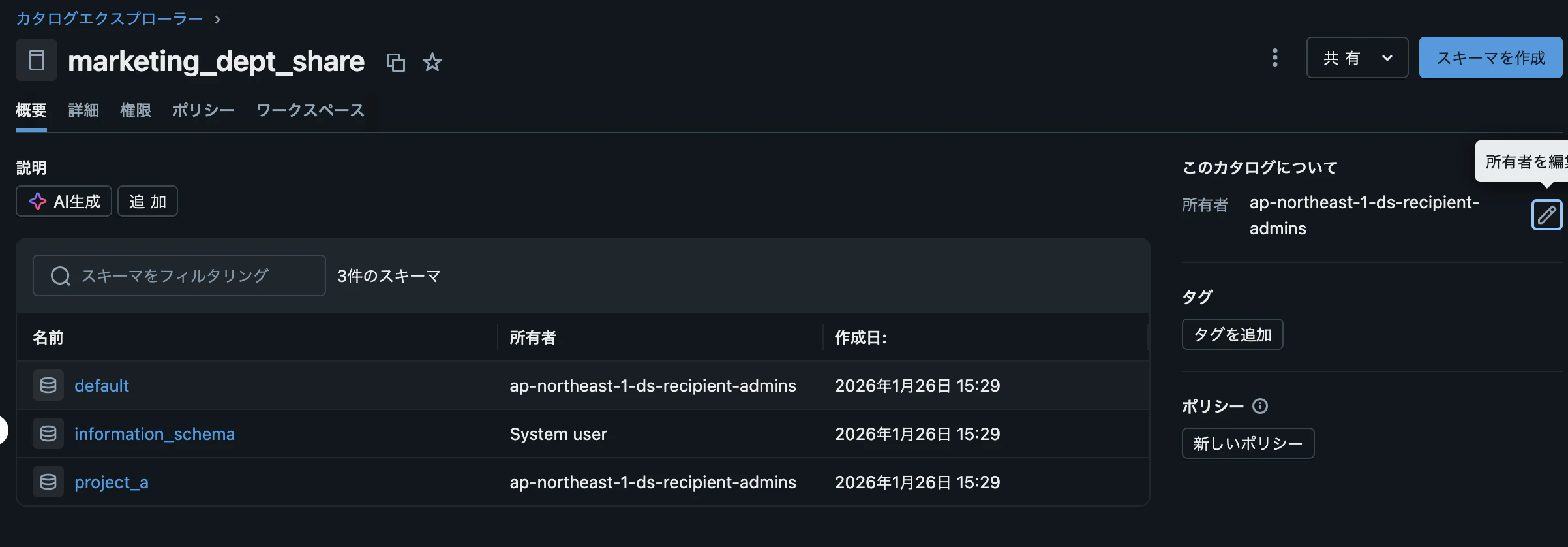
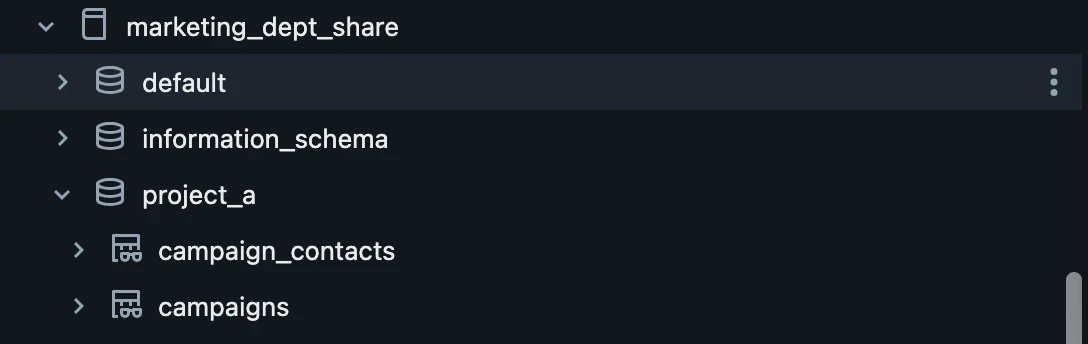
まとめ
今回はDelta Sharingにおけるデータガバナンス、とりわけデータアクセス制御に関しての記載をしました。
少しでも参考になれば幸いです。
最後まで記事を閲覧頂きありがとうございました。