
解決すべき問題
2025年8月10日、わたしはKatalon Studioというソフトウェア製品の.dmgファイル(Mac向けインストーラ)をダウンロードしようとして失敗した。Katalon StudioはGit Hubにレポジトリを持っていて、Releasesページを公開している。
ChromeブラウザでReleasesページを開き、その中に列挙されている中から下記のURLを選び、リンクをクリックした。
クリックしたあとしばらく静かにダウンロードが進んだ。しかし5分後に中断した。
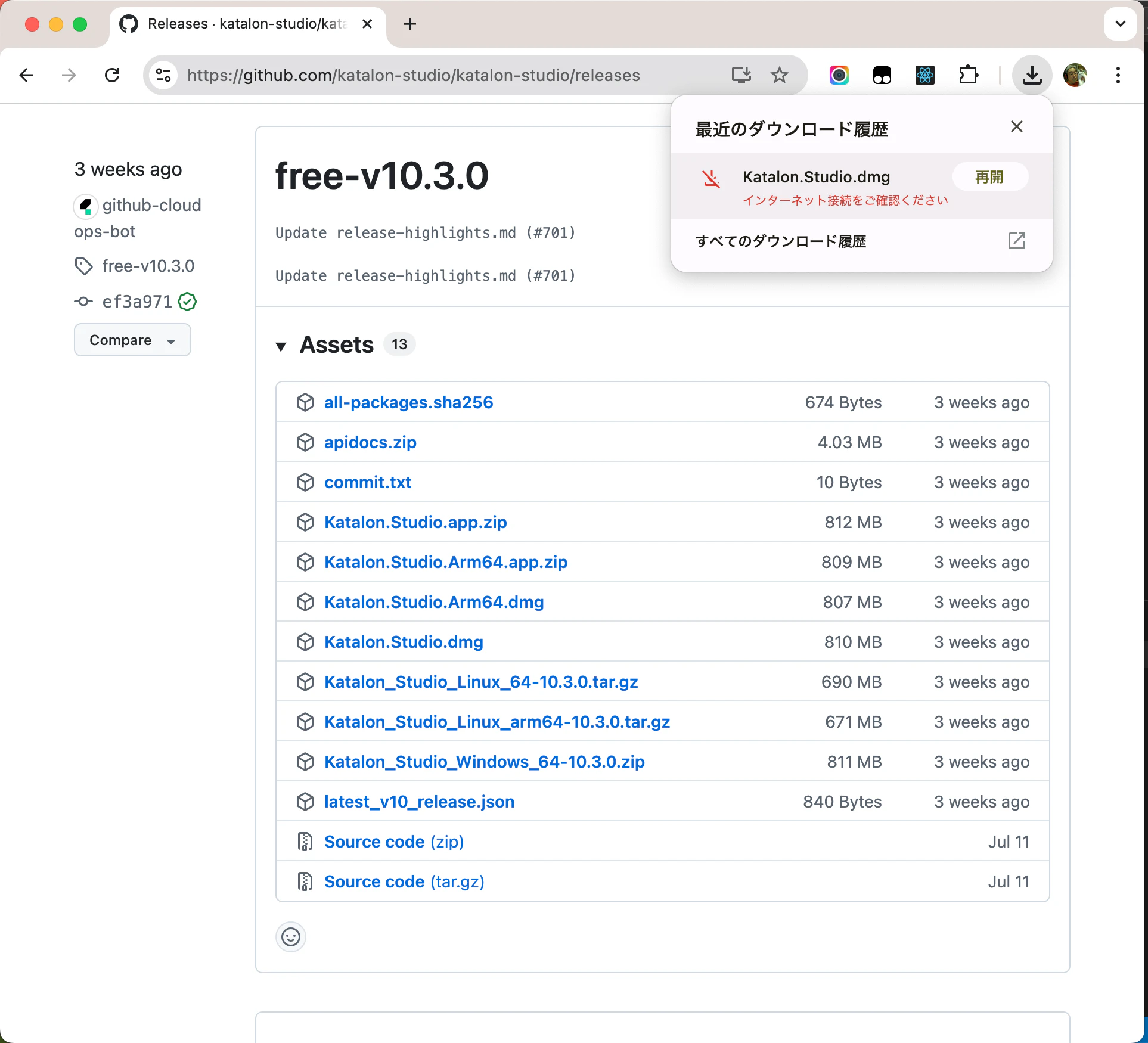
Chromeは "インターネット接続をご確認ください" というメッセージを表示したが、これでは情報不足で何もわからない。ただしブラウザでいろんなURLを閲覧できていたから、単純なネットワーク障害でないことは明らかだった。
上記のURLの他にいろいろのURLを試した。サイズの小さなファイルなら問題なくダウンロードできた。しかし300メガバイトを超える大きなファイルをダウンロードしようとすると5分後に中断した。ファイルの種類つまりファイル名の末尾が.dmgか.zipか.tar.gzかは成否に関係なかった。
たしか数日前に600メガバイトぐらいのファイルをダウンロードできた。だからGitHubのサーバーの設定がつい最近変更されたらしいと思われた。
自分のMacがインターネットと接続しているネットワークのスピードを測定したところ、約8 mega-bit-per-secondだった。8Mbpsのネットワーク環境で300メガバイトのファイルをダウンロードするのに何分かかるか?単純な計算をすればすぐわかる。5分かかるはずだ。
これらの観察から、GitHubのReleasesページからファイルをダウンロードするHTTPセッションに5分のタイムアウトが設定されているらしいと推測した。でも本当にそうなのか?
コマンドラインでwgetコマンドを使って同じURLをダウンロードすることを試みたが、エラーが発生した。
$ wget https://github.com/katalon-studio/katalon-studio/releases/download/free-v9.7.6/Katalon.Studio.Free.dmg
--2025-08-17 15:10:38--  https://github.com/katalon-studio/katalon-studio/releases/download/free-v9.7.6/Katalon.Studio.Free.dmg
github.com (github.com) をDNSに問いあわせています... 20.27.177.113
github.com (github.com)|20.27.177.113|:443 に接続しています... 接続しました。
HTTP による接続要求を送信しました、応答を待っています... 302 Found
場所: https://release-assets.githubusercontent.com/github-production-release-asset/148249057/41ed9d81-9f68-4158-a543-2e929efde0c3?sp=r&sv=2018-11-09&sr=b&spr=https&se=2025-08-17T07%3A05%3A53Z&rscd=attachment%3B+filename%3DKatalon.Studio.Free.dmg&rsct=application%2Foctet-stream&skoid=96c2d410-5711-43a1-aedd-ab1947aa7ab0&sktid=398a6654-997b-47e9-b12b-9515b896b4de&skt=2025-08-17T06%3A05%3A28Z&ske=2025-08-17T07%3A05%3A53Z&sks=b&skv=2018-11-09&sig=vEZ6kPsitPrKahQY6YSQxlbzRxSc%2B%2B6NLCMoDia%2FgEo%3D&jwt=eyJ0eXAiOiJKV1QiLCJhbGciOiJIUzI1NiJ9.eyJpc3MiOiJnaXRodWIuY29tIiwiYXVkIjoicmVsZWFzZS1hc3NldHMuZ2l0aHVidXNlcmNvbnRlbnQuY29tIiwia2V5Ijoia2V5MSIsImV4cCI6MTc1NTQxMTMzOCwibmJmIjoxNzU1NDExMDM4LCJwYXRoIjoicmVsZWFzZWFzc2V0cHJvZHVjdGlvbi5ibG9iLmNvcmUud2luZG93cy5uZXQifQ.JBWLkanUKc-GjE6wwE9vXEmrynvTRy02duQK7VCJXv0&response-content-disposition=attachment%3B%20filename%3DKatalon.Studio.Free.dmg&response-content-type=application%2Foctet-stream [続く]
--2025-08-17 15:10:38--  https://release-assets.githubusercontent.com/github-production-release-asset/148249057/41ed9d81-9f68-4158-a543-2e929efde0c3?sp=r&sv=2018-11-09&sr=b&spr=https&se=2025-08-17T07%3A05%3A53Z&rscd=attachment%3B+filename%3DKatalon.Studio.Free.dmg&rsct=application%2Foctet-stream&skoid=96c2d410-5711-43a1-aedd-ab1947aa7ab0&sktid=398a6654-997b-47e9-b12b-9515b896b4de&skt=2025-08-17T06%3A05%3A28Z&ske=2025-08-17T07%3A05%3A53Z&sks=b&skv=2018-11-09&sig=vEZ6kPsitPrKahQY6YSQxlbzRxSc%2B%2B6NLCMoDia%2FgEo%3D&jwt=eyJ0eXAiOiJKV1QiLCJhbGciOiJIUzI1NiJ9.eyJpc3MiOiJnaXRodWIuY29tIiwiYXVkIjoicmVsZWFzZS1hc3NldHMuZ2l0aHVidXNlcmNvbnRlbnQuY29tIiwia2V5Ijoia2V5MSIsImV4cCI6MTc1NTQxMTMzOCwibmJmIjoxNzU1NDExMDM4LCJwYXRoIjoicmVsZWFzZWFzc2V0cHJvZHVjdGlvbi5ibG9iLmNvcmUud2luZG93cy5uZXQifQ.JBWLkanUKc-GjE6wwE9vXEmrynvTRy02duQK7VCJXv0&response-content-disposition=attachment%3B%20filename%3DKatalon.Studio.Free.dmg&response-content-type=application%2Foctet-stream
release-assets.githubusercontent.com (release-assets.githubusercontent.com) をDNSに問いあわせています... 185.199.110.133, 185.199.109.133, 185.199.108.133, ...
release-assets.githubusercontent.com (release-assets.githubusercontent.com)|185.199.110.133|:443 に接続しています... 接続しました。
HTTP による接続要求を送信しました、応答を待っています... 200 OK
長さ: 721311293 (688M) [application/octet-stream]
`Katalon.Studio.Free.dmg' に保存中

Katalon.Studio.Free  49%[=======>          ] 340.00M  1.48MB/s 時間 5m 9s

2025-08-17 15:15:48 (1.10 MB/s) - 356515840 バイトで接続が終了しました。 再試行しています。

--2025-08-17 15:15:49--  (試行: 2)  https://release-assets.githubusercontent.com/github-production-release-asset/148249057/41ed9d81-9f68-4158-a543-2e929efde0c3?sp=r&sv=2018-11-09&sr=b&spr=https&se=2025-08-17T07%3A05%3A53Z&rscd=attachment%3B+filename%3DKatalon.Studio.Free.dmg&rsct=application%2Foctet-stream&skoid=96c2d410-5711-43a1-aedd-ab1947aa7ab0&sktid=398a6654-997b-47e9-b12b-9515b896b4de&skt=2025-08-17T06%3A05%3A28Z&ske=2025-08-17T07%3A05%3A53Z&sks=b&skv=2018-11-09&sig=vEZ6kPsitPrKahQY6YSQxlbzRxSc%2B%2B6NLCMoDia%2FgEo%3D&jwt=eyJ0eXAiOiJKV1QiLCJhbGciOiJIUzI1NiJ9.eyJpc3MiOiJnaXRodWIuY29tIiwiYXVkIjoicmVsZWFzZS1hc3NldHMuZ2l0aHVidXNlcmNvbnRlbnQuY29tIiwia2V5Ijoia2V5MSIsImV4cCI6MTc1NTQxMTMzOCwibmJmIjoxNzU1NDExMDM4LCJwYXRoIjoicmVsZWFzZWFzc2V0cHJvZHVjdGlvbi5ibG9iLmNvcmUud2luZG93cy5uZXQifQ.JBWLkanUKc-GjE6wwE9vXEmrynvTRy02duQK7VCJXv0&response-content-disposition=attachment%3B%20filename%3DKatalon.Studio.Free.dmg&response-content-type=application%2Foctet-stream
release-assets.githubusercontent.com (release-assets.githubusercontent.com)|185.199.110.133|:443 に接続しています... 接続しました。
HTTP による接続要求を送信しました、応答を待っています... 618 jwt:expired
2025-08-17 15:15:50 エラー 618: jwt:expired。
最後に表示されたメッセージ 618: jwt:expired に注目しよう。これこそダウンロードが中断した理由に違いない。
分析:jwt:expiredとは何か
jwtとはJson Web Tokenの略。Qiita「 JWTって何に使うの?仕組みとその利便性」を参照しながら、分析してみた。
最初にわたしは GET https://github.com/katalon-studio/katalon-studio/releases/download/free-v9.7.6/Katalon.Studio.Free.dmg を試みた。このGET要求に対してGitHubのサーバはHTTPステータス 302 Found を応答し、別のURLに移動するよう指図してきた。そのURLは https://release-assets.githubusercontent.com/github-production-release-asset/ で始まるとても長い文字列だ。このURLのなかにjwtという名前で下記のURLパラメータが埋め込まれていた。
jwt=eyJ0eXAiOiJKV1QiLCJhbGciOiJIUzI1NiJ9.eyJpc3MiOiJnaXRodWIuY29tIiwiYXVkIjoicmVsZWFzZS1hc3NldHMuZ2l0aHVidXNlcmNvbnRlbnQuY29tIiwia2V5Ijoia2V5MSIsImV4cCI6MTc1NTQxMTMzOCwibmJmIjoxNzU1NDExMDM4LCJwYXRoIjoicmVsZWFzZWFzc2V0cHJvZHVjdGlvbi5ibG9iLmNvcmUud2luZG93cy5uZXQifQ.JBWLkanUKc-GjE6wwE9vXEmrynvTRy02duQK7VCJXv0
JSON Web Tokenデコーダーにこの文字列を転記すると、内容を読むことができた。
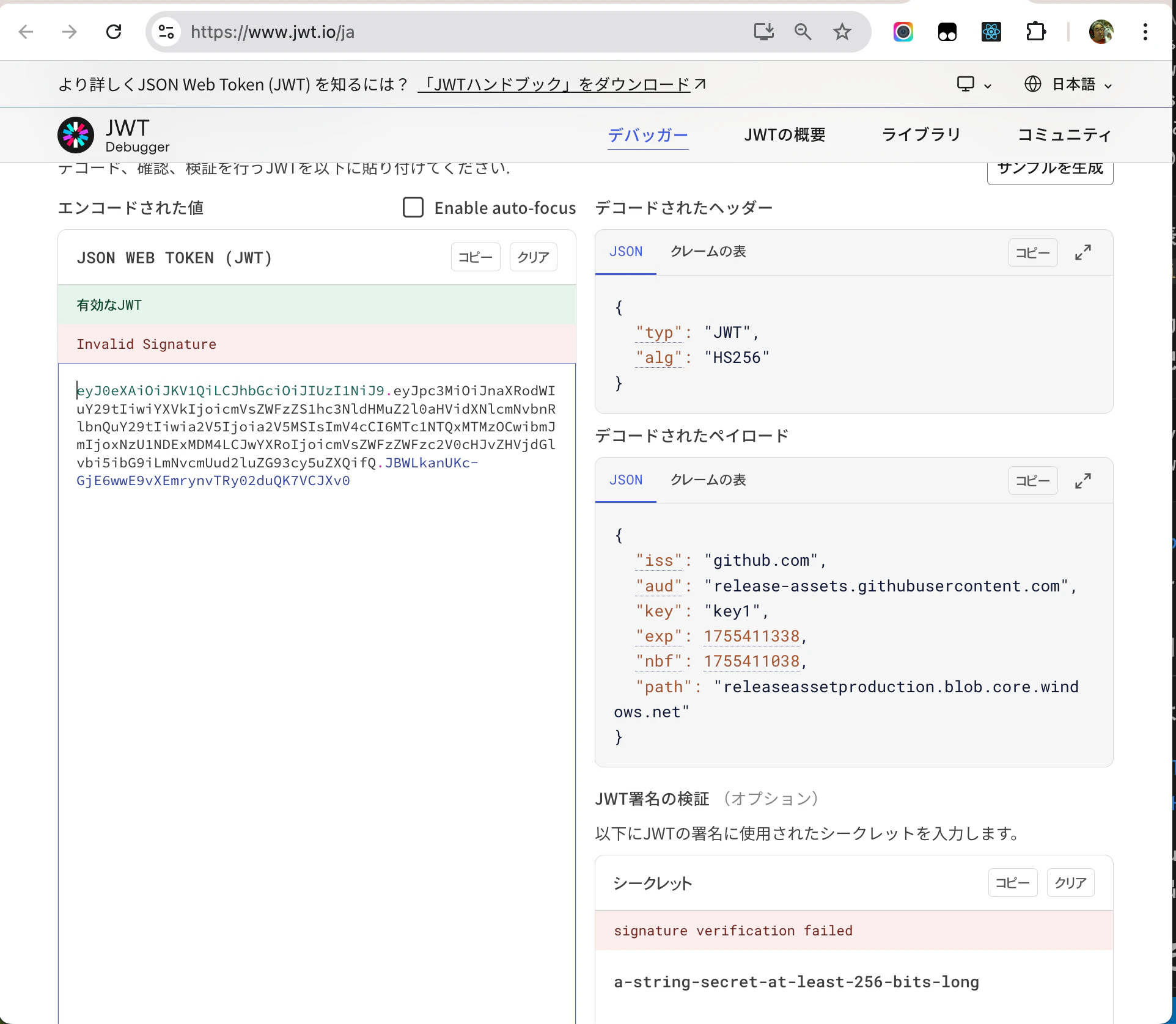
「デコードされたペイロード」の内容がこうなっていた。
{
  "iss": "github.com",
  "aud": "release-assets.githubusercontent.com",
  "key": "key1",
  "exp": 1755411338,
  "nbf": 1755411038,
  "path": "releaseassetproduction.blob.core.windows.net"
}
nbfつまりNot Beforeの値 1755411038 はUnixtimeだ。これをUnixtime相互変換ツールを使ってAsia/Tokyo(JST)+09:00基準に変換すると 2025-08-17 15:10:38 だ。次にexpつまりexpirationの値 1755411338 を同様に変換すると 2025-08-17 15:15:38 だ。nbfからexpまでの時間間隔はピッタリ 5分 だ。つまりReleasesページからファイルをダウンロードするHTTP要求が最長5分でexpireするように設定されていた。間違いない。
GitHub Communityでの情報交換
わたしはGitHub Communityにひとつissueを投稿した。
このissueに10人以上が情報を寄せてくれた。いくつか有効な策を見出すことができた。
対策その1: wget -cオプション
下記のスクリプト downloadKS.sh を作った。
#!/bin/bash
export LC_ALL=en_US.UTF-8
counter=1
until wget -o ./log$counter.txt -c https://github.com/katalon-studio/katalon-studio/releases/download/free-v10.3.0/Katalon.Studio.dmg
do
((counter++))
done
このスクリプトがwgetコマンドの-c(--continue)オプションを利用していることに注目してほしい。wgetのドキュメントから-cオプションの説明文を下記に引用する。
       Continue getting a partially-downloaded file.  This is useful
       when you want to finish up a download started by a previous
       instance of Wget, or by another program.  For instance:

               wget -c ftp://sunsite.doc.ic.ac.uk/ls-lR.Z

       If there is a file named ls-lR.Z in the current directory,
       Wget will assume that it is the first portion of the remote
       file, and will ask the server to continue the retrieval from
       an offset equal to the length of the local file.

       Note that you don't need to specify this option if you just
       want the current invocation of Wget to retry downloading a
       file should the connection be lost midway through.  This is
       the default behavior.  -c only affects resumption of downloads
       started prior to this invocation of Wget, and whose local
       files are still sitting around.

       Without -c, the previous example would just download the
       remote file to ls-lR.Z.1, leaving the truncated ls-lR.Z file
       alone.

       If you use -c on a non-empty file, and the server does not
       support continued downloading, Wget will restart the download
       from scratch and overwrite the existing file entirely.

       Beginning with Wget 1.7, if you use -c on a file which is of
       equal size as the one on the server, Wget will refuse to
       download the file and print an explanatory message.  The same
       happens when the file is smaller on the server than locally
       (presumably because it was changed on the server since your
       last download attempt)---because "continuing" is not
       meaningful, no download occurs.

       On the other side of the coin, while using -c, any file that's
       bigger on the server than locally will be considered an
       incomplete download and only "(length(remote) -
       length(local))" bytes will be downloaded and tacked onto the
       end of the local file.  This behavior can be desirable in
       certain cases---for instance, you can use wget -c to download
       just the new portion that's been appended to a data collection
       or log file.

       However, if the file is bigger on the server because it's been
       changed, as opposed to just appended to, you'll end up with a
       garbled file.  Wget has no way of verifying that the local
       file is really a valid prefix of the remote file.  You need to
       be especially careful of this when using -c in conjunction
       with -r, since every file will be considered as an "incomplete
       download" candidate.

       Another instance where you'll get a garbled file if you try to
       use -c is if you have a lame HTTP proxy that inserts a
       "transfer interrupted" string into the local file.  In the
       future a "rollback" option may be added to deal with this
       case.

       Note that -c only works with FTP servers and with HTTP servers
       that support the "Range" header.
downloadKS.shスクリプトを実行すると最終的に Katalon.Studio.dmg ファイル(810メガバイト)をダウンロードすることに成功した。
$ ls -A
Katalon.Studio.dmg	log1.txt		log3.txt
downloadKS.sh		log2.txt
これを実行した時、ログがlog1.txt、log2.txt、log3.txtの3つのファイルに出力された。このことからシェルのuntilコマンドによるループの中でwgetコマンドが3回実行されたことがわかる。
log2.txtファイルの冒頭に下記のようなログが記録されていた。
--2025-08-14 22:42:14--  https://github.com/katalon-studio/katalon-studio/releases/download/free-v10.3.0/Katalon.Studio.dmg
Resolving github.com (github.com)... 20.27.177.113
Connecting to github.com (github.com)|20.27.177.113|:443... connected.
HTTP request sent, awaiting response... 302 Found
Location: https://release-assets.githubusercontent.com/github-production-release-asset/148249057/104040b8-733f-4663-8cbb-f9b2a4bd0f5e?sp=r&sv=2018-11-09&sr=b&spr=https&se=2025-08-14T14%3A30%3A47Z&rscd=attachment%3B+filename%3DKatalon.Studio.dmg&rsct=application%2Foctet-stream&skoid=96c2d410-5711-43a1-aedd-ab1947aa7ab0&sktid=398a6654-997b-47e9-b12b-9515b896b4de&skt=2025-08-14T13%3A30%3A15Z&ske=2025-08-14T14%3A30%3A47Z&sks=b&skv=2018-11-09&sig=HWKC5VysnYk6eiz02ZvQQJEntze1ZXYGi1NG2eWvFms%3D&jwt=eyJ0eXAiOiJKV1QiLCJhbGciOiJIUzI1NiJ9.eyJpc3MiOiJnaXRodWIuY29tIiwiYXVkIjoicmVsZWFzZS1hc3NldHMuZ2l0aHVidXNlcmNvbnRlbnQuY29tIiwia2V5Ijoia2V5MSIsImV4cCI6MTc1NTE3OTIzNSwibmJmIjoxNzU1MTc4OTM1LCJwYXRoIjoicmVsZWFzZWFzc2V0cHJvZHVjdGlvbi5ibG9iLmNvcmUud2luZG93cy5uZXQifQ.p90UDQwBpUvZjzI1FbxTO71AM0684Z_CPM38whGa3oY&response-content-disposition=attachment%3B%20filename%3DKatalon.Studio.dmg&response-content-type=application%2Foctet-stream [following]
--2025-08-14 22:42:15--  https://release-assets.githubusercontent.com/github-production-release-asset/148249057/104040b8-733f-4663-8cbb-f9b2a4bd0f5e?sp=r&sv=2018-11-09&sr=b&spr=https&se=2025-08-14T14%3A30%3A47Z&rscd=attachment%3B+filename%3DKatalon.Studio.dmg&rsct=application%2Foctet-stream&skoid=96c2d410-5711-43a1-aedd-ab1947aa7ab0&sktid=398a6654-997b-47e9-b12b-9515b896b4de&skt=2025-08-14T13%3A30%3A15Z&ske=2025-08-14T14%3A30%3A47Z&sks=b&skv=2018-11-09&sig=HWKC5VysnYk6eiz02ZvQQJEntze1ZXYGi1NG2eWvFms%3D&jwt=eyJ0eXAiOiJKV1QiLCJhbGciOiJIUzI1NiJ9.eyJpc3MiOiJnaXRodWIuY29tIiwiYXVkIjoicmVsZWFzZS1hc3NldHMuZ2l0aHVidXNlcmNvbnRlbnQuY29tIiwia2V5Ijoia2V5MSIsImV4cCI6MTc1NTE3OTIzNSwibmJmIjoxNzU1MTc4OTM1LCJwYXRoIjoicmVsZWFzZWFzc2V0cHJvZHVjdGlvbi5ibG9iLmNvcmUud2luZG93cy5uZXQifQ.p90UDQwBpUvZjzI1FbxTO71AM0684Z_CPM38whGa3oY&response-content-disposition=attachment%3B%20filename%3DKatalon.Studio.dmg&response-content-type=application%2Foctet-stream
Resolving release-assets.githubusercontent.com (release-assets.githubusercontent.com)... 185.199.109.133, 185.199.111.133, 185.199.108.133, ...
Connecting to release-assets.githubusercontent.com (release-assets.githubusercontent.com)|185.199.109.133|:443... connected.
HTTP request sent, awaiting response... 206 Partial Content
Length: 849195896 (810M), 534623096 (510M) remaining [application/octet-stream]
Saving to: ‘Katalon.Studio.dmg’

        [ skipping 307200K ]
307200K
307200K .......... .......... .......... .......... .......... 37%  811K 10m44s
307250K .......... .......... .......... .......... .......... 37% 1.21M 8m53s
...(continue)
これを見るとHTTPサーバがHTTPステータス 206 Partial Content を応答したことがわかる。このことからGitHubのサーバーが wget -c に正しく応答できるように構成されていることが確認できた。
GitHub Communityの別のissueによると、GitHubのサーバはつい数週前までダウンロードの再開をサポートしていなかったらしい。GitHubから何もアナウンスされていないので根拠薄弱だが、GitHubはJWTのexpireを短くする一方で、ダンロードの再開をサポートするようにサーバの設定を変更したんじゃないかと思われる。良心的だと思う。
対策その2: curl -cオプション
"wget -c" と同等のことがcurlコマンドでも実現できる。下記のシェルスクリプトを書いた。
#!/bin/bash
until curl -C - -L -O https://github.com/katalon-studio/katalon-studio/releases/download/free-v10.3.0/Katalon.Studio.dmg -o Katalon.Studio.dmg; do :; done
これを実行したら800メガバイト超のファイルをダウンロードすることができた。
$ ./downloadKS-curl.sh
** Resuming transfer from byte position 545714176
  % Total    % Received % Xferd  Average Speed   Time    Time     Time  Current
                                 Dload  Upload   Total   Spent    Left  Speed
  0     0    0     0    0     0      0      0 --:--:-- --:--:-- --:--:--     0
 86  289M   86  249M    0     0  1032k      0  0:04:46  0:04:07  0:00:39 1061k
curl: (92) HTTP/2 stream 1 was not closed cleanly: PROTOCOL_ERROR (err 1)
Warning: Got more output options than URLs
** Resuming transfer from byte position 807403520
  % Total    % Received % Xferd  Average Speed   Time    Time     Time  Current
                                 Dload  Upload   Total   Spent    Left  Speed
  0     0    0     0    0     0      0      0 --:--:-- --:--:-- --:--:--     0
100 39.8M  100 39.8M    0     0   961k      0  0:00:42  0:00:42 --:--:-- 1106k
Warning: Got more output options than URLs
このメッセージを見ると、curlによるHTTPセッションが2回中断してつごう3回目のセッションで完了したことがわかる。
対策その3: PowerShell の Invoke-WebRequest
GitHub Communityにおけるsemagnumによる投稿:
によれば、PowerShellの Invoke-WebRequest を -Resume つきで実行すれば "wget -c" と同じことが実行できるとのこと。WindowsユーザーにとってはPowerShellが好ましいかもしれない。
C:\Users\kazurayam\tmp\katalonフォルダを作り downloadKS.ps1 ファイルを作った。内容は下記のとおり。
# downloadKS.ps1
Invoke-WebRequest -uri https://github.com/katalon-studio/katalon-studio/releases/download/free-v10.3.0/Katalon.Studio.dmg -OutFile Katalon.Studio.dmg -MaximumRetryCount 20 -Resume
echo $?
PowerShellのコマンドラインを開いて downloadKS.ps1 を実行した。
PS C:\Users\uraya\tmp\katalon> ls

    Directory: C:\Users\uraya\tmp\katalon

Mode                 LastWriteTime         Length Name
----                 -------------         ------ ----
-a---          2025/08/19     7:31            188 downloadKS.ps1

PS C:\Users\uraya\tmp\katalon> .\downloadKS.ps1
True
スクリプトが進行中、Invoke-WebRequestコマンドレットが下記のように進捗状況を表示してくれた。
Web Request status[#Downloaded: XXX.X MB of 809.9 MB ]
5分ぐらい経過したところで(予想どおり)エラーが発生した。
Invoke-WebRequest: C:\Users\uraya\tmp\katalon\downloadKS.ps1:1:1
Line |
   1 |  Invoke-WebRequest -uri https://github.com/katalon-studio/katalon-stud …
~~~~~~~~~~~~
     | One or more errors occurred. (The response ended
     | prematurely. (ResponseEnded))
もういちどdownloadKS.ps1スクリプトを実行した。Invoke-WebRequestコマンドレットに-Resumeオプションを指定したから、前回実行時にダウンロードが中断したところから再度継続してくれることを期待して。
PS C:\Users\kazurayam\tmp\katalon> .\downloadKS.ps1
つごう3回、downloadKS.ps1スクリプトを実行して、最終的に800メガバイトのファイルがダウンロードできた。
do { ... } until (Invoke-WebRequest ...) のようなループを含むスクリプトを書きたいと思った。downloadKS.ps1を2回、3回実行するのはダサいとおもったから。しかしできなかった。わたしはPowerShellのプログラミングに慣れていない。
GitHub CLIはどうした?
GitHub CLIでも "wget -c" と同等のことができてしかるべきと思った。ところが2025年8月21日現在、GitHub CLIはファイルダウンロードの継続を未だサポートしていない。どうした?GitHub!
結論
先々週まで、GitHubのReleasesページをブラウザで開いてリンクをクリックして10分ちょっと待てば、800メガバイトを超える大きなファイルをダウンロードすることができた。ところが8月10日あたり以降、ブラウザでクリックする方法では大きなファイルをダウンロードできなくなった。困った。しかし回避策はある。wgetやcurlを使って中断したダウンロードを継続するようなスクリプトを作って実行せよ。