

はじめに
ウェブサイトを巡回していると滞在後「すぐ」に表示されるのではなく
「一定時間経過後」に表示されるバナーを見たことはないだろうか?
例えばの例で話してみよう。
もしあなたがどこかのレストランに入ったとする。
その際にメニューを決めることになるのだが、最初のオーダー時にデザートを注文せず、食後に注文することはないだろうか?
それは食後の満腹度合いは料理を食べてみないとわからないので、あとでデザートを別途注文するわけである。
時間差のメニューの提示はレストランでは容易にできるが、
インターネットでは難しいのである。
サイトを訪問して1分後にアクションを起こすためにはユーザがサイト訪問時から難病滞在したかを裏ストップウォッチで何分サイトに滞在したかをカウントしなければならない。
ウェブサイトで一定時間経過後にバナーを表示する
gtmTimer.js
function() {
return Math.floor({{gtmTimer}} / 1000);
}
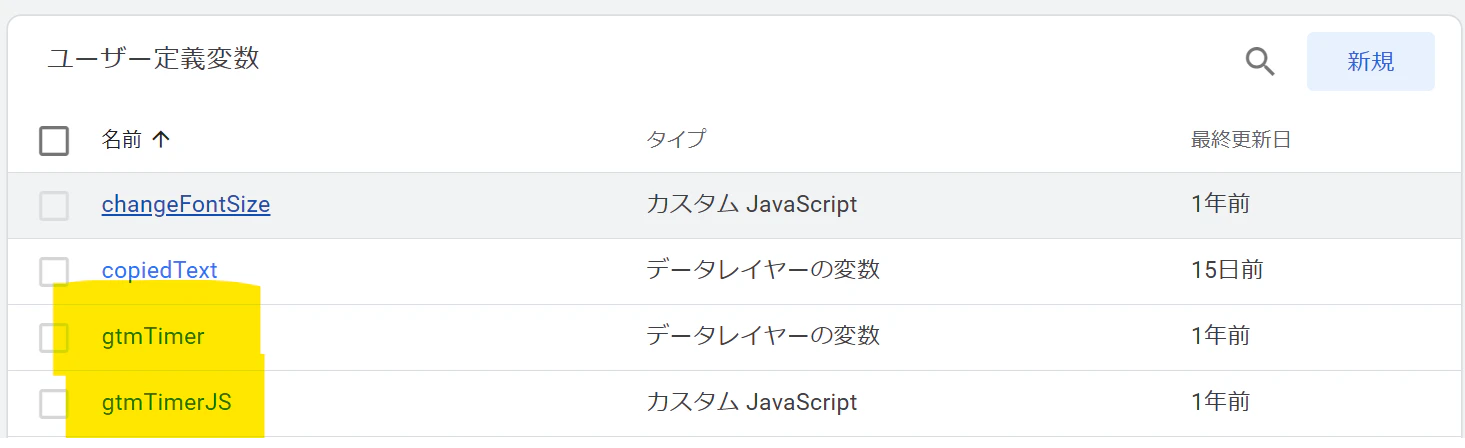
上記のような変数を書くことで、gtmTimerというデータレイヤー関数にサイト滞在時間を格納するのである。
サイト滞在時間が一定時間経過にバナーをポップアップさせる
一定時間経過にポップアップを表示させるために以下のjavascriptを記述する。
gtmTimer.js
function() {
<script>
!function(html){
 var
   imageURL   = 'https://www20.a8.net/svt/bgt?aid=160918734322&wid=001&eno=01&mid=s00000012624004142000&mc=1',
   spImageURL = 'https://www20.a8.net/svt/bgt?aid=160918734322&wid=001&eno=01&mid=s00000012624004142000&mc=1',
   linkURL    = '"https://px.a8.net/svt/ejp?a8mat=2NT1OU+5BPLKI+2PEO+ONRVL',
   position   = 'br',
   breakpoint = 767,
   color      = '#ff99cc',
   prefix     = 'optimize';
 var e = document.createElement('div')
 if ( !imageURL || !linkURL || !position || !prefix ) return false;
 if ( !/relative|absolute|fixed/.test( document.body.style ) ) document.body.style.position = 'relative';
 e.insertAdjacentHTML('afterbegin',html.replace( /PREFIX/g, prefix ).replace( /PCIMAGEURL/, imageURL ).replace( /SPIMAGEURL/, spImageURL ).replace( /LINKURL/, linkURL ).replace( /BREAKPOINT/, breakpoint+'' ).replace( /BUTTONCOLOR/, color ).replace( /POSITIONSTYLE/, position.split('').reduce(function(a,c){ return a + ( c=='t' ? 'top' : c=='b' ? 'bottom' : c=='r' ? 'right' : c=='l' ? 'left' : '' ) + ':20px;';},'')))
 e=e.firstChild;e.querySelector('.'+prefix+'-close').addEventListener('click',function(){e.style.display='none'});
 document.body.appendChild(e)
}(
'<div class="PREFIX-origin">\
 <style>\
 .PREFIX-origin{position:fixed;POSITIONSTYLE z-index:999999;}\
 .PREFIX-banner{max-width:200px;}\
 .PREFIX-banner img{max-width:100%;}\
 .PREFIX-close{padding:10px;font-size:10px;line-height:1;letter-spacing:1;display:block;position:absolute;right:-10px;top:-10px;background:BUTTONCOLOR;color:white;border-radius:15px;cursor:pointer}\
 .PREFIX-pc{display:inline;}\
 .PREFIX-sp{display:none;}\
 @media(max-width:BREAKPOINTpx){\
   .PREFIX-origin {\
     top: auto; left: auto; right: auto; bottom: auto;\
     width: 90vw; bottom: 5vw; left: 5vw;\
   }\
   .PREFIX-banner{ text-align: center; }\
   .PREFIX-banner img{max-width:100%;}\
   .PREFIX-pc{display:none;}\
   .PREFIX-sp{display:block;width:100%}\
 }\
 </style>\
 <div class="PREFIX-close">×</div>\
 <a class="PREFIX-banner" href="LINKURL">\
   <img class="PREFIX-pc" src="PCIMAGEURL" alt="">\
   <img class="PREFIX-sp" src="SPIMAGEURL" alt="">\
 </a>\
</div>'
)
</script>
上記スクリプトはウェブサイトにポップアップを表示させるためのコードである。
画像のリンクやジャンプ先のリンクを各々変更する。
一定時間経過後に発動させる

あとは一定時間経過後に発動させるトリガーで設置すれば完了である。
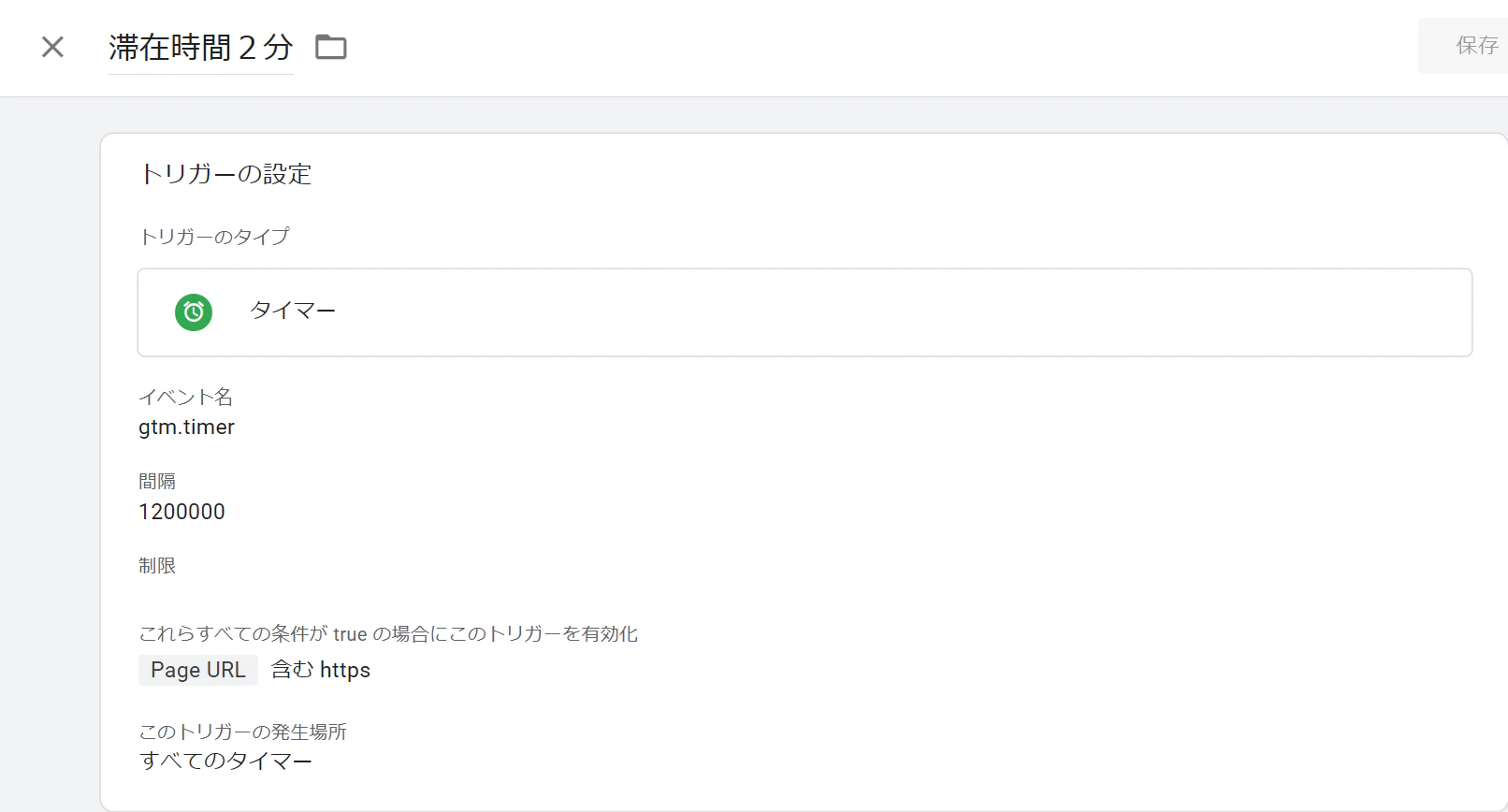
2分後に発火させるトリガーがうまく設置されると上記のような記述になる。
ウェブサイトでコンバージョンにつながるユーザーは一定以上のサイト滞在時間を有しているので、そういったユーザにリーチした方がCV率の改善がみられるのである。
まずはウェブサイトで時間に応じて何らかのアクションを設定したい方はぜひ上記の設定方法を参考にしてみてほしい。