

Google Apps Script (GAS) を使って、Googleの最新AIモデル Gemini API を呼び出す方法
コード内にAPIキーを直接書いてしまうと、GitHubへの誤ったプッシュや共有時に情報漏洩のリスクがあります。今回は、GASの 「スクリプトプロパティ」 を使って安全に実装する手順を紹介します。
1. 事前準備:APIキーの取得
まずは Google AI Studio からAPIキーを取得してください。
2. APIキーをスクリプトプロパティに保存
GASのエディタ画面の左側にある 「プロジェクトの設定」(歯車アイコン)をクリックします。
下部にある 「スクリプトプロパティを追加」 をクリックします。
プロパティに GEMINI_API_KEY、値に取得したAPIキーを入力して保存します。
3. 実装コード
以下のコードをGASのエディタに貼り付けてください。
gemini.gs
/**
 * スクリプトプロパティからAPIキーを取得
 */
const API_KEY = PropertiesService.getScriptProperties().getProperty('GEMINI_API_KEY');

/**
 * 利用可能なモデル一覧を確認する(デバッグ用)
 */
function listAvailableModels() {
  const url = `https://generativelanguage.googleapis.com/v1beta/models?key=${API_KEY}`;

  const response = UrlFetchApp.fetch(url, {muteHttpExceptions: true});
  Logger.log(response.getContentText());
}

/**
 * Gemini API 呼び出し
 * @param {string} promptText
 */
function callGeminiAPI(promptText) {
  if (!API_KEY) {
    return "エラー:APIキーが設定されていません。プロジェクト設定を確認してください。";
  }

  // 最新のモデル名(必要に応じて変更してください)
  const model = "gemini-1.5-flash-latest";
  const url = `https://generativelanguage.googleapis.com/v1beta/models/${model}:generateContent?key=${API_KEY}`;

  const textToSend = promptText || "iPhoneで同じアプリを2つのアカウントで使う方法を教えて";

  const payload = {
    "contents": [{
      "parts": [{
        "text": textToSend
      }]
    }]
  };

  const options = {
    "method": "post",
    "contentType": "application/json",
    "payload": JSON.stringify(payload),
    "muteHttpExceptions": true
  };

  try {
    const response = UrlFetchApp.fetch(url, options);
    const resJson = JSON.parse(response.getContentText());

    if (response.getResponseCode() !== 200) {
      Logger.log("エラー詳細: " + JSON.stringify(resJson));
      return "APIエラーが発生しました。";
    }

    return resJson.candidates[0].content.parts[0].text;

  } catch (e) {
    return "実行エラー: " + e.toString();
  }
}

/**
 * 実行テスト
 */
function testGemini() {
  const result = callGeminiAPI();
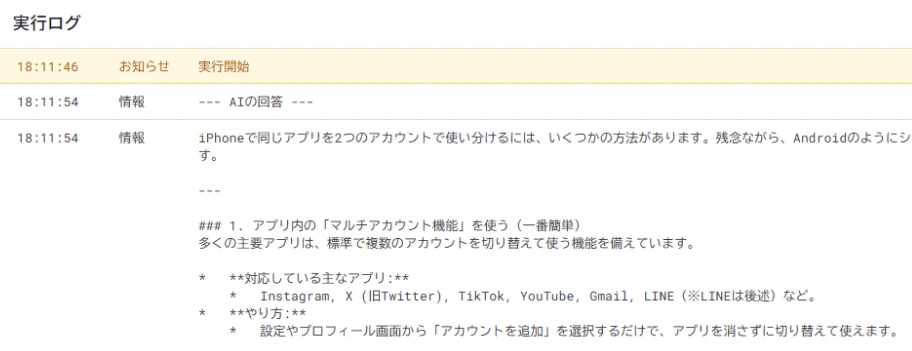
  Logger.log("--- AIの回答 ---");
  Logger.log(result);
}
実行結果
コードのポイント
-
セキュリティ対策
PropertiesService.getScriptProperties() を使うことで、コードを誰かに共有してもAPIキーが漏れることはありません。 -
モデルの指定
今回は軽量で高速な gemini-1.5-flash-latest を使用しています。より高度な推論が必要な場合は gemini-1.5-pro-latest などに書き換えてください。 -
エラーハンドリング
muteHttpExceptions: true を設定することで、API側でエラーが起きた際もGASがクラッシュせず、ログを確認できるようになっています。
まとめ
GASとGeminiを連携させれば、Googleスプレッドシート上での自動テキスト生成や、Gmailの自動返信など、活用の幅が大きく広がります。まずはこの基本構成から試してみてください!