

はじめに
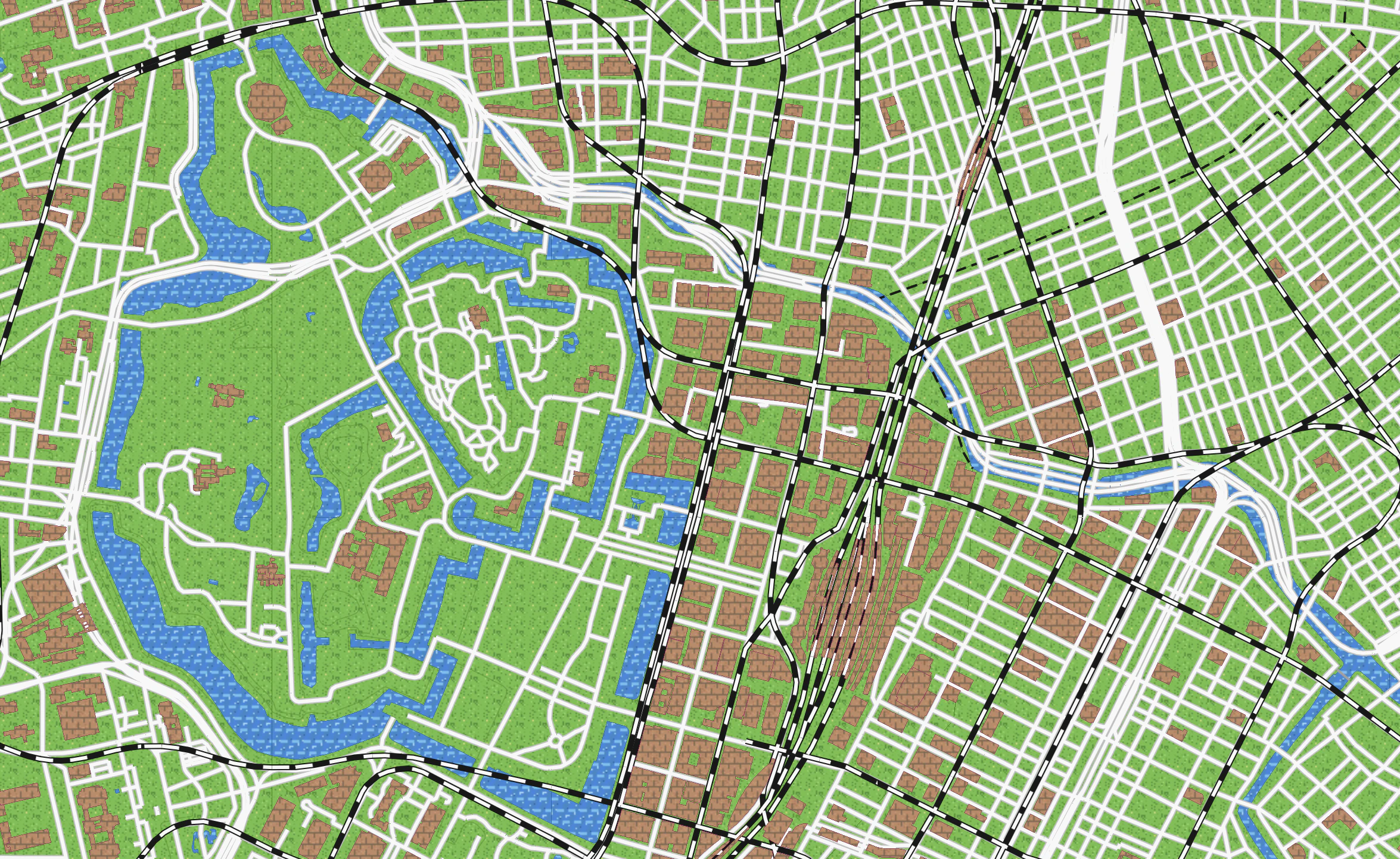
国土地理院が提供する最適化ベクトルタイルと MapLibre GL JS を使って、レトロな8bitゲーム風の地図レイヤーを作る方法を紹介します。
ベクトルタイルはスタイルを自由にカスタマイズできるため、色やフォント、線の太さだけでなく、プログラムで生成したドット絵パターンを塗りつぶしに使うことで、ファミコン時代のRPGのような見た目を実現できます。
デモ
レイヤーパネルから「8bitゲーム風」を選択すると確認できます。
完成イメージ
- 緑のドット絵草原が広がるフィールド
- 青い波模様の海と川
- 赤い高速道路、黄色い国道
- 踏切風の鉄道ライン
- レンガ模様の建物
技術スタック
| ライブラリ | バージョン | 用途 |
|---|---|---|
| Next.js | 16 | フレームワーク |
| MapLibre GL JS | 5 | 地図描画 |
| pmtiles | 4 | PMTilesプロトコル |
| TypeScript | 5 | 型安全 |
1. 国土地理院ベクトルタイルについて
国土地理院は 最適化ベクトルタイル(optimal_bvmap) を PMTiles 形式で公開しています。
pmtiles://https://cyberjapandata.gsi.go.jp/xyz/optimal_bvmap-v1/optimal_bvmap-v1.pmtiles/{z}/{x}/{y}
このタイルには以下のようなソースレイヤーが含まれています:
| ソースレイヤー | 内容 |
|---|---|
AdmArea |
行政区域 |
AdmBdry |
行政境界線 |
WA |
水域(湖沼等) |
RvrCL |
河川中心線 |
WL |
水涯線 |
Cstline |
海岸線 |
RdCL |
道路中心線 |
RailCL |
鉄道中心線 |
BldA |
建物 |
Cntr |
等高線 |
TpgphArea |
地形面 |
TpgphLine |
地形線 |
WStrA |
水部構造物面 |
WStrL |
水部構造物線 |
2. PMTiles プロトコルの登録
MapLibre で pmtiles:// スキームを使うには、pmtiles パッケージのプロトコルを登録する必要があります。
npm install maplibre-gl pmtiles
import maplibregl from "maplibre-gl";
import { Protocol } from "pmtiles";

const protocol = new Protocol();
maplibregl.addProtocol("pmtiles", protocol.tile);
これをモジュールのトップレベルで一度だけ実行します。
3. 8bitゲーム風スタイルJSON の作成
MapLibre のスタイル仕様に従い、レトロゲーム風の色使いとスタイルを定義します。ポイントは以下の3つです:
- ファミコン風カラーパレット(#60b830, #f83800, #f8b800 など限られた色数)
-
line-cap: "butt"でピクセル感のある直角な線端 -
fill-patternでドット絵テクスチャを適用
スタイルJSONの全体構造
public/styles/8bit.json として配置します。
{
  "version": 8,
  "name": "8bit-famicom",
  "metadata": { "retroPatterns": true },
  "sources": {
    "v": {
      "type": "vector",
      "minzoom": 4,
      "maxzoom": 16,
      "tiles": [
        "pmtiles://https://cyberjapandata.gsi.go.jp/xyz/optimal_bvmap-v1/optimal_bvmap-v1.pmtiles/{z}/{x}/{y}"
      ],
      "attribution": "国土地理院最適化ベクトルタイル(8bitスタイル)"
    }
  },
  "glyphs": "https://gsi-cyberjapan.github.io/optimal_bvmap/glyphs/{fontstack}/{range}.pbf",
  "layers": [...]
}
metadata に "retroPatterns": true を設定しています。これはアプリ側でパターン画像の注入が必要なスタイルであることを示すフラグです。
背景 — 緑のフィールド
{
  "id": "background",
  "type": "background",
  "paint": {
    "background-color": "#60b830"
  }
}
行政区域 — 草原パターン
{
  "id": "admin-area",
  "type": "fill",
  "source": "v",
  "source-layer": "AdmArea",
  "paint": {
    "fill-pattern": "pat-grass",
    "fill-outline-color": "#388018"
  }
}
水域 — ドット絵の波模様
{
  "id": "water-area",
  "type": "fill",
  "source": "v",
  "source-layer": "WA",
  "paint": {
    "fill-pattern": "pat-water",
    "fill-outline-color": "#1868a8"
  }
}
fill-pattern に "pat-water" を指定しています。この画像は後述するJavaScriptコードで動的に生成・登録します。
重要: water-area は admin-area より後に配置する必要があります。MapLibre はレイヤー配列の順番通りに描画するため、行政区域(草原)を先に描いた上に水域を重ねないと、河川や湖が草原パターンに覆い隠されてしまいます。
道路 — ピクセル感のあるライン
高速道路は赤、国道は黄色、その他の道路は白で表現します。line-cap: "butt" がピクセルアート感を出すポイントです。
{
  "id": "road-highway",
  "type": "line",
  "source": "v",
  "source-layer": "RdCL",
  "filter": ["==", ["get", "motorway"], true],
  "paint": {
    "line-color": "#f83800",
    "line-width": [
      "interpolate", ["linear"], ["zoom"],
      4, 2,
      14, 6
    ]
  },
  "layout": { "line-cap": "butt" }
}
アウトライン用のレイヤーを下に重ねることで、線に縁取りを付けます:
{
  "id": "road-highway-outline",
  "type": "line",
  "source": "v",
  "source-layer": "RdCL",
  "filter": ["==", ["get", "motorway"], true],
  "paint": {
    "line-color": "#b81010",
    "line-width": [
      "interpolate", ["linear"], ["zoom"],
      4, 3,
      14, 8
    ]
  },
  "layout": { "line-cap": "butt" }
}
鉄道 — ダッシュパターン
白黒の踏切風ラインです。
{
  "id": "railway-outline",
  "type": "line",
  "source": "v",
  "source-layer": "RailCL",
  "paint": {
    "line-color": "#181818",
    "line-width": ["interpolate", ["linear"], ["zoom"], 4, 2, 14, 5]
  },
  "layout": { "line-cap": "butt" }
},
{
  "id": "railway",
  "type": "line",
  "source": "v",
  "source-layer": "RailCL",
  "paint": {
    "line-color": "#f8f8f8",
    "line-width": ["interpolate", ["linear"], ["zoom"], 4, 1, 14, 3],
    "line-dasharray": [4, 4]
  },
  "layout": { "line-cap": "butt" }
}
ラベル — 白文字 + 黒縁取り
{
  "id": "label-admin",
  "type": "symbol",
  "source": "v",
  "source-layer": "AdmArea",
  "minzoom": 6,
  "layout": {
    "text-field": ["get", "knj"],
    "text-font": ["NotoSansJP-Bold"],
    "text-size": ["interpolate", ["linear"], ["zoom"], 6, 12, 10, 16, 14, 20]
  },
  "paint": {
    "text-color": "#f8f8f8",
    "text-halo-color": "#181818",
    "text-halo-width": 3
  }
}
4. ドット絵パターンの生成(TypeScript)
ここが8bitゲーム風の要です。MapLibre の map.addImage() を使い、プログラムで生成した16x16ピクセルのパターン画像を登録します。
パターン生成の基盤
type RGBA = [number, number, number, number];

function createImage(
  w: number,
  h: number,
  gen: (x: number, y: number) => RGBA
): { width: number; height: number; data: Uint8Array } {
  const data = new Uint8Array(w * h * 4);
  for (let y = 0; y < h; y++) {
    for (let x = 0; x < w; x++) {
      const [r, g, b, a] = gen(x, y);
      const i = (y * w + x) * 4;
      data[i] = r;
      data[i + 1] = g;
      data[i + 2] = b;
      data[i + 3] = a;
    }
  }
  return { width: w, height: h, data };
}
ピクセルごとにRGBA値を返すジェネレータ関数を受け取り、Uint8Array のバイト配列を生成します。MapLibre の addImage はこの { width, height, data } 形式を受け付けます。
擬似乱数ハッシュ
パターンに自然なバリエーションを出すため、座標ベースの決定的ハッシュを使います:
const hash = (x: number, y: number, s: number) =>
  (((x * 374761393 + y * 668265263 + s) ^ (x * 1274126177 + y)) >>> 0) % 100;
Math.random() と違い、同じ座標に対して常に同じ値を返すのでタイル間でパターンが一貫します。
草原パターン
function grassPattern() {
  return createImage(16, 16, (x, y) => {
    const h = hash(x, y, 1);
    if (h < 8) return [72, 144, 48, 255];    // 濃い草
    if (h < 14) return [96, 176, 56, 255];   // やや濃い草
    if (h < 18) return [144, 216, 104, 255]; // ハイライト
    if (h === 25 && x % 5 === 0) return [232, 224, 120, 255]; // 小さな花
    return [112, 192, 72, 255]; // ベースの緑
  });
}
確率的に異なる緑色を配置し、まれに黄色い花を散らすことで、RPGのフィールドのような見た目になります。
水面パターン
function waterPattern() {
  return createImage(16, 16, (x, y) => {
    const wave = Math.sin((x + y * 0.5) * 0.8) * 0.5 + 0.5;
    const row = y % 8;
    // 波の頂点のハイライトバンド
    if (row === 0 || row === 1) {
      const shift = (y < 8 ? 0 : 4);
      const wx = (x + shift) % 8;
      if (wx >= 1 && wx <= 5) return [104, 192, 240, 255];
    }
    // 泡のきらめき
    if (hash(x, y, 2) < 3) return [160, 216, 248, 255];
    // 深い影
    if (hash(x, y, 3) < 5) return [40, 96, 168, 255];
    // ベースの水面 + 波のバリエーション
    const b = Math.round(200 + wave * 24);
    return [56, 136, b, 255];
  });
}
Math.sin による波模様と、行ごとのハイライトバンドで、8bit風の水面を表現します。
森林パターン
function forestPattern() {
  return createImage(16, 16, (x, y) => {
    const d1 = Math.hypot(x - 4, y - 4);
    const d2 = Math.hypot(x - 12, y - 11);
    const d3 = Math.hypot(x - 8, y - 14);

    // 樹冠(明るい)
    if (d1 < 4 || d2 < 3.5 || d3 < 2.5) {
      const h = hash(x, y, 4);
      if (h < 15) return [80, 144, 56, 255];
      if (h < 30) return [56, 120, 40, 255];
      return [64, 136, 48, 255];
    }
    // 樹冠の影
    if (d1 < 5.5 || d2 < 5 || d3 < 4) {
      return [40, 88, 32, 255];
    }
    // 木々の間の地面
    const h = hash(x, y, 5);
    if (h < 10) return [56, 104, 40, 255];
    return [48, 96, 36, 255];
  });
}
Math.hypot で円形の樹冠を3つ配置し、影を付けることで上から見た森を表現しています。
建物パターン
function buildingPattern() {
  return createImage(16, 16, (x, y) => {
    const row = y % 8;
    const isOddRow = Math.floor(y / 4) % 2 === 1;
    const bx = (x + (isOddRow ? 4 : 0)) % 8;

    // モルタル線
    if (row === 0 || bx === 0) return [128, 104, 80, 255];

    // レンガ表面
    const h = hash(x, y, 7);
    if (h < 10) return [176, 120, 88, 255];
    if (h < 20) return [208, 152, 112, 255];
    return [192, 136, 100, 255];
  });
}
交互にオフセットしたレンガパターンです。モルタル線と色のバリエーションでリアルさを出しています。
岩山パターン
function mountainPattern() {
  return createImage(16, 16, (x, y) => {
    const ridge = (x + y) % 6;
    const h = hash(x, y, 8);

    if (ridge === 0) return [96, 88, 80, 255];    // 影の線
    if (ridge === 1) return [160, 152, 136, 255]; // ハイライト
    if (h < 12) return [120, 112, 96, 255];
    if (h < 20) return [144, 136, 120, 255];
    return [136, 128, 112, 255];
  });
}
5. パターン画像の登録
生成したパターンを map.addImage() で登録します:
export function addRetroPatterns(map: MaplibreMap) {
  const patterns: [string, ReturnType<typeof createImage>][] = [
    ["pat-grass", grassPattern()],
    ["pat-water", waterPattern()],
    ["pat-forest", forestPattern()],
    ["pat-sand", sandPattern()],
    ["pat-building", buildingPattern()],
    ["pat-mountain", mountainPattern()],
  ];

  for (const [name, img] of patterns) {
    if (!map.hasImage(name)) {
      map.addImage(name, img);
    }
  }
}
6. MapLibre マップへの統合
スタイル読み込み後にパターンを注入する仕組みです。
import maplibregl from "maplibre-gl";
import { Protocol } from "pmtiles";
import { addRetroPatterns } from "@/utils/patterns";

// PMTilesプロトコル登録
const protocol = new Protocol();
maplibregl.addProtocol("pmtiles", protocol.tile);

// マップ初期化
const map = new maplibregl.Map({
  container: containerRef.current,
  style: "/styles/8bit.json",  // 8bitスタイルJSON
  center: [139.7, 35.68],
  zoom: 12,
});

// スタイル読み込み完了後にパターンを注入
map.on("load", () => {
  const meta = map.getStyle()?.metadata as Record<string, unknown> | undefined;
  if (meta?.retroPatterns) {
    addRetroPatterns(map);
  }
});
metadata.retroPatterns フラグをチェックしているため、通常のスタイルJSONに切り替えたときはパターン注入がスキップされます。
7. カラーパレット一覧
8bitゲーム風で使用している色の一覧です。ファミコンの限られたパレットを意識しています。
| 用途 | 色コード | 色 |
|---|---|---|
| 背景(草原) | #60b830 |
🟩 |
| 海岸線 | #f8d830 |
🟨 |
| 高速道路 | #f83800 |
🟥 |
| 高速道路(縁) | #b81010 |
🟥 |
| 国道 | #f8b800 |
🟨 |
| 国道(縁) | #a85800 |
🟫 |
| その他の道路 | #f8f8f8 |
⬜ |
| 鉄道 | #181818 |
⬛ |
| 河川 | #3090d0 |
🟦 |
| 水域輪郭 | #1868a8 |
🟦 |
| 行政境界 | #181818 |
⬛ |
| 建物輪郭 | #a03060 |
🟪 |
| ラベル | #f8f8f8 |
⬜ |
| ラベル縁取り | #181818 |
⬛ |
8. ハマりポイント
PMTilesプロトコルの登録忘れ
pmtiles:// スキームのURLを使う場合、maplibregl.addProtocol("pmtiles", protocol.tile) を必ず事前に呼び出す必要があります。登録しないと Unsupported protocol エラーになります。
fill-pattern の画像登録タイミング
fill-pattern で参照する画像は、スタイル読み込み完了後に map.addImage() で登録する必要があります。map.on("load", ...) または map.once("style.load", ...) のコールバック内で実行してください。
line-cap: "butt" の重要性
デフォルトの line-cap は "butt" ですが、スタイルによっては "round" が設定されている場合があります。8bitのピクセル感を出すには "butt" を明示指定することで、線の端が直角に切れてドット絵らしくなります。
fill レイヤーの描画順序
MapLibre では layers 配列の先頭から順に描画されるため、後に定義したレイヤーが上に重なります。行政区域(AdmArea)の草原パターンを水域(WA)より先に配置しないと、河川や湖が草に覆われてしまいます。正しい順序は admin-area → topo-area → water-area です。
ベクトルタイルのズームレベル
国土地理院の最適化ベクトルタイルは minzoom: 4, maxzoom: 16 です。この範囲外ではタイルが取得できないため、スタイルJSON側の minzoom / maxzoom 設定と合わせて確認してください。
9. スタイルJSON 全文
最後に、8bit.json の全文を掲載します。
public/styles/8bit.json(クリックで展開)
{
  "version": 8,
  "name": "8bit-famicom",
  "metadata": { "retroPatterns": true },
  "sources": {
    "v": {
      "type": "vector",
      "minzoom": 4,
      "maxzoom": 16,
      "tiles": [
        "pmtiles://https://cyberjapandata.gsi.go.jp/xyz/optimal_bvmap-v1/optimal_bvmap-v1.pmtiles/{z}/{x}/{y}"
      ],
      "attribution": "国土地理院最適化ベクトルタイル(8bitスタイル)"
    }
  },
  "glyphs": "https://gsi-cyberjapan.github.io/optimal_bvmap/glyphs/{fontstack}/{range}.pbf",
  "layers": [
    {
      "id": "background",
      "type": "background",
      "paint": { "background-color": "#60b830" }
    },
    {
      "id": "admin-area",
      "type": "fill",
      "source": "v",
      "source-layer": "AdmArea",
      "paint": { "fill-pattern": "pat-grass", "fill-outline-color": "#388018" }
    },
    {
      "id": "topo-area",
      "type": "fill",
      "source": "v",
      "source-layer": "TpgphArea",
      "paint": { "fill-pattern": "pat-forest", "fill-opacity": 0.8 }
    },
    {
      "id": "water-area",
      "type": "fill",
      "source": "v",
      "source-layer": "WA",
      "paint": { "fill-pattern": "pat-water", "fill-outline-color": "#1868a8" }
    },
    {
      "id": "coastline",
      "type": "line",
      "source": "v",
      "source-layer": "Cstline",
      "paint": { "line-color": "#f8d830", "line-width": 2 }
    },
    {
      "id": "river",
      "type": "line",
      "source": "v",
      "source-layer": "RvrCL",
      "paint": {
        "line-color": "#3090d0",
        "line-width": ["interpolate", ["linear"], ["zoom"], 4, 1, 14, 3]
      },
      "layout": { "line-cap": "butt" }
    },
    {
      "id": "waterline",
      "type": "line",
      "source": "v",
      "source-layer": "WL",
      "paint": { "line-color": "#3090d0", "line-width": 1 }
    },
    {
      "id": "contour",
      "type": "line",
      "source": "v",
      "source-layer": "Cntr",
      "minzoom": 12,
      "paint": { "line-color": "#489020", "line-width": 1, "line-opacity": 0.5 }
    },
    {
      "id": "admin-boundary",
      "type": "line",
      "source": "v",
      "source-layer": "AdmBdry",
      "paint": {
        "line-color": "#181818",
        "line-width": ["interpolate", ["linear"], ["zoom"], 4, 1, 14, 2],
        "line-dasharray": [4, 2]
      }
    },
    {
      "id": "water-structure-area",
      "type": "fill",
      "source": "v",
      "source-layer": "WStrA",
      "paint": { "fill-pattern": "pat-mountain" }
    },
    {
      "id": "water-structure-line",
      "type": "line",
      "source": "v",
      "source-layer": "WStrL",
      "paint": { "line-color": "#a0a0a0", "line-width": 2 }
    },
    {
      "id": "road-highway-outline",
      "type": "line",
      "source": "v",
      "source-layer": "RdCL",
      "filter": ["==", ["get", "motorway"], true],
      "paint": {
        "line-color": "#b81010",
        "line-width": ["interpolate", ["linear"], ["zoom"], 4, 3, 14, 8]
      },
      "layout": { "line-cap": "butt" }
    },
    {
      "id": "road-highway",
      "type": "line",
      "source": "v",
      "source-layer": "RdCL",
      "filter": ["==", ["get", "motorway"], true],
      "paint": {
        "line-color": "#f83800",
        "line-width": ["interpolate", ["linear"], ["zoom"], 4, 2, 14, 6]
      },
      "layout": { "line-cap": "butt" }
    },
    {
      "id": "road-national-outline",
      "type": "line",
      "source": "v",
      "source-layer": "RdCL",
      "filter": ["all", ["!=", ["get", "motorway"], true], ["==", ["get", "rdCtg"], 0]],
      "paint": {
        "line-color": "#a85800",
        "line-width": ["interpolate", ["linear"], ["zoom"], 4, 2, 14, 6]
      },
      "layout": { "line-cap": "butt" }
    },
    {
      "id": "road-national",
      "type": "line",
      "source": "v",
      "source-layer": "RdCL",
      "filter": ["all", ["!=", ["get", "motorway"], true], ["==", ["get", "rdCtg"], 0]],
      "paint": {
        "line-color": "#f8b800",
        "line-width": ["interpolate", ["linear"], ["zoom"], 4, 1, 14, 4]
      },
      "layout": { "line-cap": "butt" }
    },
    {
      "id": "road-other-outline",
      "type": "line",
      "source": "v",
      "source-layer": "RdCL",
      "filter": ["all", ["!=", ["get", "motorway"], true], ["!=", ["get", "rdCtg"], 0]],
      "minzoom": 10,
      "paint": {
        "line-color": "#c0c0c0",
        "line-width": ["interpolate", ["linear"], ["zoom"], 10, 2, 14, 5]
      },
      "layout": { "line-cap": "butt" }
    },
    {
      "id": "road-other",
      "type": "line",
      "source": "v",
      "source-layer": "RdCL",
      "filter": ["all", ["!=", ["get", "motorway"], true], ["!=", ["get", "rdCtg"], 0]],
      "minzoom": 10,
      "paint": {
        "line-color": "#f8f8f8",
        "line-width": ["interpolate", ["linear"], ["zoom"], 10, 1, 14, 3]
      },
      "layout": { "line-cap": "butt" }
    },
    {
      "id": "railway-outline",
      "type": "line",
      "source": "v",
      "source-layer": "RailCL",
      "paint": {
        "line-color": "#181818",
        "line-width": ["interpolate", ["linear"], ["zoom"], 4, 2, 14, 5]
      },
      "layout": { "line-cap": "butt" }
    },
    {
      "id": "railway",
      "type": "line",
      "source": "v",
      "source-layer": "RailCL",
      "paint": {
        "line-color": "#f8f8f8",
        "line-width": ["interpolate", ["linear"], ["zoom"], 4, 1, 14, 3],
        "line-dasharray": [4, 4]
      },
      "layout": { "line-cap": "butt" }
    },
    {
      "id": "building",
      "type": "fill",
      "source": "v",
      "source-layer": "BldA",
      "minzoom": 14,
      "paint": { "fill-pattern": "pat-building", "fill-outline-color": "#a03060" }
    },
    {
      "id": "topo-line",
      "type": "line",
      "source": "v",
      "source-layer": "TpgphLine",
      "minzoom": 12,
      "paint": { "line-color": "#388018", "line-width": 1 }
    },
    {
      "id": "label-water",
      "type": "symbol",
      "source": "v",
      "source-layer": "WA",
      "minzoom": 8,
      "layout": {
        "text-field": ["get", "knj"],
        "text-font": ["NotoSansJP-Bold"],
        "text-size": ["interpolate", ["linear"], ["zoom"], 8, 10, 14, 14]
      },
      "paint": {
        "text-color": "#f8f8f8",
        "text-halo-color": "#1868a8",
        "text-halo-width": 2
      }
    },
    {
      "id": "label-admin",
      "type": "symbol",
      "source": "v",
      "source-layer": "AdmArea",
      "minzoom": 6,
      "layout": {
        "text-field": ["get", "knj"],
        "text-font": ["NotoSansJP-Bold"],
        "text-size": ["interpolate", ["linear"], ["zoom"], 6, 12, 10, 16, 14, 20]
      },
      "paint": {
        "text-color": "#f8f8f8",
        "text-halo-color": "#181818",
        "text-halo-width": 3
      }
    }
  ]
}
まとめ
国土地理院のベクトルタイル + MapLibre GL JS の組み合わせで、以下の手法を使って8bitゲーム風地図を実現しました:
- カラーパレットの制限 — ファミコン風の限られた色数で統一感を出す
-
line-cap: "butt"— 線の端を直角にしてピクセル感を演出 -
fill-pattern+ 動的パターン生成 —Uint8Arrayでドット絵テクスチャを生成しmap.addImage()で登録 -
metadataフラグ — スタイルJSONにカスタムメタデータを持たせ、アプリ側でパターン注入の要否を判断
ベクトルタイルはスタイリングの自由度が高いので、色やパターンを変えるだけで全く違う雰囲気の地図を作ることができます。ぜひ自分だけのオリジナルスタイルを作ってみてください。