
前回はAGGridの概要について簡単にまとめてみました。
今回は実際に JavaScript でシンプルに導入してみたいと思います。
サンプルコード
HTML
<!DOCTYPE html>
<html lang="ja">
<head>
  <meta charset="UTF-8">
  <title>AG Grid Vanilla JS サンプル</title>
  <!-- CDN の読み込み -->
  <script src="https://cdn.jsdelivr.net/npm/ag-grid-community/dist/ag-grid-community.min.js"></script>
  <link rel="stylesheet" href="https://cdn.jsdelivr.net/npm/ag-grid-community/styles/ag-grid.css">
  <link rel="stylesheet" href="https://cdn.jsdelivr.net/npm/ag-grid-community/styles/ag-theme-quartz.css">
</head>
<body>

  <h1>AG Grid JavaScript入門</h1>

  <div id="myGrid" class="ag-theme-quartz" style="height: 300px; width: 600px;"></div>

  <script>
    // 列の定義(どのデータをどの列に見せるか)
    const columnDefs = [
      { field: "name", headerName: "氏名", sortable: true, filter: true },
      { field: "role", headerName: "役職", filter: true },
      { field: "status", headerName: "ステータス" }
    ];

    // 表示するデータ
    const rowData = [
      { name: "田中 太郎", role: "エンジニア", status: "在宅" },
      { name: "佐藤 次郎", role: "デザイナー", status: "出社" },
      { name: "鈴木 花子", role: "マネージャー", status: "会議中" }
    ];

    // グリッドのオプション設定
    const gridOptions = {
      columnDefs: columnDefs,
      rowData: rowData,
    };

    // 初期化:HTML要素と設定を結びつける
    document.addEventListener('DOMContentLoaded', () => {
      const gridDiv = document.querySelector('#myGrid');
      // AG Gridの作成
      agGrid.createGrid(gridDiv, gridOptions);
    });
  </script>
</body>
</html>
・上記コードでできるテーブルイメージ
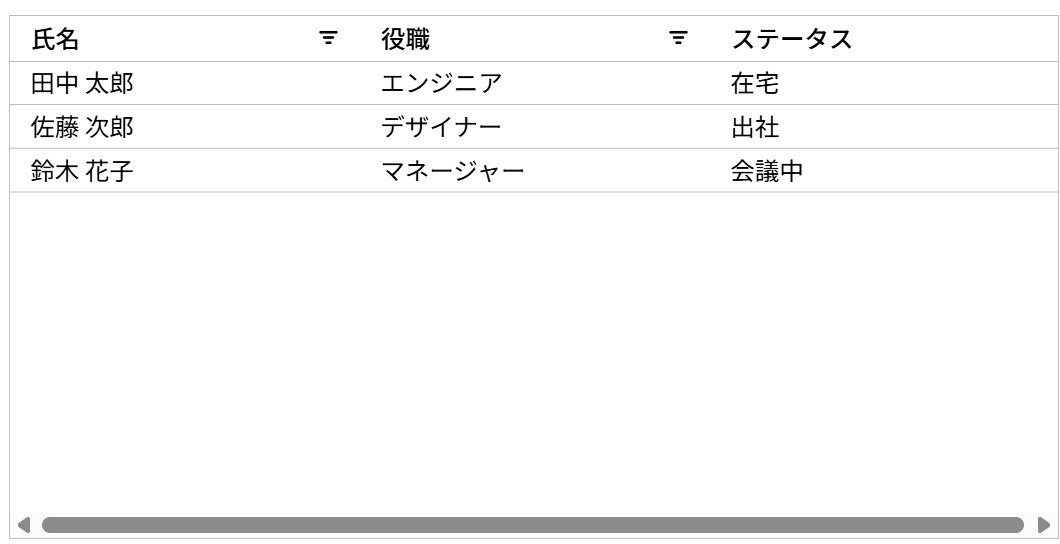
導入自体は比較的シンプルにできますね
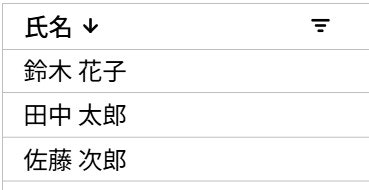
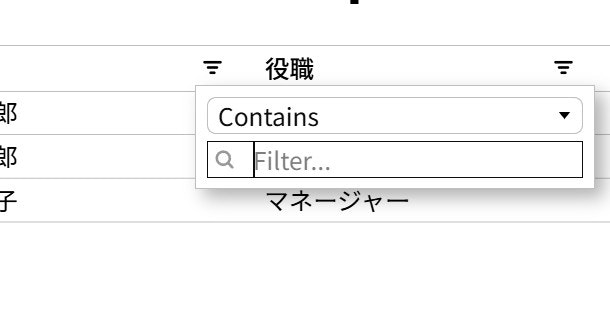
また columnDefs 内で "sortable: true, filter: true " とすることでソートとフィルターオプションが有効になります。
・項目の順序変更
・フィルター機能
以上 JavaScript で AGGrid をシンプルに導入してみました。
JavaScript版のAG Gridは外部ライブラリへの依存が少ないのでお試しにはよさそうですね。