
はじめに

Claude Code をYOLOモード(--dangerously-skip-permissions)でコンテナ内で暴れてもらいつつ、Claude Code Usage Monitorも使いたい……!
この記事では、VS Code の devcontainer 上で claude-monitor を自動導入する方法をご紹介します!
この記事でできること
-
devcontainer.jsonで再現可能な Claude Code 開発環境の構築 -
claude-monitorのインストール自動化
方法
↓1.~3.各ファイルを置いたリポジトリはこちら
1.devcontainer.json を準備する
まずは .devcontainer/devcontainer.json を以下のように編集します↓
折り畳みました
{
  "name": "Claude Code Sandbox",
  "build": {
    "dockerfile": "Dockerfile",
    "args": {
      "TZ": "${localEnv:TZ:Asia/Tokyo}"
    }
  },
  "runArgs": ["--cap-add=NET_ADMIN", "--cap-add=NET_RAW"],
  "customizations": {
    "vscode": {
      "extensions": [
        "dbaeumer.vscode-eslint",
        "esbenp.prettier-vscode",
        "eamodio.gitlens"
      ],
      "settings": {
        "editor.formatOnSave": true,
        "editor.defaultFormatter": "esbenp.prettier-vscode",
        "editor.codeActionsOnSave": {
          "source.fixAll.eslint": "explicit"
        },
        "terminal.integrated.defaultProfile.linux": "zsh",
        "terminal.integrated.profiles.linux": {
          "bash": {
            "path": "bash",
            "icon": "terminal-bash"
          },
          "zsh": {
            "path": "zsh"
          }
        }
      }
    }
  },
  "remoteUser": "node",
  "mounts": [
    "source=claude-code-bashhistory-${devcontainerId},target=/commandhistory,type=volume",
    "source=claude-code-config-${devcontainerId},target=/home/node/.claude,type=volume"
  ],
  "remoteEnv": {
    "NODE_OPTIONS": "--max-old-space-size=4096",
    "CLAUDE_CONFIG_DIR": "/home/node/.claude",
    "PATH": "${containerEnv:PATH}:/home/node/.local/bin"
  },
  "postCreateCommand": "bash -li /workspace/.devcontainer/install-usage-monitor.sh",
  "workspaceMount": "source=${localWorkspaceFolder},target=/workspace,type=bind,consistency=delegated",
  "workspaceFolder": "/workspace"
  // "postCreateCommand": "sudo /usr/local/bin/init-firewall.sh"
}
ベースは、claude codeの公式リポジトリのファイルを使っています!
2.install-usage-monitor.sh を用意
続いて .devcontainer/install-usage-monitor.sh を作成
#!/usr/bin/env bash
set -e
curl -LsSf https://astral.sh/uv/install.sh | sh
echo 'export PATH="$HOME/.local/bin:$PATH"' >> ~/.zshrc
uv tool update-shell || true
uv tool install claude-monitor
(devcontainer.jsonのpostCreateCommand によって、devcontainer 起動時にスクリプトが自動で実行されます!)
3.Dockerfileを用意
以下のClaude Code公式のをそのまま使いましょう〜
🚀 使ってみる!
コンテナを Rebuild Container(再構築) し、
claude-monitorコマンドを実行すると…
claude-monitor --plan pro --timezone Asia/Tokyo
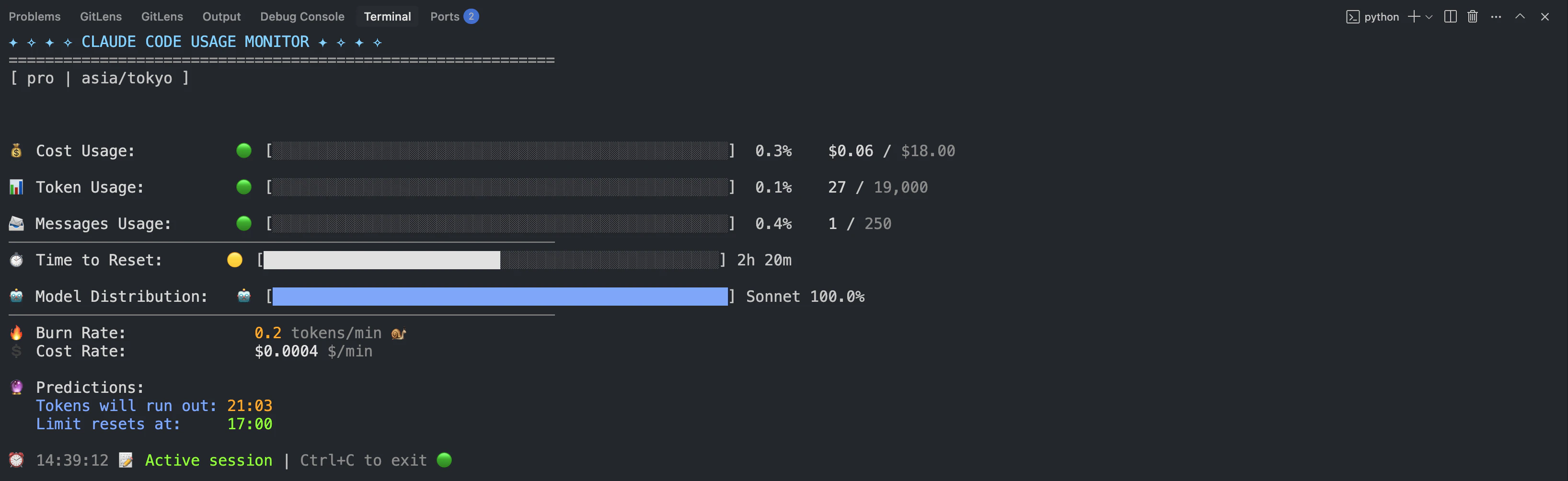
このように、すでに claude-monitor が使えるようになっています!
🙌 まとめ
コンテナ内で自由にYOLOで暴れてもらいつつ、トークン使用量も把握しましょう〜!