
はじめまして。
Qiitaって、凄腕技術者の人が投稿するところというイメージで読む専でした
でも、2025年はkintoneアドベントカレンダーにエントリーしたので初投稿。
 いつ変えたの?問題
kintoneを使っていると、アプリの設定やプラグインの設定をいつ変えたかわからなくなること、ありませんか?
そんな時、アプリの設定であれば [kintoneシステム管理]-[アプリ管理]-[設定の最終更新〇〇]や、そのアプリの管理画面の右上の「最終更新者と日時」を見ればわかります。

この一覧画面に「アプリ管理者用メモ」の表示もお願いしたい。
こちらの記事もとても興味深かったです。

プラグインの設定はプラグイン側で表示するようにしてくれていると嬉しいです。私が自分でプラグインを作る時には、このように更新日時と更新者を表示するようにしておくことが多いです。
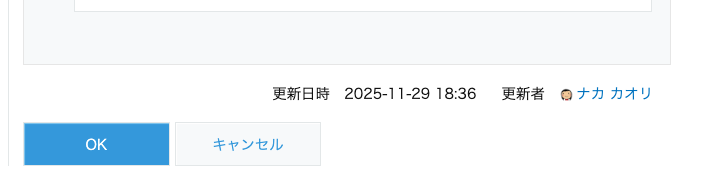
でも、アプリのカスタマイズのファイルは誰がいつアップロードしたのかわからない!
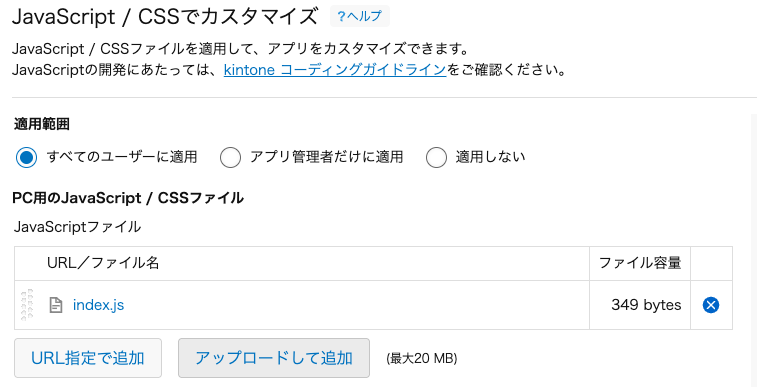
URL/ファイル名の右に、アップロード情報、とかってアップロードした日時とユーザーが表示されてくれたら嬉しいな、と思っていました。(以下はイメージ)

 誰がいつアップロードしたかわかるようにする方法
そこで、kintoneカスタマイズのCSSやJavaScriptファイルをkintoneへ適用できるCLIツール「kintone customize-uploader」を使って、カスタマイズのファイルを誰がいつアップロードしたかわかるようにする方法を考えてみました。
ポイントは以下です。
- カスタマイズのファイルを複製して、タイムスタンプとユーザー名を追加したファイルを作成
- customize-uploader用のマニフェストファイルも複製して、リネームしたファイルをアップロードするようにしたマニフェストファイルを作成
これで監視モードにしておいて開発すれば、ファイルを変更するたびに自動的にタイムスタンプとユーザー名を付与したカスタマイズファイルがアップロードされて、後から見てもいつ誰がアップロードしたファイルなのかがわかるようになるという仕組みです。
 概要
概要
project/
├── dest/
│   ├── customize-manifest_upload.json(実行したら生成される)
│   └── customize-manifest.json(customise-uploader用のファイル)
├── desktop/
│   └── index.js(カスタマイズのファイル)
├── upload/(実行したら生成される)
│   └── desktop/
│      └── index_YYYYMMDDhhmmss_name.js
├── .env
├── customize_upload.js
└── package.json
簡略化のために、kintoneに適用するファイルはdesktop/index.js一つとしていますが、customize-manifest.jsonに記載したファイルが対象になります。
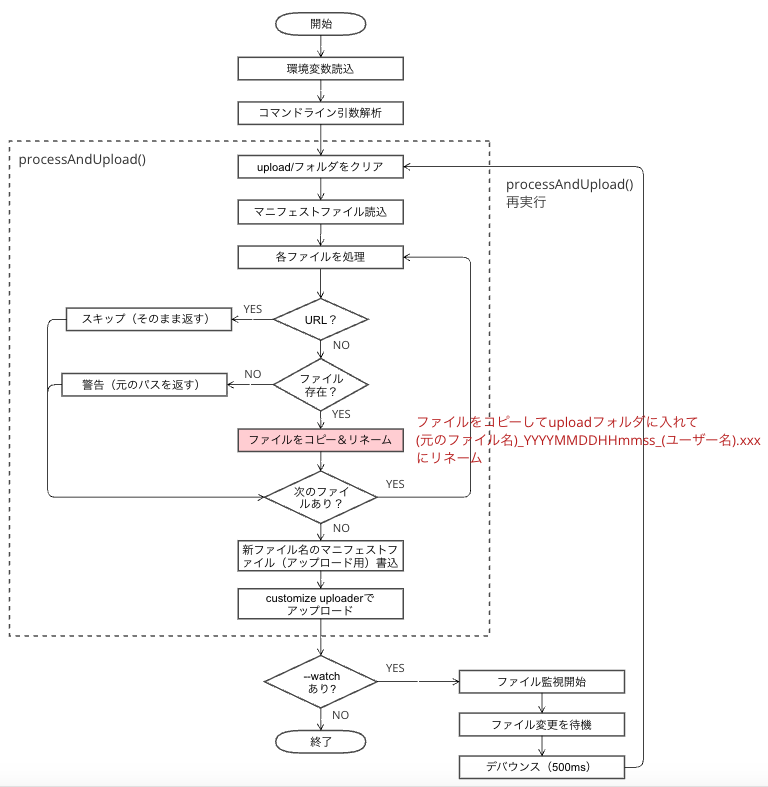
この機能のキーとなるファイル、customize_upload.js のフロー図です。
 コード
コード
package.json(抜粋)
@kintone/customize-uploaderは、グローバルにインストールしてあるとします。
  "scripts": {
    "upload": "node customize_upload.js",
    "upload:dev": "node customize_upload.js --watch"
  },
  "devDependencies": {
    "chokidar": "^3.6.0",
    "dotenv": "^17.2.3"
  }
.env
ユーザーごとの内容に置き換えてください。
KINTONE_BASE_URL=アップロードするkintone環境(https://xxx.cybozu.com)
KINTONE_USERNAME=上記kintoneのユーザー名
KINTONE_PASSWORD=上記kintoneのパスワード
CUSTOMIZE_MANIFEST_PATH=マニフェストファイルの場所(例:dest/customize-manifest.json)
CUSTOMIZE_USERNAME=ファイル名に入れるユーザー名
customize_upload.js
customize_upload.jsのコード
const fs = require('fs');
const path = require('path');
const { execSync } = require('child_process');
const chokidar = require('chokidar');

// .envファイルから環境変数を読み込む
require('dotenv').config({ path: '.env' });

const KINTONE_USERNAME = process.env.KINTONE_USERNAME;
const CUSTOMIZE_MANIFEST_PATH = process.env.CUSTOMIZE_MANIFEST_PATH || 'dest/customize-manifest.json';
const KINTONE_BASE_URL = process.env.KINTONE_BASE_URL;
const KINTONE_PASSWORD = process.env.KINTONE_PASSWORD;
const CUSTOMIZE_USERNAME = process.env.CUSTOMIZE_USERNAME;

// タイムスタンプを生成(yyyymmddhhmmss)
function getTimestamp() {
  const now = new Date();
  return now.getFullYear().toString() +
    String(now.getMonth() + 1).padStart(2, '0') +
    String(now.getDate()).padStart(2, '0') +
    String(now.getHours()).padStart(2, '0') +
    String(now.getMinutes()).padStart(2, '0') +
    String(now.getSeconds()).padStart(2, '0');
}

// manifest.jsonを読み込む
function loadManifest() {
  const manifestPath = path.resolve(CUSTOMIZE_MANIFEST_PATH);
  return JSON.parse(fs.readFileSync(manifestPath, 'utf8'));
}

// upload用のmanifestファイルパスを生成(末尾に_uploadを追加)
function getUploadManifestPath() {
  const manifestPath = path.resolve(CUSTOMIZE_MANIFEST_PATH);
  const dir = path.dirname(manifestPath);
  const ext = path.extname(manifestPath);
  const baseName = path.basename(manifestPath, ext);
  return path.join(dir, `${baseName}_upload${ext}`);
}

// 元のmanifestファイルからすべてのファイルパスを取得
function getOriginalFilePaths() {
  const originalFiles = [];
  const originalManifest = loadManifest();

  function extractPaths(files) {
    if (!files || !Array.isArray(files)) return;
    files.forEach(filePath => {
      if (filePath) {
        originalFiles.push(path.resolve(filePath));
      }
    });
  }

  if (originalManifest.desktop) {
    extractPaths(originalManifest.desktop.js);
    extractPaths(originalManifest.desktop.css);
  }

  if (originalManifest.mobile) {
    extractPaths(originalManifest.mobile.js);
    extractPaths(originalManifest.mobile.css);
  }

  return originalFiles;
}

// ファイルを処理してコピーし、manifestを更新
function processAndUpload() {
  const timestamp = getTimestamp();
  const manifestPath = path.resolve(CUSTOMIZE_MANIFEST_PATH);
  const manifest = loadManifest();

  // uploadディレクトリをクリア(サブディレクトリも含めて再帰的に削除)
  const uploadDir = path.resolve('upload');
  if (fs.existsSync(uploadDir)) {
    fs.rmSync(uploadDir, { recursive: true, force: true });
    console.log('✓ Cleared upload/ folder');
  }
  fs.mkdirSync(uploadDir, { recursive: true });

  // 元のmanifestファイルを読み込む
  const originalManifest = loadManifest();

  // ファイルを処理する関数
  function processFiles(files, type) {
    if (!files || !Array.isArray(files)) return files;

    // 元のmanifestから対応するファイルリストを取得
    let originalFiles = [];
    if (type === 'desktop-js' && originalManifest.desktop?.js) {
      originalFiles = originalManifest.desktop.js;
    } else if (type === 'desktop-css' && originalManifest.desktop?.css) {
      originalFiles = originalManifest.desktop.css;
    } else if (type === 'mobile-js' && originalManifest.mobile?.js) {
      originalFiles = originalManifest.mobile.js;
    } else if (type === 'mobile-css' && originalManifest.mobile?.css) {
      originalFiles = originalManifest.mobile.css;
    }

    return files.map((filePath, index) => {
      if (!filePath) return filePath;

      // URLの場合はそのまま返す(コピー不要)
      if (filePath.startsWith('http://') || filePath.startsWith('https://')) {
        console.log(`→ Skipped (URL): ${filePath}`);
        return filePath;
      }

      // 元のmanifestから同じインデックスのパスを取得
      const originalFilePath = originalFiles[index];

      if (!originalFilePath) {
        console.warn(`⚠ Could not determine original path for: ${filePath}`);
        return filePath;
      }

      const originalPath = path.resolve(originalFilePath);
      const fileName = path.basename(originalPath);
      const ext = path.extname(fileName);
      const nameWithoutExt = path.basename(fileName, ext);

      // 元のファイルの相対ディレクトリを取得
      const relativeDir = path.dirname(originalFilePath);
      const newFileName = `${nameWithoutExt}_${timestamp}_${CUSTOMIZE_USERNAME}${ext}`;

      // upload フォルダ内に同じディレクトリ構造を作成
      const targetDir = path.join(uploadDir, relativeDir);
      if (!fs.existsSync(targetDir)) {
        fs.mkdirSync(targetDir, { recursive: true });
      }

      const newPath = path.join(targetDir, newFileName);

      if (fs.existsSync(originalPath)) {
        fs.copyFileSync(originalPath, newPath);
        // パスの区切りを / に統一(Windows対応)
        const relativePath = path.join('upload', relativeDir, newFileName).replace(/\\/g, '/');
        console.log(`✓ Copied: ${originalFilePath} → ${relativePath}`);
        return relativePath;
      } else {
        console.warn(`⚠ File not found: ${originalFilePath}`);
        return filePath;
      }
    });
  }

  // 各セクションのファイルを処理
  if (manifest.desktop) {
    if (manifest.desktop.js) {
      manifest.desktop.js = processFiles(manifest.desktop.js, 'desktop-js');
    }
    if (manifest.desktop.css) {
      manifest.desktop.css = processFiles(manifest.desktop.css, 'desktop-css');
    }
  }

  if (manifest.mobile) {
    if (manifest.mobile.js) {
      manifest.mobile.js = processFiles(manifest.mobile.js, 'mobile-js');
    }
    if (manifest.mobile.css) {
      manifest.mobile.css = processFiles(manifest.mobile.css, 'mobile-css');
    }
  }

  const uploadManifestPath = getUploadManifestPath();

  if (!fs.existsSync(uploadManifestPath)) {
    fs.copyFileSync(manifestPath, uploadManifestPath);
    console.log(`✓ Created upload manifest: ${path.relative(process.cwd(), uploadManifestPath)}`);
  }

  fs.writeFileSync(uploadManifestPath, JSON.stringify(manifest, null, 4), 'utf8');
  console.log(`✓ Updated: ${path.relative(process.cwd(), uploadManifestPath)}`);
  console.log('\n📤 Uploading to kintone...\n');
  try {
    execSync(
      `kintone-customize-uploader --base-url "${KINTONE_BASE_URL}" --username "${KINTONE_USERNAME}" --password "${KINTONE_PASSWORD}" "${uploadManifestPath}"`,
      { stdio: 'inherit' }
    );
    console.log('✓ Upload completed\n');
  } catch (error) {
    console.error('❌ Error uploading:', error.message);
  }
}

// コマンドライン引数から監視モードを判定
const watchMode = process.argv.includes('--watch');

// 初回実行
if (watchMode) {
  console.log('🚀 Starting file watcher...\n');
} else {
  console.log('🚀 Uploading files...\n');
}
processAndUpload();

// 監視モードの場合のみファイル監視を開始
if (watchMode) {
  const originalFiles = getOriginalFilePaths();
  const watchPaths = [...originalFiles];
  const watcher = chokidar.watch(watchPaths, {
    ignored: /(^|[\/\\])\../, // dotfilesを無視
    persistent: true,
    ignoreInitial: true // 初回の読み込みイベントを無視
  });

  let debounceTimer;
  let isProcessing = false;

  watcher.on('all', (event, filePath) => {
    if (isProcessing) {
      return;
    }

    // デバウンス: 500ms以内の連続変更を1回にまとめる
    clearTimeout(debounceTimer);
    debounceTimer = setTimeout(() => {
      if (!isProcessing) {
        console.log(`\n🔄 File changed: ${path.relative(process.cwd(), filePath)}`);
        isProcessing = true;
        try {
          processAndUpload();

          // 新しいファイルが追加された場合に監視対象を更新
          const newOriginalFiles = getOriginalFilePaths();
          newOriginalFiles.forEach(file => {
            if (!watchPaths.includes(file)) {
              watcher.add(file);
              watchPaths.push(file);
              console.log(`   + Added to watch: ${path.relative(process.cwd(), file)}`);
            }
          });
        } finally {
          isProcessing = false;
        }
      }
    }, 500);
  });

  console.log('👀 Watching files:');
  watchPaths.forEach(file => {
    console.log(`   - ${path.relative(process.cwd(), file)}`);
  });
  console.log('\n💡 Files will be automatically uploaded on change.\n');

  // エラーハンドリング
  watcher.on('error', error => {
    console.error('❌ Watcher error:', error);
  });
} else {
  console.log('✓ Upload completed. (Run "npm run upload:dev" to enable watch mode)\n');
}
 いざ開発!
いざ開発!
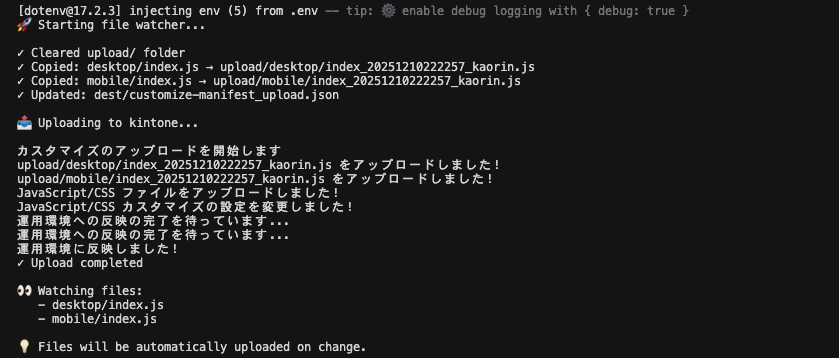
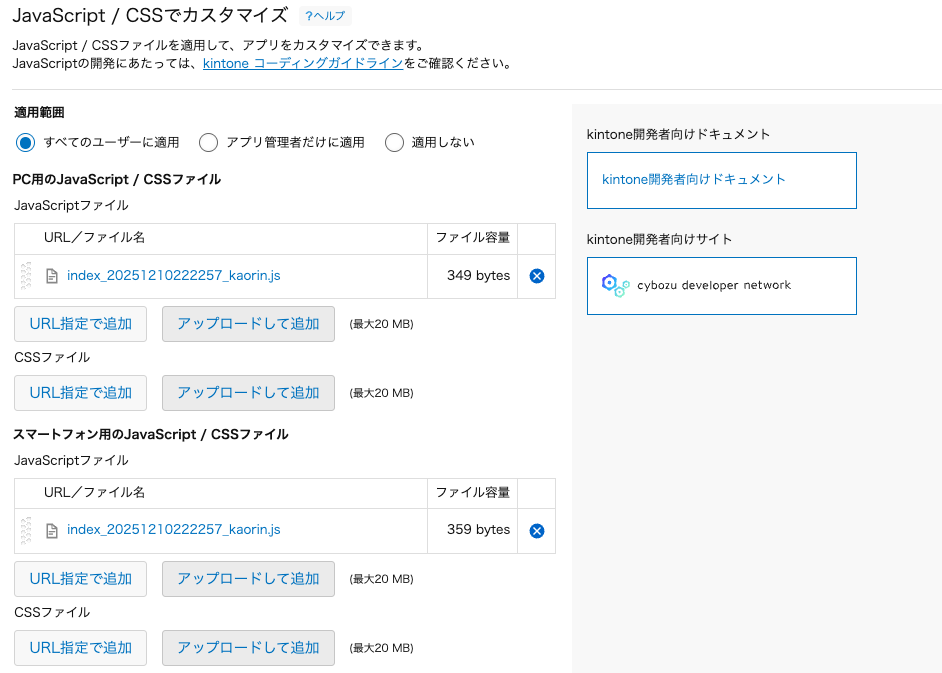
これでターミナルで、npm run upload を実行すればその時点のカスタマイズファイルをリネームしたものがkintoneにアップロードされるし、npm run upload:dev を実行しておけば、カスタマイズのファイルを変更して保存する度にタイムスタンプとユーザー名が付与されたファイルになって自動でアップロードされます。!
 おわりに
おわりに
こんな機能、実際に使うかどうかはわかりませんが、自分で「こんなことできるかな?こうすればできそう!」って閃いたのを実装して、できた時の嬉しさってイイです✨️
世の中の開発を楽しんでいる人って、この楽しさに魅了されているのでしょうね。
一人でも多くの人に開発の楽しさが伝わりますように。
Merry Christmas!
よいお年をお迎えください。