
YomiTokuは、日本語に特化したAI OCRソフトウェアです。Pythonで作られており、 pip コマンドでインストールできます。日本の帳票にあるような複雑なレイアウトや、縦書きの解析も可能です。
今回はYomiTokuを使って、帳票を解析してみます。また、下記のようなOCRソリューションも使って、その結果の違いを確認します。
- YomiToku
- Tesseract
- PaddleOCR
- Google Cloud Vision API
YomiTokuのセットアップ
YomiTokuは pip でインストールします。
pip install yomitoku
ONNX Runtimeの実行にGPUを利用する場合は、以下のコマンドになります。
pip install yomitoku[gpu]
注意点
pytorchはCUDAのバージョンに合わせて選択してください。デフォルトではCUDA12.4以上を想定してインストールされます。また、pytorch自身は2.5以上のバージョンが必要です。Dockerfileもあります。
今回の帳票
今回は請求管理ロボにて公開されているテンプレートをベースにさせてもらっています。住所などの情報は個人情報テストデータ生成ツールを使って生成したダミーデータです。
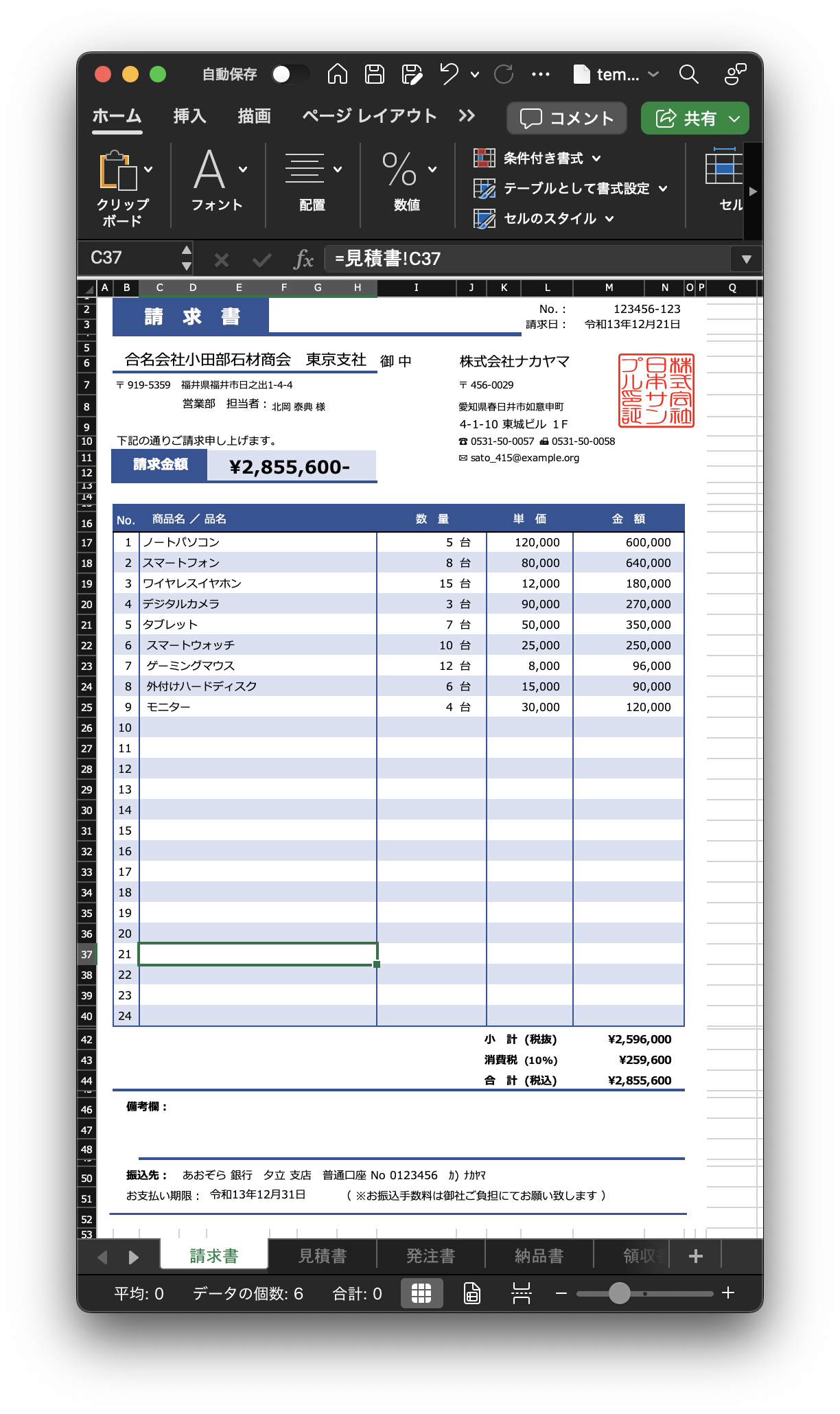
一般的な帳票にあるような構成かと思います。
- ヘッダー
- リスト
- フッター
この帳票をYomiTokuで解析します。
OCR処理を行う
ファイルを配置する
解析対象とするファイルは、ExcelファイルではなくPDFファイルになります。ExcelからPDFとしてエクスポートしたものを、 docs フォルダ以下に保存しています。
解析を実行する
以下のコマンドで解析を実行します。
# HTMLファイルを出力
yomitoku ./docs -f html
# JSONファイルを出力
yomitoku ./docs -f json
# Markdownファイルを出力
yomitoku ./docs -f md
# CSVファイルを出力
yomitoku ./docs -f csv
コマンドを実行すると、最初にモデルをダウンロードします。これは自動的に行われ、初回のみです。
model.safetensors: 100% 102M/102M [00:02<00:00, 42.4MB/s]
model.safetensors: 100% 200M/200M [00:04<00:00, 42.7MB/s]
model.safetensors: 100% 172M/172M [00:04<00:00, 37.0MB/s]
model.safetensors: 100% 172M/172M [00:04<00:00, 41.2MB/s]
そして解析を実行し、 results ディレクトリに結果が出力されます。出力先フォルダは変更可能で、なければ自動で作成されます。
yomitoku.cli.main - INFO - Total Processing time: 4.81 sec
結果の確認
YomiTokuでの解析結果です。まずレイアウトファイルの内容になります。ヘッダーやフッターの情報、そしてリストの部分が正しく認識されているのがわかります。
Markdown
Markdownでの出力結果です。
# 請 求 書

# 合名会社小田部石材商会 東京支社 御 中

〒 919\-5359 福井県福井市日之出1\-4\-4<br>営業部 担当者:北岡 泰典 様

下記の通りご請求申し上げます。

請求金額

¥2,855,600\-

|No\. :|123456\-123|
|-|-|
|請求日:|令和13年12月21日|

株式会社ナカヤマ<br>〒 456\-0029<br>愛知県春日井市如意申町<br>4\-1\-10 東城ビル 1F<br>☎ 0531\-50\-0057 0531\-50\-0058<br>sato\_415@example\.org

|No\.|商品名 / 品名|数 |単価|金 額|
|-|-|-|-|-|
|1|ノートパソコン|5 |120,000|600,000|
|2|スマートフォン|8台|80,000|640,000|
  :
|24|||||

備考欄:

|小 計\(税抜\)|¥2,596,000|
|-|-|
|消費税\(10%\)|¥259,600|
|合 計\(税込\)|¥2,855,600|

振込先: あおぞら 銀行 夕立 支店 普通口座 No 0123456 カ\) ナカヤマ

お支払い期限:令和13年12月31日<br>\(※お振込手数料は御社ご負担にてお願い致します\)
HTML
HTMLでの出力結果(一部)です。
    <table border="1" style="border-collapse: collapse">
      <tr>
        <td rowspan="1" colspan="1">No. :</td>
        <td rowspan="1" colspan="1">123456-123</td>
      </tr>
      <tr>
        <td rowspan="1" colspan="1">請求日:</td>
        <td rowspan="1" colspan="1">令和13年12月21日</td>
      </tr>
    </table>
    <p>株式会社ナカヤマ<br/>〒 456-0029<br/>愛知県春日井市如意申町<br/>4-1-10 東城ビル 1F<br/>☎ 0531-50-0057 0531-50-0058<br/>sato_415@example.org</p>
    <table border="1" style="border-collapse: collapse">
      <tr>
        <td rowspan="1" colspan="1">No.</td>
        <td rowspan="1" colspan="1">商品名 / 品名</td>
        <td rowspan="1" colspan="1">数 </td>
        <td rowspan="1" colspan="1">単価</td>
        <td rowspan="1" colspan="1">金 額</td>
      </tr>
JSON
JSONでの出力結果です(一部)。 tables キー以下がリスト部分になります。
{
    "figures": [
        {
            "box": [1310, 274, 1473, 430],
            "direction": "horizontal",
            "order": 7,
            "paragraphs": [
                {
                    "box": [1313, 280, 1470, 426],
                    "contents": "コロ尚\n山手式\n隠せ風\n証二軸",
                    "direction": "horizontal",
                    "order": 0,
                    "role": null
                }
            ]
        }
    ],
    "paragraphs": [
        {
            "box": [249, 168, 476, 216],
            "contents": "請 求 書",
            "direction": "horizontal",
            "order": 0,
            "role": "section_headings"
        },
        :
    ],
    "tables": [
        {
            "box": [186, 601, 1453, 1743],
            "cells": [
                {
                    "box": [189, 660, 245, 705],
                    "col": 1,
                    "col_span": 1,
                    "contents": "1",
                    "row": 2,
                    "row_span": 1
                },
                {
                    "box": [246, 660, 773, 705],
                    "col": 2,
                    "col_span": 1,
                    "contents": "ノートパソコン",
                    "row": 2,
                    "row_span": 1
                },
                {
                    "box": [773, 660, 1014, 705],
                    "col": 3,
                    "col_span": 1,
                    "contents": "5 ",
                    "row": 2,
                    "row_span": 1
                },
                {
                    "box": [1015, 660, 1205, 705],
                    "col": 4,
                    "col_span": 1,
                    "contents": "120,000",
                    "row": 2,
                    "row_span": 1
                },
                {
                    "box": [1205, 660, 1450, 705],
                    "col": 5,
                    "col_span": 1,
                    "contents": "600,000",
                    "row": 2,
                    "row_span": 1
                },
CSV
CSVでの出力結果です。
請 求 書
""
合名会社小田部石材商会 東京支社 御 中
""
"〒 919-5359 福井県福井市日之出1-4-4
営業部 担当者:北岡 泰典 様"
""
下記の通りご請求申し上げます。
""
請求金額
""
"¥2,855,600-"
""
No. :,123456-123
請求日:,令和13年12月21日
""
"株式会社ナカヤマ
〒 456-0029
愛知県春日井市如意申町
4-1-10 東城ビル 1F
☎ 0531-50-0057 0531-50-0058
sato_415@example.org"
""
No.,商品名 / 品名,数 ,単価,金 額
1,ノートパソコン,5 ,"120,000","600,000"
2,スマートフォン,8台,"80,000","640,000"
他のOCRソリューションで試す
同じファイルを他のOCRソリューションで解析してみます。
Tesseract
Tesseractで解析を行うと、hocrファイルが出力されます。これはHTMLに似たフォーマットで、テキストが出力されます。タグが多数入るので、実際に利用する際にはテキストのみの抽出が必要です。
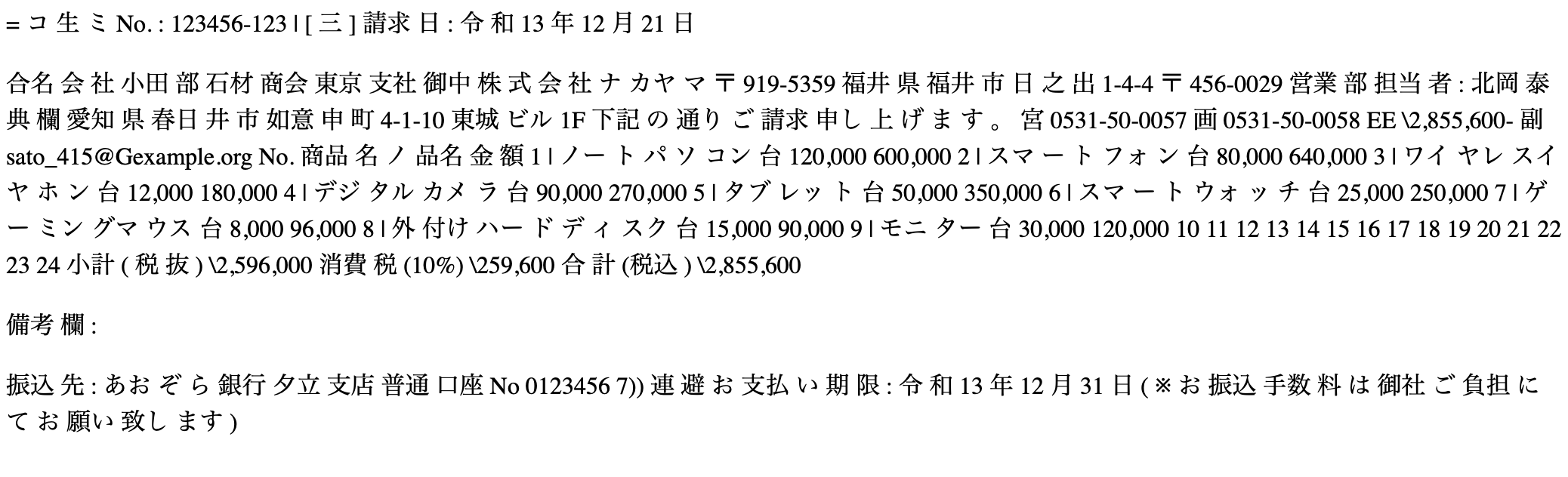
最初の「請求書」が読み取れなかったようです。
 <body>
  <div class='ocr_page' id='page_1' title='image "template_02.png"; bbox 0 0 2893 4092; ppageno 0'>
   <div class='ocr_carea' id='block_1_1' title="bbox 452 278 2528 389">
    <p class='ocr_par' id='par_1_1' lang='jpn' title="bbox 444 278 2528 388">
     <span class='ocr_line' id='line_1_1' title="bbox 452 278 2528 350; baseline -0.003 -18.023; x_size 63.75; x_descenders 13.5; x_ascenders 16.75">
      <span class='ocrx_word' id='word_1_1' title='bbox 452 302 500 343; x_wconf 36'>=</span>
      <span class='ocrx_word' id='word_1_2' title='bbox 482 278 518 350; x_wconf 28'>コ</span>
      <span class='ocrx_word' id='word_1_3' title='bbox 751 278 787 350; x_wconf 0'>生</span>
      <span class='ocrx_word' id='word_1_4' title='bbox 787 302 823 344; x_wconf 6'>ミ</span>
      <span class='ocrx_word' id='word_1_5' title='bbox 1989 297 2052 330; x_wconf 29'>No.</span>
      <span class='ocrx_word' id='word_1_6' title='bbox 2051 275 2075 347; x_wconf 29'>:</span>
      <span class='ocrx_word' id='word_1_7' title='bbox 2280 293 2528 327; x_wconf 92'>123456-123</span>
     </span>
     <span class='ocr_line' id='line_1_2' title="bbox 489 333 2524 389; baseline 0.007 -16.69; x_size 48.208954; x_descenders 10.208955; x_ascenders 12.666667">
      <span class='ocrx_word' id='word_1_8' title='bbox 489 334 514 372; x_wconf 44'>|</span>
      <span class='ocrx_word' id='word_1_9' title='bbox 762 346 800 372; x_wconf 31'>[</span>
      <span class='ocrx_word' id='word_1_10' title='bbox 786 333 814 389; x_wconf 4'>三</span>
      <span class='ocrx_word' id='word_1_11' title='bbox 804 333 824 389; x_wconf 83'>]</span>
      <span class='ocrx_word' id='word_1_12' title='bbox 1930 350 2051 388; x_wconf 96'>請求</span>
      <span class='ocrx_word' id='word_1_13' title='bbox 2075 361 2081 385; x_wconf 93'>日</span>
      <span class='ocrx_word' id='word_1_14' title='bbox 2078 345 2116 402; x_wconf 75'>:</span>
表部分は <table /> タグにはなっていないので、情報を抽出する際には解析が必要になります。
<span class='ocr_line' id='line_1_13' title="bbox 354 1089 2394 1131; baseline 0 -2; x_size 49.166664; x_descenders 11.190476; x_ascenders 9.5">
  <span class='ocrx_word' id='word_1_96' title='bbox 354 1097 418 1130; x_wconf 91'>No.</span>
  <span class='ocrx_word' id='word_1_97' title='bbox 497 1089 627 1131; x_wconf 91'>商品</span>
  <span class='ocrx_word' id='word_1_98' title='bbox 599 1085 640 1146; x_wconf 91'>名</span>
  <span class='ocrx_word' id='word_1_99' title='bbox 650 1091 692 1130; x_wconf 73'>ノ</span>
  <span class='ocrx_word' id='word_1_100' title='bbox 712 1089 795 1131; x_wconf 96'>品名</span>
  <span class='ocrx_word' id='word_1_101' title='bbox 2285 1090 2303 1130; x_wconf 89'>金</span>
  <span class='ocrx_word' id='word_1_102' title='bbox 2349 1090 2394 1131; x_wconf 89'>額</span>
  </span>
  <span class='ocr_line' id='line_1_14' title="bbox 387 1176 2473 1221; baseline -0.001 -5; x_size 44.018806; x_descenders 10.018808; x_ascenders 8.5053301">
  <span class='ocrx_word' id='word_1_103' title='bbox 387 1184 405 1216; x_wconf 94'>1</span>
  <span class='ocrx_word' id='word_1_104' title='bbox 445 1180 477 1215; x_wconf 94'>|</span>
  <span class='ocrx_word' id='word_1_105' title='bbox 454 1172 554 1229; x_wconf 92'>ノー</span>
  <span class='ocrx_word' id='word_1_106' title='bbox 569 1180 585 1214; x_wconf 92'>ト</span>
  <span class='ocrx_word' id='word_1_107' title='bbox 595 1176 610 1214; x_wconf 92'>パ</span>
  <span class='ocrx_word' id='word_1_108' title='bbox 616 1180 651 1215; x_wconf 93'>ソ</span>
  <span class='ocrx_word' id='word_1_109' title='bbox 657 1181 738 1214; x_wconf 96'>コン</span>
  <span class='ocrx_word' id='word_1_110' title='bbox 1673 1180 1714 1218; x_wconf 92'>台</span>
  <span class='ocrx_word' id='word_1_111' title='bbox 1878 1180 2042 1221; x_wconf 89'>120,000</span>
  <span class='ocrx_word' id='word_1_112' title='bbox 2306 1180 2473 1221; x_wconf 87'>600,000</span>
</span>
<span class='ocr_line' id='line_1_15' title="bbox 385 1255 2473 1308; baseline -0 -14; x_size 44.018806; x_descenders 10.018808; x_ascenders 8.5053301">
  <span class='ocrx_word' id='word_1_113' title='bbox 385 1261 406 1294; x_wconf 94'>2</span>
  <span class='ocrx_word' id='word_1_114' title='bbox 442 1260 475 1294; x_wconf 94'>|</span>
  <span class='ocrx_word' id='word_1_115' title='bbox 451 1253 554 1309; x_wconf 93'>スマ</span>
  <span class='ocrx_word' id='word_1_116' title='bbox 521 1253 587 1309; x_wconf 92'>ー</span>
  <span class='ocrx_word' id='word_1_117' title='bbox 582 1257 610 1294; x_wconf 92'>ト</span>
  <span class='ocrx_word' id='word_1_118' title='bbox 617 1260 690 1294; x_wconf 93'>フォ</span>
  <span class='ocrx_word' id='word_1_119' title='bbox 701 1260 731 1294; x_wconf 92'>ン</span>
  <span class='ocrx_word' id='word_1_120' title='bbox 1673 1258 1714 1296; x_wconf 92'>台</span>
  <span class='ocrx_word' id='word_1_121' title='bbox 1901 1255 2043 1308; x_wconf 89'>80,000</span>
  <span class='ocrx_word' id='word_1_122' title='bbox 2306 1259 2473 1300; x_wconf 90'>640,000</span>
</span>
PaddleOCR
PaddleOCRは、Baiduの開発する日本語対応OCRエンジンです。結果ファイルを出力できます。この内容を見ると、 御中 など分かれて認識されている部分が確認できます。
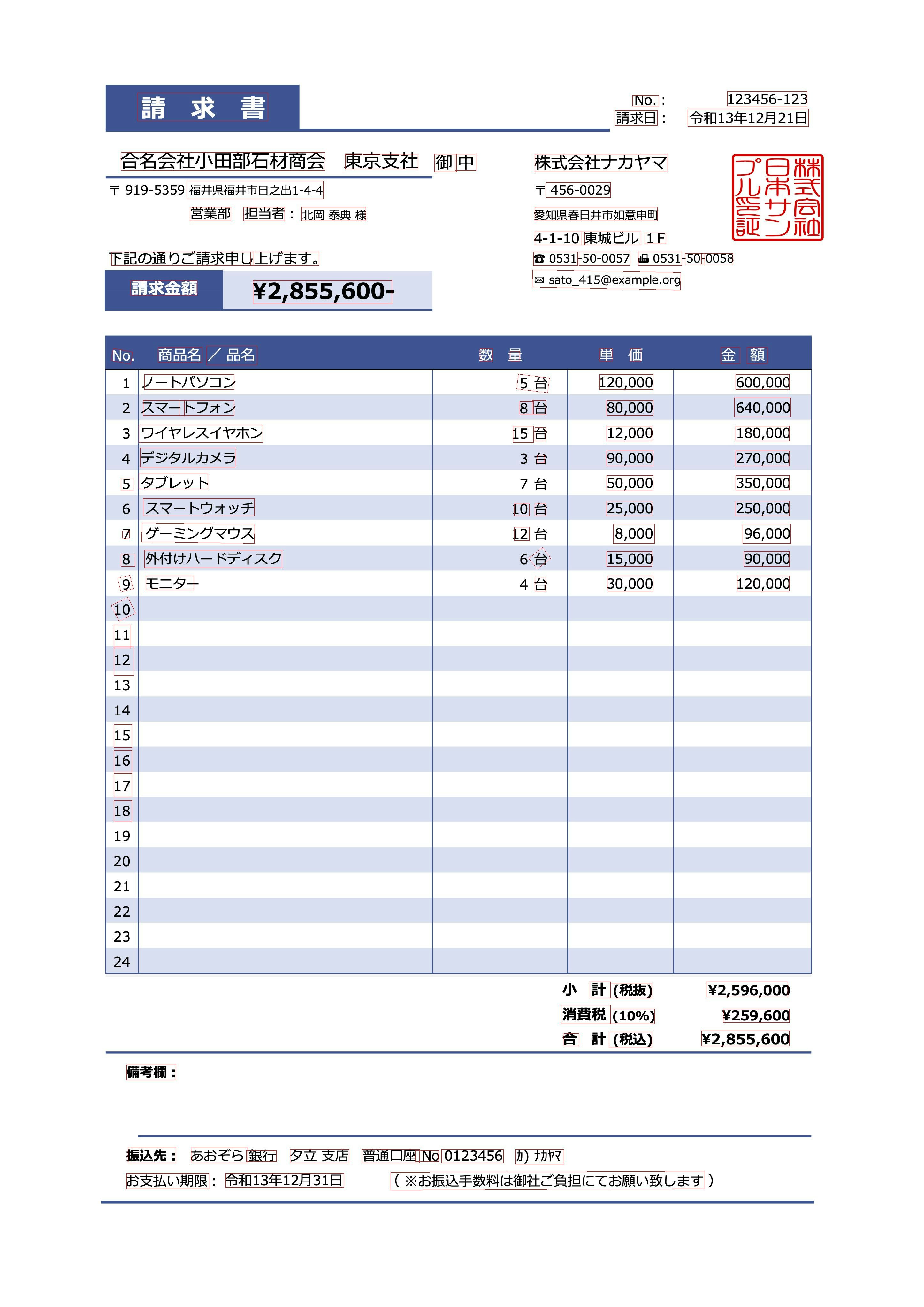
結果は、認識されたテキストとその確立、認識された座標を取得できます。以下は、それをJSONにした結果です。テキストは問題なく解析されています。
[
  {
    "coordinates": [[431, 290], [839, 290], [839, 379], [431, 379]],
    "text": "請求書",
    "confidence": 0.9986839294433594
  },
  {
    "coordinates": [[2277, 286], [2527, 286], [2527, 332], [2277, 332]],
    "text": "123456-123",
    "confidence": 0.9999499320983887
  },
  {
    "coordinates": [[1980, 298], [2062, 298], [2062, 332], [1980, 332]],
    "text": "No.",
    "confidence": 0.9999938607215881
  },
  {
    "coordinates": [[1924, 345], [2058, 345], [2058, 392], [1924, 392]],
    "text": "請求日",
    "confidence": 0.9983651638031006
  },
一部、一文が二つに分かれてしまった部分があります。
  {
    "coordinates": [[349, 789], [792, 789], [792, 831], [349, 831]],
    "text": "下記の通りご請求申し",
    "confidence": 0.9995622634887695
  },
  {
    "coordinates": [[784, 789], [999, 789], [999, 831], [784, 831]],
    "text": "上げます。",
    "confidence": 0.9994457364082336
  },
  {
    "coordinates": [[1670, 789], [1808, 789], [1808, 831], [1670, 831]],
    "text": "80531",
    "confidence": 0.8503488302230835
  },
  {
    "coordinates": [[1812, 789], [1972, 789], [1972, 831], [1812, 831]],
    "text": "-50-0057",
    "confidence": 0.9998257160186768
  },
  {
    "coordinates": [[1998, 789], [2135, 789], [2135, 831], [1998, 831]],
    "text": "塩0531",
    "confidence": 0.8567706942558289
  },
  {
    "coordinates": [[2144, 793], [2204, 793], [2204, 827], [2144, 827]],
    "text": "50-",
    "confidence": 0.9983447194099426
  },
一覧部分でも、セル内のテキストが分かれて認識されてしまった場合があります。
{
  "coordinates": [[448, 1253], [577, 1253], [577, 1300], [448, 1300]],
  "text": "スマー",
  "confidence": 0.9994642734527588
},
{
  "coordinates": [[560, 1253], [732, 1253], [732, 1300], [560, 1300]],
  "text": "トフォン",
  "confidence": 0.9854453802108765
}
Google Cloud Vision API
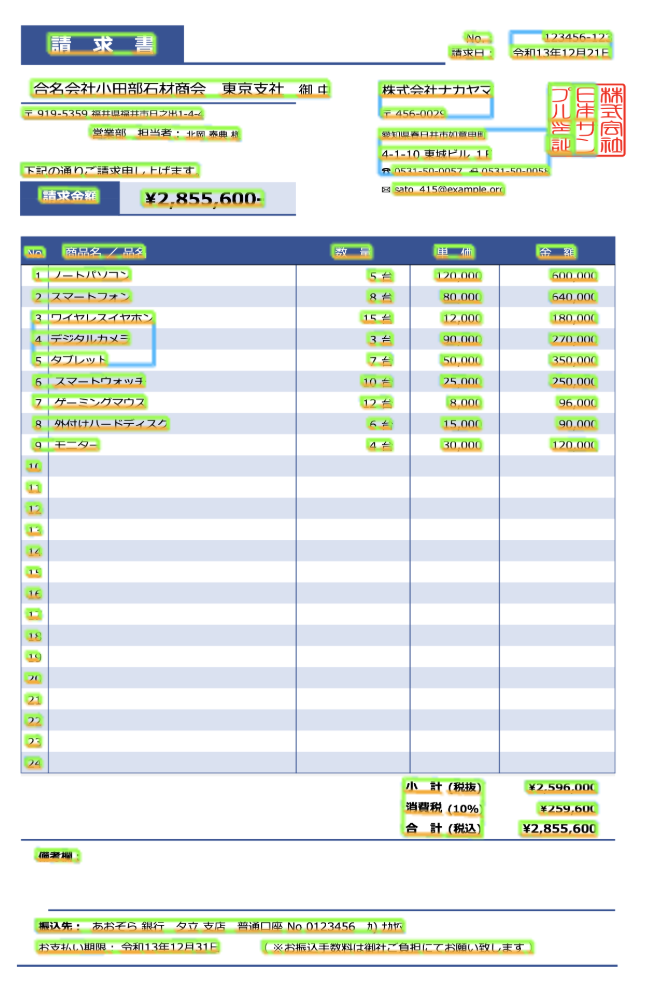
Google Cloud Vision APIは、Googleが提供するOCR APIです。「請求書」がそれぞれ別な文字として認識されているので、情報抽出時には何らかの結合する必要がありそうです。以下は出力結果の一部です。
{
  "fullTextAnnotation": {
    "pages": [
      {
        "blocks": [
          {
            "blockType": "TEXT",
            "boundingBox": { "vertices": [{"x": 439, "y": 303}, {"x": 831, "y": 303}, {"x": 831, "y": 372}, {"x": 439, "y": 372}] },
            "confidence": 0.9854585,
            "paragraphs": [
              {
                "boundingBox": { "vertices": [{"x": 439, "y": 303}, {"x": 831, "y": 303}, {"x": 831, "y": 372}, {"x": 439, "y": 372}] },
                "confidence": 0.9854585,
                "words": [
                  {
                    "boundingBox": { "vertices": [{"x": 439, "y": 303}, {"x": 674, "y": 303}, {"x": 674, "y": 372}, {"x": 439, "y": 372}] },
                    "confidence": 0.99250364,
                    "symbols": [
                      {
                        "boundingBox": { "vertices": [{"x": 439, "y": 303}, {"x": 521, "y": 303}, {"x": 521, "y": 372}, {"x": 439, "y": 372}] },
                        "confidence": 0.9915527,
                        "text": "請"
                      },
                      {
                        "boundingBox": { "vertices": [{"x": 594, "y": 303}, {"x": 674, "y": 303}, {"x": 674, "y": 372}, {"x": 594, "y": 372}] },
                        "confidence": 0.99345464,
                        "text": "求"
                      }
                    ]
                  },
                  {
                    "boundingBox": { "vertices": [{"x": 747, "y": 303}, {"x": 831, "y": 303}, {"x": 831, "y": 372}, {"x": 747, "y": 372}] },
                    "confidence": 0.97136813,
                    "symbols": [
                      {
                        "boundingBox": { "vertices": [{"x": 747, "y": 303}, {"x": 831, "y": 303}, {"x": 831, "y": 372}, {"x": 747, "y": 372}] },
                        "confidence": 0.97136813,
                        "property": { "detectedBreak": { "type": "LINE_BREAK" } },
                        "text": "書"
                      }
                    ]
                  }
                ]
              }
            ]
          },
          {
            "blockType": "TEXT",
            "boundingBox": { "vertices": [{"x": 374, "y": 475}, {"x": 1480, "y": 475}, {"x": 1480, "y": 532}, {"x": 374, "y": 532}] },
            "confidence": 0.98113906,
            "paragraphs": [
              {
                "boundingBox": { "vertices": [{"x": 374, "y": 475}, {"x": 1480, "y": 475}, {"x": 1480, "y": 532}, {"x": 374, "y": 532}] },
                "confidence": 0.98113906,
                "words": [
                  {
                    "boundingBox": { "vertices": [{"x": 374, "y": 475}, {"x": 486, "y": 475}, {"x": 486, "y": 529}, {"x": 374, "y": 529}] },
                    "confidence": 0.98838997,
                    "property": { "detectedLanguages": [{ "confidence": 1, "languageCode": "ja" }] },
                    "symbols": [
                      {
                        "boundingBox": { "vertices": [{"x": 374, "y": 475}, {"x": 431, "y": 475}, {"x": 431, "y": 529}, {"x": 374, "y": 529}] },
                        "confidence": 0.98224795,
                        "text": "合"
                      },
                      {
                        "boundingBox": { "vertices": [{"x": 435, "y": 475}, {"x": 486, "y": 475}, {"x": 486, "y": 529}, {"x": 435, "y": 529}] },
                        "confidence": 0.994532,
                        "text": "名"
                      }
                    ]
                  },
                  {
                    "boundingBox": { "vertices": [{"x": 493, "y": 475}, {"x": 606, "y": 475}, {"x": 606, "y": 529}, {"x": 493, "y": 529}] },
                    "confidence": 0.99610496,
                    "property": { "detectedLanguages": [{ "confidence": 1, "languageCode": "ja" }] },
                    "symbols": [
                      {
                        "boundingBox": { "vertices": [{"x": 493, "y": 475}, {"x": 547, "y": 475}, {"x": 547, "y": 529}, {"x": 493, "y": 529}] },
                        "confidence": 0.99506485,
                        "text": "会"
                      },
                      {
                        "boundingBox": { "vertices": [{"x": 551, "y": 475}, {"x": 606, "y": 475}, {"x": 606, "y": 529}, {"x": 551, "y": 529}] },
                        "confidence": 0.997145,
                        "text": "社"
                      }
                    ]
                  }
リスト部分でも、セル中の文字が分かれてしまっている部分があります。
{
  "boundingPoly": {
    "vertices": [
      { "x": 440, "y": 1176},
      { "x": 571, "y": 1175},
      { "x": 571, "y": 1214},
      { "x": 440, "y": 1215}
    ]
  },
  "description": "ノート"
},
{
  "boundingPoly": {
    "vertices": [
      { "x": 565, "y": 1175},
      { "x": 740, "y": 1174},
      { "x": 740, "y": 1214},
      { "x": 565, "y": 1215}
    ]
  },
  "description": "パソコン"
},
商品名と、数量と単価部分が分かれて出力されました。この場合、商品名と金額との付け合わせの実装が必要になるでしょう。
{
  "boundingPoly": { "vertices": [{ "x": 1627, "y": 1182}, { "x": 1651, "y": 1182}, { "x": 1651, "y": 1217}, { "x": 1627, "y": 1217}] },
  "description": "5"
},
{
  "boundingPoly": { "vertices": [{ "x": 1670, "y": 1182}, { "x": 1715, "y": 1182}, { "x": 1715, "y": 1217}, { "x": 1670, "y": 1217}] },
  "description": "台"
},
{
  "boundingPoly": { "vertices": [{ "x": 1876, "y": 1182}, { "x": 2043, "y": 1182}, { "x": 2043, "y": 1216}, { "x": 1876, "y": 1216}] },
  "description": "120,000"
},
{
  "boundingPoly": { "vertices": [{ "x": 2306, "y": 1182}, { "x": 2474, "y": 1182}, { "x": 2474, "y": 1216}, { "x": 2306, "y": 1216}] },
  "description": "600,000"
},
{
  "boundingPoly": { "vertices": [{ "x": 1627, "y": 1257}, { "x": 1649, "y": 1257}, { "x": 1649, "y": 1295}, { "x": 1627, "y": 1295}] },
  "description": "8"
},
{
  "boundingPoly": { "vertices": [{ "x": 1671, "y": 1257}, { "x": 1715, "y": 1257}, { "x": 1715, "y": 1295}, { "x": 1671, "y": 1295}] },
  "description": "台"
}
YomiTokuの特徴
YomiTokuの特徴は、以下の通りです。
AIを活用
YomiTokuでは、以下の4種類のAIモデルを搭載しています。
- 文字位置の検知
- 文字列認識
- レイアウト解析
- 表の構造認識
いずれも日本語データセットで学習しています。
日本語、英語に対応
日本語の文書画像に特化して学習しており、日本の商習慣で使われる複雑な表であったり、縦書き文書にも対応しています。7,000文字を超える大規模な日本語文書でも利用できます。
レイアウト解析・表の構造認識
段組や、帳票や書面の中で使われている表の構造認識ができ、レイアウトの意味的構造を正しく認識、情報を抜き出します。
多様な出力フォーマット
出力は以下の4フォーマットに対応しています。
- Markdown
- JSON
- HTML
- CSV
システム連携も容易なJSON、見やすいMarkdown、表計算ソフトでの利用に便利なCSVなど、用途に合わせて使い分けることができます。
セキュリティ
クラウドサービスではないので、自社サーバー内に閉じた環境下で解析できます。請求データなど、機密情報を取り扱う上でも安心です。
GPU利用
GPU環境下で高速に動作します。VRAMは8GB以内で動作しますので、ハイエンドなGPUでなくても利用できます。
注意点
CPUでの利用について
YomiTokuはGPUでの利用を推奨していますが、CPU環境下でも実行は可能です。ただし、解析には数分かかるので注意してください。
手書き文字について
2025年2月現在のYomiTokuでは、活字のみサポートしています。手書き文字については、公式にはサポートしておりません。また、看板など紙以外にプリントされた情景OCRについては、最適化されていません。
画像サイズについて
低解像度画像では識別精度が低下します。画像の短辺を720px以上の画像で解析することを推奨します。
ライセンス
YomiTokuのライセンスはコモンズ証 - 表示 - 非営利 - 継承 4.0 国際 - Creative Commonsです。非商用での個人利用、研究目的においては、ご自由に利用できます。商用目的での利用に関しては、商用ライセンスが必要です。
まとめ
今回は主なOCRエンジンと、YomiTokuの解析結果の違いについて解説しました。YomiTokuは日本語OCRに特化しており、テキストの認識精度はもちろん、縦書きや日本の商習慣にあった帳票の解析にも向いています。各種出力フォーマットを用意していますので、システム連携や業務効率化に役立つはずです。