
AWSでサーバレスアプリケーションに触れたことがないので、AWS初心者向けハンズオンで紹介されているものをやってみる。
https://aws.amazon.com/jp/events/aws-event-resource/hands-on/
サーバーレスアーキテクチャで翻訳 Web API を構築する
構成図

流れ
- Lambda 関数の作成
- API Gateway の設定
- DynamoDB との連携
という流れで実施した。
1. Lambda 関数の作成
Amazon Translate と組み合わせて翻訳してみる。
import json
import boto3

c = boto3.client('translate')

def lambda_handler(event, context):

    input_text = 'おはよう'

    response = c.translate_text(
    Text=input_text,
    SourceLanguageCode='ja',
    TargetLanguageCode='en',
    )

    output_text = response.get('TranslatedText')

    return {
        'statusCode': 200,
        'body': json.dumps({
            'output_text': output_text
        })
    }
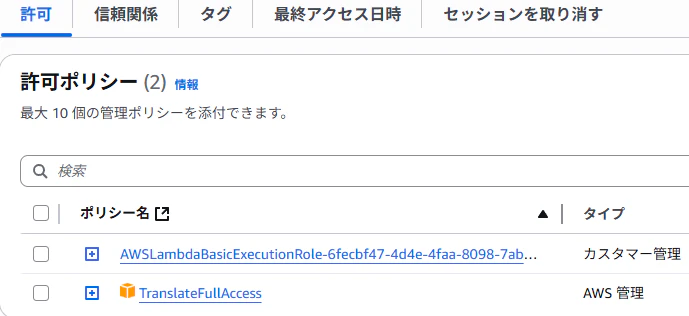
IAMロールに、TranslateFullAccess を付与する。
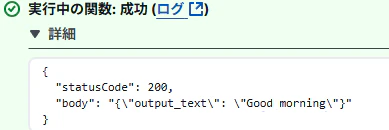
テスト成功
2. API Gateway の設定
Lambda プロキシ統合で GET メソッドを作成する。
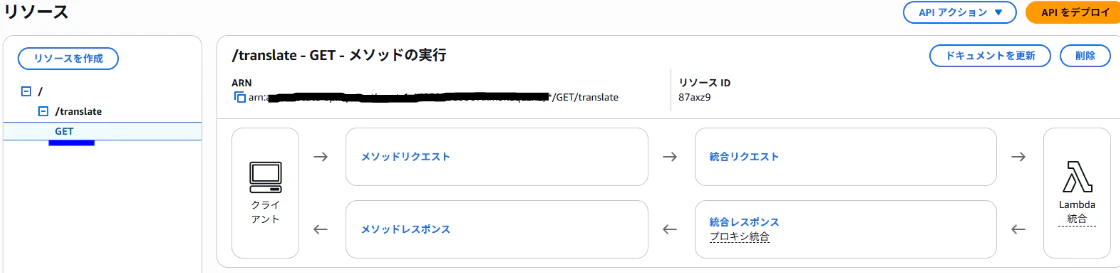
メソッドリスエストの URL クエリ文字列パラメータ に input_text を追加する。

Lambdaのコードを修正する。
import json
import boto3

c = boto3.client('translate')

def lambda_handler(event, context):

    input_text = event['queryStringParameters']['input_text']

    response = c.translate_text(
    Text=input_text,
    SourceLanguageCode='ja',
    TargetLanguageCode='en',
    )

    output_text = response.get('TranslatedText')

    return {
        'statusCode': 200,
        'body': json.dumps({
            'output_text': output_text
        }),
        'isBase64Encoded': False,
        'headers': {}
    }
API をデプロイして呼び出して、翻訳されていることを確認した。

3. DynamoDB との連携
DynamoDB を作成する。

Lambda のコードにストアする DynamoDB を記述する。
import json
import boto3
import datetime

c = boto3.client('translate')

# ストアするDynamoDB
dynamodb_translate_history_table = boto3.resource('dynamodb').Table('translate-history')

def lambda_handler(event, context):

    input_text = event['queryStringParameters']['input_text']

    response = c.translate_text(
    Text=input_text,
    SourceLanguageCode='ja',
    TargetLanguageCode='en',
    )

    output_text = response.get('TranslatedText')

    # DynamoDBにストアする
    dynamodb_translate_history_table.put_item(
        Item = {
            'timestamp': datetime.datetime.now().strftime('%Y%m%d%H%M%S'),
            'input_text': input_text,
            'output_text': output_text
        }
    )

    return {
        'statusCode': 200,
        'body': json.dumps({
            'output_text': output_text
        }),
        'isBase64Encoded': False,
        'headers': {}
    }
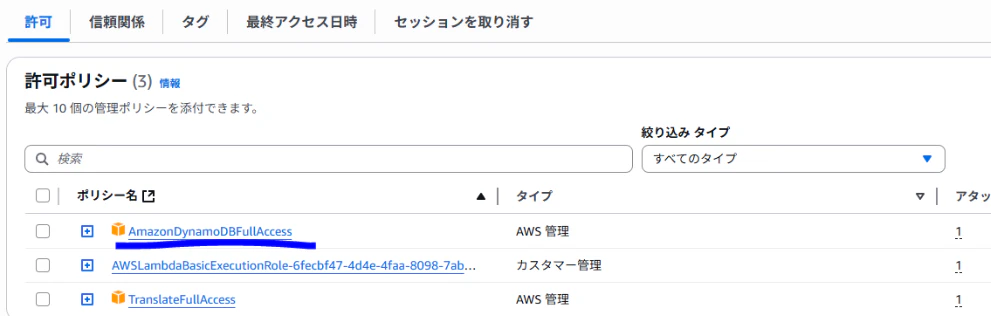
Lambda のIAMロールに、AmazonDynamoDBFullAccess を付与する。
API を呼び出して、翻訳されてることが確認できた。

最後に、DynamoDB に翻訳結果が格納されていることを確認した。

まとめ
Amazon API Gateway、AWS Lambda、Amazon Translate、Amazon DynamoDB を使って、サーバレス翻訳APIを構築することができました。
翻訳したい文字列をURLに直接記述する方法や、IAMロールに適切な権限(例:FullAccess)を付与する必要があるなど、気をつけるポイントも多くありましたが、API構築の全体的な流れを掴む良い経験となりました。
個人的に難しいと感じたのは、AWS公式のAPIリファレンスを参照しながらコードを修正することでした。
ハンズオン自体は非常に分かりやすく丁寧に構成されていましたが、自分で別のAPIを一から作ろうとした際に、必要な情報にたどり着けるかどうか不安を感じました。
特に、どのサービスとどのパラメータをどう使えば良いか、リファレンスだけでは分かりにくい場面も多く、今後はドキュメントの読み方や調べ方も学んでいく必要があると感じました。
Qiitaへの記事投稿はこれが初めてということもあり、内容はややざっくりとしたものになってしまいましたが、今後は記事の書き方も含めて少しずつブラッシュアップしていこうと思います。