

OCI HPC ClusterをスタックでOpen OnDemand込みで構築する手順
はじめに
本記事では、Oracle Cloud Infrastructure (OCI) 上にて、GitHubで公開されている oci-hpc-v2.10 スタックを利用し、HPCクラスタを構築する手順を解説します。
OCIのHPC Clusterは、Terraform + Ansible によって構成されており、
以下のような機能をまとめて構築できます。
- ヘッドノード
- コンピュートノード
- Slurmジョブスケジューラ
- NFS共有ストレージ
- LDAPユーザ管理
- Autoscaling機能
- Open OnDemand(本記事のポイント)
前提条件
- OCIアカウント
- 適切なポリシー(Compute / Network / Storage / IAM)
- SSH鍵ペア
- OCI Resource Manager(Terraform)
OCIでスタックデプロイとオートスケーリングを行うためのポリシー設定
Oracle Cloud Infrastructure (OCI) でスタックのデプロイやオートスケーリング(リサイズ)を行う際には、適切な IAM ポリシー設定が必要です。
スタックデプロイに必要なポリシー
スタックをデプロイするためには、compute_management サービスに対して以下の権限を付与します。
allow service compute_management to use tag-namespace in tenancy
allow service compute_management to manage compute-management-family in tenancy
allow service compute_management to read app-catalog-listing in tenancy
allow group user to manage all-resources in compartment <compartmentName>
オートスケーリング / リサイズ用ポリシー
ノードの認証方式として Instance Principal を使用する場合、
Dynamic Group を作成し、そのグループに対してポリシーを付与する必要があります。
- 必須ポリシー
Allow dynamic-group instance_principal to read app-catalog-listing in tenancy
Allow dynamic-group instance_principal to use tag-namespace in tenancy
- 追加ポリシー(いずれかを選択)
パターンA(細かく権限を付与)
Allow dynamic-group instance_principal to manage compute-management-family in compartment <compartmentName>
Allow dynamic-group instance_principal to manage instance-family in compartment <compartmentName>
Allow dynamic-group instance_principal to use virtual-network-family in compartment <compartmentName>
Allow dynamic-group instance_principal to use volumes in compartment <compartmentName>
パターンB(まとめて権限を付与)
Allow dynamic-group instance_principal to manage all-resources in compartment <compartmentName>
利用するGitHubリポジトリ
アーキテクチャ概要
[ Internet ]
     |
[ Bastion / Head Node ]
     |
-------------------------
|           |           |
Compute   Compute   Compute
Node      Node      Node
     |
[ NFS Storage ]
     |
[ LDAP Server ]
特徴:
- RDMAネットワークによる高性能通信
- Slurmによるジョブ管理
- LDAPによるユーザ統合管理
- Autoscaling対応
- Open OnDemandによるジョブ実行・管理UI提供(本記事のポイント)
デプロイ方法

スタック情報:
- Oracle使用条件の同意
- Next

変数の構成:
- 公開キーのアップロード

Headnode options:
- ADの指定
- シェイプの指定
- コア数の指定

Compute node options:
- ADの指定
- シェイプの指定
- イメージの指定
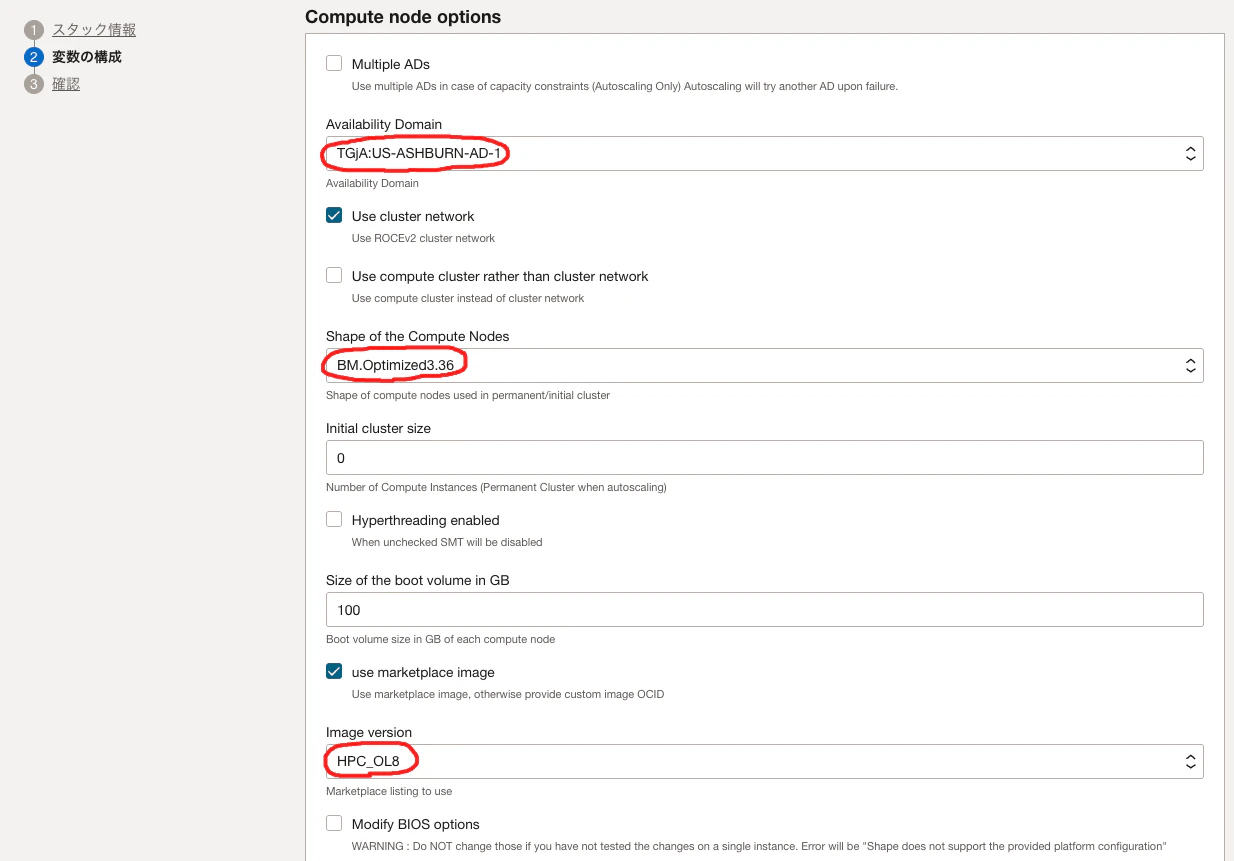
- ネットワーク設定(VCN、サブネット)

- Install Open OnDemandのチェック
- Next

確認:
- 作成

ステータスが成功になるまで待ちます。

スタックのジョブが成功したら、最下部のcontrollerでIPアドレスを確認します。

LDAPユーザの作成
OCI HPCクラスタでは、LDAPによりユーザ管理が行われます。
1. Head Nodeへログイン
ssh -i <Private Key> opc@<Private IP of Head Node>
2. LDAPユーザ作成
sudo sed -i 's/\/home\//\/mnt\/nfs\/home\//g' /usr/bin/cluster
cluster user add <user_name>
Password:  <Password for user_name>
Repeat for confirmation: <Password for user_name>
Full Name: full_name <Full name for user_name>
Open OnDemandへのログイン
1. Open OnDemandへログイン
ブラウザで、Head Node(controller)のIPアドレスを指定します。

作成したLDAPユーザとパスワードを指定して、Open OnDemandへログインします。

2. Opne OnDemand画面イメージ
以下は、Dashboardイメージです。

以下は、ジョブ管理画面イメージです。

OCIへのOpen OnDemandインストールについては、以下もご参照ください。
まとめ
本記事では、OCI上で以下を実現しました。
- OCI Resource Manager(Terraform)によるHPCクラスタ構築
- Slurm + NFS + LDAP + Open OnDemand統合環境
- LDAPユーザ管理
OCIのHPCは、オンプレHPCに近い構成をクラウドで簡単に構築できる点が特徴です。