
はじめに
2026年6月6日、Gemini Interactions APIのlegacyスキーマが 完全削除 されます。
対象となる変更は outputs 配列から steps 配列への移行です。Interactions APIを利用しているコードは、この日までに対応しなければ動作しなくなります。
この記事で解説すること
-
outputs→stepsの変更点と理由 - Python/JavaScript SDK のアップグレード手順
- レスポンス読み取り・構造化出力・ストリーミング・履歴管理それぞれの移行方法
- REST APIでの段階的移行方法
対象読者
- Gemini Interactions APIを利用しているエンジニア
- Google AI SDK (Python/JavaScript) を使っているチーム
前提環境
- Python 3.9+
-
google-genaiSDK(現行バージョン確認手順も後述)
TL;DR
- 期限: 2026年6月6日(legacy schema削除)
-
対応: Python SDK を
>=1.76.0、JavaScript SDK を>=1.53.0にアップグレード -
主要変更:
interaction.outputs[-1].text→interaction.steps[-1].content[0].text -
REST API:
Api-Revision: 2026-05-20ヘッダーで早期オプトイン可能 - SDK更新だけで自動移行される部分と、コードの書き直しが必要な部分がある
変更の背景
Gemini Interactions APIは generateContent APIの改良版として、会話履歴の自動管理・ツールオーケストレーション・長時間タスクを統一インターフェースで提供します。
これまでのlegacy形式では、レスポンスがシンプルな outputs 配列として返っていました。しかしモデル出力・ツール呼び出し・ユーザー入力など複数種類のステップが混在するユースケースが増え、各ステップを型で識別できる steps 配列に刷新されました。
公式ブログ(Interactions API発表)によると、この設計変更により将来的な機能拡張も容易になるとされています。
マイグレーションタイムライン
| 日付 | 内容 |
|---|---|
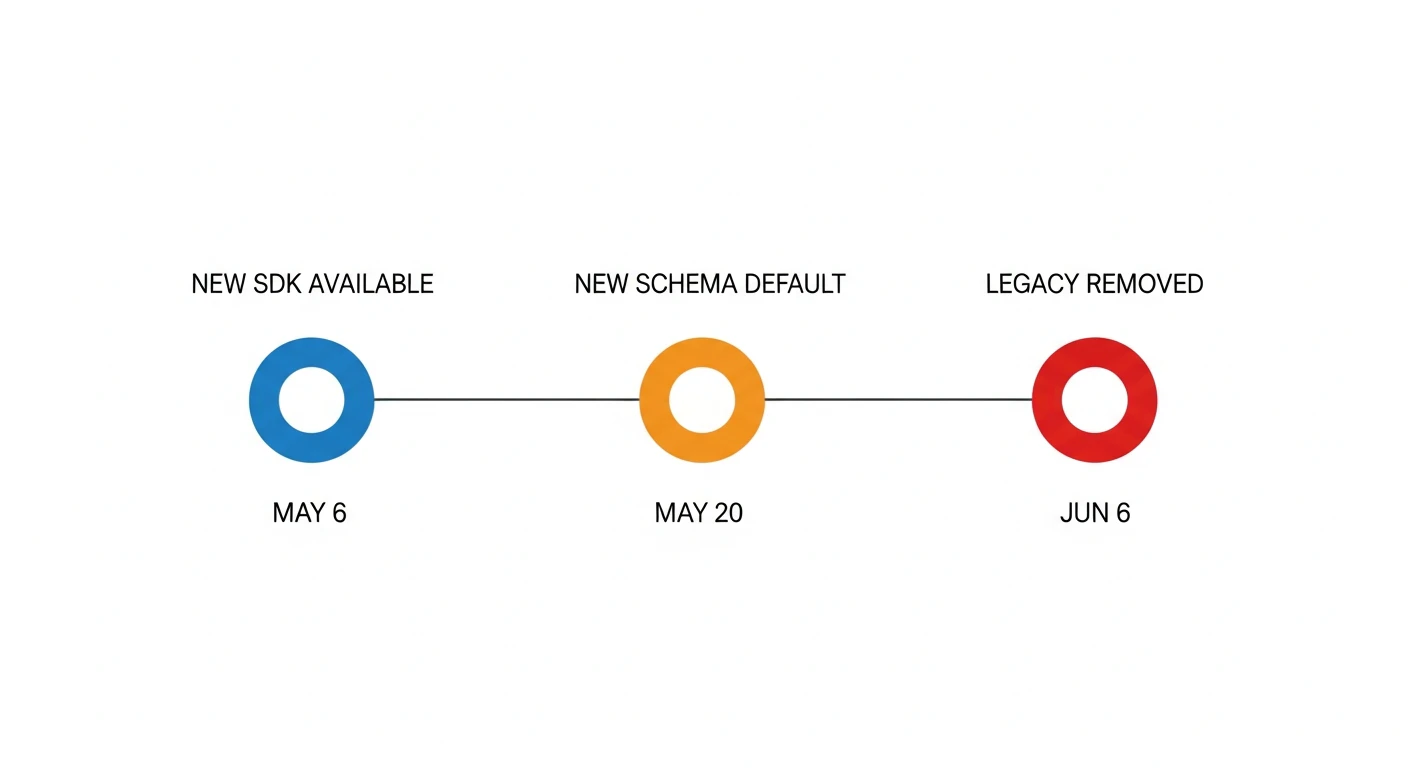
| 2026-05-06 | 新SDK提供開始。REST APIはオプトインで新スキーマを先行利用可能 |
| 2026-05-20 | 新スキーマがデフォルトに。REST APIはレガシーを一時的にオプトアウト可能 |
| 2026-06-06 | Legacy schema完全削除。古いSDKバージョンでのInteractions API呼び出しが動作不能になる |
重要: 5月20日以降も
Api-Revision: 2026-05-06ヘッダーで6月6日まで一時的にlegacyを維持できますが、これはあくまで移行作業の猶予期間 です。
Step 1: SDKのアップグレード
まず現在のバージョンを確認します。
# Python
pip show google-genai | grep Version

# Node.js
npm list @google/genai
必要なバージョンにアップグレードします。
# Python: 1.76.0以上が必須(公式移行ガイド記載)
pip install "google-genai>=1.76.0"

# Node.js: 1.53.0以上が必須(公式移行ガイド記載)
npm install @google/genai@latest
注意: SDKバージョンは公式移行ガイドに記載の要件です。リリース状況は PyPI google-genai および npm @google/genai で最新版を確認してください。
新しいSDKバージョンは 自動的に新スキーマを使用 します。ただし、レスポンスの読み取り方法はコードで変更する必要があります。
Step 2: レスポンス読み取りの変更
最も広く影響する変更です。
テキスト生成の基本パターン
# Before (legacy)
from google import genai

client = genai.Client()
interaction = client.interactions.create(
    model="gemini-3-flash-preview",
    input="Pythonでフィボナッチ数列を生成するコードを書いてください。"
)

# Legacy: outputs配列の最後の要素
print(interaction.outputs[-1].text)
# After (new schema)
from google import genai

client = genai.Client()
interaction = client.interactions.create(
    model="gemini-3-flash-preview",
    input="Pythonでフィボナッチ数列を生成するコードを書いてください。"
)

# New: steps配列の最後の要素のcontent
print(interaction.steps[-1].content[0].text)
POSTとGETでの違い
新スキーマでは POST /interactions と GET /interactions/{id} の返却内容が異なります。
| メソッド | 返却されるsteps |
|---|---|
| POST | モデルの出力ステップのみ(model_output 等) |
| GET | 全タイムライン(user_input から始まる全ステップ) |
# GETで全タイムラインを取得する場合
interaction = client.interactions.get(interaction_id)

# model_outputステップを明示的に探す
model_steps = [s for s in interaction.steps if s.type == "model_output"]
print(model_steps[-1].content[0].text)
ステップの種別
新スキーマで登場する type フィールドの値です。
| type | 内容 |
|---|---|
user_input |
ユーザーの入力(GETのみ) |
model_output |
モデルが生成したテキスト・画像等 |
function_call |
ツール呼び出しリクエスト |
function_result |
ツール呼び出しの結果 |
Step 3: 構造化出力(JSON)の変更
response_mime_type フィールドが削除され、response_format オブジェクトに統合されました。
# Before (legacy)
interaction = client.interactions.create(
    model="gemini-3-flash-preview",
    input="東京の天気を教えてください。JSON形式で返してください。",
    response_mime_type="application/json",
    response_schema={
        "type": "object",
        "properties": {
            "city": {"type": "string"},
            "temperature": {"type": "number"},
            "condition": {"type": "string"}
        }
    }
)
# After (new schema)
interaction = client.interactions.create(
    model="gemini-3-flash-preview",
    input="東京の天気を教えてください。JSON形式で返してください。",
    response_format={
        "type": "text",
        "mime_type": "application/json",
        "schema": {
            "type": "object",
            "properties": {
                "city": {"type": "string"},
                "temperature": {"type": "number"},
                "condition": {"type": "string"}
            }
        }
    }
)
画像生成との組み合わせ
マルチモーダル出力(テキスト + 画像)では response_format が配列になります。
# After: テキスト + 画像を同時生成
interaction = client.interactions.create(
    model="gemini-3-flash-preview",
    input="猫のイラストと説明文を生成してください。",
    response_format=[
        {"type": "text"},
        {"type": "image"}
    ]
)
Step 4: 関数呼び出し(ツール)の変更
import json
from google import genai
from google.genai import types

def get_weather(city: str) -> str:
    return json.dumps({"city": city, "temperature": 22, "condition": "晴れ"})

weather_tool = types.Tool(
    function_declarations=[
        types.FunctionDeclaration(
            name="get_weather",
            description="指定された都市の天気を返す",
            parameters=types.Schema(
                type="object",
                properties={"city": types.Schema(type="string")},
                required=["city"]
            )
        )
    ]
)

client = genai.Client()
interaction = client.interactions.create(
    model="gemini-3-flash-preview",
    input="東京の天気を教えてください。",
    tools=[weather_tool]
)

# After: function_callステップを探す
function_call_step = next(
    (s for s in interaction.steps if s.type == "function_call"),
    None
)

if function_call_step:
    fn = function_call_step.function_calls[0]
    result = get_weather(**fn.args)

    # ツール結果を送信して応答を続ける
    continued = client.interactions.create(
        model="gemini-3-flash-preview",
        input=interaction.steps,  # stepsを渡す(後述)
        tool_results=[
            types.ToolResult(
                function_responses=[
                    types.FunctionResponse(name=fn.name, response=json.loads(result))
                ]
            )
        ]
    )
    print(continued.steps[-1].content[0].text)
Step 5: 会話履歴管理の変更
マルチターン会話での履歴の渡し方も変わりました。
# Before: outputs配列を履歴として渡す
second_turn = client.interactions.create(
    model="gemini-3-flash-preview",
    input={
        "history": first_interaction.outputs,  # legacy
        "message": "もっと詳しく説明してください。"
    }
)
# After: steps配列を渡す
second_turn = client.interactions.create(
    model="gemini-3-flash-preview",
    input=first_interaction.steps,  # new: stepsをそのまま渡す
    # または
    # input={"history": first_interaction.steps, "message": "..."}
)
注意: サーバーサイドステートフルモード(
previous_interaction_idを使う方法)に切り替えると、履歴管理をAPIが自動的に行うため、この変更を気にしなくて済みます。
Step 6: ストリーミングのSSEイベント変更
ストリーミングを使っている場合、イベント名が変わります。
# Before: legacy SSEイベント
# interaction.start → content_delta → interaction.stop

# After: 新SSEイベント(stream=True を渡してストリーミング)
stream = client.interactions.create(
    model="gemini-3-flash-preview",
    input="長い物語を生成してください。",
    stream=True
)
for event in stream:
    if event.type == "step.delta":
        # 新: step.delta でテキストをストリーミング受信
        if event.delta.content:
            print(event.delta.content[0].text, end="", flush=True)
    elif event.type == "interaction.created":
        # 新: interaction.created でinteraction IDを取得
        interaction_id = event.interaction.id
    elif event.type == "step.stop":
        # 新: step.stop でステップ完了
        pass
新旧イベント対応表
| Legacy | New | 説明 |
|---|---|---|
interaction.start |
interaction.created |
インタラクション開始 |
content_delta |
step.delta |
コンテンツのストリーミング |
interaction.stop |
step.stop + interaction.status_update
|
インタラクション完了 |
REST APIでの段階的移行
SDKを使わずREST APIを直接呼び出している場合は、ヘッダーで移行タイミングを制御できます。
# 早期オプトイン(2026-05-06〜): 新スキーマを先行利用
curl -X POST https://generativelanguage.googleapis.com/v1beta/interactions \
  -H "Api-Revision: 2026-05-20" \
  -H "Content-Type: application/json" \
  -H "X-Goog-Api-Key: YOUR_API_KEY" \
  -d '{
    "model": "models/gemini-3-flash-preview",
    "input": "こんにちは"
  }'
# 一時的なlegacy維持(2026-05-20〜2026-06-05まで有効)
curl -X POST https://generativelanguage.googleapis.com/v1beta/interactions \
  -H "Api-Revision: 2026-05-06" \
  -H "Content-Type: application/json" \
  -H "X-Goog-Api-Key: YOUR_API_KEY" \
  -d '...'
2026年6月6日以降、
Api-Revision: 2026-05-06ヘッダーは無視され、常に新スキーマが返ります。
移行チェックリスト
実際のコードベースを移行する際のチェックリストです。
-
pip show google-genaiまたはnpm list @google/genaiでバージョン確認 -
Python SDK を
>=1.76.0、JS SDK を>=1.53.0にアップグレード -
interaction.outputsを参照しているコードを全件検索(grep -r "\.outputs" .) -
interaction.outputs[-1].text→interaction.steps[-1].content[0].textに変更 -
response_mime_typeを使っているコードをresponse_formatに変更 -
image_configがgeneration_configの下にある場合はresponse_formatに移動 - SSEイベントリスナーのイベント名を新形式に変更
-
マルチターン会話で
outputs配列を履歴として渡している箇所をstepsに変更 -
関数呼び出しで
outputsからfunctionCallを取得しているコードをstepsから取得するように変更
よくある注意点
steps[-1] が model_output でない場合
ツールを使うインタラクションでは、最後のステップが function_call になる場合があります。
# 安全なテキスト取得
def get_text(interaction):
    model_steps = [s for s in interaction.steps if s.type == "model_output"]
    if model_steps:
        return model_steps[-1].content[0].text
    return None
SDK自動移行とコード変更の範囲
SDKを >=1.76.0 にアップグレードすれば、API通信部分は自動的に新スキーマへ切り替わります。ただし、レスポンスオブジェクトの読み取り方 はコードを書き換える必要があります。
参考: Gemini API 公式移行ガイド(2026-05-06)
まとめ
| 変更箇所 | Legacy | New |
|---|---|---|
| レスポンス |
outputs 配列 |
steps 配列 |
| テキスト取得 | .outputs[-1].text |
.steps[-1].content[0].text |
| 構造化出力 | response_mime_type |
response_format オブジェクト |
| 関数呼び出し |
outputs から探す |
type="function_call" のstepから探す |
| 会話履歴 |
outputs を渡す |
steps を渡す |
| SSEイベント |
interaction.start 等 |
interaction.created 等 |
期限は2026年6月6日。まずはSDKバージョンを確認し、outputs を参照しているコードをグレップして洗い出すところから始めるとスムーズです。