
launch.jsonの小ネタ集
launch.json自動生成
1.Ctrl+Pを押してからdebug[半角スペース]と入力、構成の追加を選択

2.Python Debuggerを選択

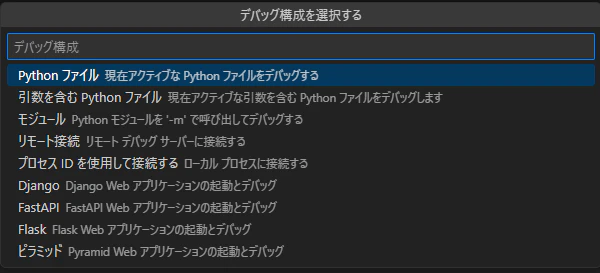
Python ファイル
現在アクティブな Pythonファイルをデバッグする
launch.json
{
    // IntelliSense を使用して利用可能な属性を学べます。
    // 既存の属性の説明をホバーして表示します。
    // 詳細情報は次を確認してください: https://go.microsoft.com/fwlink/?linkid=830387
    "version": "0.2.0",
    "configurations": [
        {
            "name": "Python デバッガー: 現在のファイル",
            "type": "debugpy",
            "request": "launch",
            "program": "${file}",
            "console": "integratedTerminal"
        }
    ]
}
引数を含む Pythonファイル
現在アクティブな引数を含む Python ファイルをデバッグします
launch.json
{
    // IntelliSense を使用して利用可能な属性を学べます。
    // 既存の属性の説明をホバーして表示します。
    // 詳細情報は次を確認してください: https://go.microsoft.com/fwlink/?linkid=830387
    "version": "0.2.0",
    "configurations": [
        {
            "name": "Python デバッガー: 引数を含む現在のファイル",
            "type": "debugpy",
            "request": "launch",
            "program": "${file}",
            "console": "integratedTerminal",
            "args": "${command:pickArgs}"
        }
    ]
}
モジュール
Pythonモジュールを'-m'で呼び出してデバッグする
launch.json
{
    // IntelliSense を使用して利用可能な属性を学べます。
    // 既存の属性の説明をホバーして表示します。
    // 詳細情報は次を確認してください: https://go.microsoft.com/fwlink/?linkid=830387
    "version": "0.2.0",
    "configurations": [
        {
            "name": "Python デバッガー: モジュール",
            "type": "debugpy",
            "request": "launch",
            "module": "src.sample.hello"
        }
    ]
}
src/sample/
   hello.py
hello.py
def main():
    print("hello world")

if __name__ == "__main__":
    main()
launch.jsonをGit管理から外す
-
.gitigoreに追加する -
.git/info/excludeに追加する
launch.jsonはプロジェクトでGit管理されていないが除外したい場合こちら