
はじめに
今回はGitHubのプライベートリポジトリにDependabotを導入する手順をまとめてみました。
少しでも参考になると幸いです。
Dependabotとは
GitHub公式の、依存関係(dependencies)自動管理機能です。
ライブラリの更新を自動で監視し、危険なものや古いものを自動でPRにしてくれます。
脆弱性の通知も行なってくれるうえ、多くの機能が基本無料で使用できるため、導入するのがおすすめです。
導入方法
① 対象のリポジトリの「Setting」画面を開きます。
② サイドバーの「Security and quality >> Advanced Security」を選択します。
③ 必要な機能をONにすれば完了です。
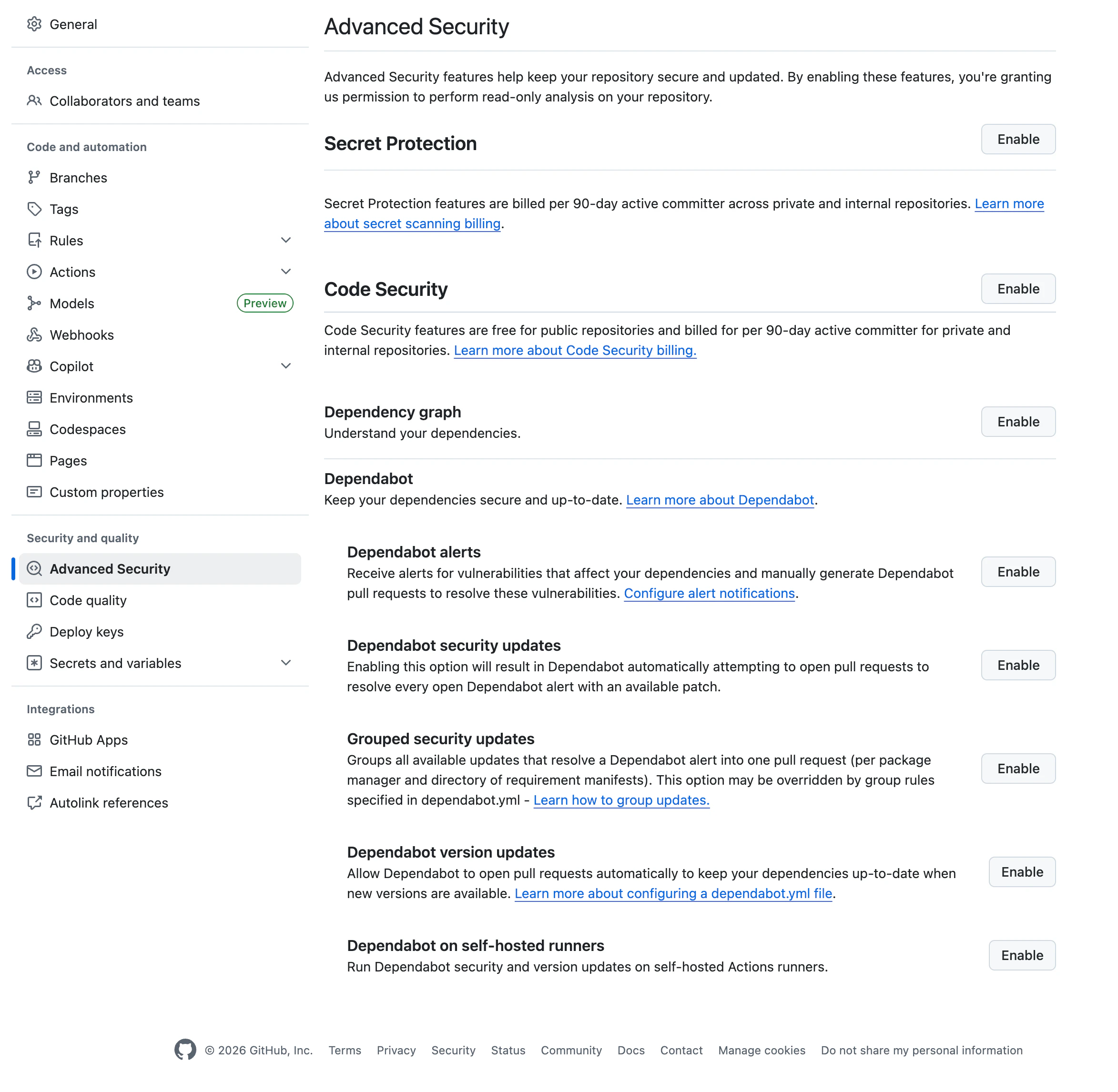
以下、各設定項目の内容と推奨設定になります。
| 項目 | 内容 | 例 | 推奨設定 |
|---|---|---|---|
| Secret Protection | APIキー漏洩を検知 | AWSキーをpushしそうになると警告 | OFF(プライベートリポジトリは有料) |
| Code Security | コードの脆弱性を静的解析 | 危険なSQLやコードパターン検知 | OFF(プライベートリポジトリは有料) |
| Dependency graph | 使用ライブラリ一覧を解析 | Nuxt / ESLint / Axios などを認識 | ON |
| Dependabot alerts | 危険ライブラリを通知 | 「axiosに脆弱性あり」 | ON |
| Dependabot security updates | 脆弱性修正PRを自動作成 | axios 1.8.0 → 1.8.2 | ON |
| Grouped security updates | 修正PRをまとめる | 10個のPR → 1個に集約 | OFF |
| Dependabot version updates | 通常アップデートPRを作る | Nuxt 4.1 → 4.2 | ON |
| Dependabot on self-hosted runners | 自前サーバーでDependabot実行 | 社内Runner環境向け | OFF |
次に、プロジェクトルートに.github/dependabot.ymlを作成します。
上記の項目のうち、version updatesを使用する場合には必要になります。
自動PRの更新頻度などを制御します。
.github/dependabot.yml
# Dependabot 設定ファイル
# 配置場所:
# .github/dependabot.yml
#
# GitHub がこのファイルを読み取り、
# 依存ライブラリや GitHub Actions の更新を自動監視します。
#
# 主な機能:
# - 脆弱性検知
# - 自動更新PR作成
# - ライブラリ更新提案
#
# 公式:
# https://docs.github.com/en/code-security/dependabot

# Dependabot 設定フォーマットVersion
#
# 現在 GitHub で使用されているのは version: 2
version: 2

# 更新監視ルール一覧
updates:

  # ============================================================
  # Node.js / pnpm / npm / yarn 系依存関係
  # ============================================================
  #
  # "npm" ecosystem は:
  # - npm
  # - pnpm
  # - yarn
  #
  # をまとめて扱います。
  #
  # Nuxt + pnpm 構成でも "npm" を使用します。
  #
  # 監視対象:
  # - package.json
  # - pnpm-lock.yaml
  #
  # 更新対象例:
  # - Nuxt
  # - Vue
  # - ESLint
  # - Prettier
  # - TypeScript
  #
  - package-ecosystem: "npm"

    # 監視対象ディレクトリ
    #
    # "/" はリポジトリルートを意味します。
    directory: "/"

    # 更新チェック頻度
    schedule:

      # 毎週更新チェック
      #
      # daily:
      #   更新PRが大量発生しやすい
      #
      # monthly:
      #   更新が溜まりやすい
      #
      # 現在は weekly がかなり一般的
      interval: "weekly"

  # ============================================================
  # GitHub Actions 更新監視
  # ============================================================
  #
  # .github/workflows/*.yml
  #
  # 内の GitHub Actions version を監視します。
  #
  # 例:
  # uses: actions/checkout@v4
  #
  # の更新など。
  #
  - package-ecosystem: "github-actions"

    # workflow ファイルは通常 repo root 配下なので "/"
    directory: "/"

    schedule:

      # 毎週更新チェック
      interval: "weekly"
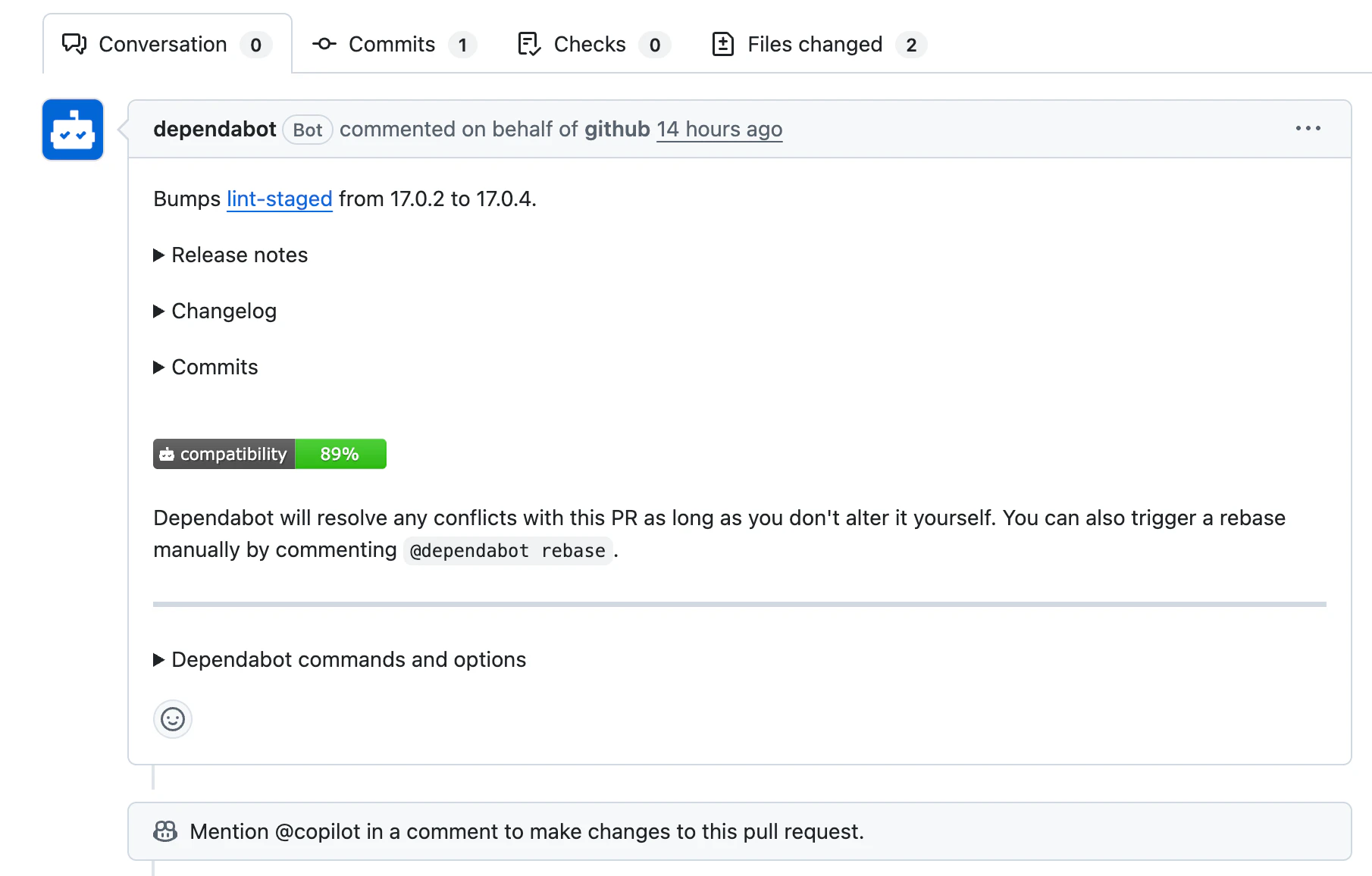
しばらく経つと、以下のように自動でプルリクエストが作成されます。

今回は以上になります!