
背景
golang のメインプロジェクトのGitHub ワークフロー上から、自作モジュール(Private レポジトリ)をダウンロードするために、GitHub Appsを使おうとした。
既に、別プロジェクトで GitHub Apps を使っていたので、それを流用しようとした。
既に All Repositories に設定してあったので、それは変更せず、content への read 権限が不足していたので追加した。(これでは、二つの意味で不十分だった。。。)
下記のエラーになった。
handler/hello_handler.go:6:2: reading github.com/{ORGANIZATION_NAME}/{REPOSITORY_NAME}/go.mod at revision v1.0.0: git ls-remote -q origin in /root/go/pkg/mod/cache/vcs/ee417039608c25bf0f720306e4f19a2dc334ee303e9ed9ca6ac890f87eefec86: exit status 128:
	remote: Repository not found.
	fatal: repository 'https://github.com/{ORGANIZATION_NAME}/{REPOSITORY_NAME}/' not found
原因
エラーにはまった原因は下記の二点を見落としていたこと。
- オリジナルの GitHub Appsの権限の設定を変更しても、すでにインストールされたものに対して、自動的に反映されない。
- インストールされたGitHub Apps で、All Repositories が設定してあっても、設定した時点の All Repositoriesであって、それ以降に作成されたレポジトリは含まれない。
下記の図にまとめました。
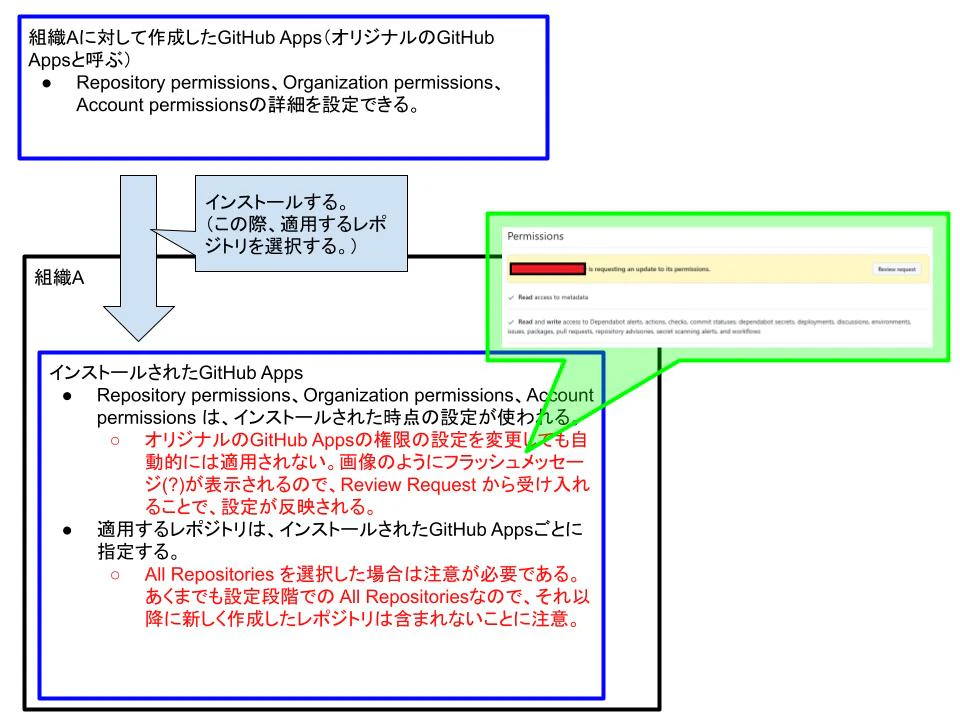
golang で同じ組織内のPrivateレポジトリ(モジュール)を、本来アプリのCIからダウンロードする手順
概要
golang のPrivateモジュールをGihtubワークフローからダウンロードする方法については、下記の記事が参考になる。
GitHub Apps でGitHubトークンを生成する方法としては、上記の記事で紹介されているサードパーティーのアクションを使う方法だけでなく、下記の記事で紹介されている自分でスクリプトをべた書きする方法もある。
セキュリティ的に、私は下記の方法を採用している。
注意するべき点
上記の最後の記事の方法(べた書きする方法)を採用する場合の注意点を書きます。
(1)
あなたは、本体アプリのレポジトリのGitHub Actionsから、your_private_module_repo_1とyour_private_module_repo_2 というPrivateレポジトリ(モジュール)をダウンロードしようとしたいと仮定します。
インストールされたGitHub Apps は、Contents: Read-only権限があり、適用レポジトリは、本体レポジトリと、ダウンロードしたい全てのPrivateレポジトリ(モジュール)となるようにしてください。
既に、Privateモジュールはリリースされていて、本体アプリがそのモジュールを利用する形になっているとします。
べた書き記事で紹介されているスクリプトを下記のように修正してください。
before
...

repo_name="$(echo "${GITHUB_REPOSITORY}" | cut -d '/' -f 2)"
token="$(curl --location --silent --request POST \
  --url "${GITHUB_API_URL}/app/installations/${installation_id}/access_tokens" \
  --header "Accept: application/vnd.github+json" \
  --header "X-GitHub-Api-Version: 2022-11-28" \
  --header "Authorization: Bearer ${jwt}" \
  --data "$(printf '{"repositories":["%s"]}' "${repo_name}")" \
  | jq -r '.token'
)"

...
after
...

token="$(curl --location --silent --request POST \
  --url "${GITHUB_API_URL}/app/installations/${installation_id}/access_tokens" \
  --header "Accept: application/vnd.github+json" \
  --header "X-GitHub-Api-Version: 2022-11-28" \
  --header "Authorization: Bearer ${jwt}" \
  --data "{\"repositories\": $MODULE_REPO_LISTS}" \
  | jq -r '.token'
)"

...
下記のように、MODULE_REPO_LISTSに、ダウンロードしたいPrivateモジュール(レポジトリ)をすべて指定してください。
...

      - name: Generate GitHub Apps token
        id: generate
        env:
          APP_ID: ${{ secrets.APP_ID }}
          PRIVATE_KEY: ${{ secrets.PRIVATE_KEY }}
          MODULE_REPO_LISTS: "[\"your_private_module_repo_1\", \"your_private_module_repo_2\"]"
        run: |
          .github/workflows/generate_github_apps_token.sh

...
(2)
べた書き記事で紹介されているスクリプトでは、下記のように、GITHUB_REPOSITORYが使われており、インストールされたGitHub Appsで、本レポジトリ(本体レポジトリ)が適用レポジトリになっていないと、installation_idを正確に取得できません。
下記のGITHUB_REPOSITORYを、使用するPrivateレポジトリに置き換えたり、installation_idをAPIから取得するのではなくあらかじめ変数として設定したりすれば、適用レポジトリに本体レポジトリを含む必要はなくなります。
私は、別の用途で本体レポジトリへのアクセスが欲しいので、本体レポジトリを適用レポジトリにしています。なので、下記のGITHUB_REPOSITORYをそのまま使っています。
installation_id="$(curl --location --silent --request GET \
  --url "${GITHUB_API_URL}/repos/${GITHUB_REPOSITORY}/installation" \
  --header "Accept: application/vnd.github+json" \
  --header "X-GitHub-Api-Version: 2022-11-28" \
  --header "Authorization: Bearer ${jwt}" \
  | jq -r '.id'
)"