0
0

Delete article

Deleted articles cannot be recovered.

Draft of this article would be also deleted.

Are you sure you want to delete this article?

More than 5 years have passed since last update.

MobaXtermでSocks経由でVMにアクセスする方法

0
Posted at

早速本題

社内環境などプロキシで囲まれた場所からAWS, Azureなどで立てたVMにアクセスするための方法として、Socksを使う方法があります。

MobaXtermでこれをやろうと思って「MobaXterm socks」などでググるとSSH tunnelやポートフォワーディングの設定方法が出てきますが、単純にSocks 5などでアクセスする場合はこの設定は必要ありません。

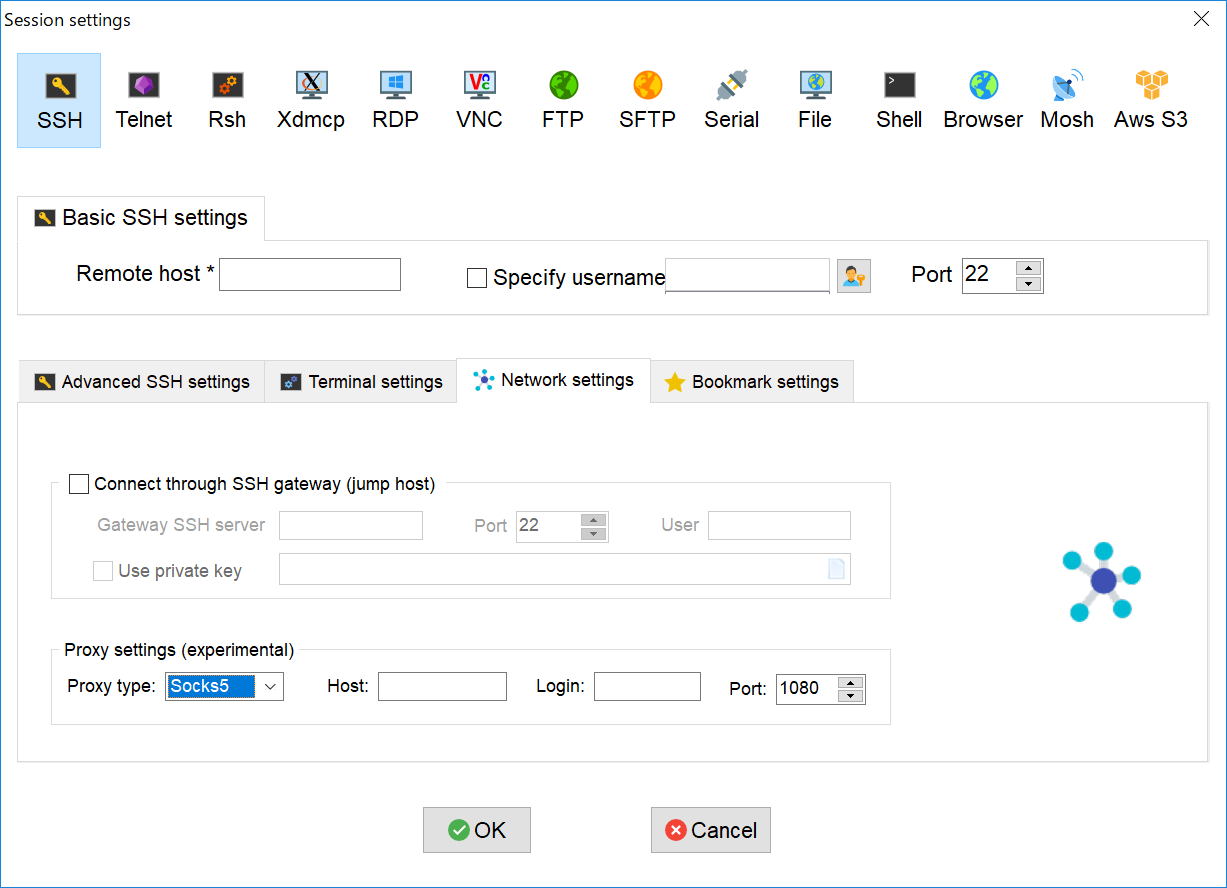
Socks 5を使用する場合は、通常のRemote hostやらユーザーやらを設定するとともに、以下の手順で接続します。

  1. Session settings -> SSH -> Network settingsを開く
  2. Proxy settingsの"Proxy type"を"Socks5"に変更する
  3. Host, Login ID, Portをセットする
  4. パスワードが求められるので、入力する
mobaXtermでのsocks5設定.png
0
0
0

Register as a new user and use Qiita more conveniently

  1. You get articles that match your needs
  2. You can efficiently read back useful information
  3. You can use dark theme
What you can do with signing up
0
0

Delete article

Deleted articles cannot be recovered.

Draft of this article would be also deleted.

Are you sure you want to delete this article?