

This article covers five tools I've integrated into my workflow over the past several months. Each one solves a specific, concrete problem — and they fit together as a coherent stack rather than a random collection of subscriptions.
| Tool | Problem it solves | Best for |
|---|---|---|
| Zest | Measuring AI coding productivity | Individual devs & teams |
| BrowserCat | Headless browser infrastructure | CI/CD, automation, scraping |
| Sequence | Web3 integration without blockchain expertise | Game devs, web3 apps |
| Sevalla | PaaS deployment without DevOps overhead | Full-stack apps & APIs |
| StackCost | Cloud cost visibility per project | Solo devs & small teams |
Zest — Observability for AI-Assisted Development
Link: https://meetzest.com
Install: VS Code / Cursor extension
The problem
Most engineers using AI coding tools have no objective data on whether it's helping. You have a feeling it's faster. You don't have numbers.
What Zest does
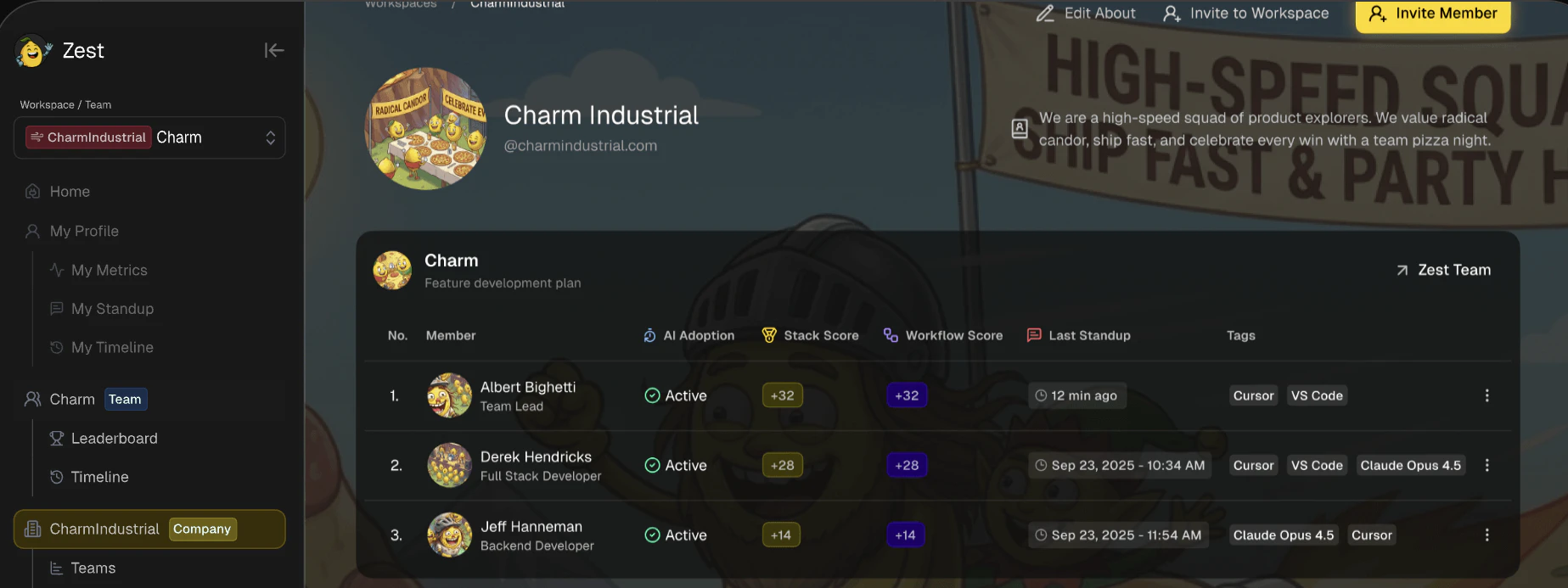
Zest is an editor extension that tracks your actual AI usage and surfaces three main things:
AI Standups — auto-generated daily summaries based on file activity, commits, and AI interactions. No more mentally reconstructing yesterday in standup.
Cheatcodes — a shareable library of prompt patterns. When someone on your team discovers a prompt that consistently works for a particular type of task, they save it. Everyone benefits.
Team adoption analytics — a dashboard showing who uses AI effectively, who doesn't, and where the gap is. Useful for leads who want to spread best practices without guessing.
Setup
# Install from VS Code marketplace
# Search: "Zest" or "MeetZest"
# Or install via Cursor's extension panel
No API key needed for the free plan. No credit card.
Output example
────────────────────────────
Files modified:  src/auth/jwt.ts, api/routes/user.ts
AI interactions: 14 (8 accepted, 6 rejected)
Time saved est.: ~42 min
Top prompt used: "Refactor this function to handle edge case where..."
When to use it
- You want to measure whether your AI tooling investment is paying off
- You're onboarding new team members to AI-assisted workflows
- You want to standardize prompt patterns across a team
BrowserCat — Managed Headless Browser Fleet

Link: https://browsercat.com
Compatible with: Playwright, Puppeteer
The problem
Running headless browsers in CI is painful. Chromium instances crash, consume excessive memory, and produce flaky test results that are hard to debug. Most teams end up spending engineering time maintaining browser infrastructure instead of writing tests.
What BrowserCat does
BrowserCat provides a hosted fleet of headless browsers accessible via WebSocket API. Your existing Playwright or Puppeteer code connects to their infrastructure instead of a local Chromium instance.
Migration
The change is a single line:
const browser = await chromium.launch();

// After: BrowserCat
const browser = await chromium.connect(process.env.BROWSERCAT_WS_URL, {
  headers: { 'Api-Key': process.env.BROWSERCAT_API_KEY }
});
Everything else in your test or automation script stays the same.
Environment variables
bashBROWSERCAT_WS_URL=wss://api.browsercat.com/connect
BROWSERCAT_API_KEY=your_key_here
Use cases
| Use case | Notes |
|---|---|
| E2E tests in CI | Parallel sessions available on demand |
| PDF generation | Pre-warmed instances reduce cold start |
| Web scraping | Instances configured to avoid bot detection |
| Screenshot diffs | Consistent rendering environment |
Pricing model
Pay-per-use. You are billed only for the duration of the browser session. Idle time costs nothing. For infrequent CI runs, this is significantly cheaper than maintaining dedicated infrastructure.
Sequence — Web3 Infrastructure Without the Blockchain Overhead

Link: https://sequence.xyz
CLI: npx sequence-cli
The problem
Adding web3 features to an application typically requires deep expertise in smart contracts, wallet management, gas estimation, and cross-chain compatibility. The learning curve is steep and the maintenance burden is ongoing.
What Sequence does
Sequence provides an abstraction layer over the blockchain stack. You integrate a set of APIs and SDKs; Sequence handles wallets, transactions, indexing, and cross-chain routing underneath.
Key components
Embedded wallets — users authenticate with email or social login. No seed phrases, no browser extension required. Account abstraction is handled transparently.
const indexer = new SequenceIndexer('https://polygon-indexer.sequence.app')

const tokenBalances = await indexer.getTokenBalances({
  accountAddress: userAddress,
  includeMetadata: true
})
Sequence Builder — a GUI portal for configuring contracts, wallets, and integrations without code.
Cross-chain transactions — send tokens or interact with contracts across supported chains with a single API call.
SDK support matrix
| Platform | SDK |
|---|---|
| Web (JS/TS) | @0xsequence/kit |
| Unity | sequence-unity |
| Unreal Engine | sequence-unreal |
| iOS / Android | Native SDKs |
CLI quickstart
npx sequence-cli contracts deploy --network polygon
npx sequence-cli transactions send --to 0x... --value 0.01
When to use it
- Building blockchain-based games (Unity/Unreal)
- Adding digital ownership or collectibles to an existing app
- Implementing token-gated features without managing wallet infrastructure
Sevalla — PaaS on Kubernetes + Cloudflare Edge

Link: https://sevalla.com
Deployment model: Git-push, Dockerfile, Nixpacks, Buildpacks
The problem
Most PaaS platforms either limit you with opinionated constraints (hard to scale, no private networking) or charge per seat which becomes expensive for small teams. Self-managed Kubernetes gives you power but requires dedicated DevOps work.
What Sevalla does
Sevalla runs on Kubernetes with Cloudflare as the edge and CDN layer. You deploy via Git push and never interact with Kubernetes directly. The platform handles routing, scaling, TLS, and CDN automatically.
Architecture overview
  └─► Sevalla build pipeline (Nixpacks / Dockerfile / Buildpacks)
        └─► Kubernetes cluster (managed)
              └─► Cloudflare edge (260+ PoPs globally)
                    └─► Your users
Pricing model (notable)
- No seat-based pricing — pay for compute only
- Unlimited users, apps, parallel builds on all plans
- Static sites: free — 100 sites, 100 GB/month bandwidth on Cloudflare's edge
- New accounts: $50 in credits
Supported runtimes
| Method | Languages / Notes |
|---|---|
| Nixpacks (auto-detect) | Node.js, Python, Go, Ruby, PHP, Java, and 15+ more |
| Dockerfile | Any containerizable workload |
| Buildpacks | Heroku-compatible |
Quick deployment example
git push origin main
# → Build triggered automatically
# → Preview URL generated per PR
# → Production deploy on merge to main
Private networking
Database and app services on the same Sevalla project communicate over a private network. No egress charges, no public exposure required.
StackCost — Cost Visibility Across Your Entire Stack

Link: https://stackcost.com
The problem
Engineering teams typically track cloud costs through billing dashboards that show totals by service, not by project. When you need to know what a specific product or client costs to run, you have to manually aggregate data from multiple sources — cloud providers, SaaS subscriptions, annual vs. monthly billing cycles.
What StackCost does
StackCost is a cost aggregation and visibility tool. You add your services, organize them by project or team, and get a unified view of what you're spending and where.
Core features
Project-level cost breakdown
────────────────────────────────
Sevalla (compute)    $42.00 / mo
Supabase (database)  $25.00 / mo
Datadog (monitoring) $31.00 / mo
GitHub Actions (CI)   $8.40 / mo
────────────────────────────────
Total               $106.40 / mo
AI recommendations — surfaces over-provisioned tiers, redundant subscriptions, and cost-saving alternatives based on actual usage patterns.
Renewal alerts — notifies you before annual subscriptions renew, preventing surprise charges.
Cross-team allocation — shared tools (monitoring, logging, CI) can be split across multiple projects proportionally.
When to use it
- You have more than 5-6 active SaaS subscriptions
- You need per-project cost reporting for clients or stakeholders
- You want to identify waste without auditing every invoice manually
Summary
These tools target different layers of the development stack:
  └─► Zest          — measure AI productivity in your editor

CI/CD & automation
  └─► BrowserCat    — managed headless browser sessions

Specialized integrations
  └─► Sequence      — web3 without the blockchain complexity

Infrastructure & deployment
  └─► Sevalla       — PaaS on K8s + Cloudflare, no YAML required

Cost & operations
  └─► StackCost     — per-project visibility across all your services
None of these tools overlap significantly. If you're missing visibility in one of these areas, the corresponding tool is worth evaluating. All five have free tiers or trial credits — low cost to test against a real workload.
References
- Sevalla documentation: https://sevalla.com/docs
- BrowserCat Playwright guide: https://browsercat.com/docs/playwright
- Sequence SDK docs: https://docs.sequence.xyz
- Zest extension: available in VS Code and Cursor marketplaces
- StackCost: https://stackcost.com