
はじめに
最近ハニカム構造にハマっており、Webブラウザで遊べる 六角形盤面のオセロ を作りました。
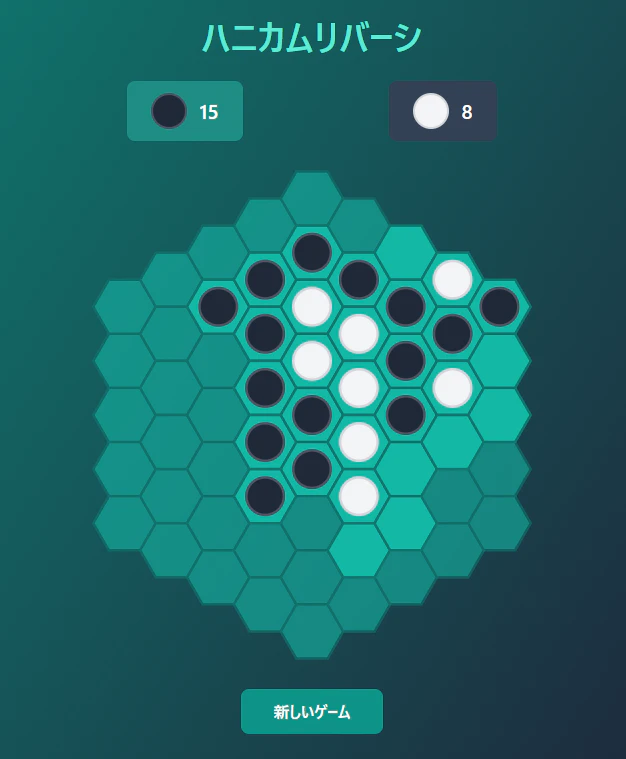
6角形特有の座標系やアルゴリズムを説明できればと思います。
六角形グリッドの座標系の種類
六角形グリッドの座標系にはいくつかの表現方法があります。
今回は、Cube座標(Cube Coordinates)を採用しました。
| 方式 | 説明 | 特徴 |
|---|---|---|
| Offset座標 | 行ごとにずらして2軸(x, y)で表現 | 二次元配列に直接マッピングしやすい 方向ごとに計算式が変わり、実装が煩雑になりやすい |
| Axial座標 | 2軸(q, r)で表現(sは省略) | データ量が少ない 方向計算時に暗黙的にsを復元する必要がある |
| Cube座標 | 3軸(q, r, s)で表現 | 全方向の計算がベクトル加算に統一され、距離・回転・対称性で計算 |
Cube座標(Cube Coordinates)
今回採用したCube座標は3つの軸 (q, r, s) を使い、常に以下の制約を満たします。
q + r + s = 0
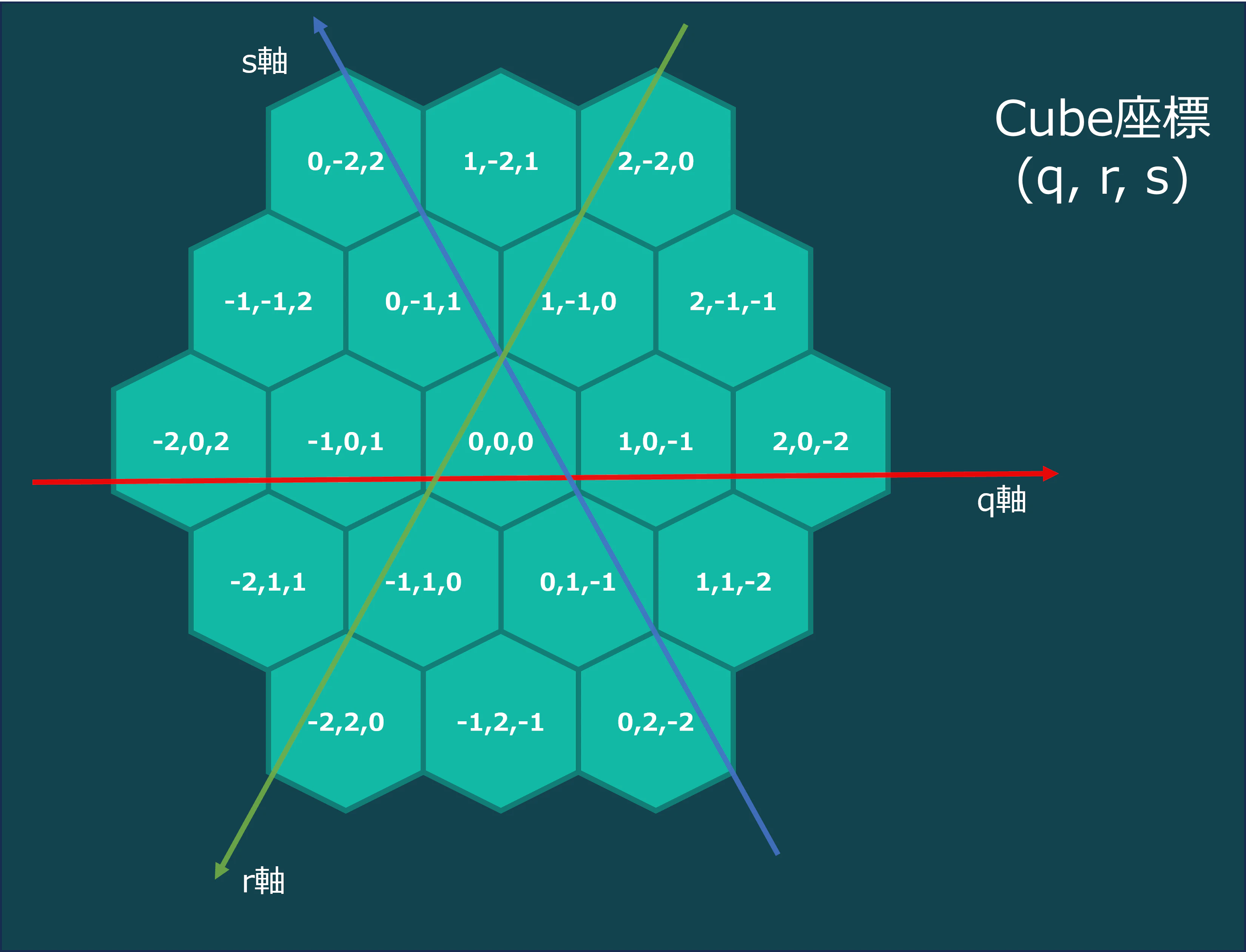
この制約があることで、グリッド上のあらゆる隣接マスへの移動が「どれかを+1、どれかを-1する」という対称的な操作で表現でき、回転も容易です。
6方向をベクトルで定義する
六角形グリッドの6方向は、Cube座標では以下のように表せます。
const directions = [
  { q: 1, r: -1, s: 0 },  // 右上
  { q: 1, r: 0, s: -1 },  // 右
  { q: 0, r: 1, s: -1 },  // 右下
  { q: -1, r: 1, s: 0 },  // 左下
  { q: -1, r: 0, s: 1 },  // 左
  { q: 0, r: -1, s: 1 },  // 左上
];
どのベクトルも q + r + s = 0 が成り立っているのが分かりますね。そして隣のセルへの移動は単純な加算で済みます。
const cubeAdd = (a, b) => ({
  q: a.q + b.q,
  r: a.r + b.r,
  s: a.s + b.s,
});
ボードの「端」の判定
ボードの中心から半径 BOARD_RADIUS 以内のセルがボード上のセルです。
六角形グリッドでは、通常の座標系とは異なる距離計算が必要になります。
Cube座標における中心からの距離は、3軸の絶対値の最大値で求められます。
const BOARD_RADIUS = 4;

const cubeDistance = (coord) => {
  return Math.max(Math.abs(coord.q), Math.abs(coord.r), Math.abs(coord.s));
};

const isInBounds = (coord) => {
  return cubeDistance(coord) <= BOARD_RADIUS;
};
配列で管理
ボードの状態は Map<string, 'black' | 'white'> で管理しています。キーは "q,r,s" 形式の文字列です。
// Mapにエントリがなければ = 空のマス
// Mapに 'black' または 'white' があれば = その色の石

const createInitialBoard = () => {
  const board = new Map();
  //  中心(0,0,0)に白を置き、周囲6マスに交互配置
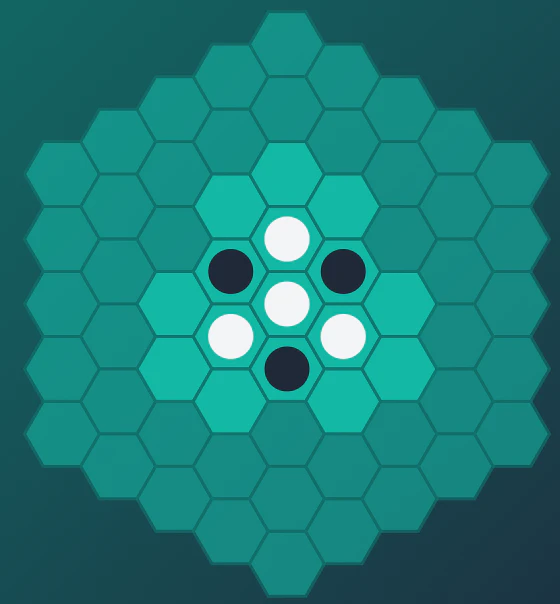
  board.set('0,0,0', 'white');
  board.set('1,-1,0', 'black');
  board.set('0,1,-1', 'black');
  board.set('-1,0,1', 'black');
  board.set('-1,1,0', 'white');
  board.set('1,0,-1', 'white');
  board.set('0,-1,1', 'white');
  return board;
};
通常の二次元配列 board[x][y] に比べて、座標が存在するかどうかを配列の範囲チェックなしに isInBounds() で判定できるのがポイントです。
六角形ボードを二次元配列で表現しようとすると「使われないセル」が大量に生まれますが、Mapを使うことでスパースな構造を自然に扱えます。
画面への描画は、Cube座標をピクセル座標へ変換することで行います。
const cubeToPixel = (q, r, size) => {
  const x = size * (3 / 2 * q);
  const y = size * (Math.sqrt(3) / 2 * q + Math.sqrt(3) * r);
  return { x, y };
};
これはいわゆる「フラットトップ(上辺が平らな)」六角形の変換式です。この x, y をSVGの <polygon> の中心座標として使います。
挟む処理
オセロの核心は「挟む」処理です。通常のオセロでは4方向(縦・横・斜め)ですが、六角形オセロでは6方向に対して同じ処理を行います。
ある方向に何個挟めるか調べる
const findFlipsInDirection = (coord, direction, player, currentBoard) => {
  const flips = [];
  let current = cubeAdd(coord, direction); // 1マス進む

  while (isInBounds(current)) {
    const key = `${current.q},${current.r},${current.s}`;
    const piece = currentBoard.get(key);

    if (!piece) break;           // 空マスに当たったら終了(挟めない)
    if (piece === player) return flips; // 自分の石に当たったら確定(挟める!)

    flips.push(key);             // 相手の石を記録
    current = cubeAdd(current, direction); // さらに進む
  }

  return []; // ボード外に出たら挟めない
};
ボード外に出たら空配列を返しています。
全6方向を調べてまとめる
const getFlips = (coord, player, currentBoard) => {
  const key = `${coord.q},${coord.r},${coord.s}`;
  if (currentBoard.has(key)) return []; // すでに石がある

  let allFlips = [];
  for (const dir of directions) {
    const flips = findFlipsInDirection(coord, dir, player, currentBoard);
    if (flips.length > 0) {
      allFlips = [...allFlips, ...flips];
    }
  }
  return allFlips;
};
getFlips が空配列を返すなら「その場所に石は置けない」、1つ以上返すなら「置ける石のリスト」になります。
有効な手を求める
全マスに対して getFlips を実行し、置ける場所を列挙します。
const calculateValidMoves = (player, currentBoard) => {
  const moves = new Set();
  for (let q = -BOARD_RADIUS; q <= BOARD_RADIUS; q++) {
    for (let r = -BOARD_RADIUS; r <= BOARD_RADIUS; r++) {
      const s = -q - r;
      if (!isInBounds({ q, r, s })) continue;

      const coord = { q, r, s };
      if (getFlips(coord, player, currentBoard).length > 0) {
        moves.add(`${q},${r},${s}`);
      }
    }
  }
  return moves;
};
完成したもの

ページ下のURLからプレイ可能です。
おまけ
初期で真ん中を置かない場合絶対取れないマスがあります。
真ん中も取れなければ角も取れないという、とてもつまらないゲームになります。

初期配置は、下記のように7駒置いてある状態で調整しました。
おわりに
今回は、六角形オセロをReactで作成しました。
六角形グリッドというと難しそうに聞こえますが、Cube座標(Cube Coordinates) を使うと意外と簡単に表現できました。
ただ、六角形の配置や向きなど画面出力する時は、四角形より圧倒的に難しかったです。
六角形グリッドでオセロ以外にも色々と作ってみたので、今後紹介出来たらなと思います。
ここまで読んで頂きありがとうございました。
リンク
- 6角形オセロゲーム
対戦相手としてCPUも実装しています。ぜひ遊んでみてください!!
- Githubリポジトリ
今回作成したオセロは、こちらのリポジトリで管理しています。