
Syomfony Advent Calendar 2025の22日目です。
以前、Symfony AI Bundleを使ってAIチャットを作る記事を投稿しましたが、今回はRAGの作成を行います。
今回は社員検索RAGを作成し、指定されたチームに最適なメンバーを見つけてチーム組成をしてくれるサービスを作ってみます。
RAGとは
RAG(ラグ)とは、Retrieval-Augmented Generation(検索拡張生成)の略で、外部データベースから関連情報を「検索(Retrieval)」して、その情報に基づいて回答を「拡張(Augmented)」する技術です。
外部データベースの情報に基づくことで、ハルシネーションを抑制し、AIがよりよい回答を導くことに貢献します。
Symfony AI Store
Symfony AI Store コンポーネントは、RAGで使うデータを保存したり取得したりすることをサポートするコンポーネントです。このコンポーネントを使えばRAGの作成を容易に行うことができます。
StoreコンポーネントはCloudflare, Pineconeなどの外部サービスからPostgres, MariaDbといったDB、またInMemoryやSymfony Cacheなどのローカル保存などいくつかのデータ保存先を用意しています。
Symfonyでは ai.yaml に設定することで、お好みのデータ保存先を利用することができます。以下の例は、Symfony Cacheに保存する様にした場合の例です。
ai:
    store:
        cache: # Symfony Cacheに保存
            default:
                service: 'cache.app'
RAGデータの作成コマンドを作る
まずは利用するためのRAGデータを作成します。今回は事前に用意したMemberテーブルのデータを使ってデータを作るものとします。
TextDocumentの作成
テーブルから取得したデータを使って TextDocument を作成します。これはRAGで検索に使うための必要なデータをまとめたものになります。以下の例であれば、チームの組成に必要そうな項目『名前』『等級』『生年月日』『経歴』をTextDocumentとして作成します。
    $metadata = new Metadata();

    if (null !== $member->getId()) {
        $metadata->setParentId($member->getId());
        $metadata->setSource(sprintf('member:%d', $member->getId()));
    }

    $content = implode("\n", [
        sprintf('名前: %s', $member->getName()),
        sprintf('等級: %s', $member->getGrade()),
        sprintf('生年月日: %s', $member->getDateOfBirth()),
        sprintf('経歴: %s', $member->getDescription()),
    ]);
    $metadata->setText($content);

    $document = new TextDocument(Uuid::v4(), $content, $metadata);
ベクトル化
作成した TextDocument を、数値の配列(ベクトル)に変更します。このベクトル化によって、テキストの文脈が数値データとして表現できる様になります。ベクトル化には Vectorizer を使います。
$vectorDocument = $this->vectorizer->vectorize($document); // ベクトル化
Vectorizer も ai.yaml に設定することが可能です。以下の例は、OpenAIのVector Embeddings Model を使う例です。
ai:
    platform:
        openai:
            api_key: '%env(OPENAI_API_KEY)%'
    vectorizer:
        openai_small:
            platform: 'ai.platform.openai'
            model:
                name: 'text-embedding-3-small'
                options:
                    dimensions: 512
上記を踏まえると以下の様なコマンドのプログラムが出来上がります。
<?php

declare(strict_types=1);

namespace App\Command;

use App\Entity\Member;
use App\Repository\MemberRepository;
use Symfony\AI\Store\Document\Metadata;
use Symfony\AI\Store\Document\TextDocument;
use Symfony\AI\Store\Document\VectorizerInterface;
use Symfony\AI\Store\StoreInterface;
use Symfony\Component\Console\Attribute\AsCommand;
use Symfony\Component\Console\Command\Command;
use Symfony\Component\Console\Input\InputInterface;
use Symfony\Component\Console\Output\OutputInterface;
use Symfony\Component\Console\Style\SymfonyStyle;
use Symfony\Component\DependencyInjection\Attribute\Autowire;
use Symfony\Component\Uid\Uuid;

#[AsCommand(
    name: 'app:index-member',
    description: 'Indexes member profiles into the configured AI vector store.',
)]
class IndexMember
{
    public function __construct(
        private readonly MemberRepository $memberRepository,
        #[Autowire(service: 'ai.vectorizer.openai_small')]
        private readonly VectorizerInterface $vectorizer,
        #[Autowire(service: 'ai.store.cache.default')]
        private readonly StoreInterface $store,
    ) {
        parent::__construct();
    }

    protected function execute(InputInterface $input, OutputInterface $output): int
    {
        $io = new SymfonyStyle($input, $output);

        $members = $this->memberRepository->findAll();
        if (0 === \count($members)) {
            $io->warning('No members found in the database.');

            return Command::SUCCESS;
        }

        foreach ($members as $member) {
            $document = $this->createDocument($member); // TextDocumentの作成
            $vectorDocument = $this->vectorizer->vectorize($document); // ベクトル化
            $this->store->add($vectorDocument);
        }

        $io->success(sprintf('%d member profiles were indexed into the vector store.', count($members)));

        return Command::SUCCESS;
    }

    /**
    * TextDcoumentの作成
    */
    private function createDocument(Member $member): TextDocument
    {
        $metadata = new Metadata();

        if (null !== $member->getId()) {
            $metadata->setParentId($member->getId());
            $metadata->setSource(sprintf('member:%d', $member->getId()));
        }

        $content = implode("\n", [
            sprintf('名前: %s', $member->getName()),
            sprintf('等級: %s', $member->getGrade()),
            sprintf('生年月日: %s', $member->getDateOfBirth()),
            sprintf('経歴: %s', $member->getDescription()),
        ]);
        $metadata->setText($content);

        return new TextDocument(Uuid::v4(), $content, $metadata);
    }
}
このコマンドを実行すれば、RAGデータが作成されます。
symfony console app:index-member
最適チーム組成エージェントを作る
RAGのデータが出来上がったので、そのデータを使ってAIにチームを組成してもらうコマンドを作成します。
Retriever
RAGからデータを取得するには Retriever を設定します。ai.yamlに以下の様な設定を追加すれば
ai:
    retriever:
        default:
            vectorizer: 'ai.vectorizer.openai_small' # 使ってるVectoizer
            store: 'ai.store.cache.default' # 保存先
この設定を行うとSymfony CLIを使ってデータを検索することができます。
symfony console ai:store:retrieve default

 What do you want to search for?:
 > スタートアップ経験者

Retrieving documents using "default" retriever
==============================================

 // Searching for: "スタートアップ経験者"

Result #1
---------

 -------- ----------------------------------------------------------------------------------------------------------------------------------------------
  ID       b2aae9c0-df2a-46db-b16d-33f864bf25fd
  Score    0.57513553321896
  Source   member:93
  Text     名前: 長谷川 遥
           グレード: A
           生年月日: 2001-09-14
           詳細: 経歴: スタートアップでモバイルアプリのバックエンドを設計し、高トラフィックに耐える構成...
 -------- ----------------------------------------------------------------------------------------------------------------------------------------------


Result #2
---------

 -------- ----------------------------------------------------------------------------------------------------------------------------------------------
  ID       18727baf-997b-409d-bbbb-c82c248273a8
  Score    0.57545520904981
  Source   member:68
  Text     名前: 小林 美和
           グレード: D
           生年月日: 1996-09-01
           詳細: 経歴: 教育系ベンチャーでプロダクトマネージャーを務め、スクラム運営とロードマップ策定を...
 -------- ----------------------------------------------------------------------------------------------------------------------------------------------

...
RAG検索Tool
Retrieverを使ってRAG検索ができるのを確認できたので、検索を行うためのToolを作成します。
以前の記事でも出てきましたが、Toolを使えばAIにメッセージとして補足情報を追加することができ、さらに綿密にAIエージェントとやり取りができます。
今回は、RAG検索Toolを作ります。
<?php

namespace App\AI\Tool;

use Symfony\AI\Agent\Toolbox\Attribute\AsTool;
use Symfony\AI\Store\RetrieverInterface;
use Symfony\Component\DependencyInjection\Attribute\Autowire;

#[AsTool(name: 'member_search', description: '条件に応じたメンバーをRAGから検索します。')]
class MemberSearch
{
    public function __construct(
        #[Autowire(service: 'ai.retriever.default')]
        private readonly RetrieverInterface $retriever,
    )
    {
    }

    public function __invoke(string $query, int $teamSize): array
    {
        $result = [];
        foreach ($this->retriever->retrieve($query, ['maxItems' => $teamSize * 2]) as $document) {
            $result[] = [
                'metadata' => $document->metadata,
                'score' => $document->score,
            ];
        }

        return $result;
    }
}
プログラム上では、 Retriever::retrieve() を使うことで データを検索することができます。今回は maxItems を設定して、取得件数を絞っています。絞らない場合は全件取得しようとしてきます。
取得した値は VectorDocument 形式となっておりAIに渡すには不要な情報もあるので、メタデータ(チーム組成に必要であろうデータ)とスコアのみに絞って返す様にしています。
maxItemsを$teamSize(希望メンバー数)の2倍にしているのは、メンバー候補を希望メンバー数よりも多く取得して、AIの選択肢を増やすためです。ここで希望メンバー数のみ取ってくると、AIに依頼する必要が特になくなります。
チーム組成AIエージェント
RAG検索Toolもできたので、AIエージェントを作ります。AIエージェントの設定も ai.yaml に記述します。
以下の例はOpenAIのGPT5-nanoを使う例です。
    agent:
        default:
            platform: 'ai.platform.openai'
            model: 'gpt-5-nano'
            tools:
                - 'App\AI\Tool\MemberSearch' # 作ったツールを登録
あとは、前回の記事と同じ様にコマンドを作れば動きます。
<?php

declare(strict_types=1);

namespace App\Command;

use Symfony\AI\Agent\AgentInterface;
use Symfony\AI\Agent\Exception\ExceptionInterface;
use Symfony\AI\Platform\Message\Message;
use Symfony\AI\Platform\Message\MessageBag;
use Symfony\AI\Platform\Result\TextResult;
use Symfony\Component\Console\Attribute\AsCommand;
use Symfony\Component\Console\Command\Command;
use Symfony\Component\Console\Input\InputArgument;
use Symfony\Component\Console\Input\InputInterface;
use Symfony\Component\Console\Output\OutputInterface;
use Symfony\Component\Console\Style\SymfonyStyle;
use Symfony\Component\DependencyInjection\Attribute\Autowire;

#[AsCommand(
    name: 'app:assemble-team',
    description: 'Uses the AI agent with RAG context to propose a project team.',
)]
class AssembleTeamCommand extends Command
{
    public function __construct(
        #[Autowire(service: 'ai.agent.default')]
        private readonly AgentInterface $agent,
    ) {
        parent::__construct();
    }

    protected function configure(): void
    {
        $this
            ->setDescription('希望するプロジェクト条件から、最適なメンバー構成案を生成します。')
            ->addArgument('brief', InputArgument::REQUIRED, '組成したいチームやプロジェクト条件の説明')
            ->addArgument('size', InputArgument::OPTIONAL, '想定するチーム人数 (例: 5)', '5');
    }

    protected function execute(InputInterface $input, OutputInterface $output): int
    {
        $io = new SymfonyStyle($input, $output);
        $brief = (string) $input->getArgument('brief');
        $teamSize = (int) $input->getArgument('size');
        if ($teamSize <= 0) {
            $teamSize = 5;
        }

        $messages = new MessageBag(
            Message::forSystem(<<<"PROMPT"
あなたは熟練のエンジニアリングマネージャーです。RAGから候補のメンバーを取得し、目的に沿う最適なチーム編成を提案してください。
- 各メンバーのIDと名前と年齢、強みと役割を簡潔にまとめる
- 最終的に推奨チーム人数と役割の内訳を提示する
PROMPT),
            Message::ofUser(sprintf("要件:\n%s\n\nチーム人数:\n%s", $brief, $teamSize))
        );

        $io->section('Consulting AI agent');

        try {
            $result = $this->agent->call($messages);
        } catch (ExceptionInterface $e) {
            $io->error($e->getMessage());
            return Command::FAILURE;
        }

        if ($result instanceof TextResult) {
            $io->success('推奨チームプラン');
            $io->writeln($result->getContent());

            return Command::SUCCESS;
        }

        $io->error('予期しないレスポンス形式です。');

        return Command::FAILURE;
    }
}
ポイントはプロンプトに RAGから候補のメンバーを取得し というフレーズを渡しているところです。このフレーズを渡すことで、メンバー検索Toolの説明文に記述した 条件に応じたメンバーをRAGから検索します に反応し、メンバー検索Toolを利用する様になります。
実行!
では実行してみましょう。
symfony console --profile app:assemble-team レシピ共有サービスを開発するためのチームを作りたいです。比較的若いメンバーで構成したいです。 3

Consulting AI agent
-------------------

 [OK] 推奨チームプラン


以下の3名を要件に合わせて選出しました。すべてRAG候補リストの中から、比較的年齢が若い順に3名を選定しています。

1) ID: 93
- 名前: 長谷 端
- 年齢: 約24歳(2001-09-14 生まれ)
- 強み: ユーザー視点でのフィードバックに熱心、細部にこだわる設計志向。データ分析系の実務経験(分析ダッシュボード/データパイプラインに関連する実務領域の知見あり)。
- 役割案: フロントエンド設計・実装担当(UX重視のUI実装、データビジュアライゼーションの設計にも対応可能)

2) ID: 27
- 名前: 田中 亨
- 年齢: 約30歳(1995-11-27 生まれ)
- 強み: D2CブランドのEC構築支援、Shopify連携・在庫動の実現など、外部システムとの統合に強い。品質保持・観察眼が高く、バグの早期発見と信頼性の担保が得意。
- 役割案: バックエンド/API統合担当・品質保証担当(外部サービス連携やAPI設計の実務経験を活かせる)

3) ID: 73
- 名前: 伊藤 颯
- 年齢: 約44歳(1980-10-11 生まれ)
- 強み: ユーザー視点の設計に長け、細部にこだわる設計思想を持つ。データ基盤の設計・ETLパイプライン、Kubernetes上のデプロイなど、プラットフォーム寄りの経験が豊富。複数のデータ-DP系プロジェクトをリードした実績あり。
- 役割案: プラットフォーム/データエンジニアリング担当(データパイプライン設計・インフラ運用・スケーラビリティ設計)

最終的な推奨チーム人数と役割の内訳
- チーム人数: 3名
- 役割内訳:
  - フロントエンド/UX担当: 長谷 端(ID:93)
  - バックエンドAPI統合 & 品質保証: 田中 亨(ID:27)
  - プラットフォーム/データエンジニアリング: 伊藤 颯(ID:73)

この構成の利点
- end-to-endでカバー: フロントエンド、バックエンド統合、データ/インフラの三粒度を1名ずつ割り当てることで、レシピ共有サービスの基本機能設計・実装・運用を3名でカバー可能。
- 若年層の割合を維持: 3名とも比較的若めのキャリア層を選定しており、アジャイルな開発サイクルと迅速な意思決定を促進しやすい。
- バランスの取れたスキルセット: UI/UX設計思考、外部システム統合・品質保証、データ基盤・インフラの知識を組み合わせることで、今後のスケールにも対応しやすい設計が可能。
できました!
作成したメンバー検索Toolも無事に実行されている様です。
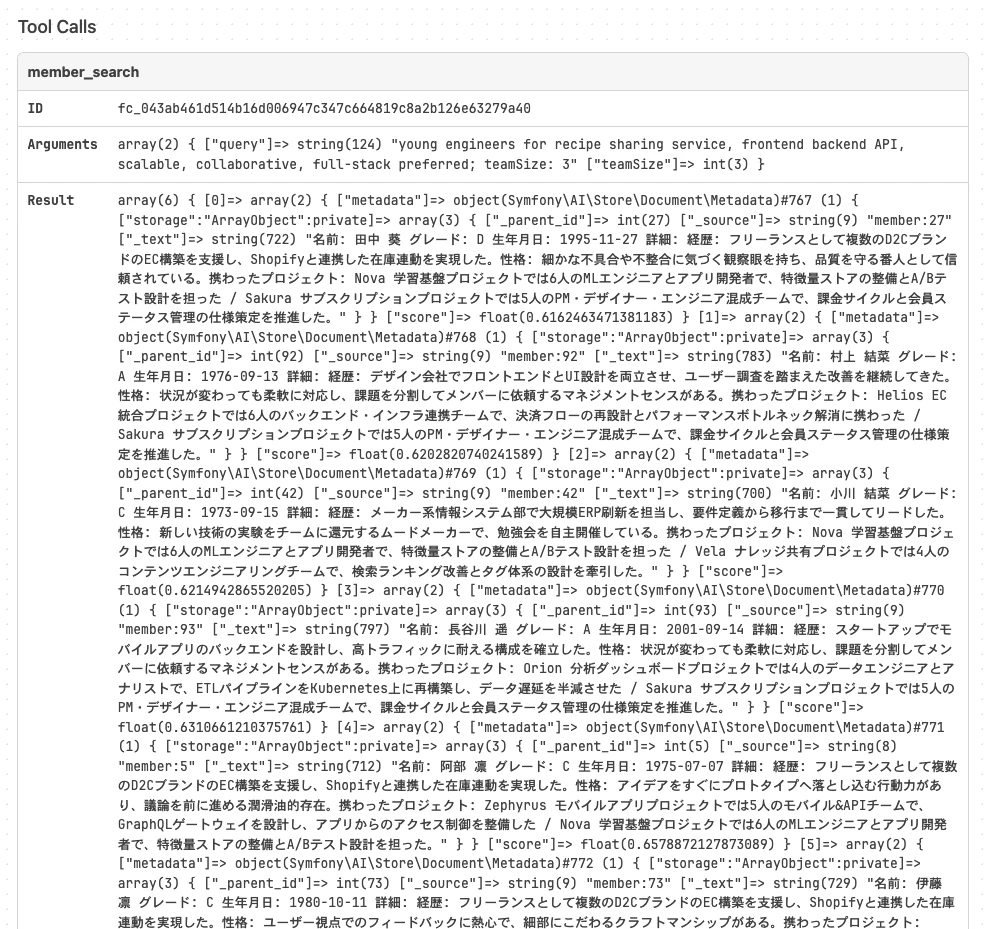
なぜか名前が変わってました。。
実際に使う時はDBからメンバーを再取得した方がよさそうですね。