
内容
運用フェーズでは、ディスク容量が不足した際にディスクを拡張したり、新規に追加したりするケースがあると思います。また、IaCでリソースを管理している場合も多いかと思います。IaCでリソースの変更時には、意図せずリソースが置き換わってしまう可能性があるため注意が必要です。
CFnを使用したディスク追加、変更時の挙動を確認していきます。まず、以下のようなコードでEC2インスタンスを作成します。
AWSTemplateFormatVersion: '2010-09-09'

Resources:
  TestEc2:
    Type: AWS::EC2::Instance
    Properties:
      ImageId: ami-xxxxxxxxxxxx
      InstanceType: t3.micro
      SecurityGroupIds: sg-xxxxxxxxxxxxx
      SubnetId: subnet-xxxxxxxxxxxx
      BlockDeviceMappings:
        - DeviceName: /dev/sda1
          Ebs: {VolumeSize: 30, VolumeType: gp3, DeleteOnTermination: true}
#        - DeviceName: xvdb
#          Ebs: {VolumeSize: 10, VolumeType: gp3, DeleteOnTermination: true}
      Tags:
        - Key: Name
          Value: 'test-ec2'
ディスクの追加
続いて、上記のコメントアウトを外してスタックを更新します。
新しいディスク(xvdb)が作成され、EC2インスタンスにアタッチされる想定です。
        - DeviceName: xvdb
          Ebs: {VolumeSize: 10, VolumeType: gp3, DeleteOnTermination: true}
変更セットを作成すると、置換が「Conditional」と表示されます。
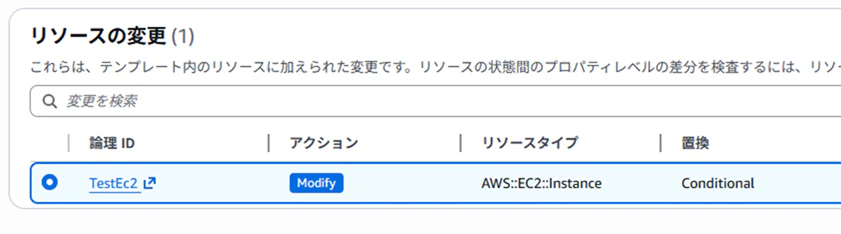
実際に更新を実行すると、新しいインスタンスが起動します。

その後、既存のインスタンスはシャットダウンされ、終了状態となります。

このように、BlockDeviceMappingsプロパティ内でディスクを追加すると、インスタンスの置換が発生します。
ディスクのサイズ変更
次に、既存ディスクのサイズを30GB→40GBに変更する場合です。
        - DeviceName: /dev/sda1
          Ebs: {VolumeSize: 40, VolumeType: gp3, DeleteOnTermination: true}
この場合も同様に、インスタンスの置換が発生します。
ディスクを別リソースとして定義して追加
次に、AWS::EC2::VolumeとAWS::EC2::VolumeAttachmentを使用して、ディスクを別リソースとして定義し、EC2インスタンスにアタッチします。
AWSTemplateFormatVersion: '2010-09-09'

Resources:
  TestEc2:
    Type: AWS::EC2::Instance
    Properties:
      ImageId: ami-xxxxxxxxxxxx
      InstanceType: t3.micro
      SecurityGroupIds: sg-xxxxxxxxxxxxx
      SubnetId: subnet-xxxxxxxxxxxx
      BlockDeviceMappings:
        - DeviceName: /dev/sda1
          Ebs: {VolumeSize: 30, VolumeType: gp3, DeleteOnTermination: true}
      Tags:
        - Key: Name
          Value: 'test-ec2'

  AdditionalVolume:
    Type: AWS::EC2::Volume
    Properties:
      AvailabilityZone: !GetAtt TestEc2.AvailabilityZone
      Size: 10
      VolumeType: gp3
      Tags:
        - Key: Name
          Value: 'test-ec2-additional'

  AdditionalVolumeAttachment:
    Type: AWS::EC2::VolumeAttachment
    Properties:
      Device: /dev/xvdb
      InstanceId: !Ref TestEc2
      VolumeId: !Ref AdditionalVolume
この場合、変更セットではリソースの追加として扱われ、EC2インスタンスの置換は発生しません。
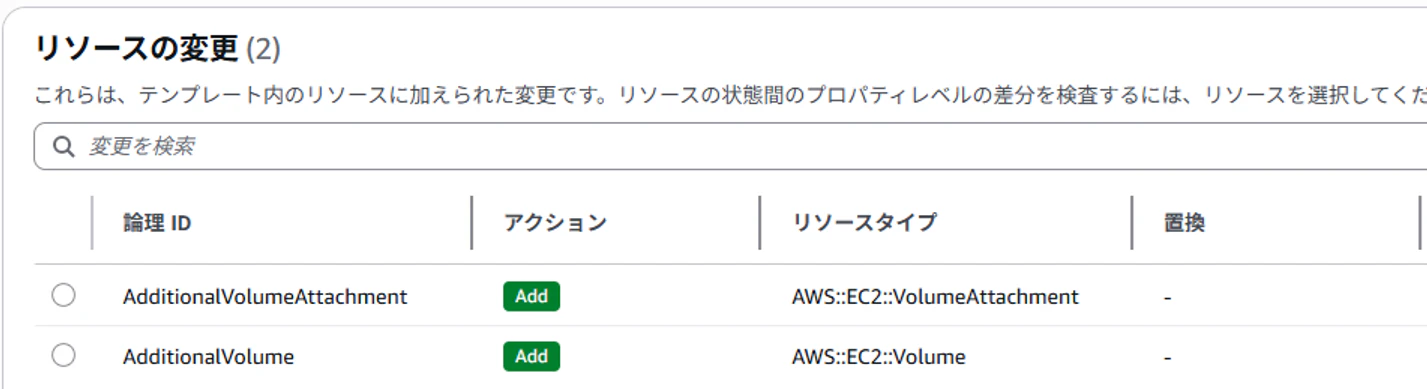
実際に、10GBのディスクが追加されていることを確認できます。

別リソースとして定義したディスクのサイズ変更
次に、追加したディスクのサイズを10GBから20GBへ変更します。
  AdditionalVolume:
    Type: AWS::EC2::Volume
    Properties:
      AvailabilityZone: !GetAtt TestEc2.AvailabilityZone
      Size: 20
      VolumeType: gp3
      Tags:
        - Key: Name
          Value: 'test-ec2-additional'
この場合も「Modify」となり、置換は発生しません。
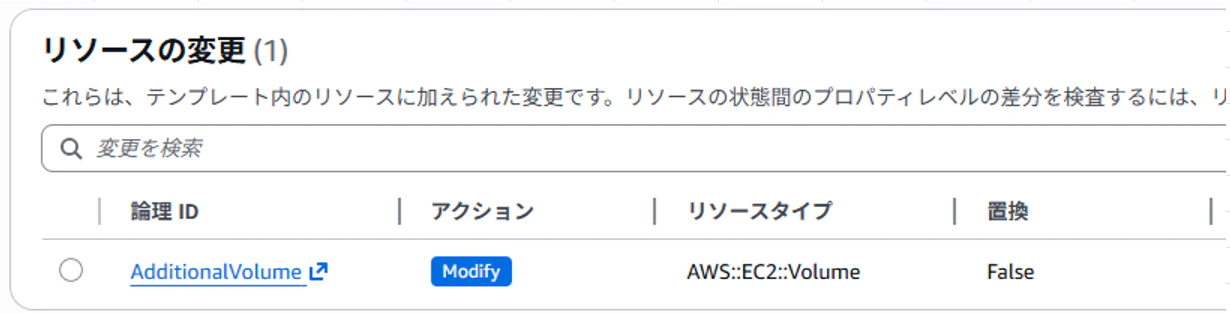
ディスクサイズが20GBに変更されていることを確認できます。
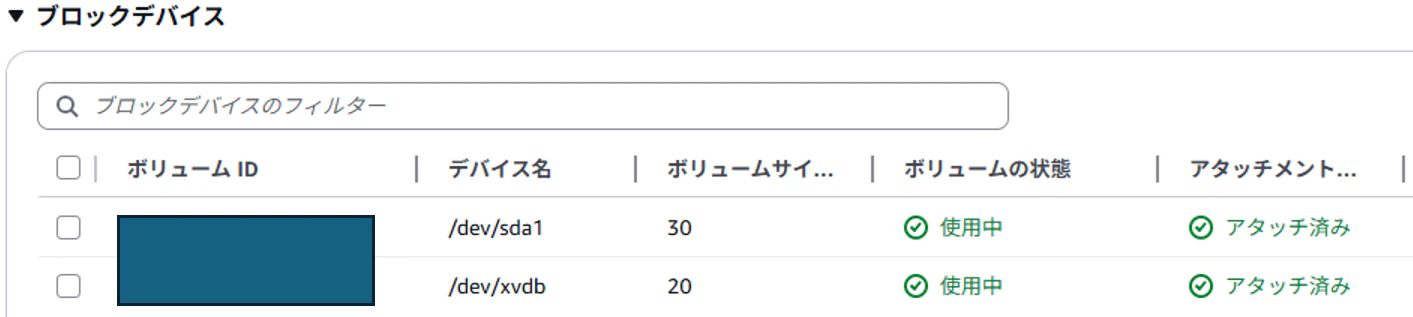
まとめ
IaCでリソースを更新する際は、変更セットの内容を必ず確認し、意図しないリソースの置換が発生しないよう注意しましょう。