
はじめに
世の中にはAnsibleというツールがあります。
これは事前に定義したファイル(プレイブック)に基づいて、冪等性を担保しつついろいろな機器の設定・構成管理が自動で行えるものです。
Linuxサーバ、Windowsサーバ、ネットワーク機器あたりがよくある管理対象だと思います。
普段の仕事では工場のIoT的なことをしていて、工場内に大量にラズパイを設置してデータ計量をしています。また、設置したラズパイはExcel帳票で管理し、Ansibleでデータ計量プログラムの一括配信などをしています。
Ansibleを導入したことで楽になったのは間違いないですが、以下の問題がありました。
- Excel帳票とAnsibleのインベントリの2重管理が必要
- 設置後に初期設定用プレイブックの適用が必要
ということで解決策を検討したところ、
- Ansibleのインベントリを使ってWeb帳票化すれば2重管理がなくなるのでは?
- Web帳票用のAPIからプレイブックの適用操作を呼び出せるのでは?
と思ったので、検証のために自動化Ansibleが実行できるWebAPIを作成してみました。
構成図
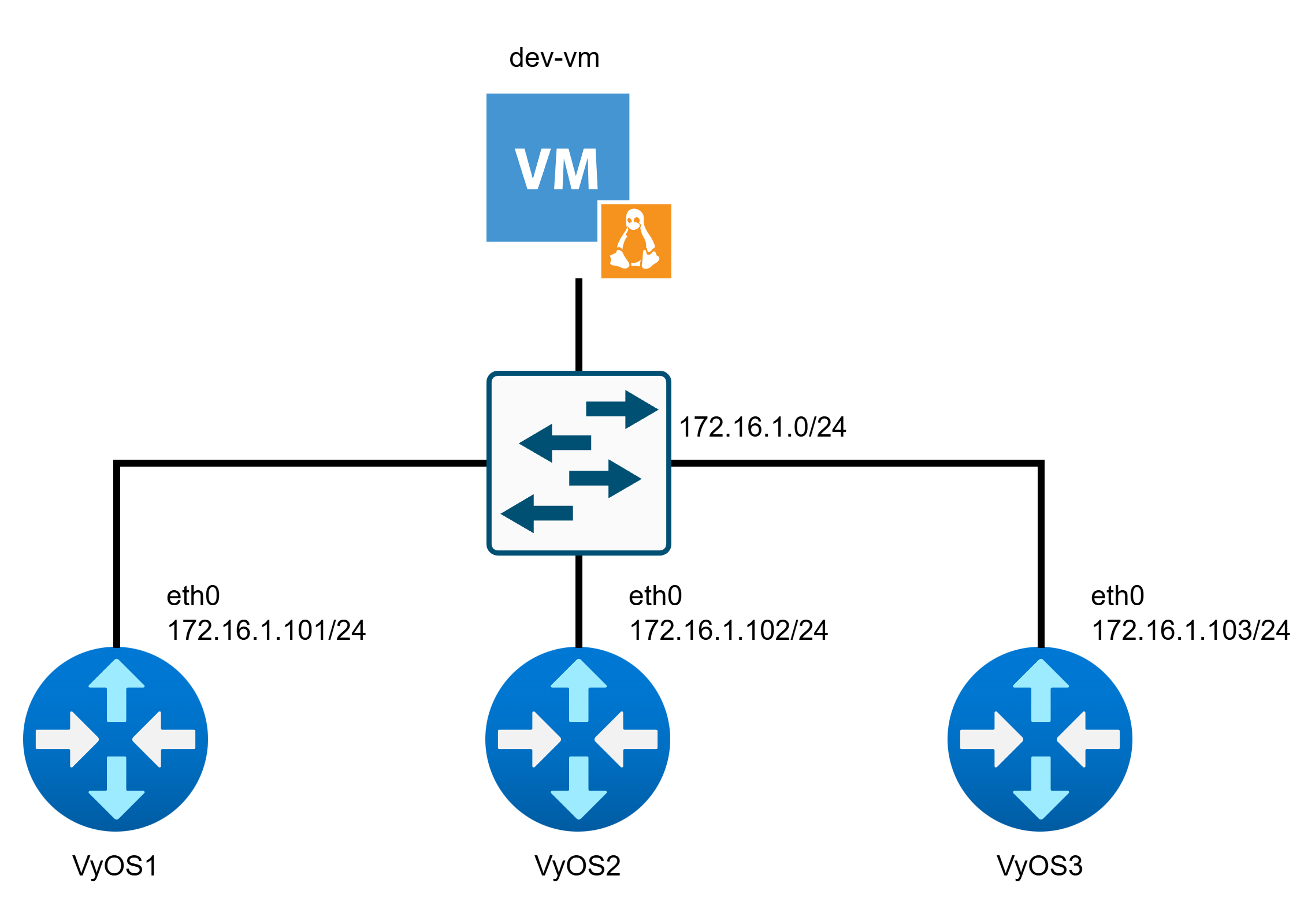
dev-vmがAPIサーバとなり、VyOS1~3は管理対象のホストとします。
※管理対象がルータなのは私の趣味です
リポジトリ
環境
開発機: Ubuntu 24.04 LTS (Python3.12)
管理対象ノード: VyOS 2025.12.20-0020-rolling
フレームワーク等: Ansible(v2.20.1), FastAPI(v0.126.0)
機能検討
簡単にできそうだったので、PUTメソッドで設定投入を行うエンドポイント
/config/banner
/config/ospf
の2つを作成します。
入出力フォーマット検討
/config/bannerについては以下の形の入力を想定しています。
※pre_login, post_loginどちらかがあればOK。hostnameの欠損は不可
{
    "hostname": [設定適用機器名(インベントリ登録名)],
    "pre_login": [ログイン前バナー],
    "post_login": [ログイン後バナー]
}
/config/ospfは以下の形です。
※すべてのフィールドが必須
{
    "hostname": [設定適用機器名(インベントリ登録名)],
    "area_id": [エリア番号],
    "network": [適用対象NW(CIDR形式)]
}
事前準備
uv init nw_mgmt_api  # uvでプロジェクト作成
cd nw_mgmt_api
uv add ansible fastapi[standard]  # Ansible, FastAPIインストール
uv add --dev pytest pytest-cov pytest-mock ruff  # 開発用ライブラリインストール
rm main.py  # いい感じにディレクトリ構成を変更
mkdir src/
mkdir tests/
echo "# NW Management API" >> README.md  # README.md作成

# 動作確認用ルートエンドポイント作成
cat << EOF >> src/main.py
from fastapi import FastAPI

app = FastAPI()

@app.get("/")
async def root():
    return {"message": "hello world!"}

EOF

# FastAPIを起動してブラウザでアクセス
uvicorn src.main:app --reload
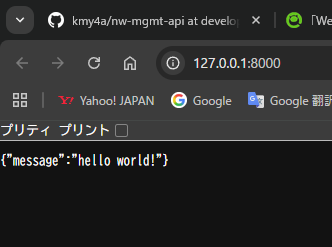
ここまでやって、ブラウザでhttp://localhost:8000にアクセスして以下のようになればOK
VyOSのコンフィグ作成
コンフィグ全体を置いておきます。(途中で取ったので変なのが混ざってますが)
実際の変更点としては、管理用IFのIPアドレス設定、SSH有効化くらいです。
VyOS1
interfaces {
    ethernet eth0 {
        address 172.16.1.101/24
        hw-id bc:24:11:d4:20:1e
        offload {
            gro
            gso
            sg
            tso
        }
        vrf MgmtVrf
    }
    ethernet eth1 {
        address 10.1.1.1/24
        hw-id bc:24:11:91:90:68
    }
    ethernet eth2 {
        address 10.2.2.1/24
        hw-id bc:24:11:d5:11:ab
    }
    loopback lo {
    }
}
protocols {
    static {
        route 0.0.0.0/0 {
            next-hop 172.16.1.254 {
                vrf MgmtVrf
            }
        }
    }
}
service {
    ntp {
        allow-client {
            address 127.0.0.0/8
            address 169.254.0.0/16
            address 10.0.0.0/8
            address 172.16.0.0/12
            address 192.168.0.0/16
            address ::1/128
            address fe80::/10
            address fc00::/7
        }
        server time1.vyos.net {
        }
        server time2.vyos.net {
        }
        server time3.vyos.net {
        }
    }
    ssh {
        vrf MgmtVrf
    }
}
system {
    config-management {
        commit-revisions 100
    }
    console {
        device ttyS0 {
            speed 115200
        }
    }
    host-name RT1
    login {
        banner {
            post-login a
            pre-login a
        }
        operator-group default {
            command-policy {
                allow "*"
            }
        }
        user vyos {
            authentication {
                encrypted-password $6$rounds=656000$QLZx93/iioPT7E4x$TFeYImbMHkz7hImVCjHgLmtSnh0s9Nb1nl0Map4WoTOCcprOTRSEjLheuJCAUR0yITfiFDW2QY7eebNFl6sSx/
                plaintext-password ""
            }
        }
    }
    name-server 192.168.1.253
    option {
        reboot-on-upgrade-failure 5
    }
    syslog {
        local {
            facility all {
                level info
            }
            facility local7 {
                level debug
            }
        }
    }
}
vrf {
    name MgmtVrf {
        table 100
    }
}
VyOS2
interfaces {
    ethernet eth0 {
        address 172.16.1.102/24
        hw-id bc:24:11:59:e5:b2
        offload {
            gro
            gso
            sg
            tso
        }
        vrf MgmtVrf
    }
    ethernet eth1 {
        address 10.1.1.2/24
        hw-id bc:24:11:cc:5f:79
        offload {
            gro
            gso
            sg
            tso
        }
    }
    ethernet eth2 {
        address 10.3.3.1/24
        hw-id bc:24:11:5b:ad:72
        offload {
            gro
            gso
            sg
            tso
        }
    }
    loopback lo {
    }
}
protocols {
    static {
        route 0.0.0.0/0 {
            next-hop 172.16.1.254 {
                vrf MgmtVrf
            }
        }
    }
}
service {
    ntp {
        allow-client {
            address 127.0.0.0/8
            address 169.254.0.0/16
            address 10.0.0.0/8
            address 172.16.0.0/12
            address 192.168.0.0/16
            address ::1/128
            address fe80::/10
            address fc00::/7
        }
        server time1.vyos.net {
        }
        server time2.vyos.net {
        }
        server time3.vyos.net {
        }
    }
    ssh {
        vrf MgmtVrf
    }
}
system {
    config-management {
        commit-revisions 100
    }
    console {
        device ttyS0 {
            speed 115200
        }
    }
    host-name RT2
    login {
        banner {
            post-login a
            pre-login a
        }
        operator-group default {
            command-policy {
                allow "*"
            }
        }
        user vyos {
            authentication {
                encrypted-password $6$rounds=656000$0s.B5d2Ieki95wHU$6py.GpDqnZKbiyWtNdKw441eGrCmbXn3RSMOzACFQX6ZCxynvxaqSNscayT5fyybJeycHYMFVMWzZ5CRnTcMx/
                plaintext-password ""
            }
        }
    }
    name-server 192.168.1.253
    option {
        reboot-on-upgrade-failure 5
    }
    syslog {
        local {
            facility all {
                level info
            }
            facility local7 {
                level debug
            }
        }
    }
}
vrf {
    name MgmtVrf {
        table 100
    }
}
VyOS3
interfaces {
    ethernet eth0 {
        address 172.16.1.103/24
        hw-id bc:24:11:ee:a3:8e
        offload {
            gro
            gso
            sg
            tso
        }
        vrf MgmtVrf
    }
    ethernet eth1 {
        address 10.2.2.2/24
        hw-id bc:24:11:0f:8b:36
        offload {
            gro
            gso
            sg
            tso
        }
    }
    ethernet eth2 {
        address 10.3.3.2/24
        hw-id bc:24:11:dc:a7:38
        offload {
            gro
            gso
            sg
            tso
        }
    }
    loopback lo {
    }
}
protocols {
    static {
        route 0.0.0.0/0 {
            next-hop 172.16.1.254 {
                vrf MgmtVrf
            }
        }
    }
}
service {
    ntp {
        allow-client {
            address 127.0.0.0/8
            address 169.254.0.0/16
            address 10.0.0.0/8
            address 172.16.0.0/12
            address 192.168.0.0/16
            address ::1/128
            address fe80::/10
            address fc00::/7
        }
        server time1.vyos.net {
        }
        server time2.vyos.net {
        }
        server time3.vyos.net {
        }
    }
    ssh {
        vrf MgmtVrf
    }
}
system {
    config-management {
        commit-revisions 100
    }
    console {
        device ttyS0 {
            speed 115200
        }
    }
    host-name RT3
    login {
        banner {
            post-login a
            pre-login a
        }
        operator-group default {
            command-policy {
                allow "*"
            }
        }
        user vyos {
            authentication {
                encrypted-password $6$rounds=656000$60bTsyt5kXhqxP8P$/NvswAlqbhGsUwqXlBpjFiaA1ukERO5JnRXc7BsLKnxodHPg9OxBilaLM8zwSexIDs1GcwGfe.kFuIFHF0DUD1
                plaintext-password ""
            }
        }
    }
    name-server 192.168.1.253
    option {
        reboot-on-upgrade-failure 5
    }
    syslog {
        local {
            facility all {
                level info
            }
            facility local7 {
                level debug
            }
        }
    }
}
vrf {
    name MgmtVrf {
        table 100
    }
}
Ansibleセットアップ
今回は./src/ansible/をansibleルートディレクトリとします。
ansible.cfgを作成
[defaults]
host_key_checking = False
inventory = ./inventory.yml
deprecation_warnings = False
vault_password_file = ./.vault_secret.txt
インベントリファイルを作成
インベントリには管理IPのみ設定し、ホスト固有の変数はhost_varsに定義します。
---
all:
  children:
    routers:
      hosts:
        VyOS1:
          ansible_host: 172.16.1.101
        VyOS2:
          ansible_host: 172.16.1.102
        VyOS3:
          ansible_host: 172.16.1.103
変数定義
グループ全体の変数を定義
group_varsではグループ全体に適用される変数を定義します。
今回はrouters全体に適用される変数としてansible_connection, ansible_network_osを定義します。
---
ansible_connection: network_cli
ansible_network_os: vyos
ホスト個別の変数を定義
host_vars配下に各ホスト個別の変数を定義します。
---
hostname: RT1
ansible_user: vyos
ansible_password: !vault |
  $ANSIBLE_VAULT;1.1;AES256
  39313639646663623837623832336664316538663462323733313432333435633066623661343238
  3336613431613366633663336261386564646636666233640a323333653061356435373130663636
  37383661626365656564646634333139653734393533383431316266666235643865313630393432
  3031356239623739620a613636366535313265333563633338623866326534326435663731376432
  3535
---
hostname: RT2
ansible_user: vyos
ansible_password: !vault |
  $ANSIBLE_VAULT;1.1;AES256
  38653330303831643439613935383765653961323135353235393234393266376461303034393932
  6365636664333365336266376435393437356439373131340a316164613363633633386239666332
  65643332373362383439376531303035626264383039363939386131633531363165306137616434
  6234376633313732640a303035626131363466626561373165363833316438333033316132313132
  3737
---
hostname: RT3
ansible_user: vyos
ansible_password: !vault |
  $ANSIBLE_VAULT;1.1;AES256
  66623866356630653536613862643262373062306664336434343734663534646530386337633237
  3739336439316433303438313732306639613731383738360a366333373266626638393036626437
  63376164316266643264666436616263333561323766393631383233333961663363346665616530
  6434336666313833390a386638393764356363316133333133616532333332363338633161643432
  3161
※ ansible_passwordは ansible-vault encrypt_string [password] で暗号化済みの文字列を使用
プレイブック作成
ここが今回のキモで、以下のことを意識して作っています
- プレイブックを部品として扱えるようにする
- プレイブック内部にロジックを持たない(ロジックはPythonが持つ)
---
- hosts: all
  gather_facts: false
  tasks:
    - name: configure ospf network settings
      vyos.vyos.vyos_ospfv2:
        config:
          areas:
            - area_id: "{{ area_id }}"
              area_type:
                normal: true
              network:
                - address: "{{ network }}"
        state: merged
      notify: save config

  handlers:
    - name: save config
      vyos.vyos.vyos_config:
        save: true
---
- hosts: all
  gather_facts: false
  tasks:
    - name: set pre-login banner
      vyos.vyos.vyos_banner:
        banner: pre-login
        text: "{{ pre_login }}"
      notify: save config

  handlers:
    - name: save config
      vyos.vyos.vyos_config:
        save: true
---
- hosts: all
  gather_facts: false
  tasks:
    - name: set post-login banner
      vyos.vyos.vyos_banner:
        banner: post-login
        text: "{{ post_login }}"
      notify: save config

  handlers:
    - name: save config
      vyos.vyos.vyos_config:
        save: true
ソースコード作成
Pythonのソースコードを作っていきます
main.py
from fastapi import FastAPI
from src.routers import config


app = FastAPI(
    title="Network Automation API",
    description="API for management network configurations using Ansible",
    version="1.0.0",
)
app.include_router(config.router)


@app.get("/")
async def root():
    return {"message": "hello world!"}


if __name__ == "__main__":  # pragma: no cover
    import uvicorn
    uvicorn.run(app)
ルータ作成
ネットワーク機器としてのルータを相手にしてる環境だと変な感じがしますね...
今回は/config/banner, /config/ospfの2つだけ作ります。
それぞれバナー更新、OSPF設定追加の機能を持っています。
また、ルータでビジネスロジックは持たないようにしてます。
from fastapi import APIRouter, status, HTTPException
from src.schemas.banner import BannerUpdate
from src.schemas.ospf import OspfUpdate
from src.core.banner import BannerUpdateService
from src.core.ospf import OspfUpdateService


router = APIRouter(
    prefix="/config",
    tags=["config"],
)


@router.put("/banner",summary="Update Login Banner")
def update_login_banner(banner: BannerUpdate):
    """
    # 概要
    バナーを更新するエンドポイント

    ## パラメータ
    **banner** (BannerUpdate): 更新するバナーの内容
    """
    try:
        BannerUpdateService.update(banner)
    except (RuntimeError, ValueError):
        raise HTTPException(
            status_code=status.HTTP_400_BAD_REQUEST,
            detail="Invalid request data"
        )
    except Exception:
        raise HTTPException(
            status_code=status.HTTP_500_INTERNAL_SERVER_ERROR,
            detail="Failed to update banner by unexpected error"
        )
    return {"message": "operation succeeded"}


@router.put("/ospf", summary="Update OSPF Configuration")
def update_ospf_config(ospf: OspfUpdate):
    """
    # 概要
    OSPF設定を更新するエンドポイント

    ## パラメータ
    **ospf** (OspfUpdate): 更新するOSPFの内容
    """
    try:
        OspfUpdateService.update(ospf)
    except RuntimeError:
        raise HTTPException(
            status_code=status.HTTP_400_BAD_REQUEST,
            detail="Invalid request data"
        )
    except Exception:
        raise HTTPException(
            status_code=status.HTTP_500_INTERNAL_SERVER_ERROR,
            detail="Failed to update OSPF configuration by unexpected error"
        )
    return {"message": "operation succeeded"}
スキーマ作成
FastAPIが参照するPydanticスキーマを定義します。
from pydantic import BaseModel, Field
from typing import Annotated


class UpdateBase(BaseModel):
    hostname: Annotated[str, Field(min_length=1)]
from .common import UpdateBase
from pydantic import Field
from typing import Annotated


class BannerUpdate(UpdateBase):
    pre_login: Annotated[str | None, Field(
            min_length=1,
            title="Pre Login Banner",
            description="Banner displayed before user login")
        ] = None
    post_login: Annotated[str | None, Field(
            min_length=1,
            title="Post Login Banner",
            description="Banner displayed after user login")
        ] = None
from .common import UpdateBase
from pydantic import Field
from ipaddress import IPv4Network
from typing import Annotated


class OspfUpdate(UpdateBase):
    area_id: Annotated[int, Field(
            ge=0,
            le=4294967295,
            title="OSPF Area ID",
            description="The OSPF area identifier"
        )
    ]
    network: Annotated[IPv4Network, Field(
            title="OSPF Network",
            description="The OSPF network identifier"
        )
    ]
ロジック作成
ロジックを実装します。本来プレイブックで定義するような適用対象ホスト決定であったり、変数のバリデーションはこの層で行います。
from src.infra.ansible_runner import run_ansible_playbook
from src.schemas.banner import BannerUpdate
from typing import ClassVar


class BannerUpdateService:
    # ログイン前バナー用プレイブック
    PRE_PLAYBOOK_NAME: ClassVar[str] = "pre_login_banner.yml"

    # ログイン後バナー用プレイブック
    POST_PLAYBOOK_NAME: ClassVar[str] = "post_login_banner.yml"

    @classmethod
    def update(cls, banner_config: BannerUpdate) -> None:
        """与えられたバナーに従って処理を行う

        Args:
            banner_config (BannerUpdate): POSTデータ
        Raises:
            ValueError: どちらのバナーも None だった場合に送出
        """
        # バナーを検証
        if not cls._validate_banner(banner_config):
            raise ValueError("Invalid banner configuration")

        # 辞書に変換し、BannerUpdate から不要な hostname を削除
        variables = dict(banner_config)
        del variables["hostname"]

        # pre_login が定義済みなら実行
        if banner_config.pre_login:
            run_ansible_playbook(cls.PRE_PLAYBOOK_NAME, banner_config.hostname, variables)

        # post_login が定義済みなら実行
        if banner_config.post_login:
            run_ansible_playbook(cls.POST_PLAYBOOK_NAME, banner_config.hostname, variables)

    @classmethod
    def _validate_banner(cls, banner_config: BannerUpdate) -> bool:
        """pre_login, post_loginどちらかがあることを検証する

        Args:
            banner_config (BannerUpdate): POSTデータ
        Returns:
            out (bool): どちらかが入っていればTrue, どちらもなければFalse
        """
        if not banner_config.pre_login and not banner_config.post_login:
            return False
        return True
from src.infra.ansible_runner import run_ansible_playbook
from src.schemas.ospf import OspfUpdate
from typing import ClassVar


class OspfUpdateService:
    PLAYBOOK_NAME: ClassVar[str] = "ospf.yml"

    @classmethod
    def update(cls, ospf_config: OspfUpdate) -> None:
        """与えられた OSPF データに従って処理を行う

        Args:
            ospf_config (OspfUpdate): POSTデータ
        """
        variables = dict(ospf_config)
        del variables["hostname"]
        run_ansible_playbook(cls.PLAYBOOK_NAME, ospf_config.hostname, variables)
インフラ層作成
コマンドの実行機能を実装します。
from subprocess import Popen, PIPE
import os


def run_ansible_playbook(
        playbook_path: str,
        target_host: str,
        extra_vars: dict[str, str] | None = None
    ) -> bool | None:
    """
    Ansibleのプレイブックを実行する。

    Args:
        playbook_path (str): Ansibleプレイブックの名前。
        target_host (str): 対象ホスト。
        extra_vars (dict[str, str] | None): 追加の変数。空のプレイブックを実行するときはNoneかからの辞書を渡す。
    Raises:
        RuntimeError: Ansibleプレイブックの実行に失敗した場合。
    Returns:
        out (bool | None): 成功した場合はTrue、失敗した場合は例外をスロー。
    """
    # 入力を検証する
    _validate_playbook_path(playbook_path)
    _validate_target_host(target_host)
    _validate_extra_vars(extra_vars)

    # コマンド組み立て
    command = ["ansible-playbook", os.path.join("playbooks", playbook_path), "-l", target_host]

    # 追加の変数(extra_vars)を組み立てる
    if extra_vars:
        for key, value in extra_vars.items():
            command.extend(["-e", f"{key}='{value}'"])

    # Ansibleプレイブックを実行する
    process = Popen(command, stdout=PIPE, stderr=PIPE, text=True, cwd=os.path.join(os.getcwd(), "src", "ansible"))
    _, stderr = process.communicate()

    # 実行結果に従って処理を行う
    if process.returncode != 0:
        raise RuntimeError(f"Ansible playbook failed: {stderr}")
    return True


def _validate_playbook_path(playbook_path: str) -> None:
    """
    プレイブックパスが空でないことを検証する。

    Args:
        playbook_path (str): プレイブックのパス。

    Raises:
        ValueError: プレイブックパスが空の場合。
    """
    if not playbook_path:
        raise ValueError("Playbook path cannot be empty.")


def _validate_target_host(target_host: str) -> None:
    """
    対象ホストが空でないことを検証する。

    Args:
        target_host (str): 対象ホスト。

    Raises:
        ValueError: 対象ホストが空の場合。
    """
    if not target_host:
        raise ValueError("Target host cannot be empty.")


def _validate_extra_vars(extra_vars: dict[str, str] | None) -> None:
    """
    追加変数がNoneまたは辞書であることを検証する。

    Args:
        extra_vars (dict[str, str] | None): 追加の変数。

    Raises:
        ValueError: 追加変数がNoneまたは辞書でない場合。
    """
    if extra_vars is not None and not isinstance(extra_vars, dict):
        raise ValueError("Extra vars must be a dictionary or None.")
機能テスト
以下のコマンドでAPIサーバを起動します
uvicorn src.main:app --reload
http://127.0.0.1:8000にアクセスし、Swaggerからリクエストを送ります。
バナー
記事が長くなったのでバナーのみ確認します。
このリクエストボディで実行しました。
{
  "hostname": "VyOS1",
  "pre_login": "pre-login-banner-test",
  "post_login": "post-login-banner-test"
}
SSH接続をしてみると想定通り変わってますね
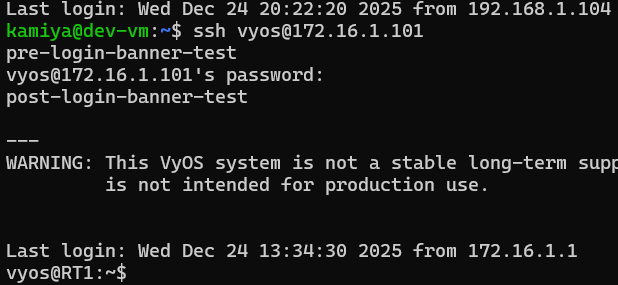
設定もちゃんと入ってます

再起動しても設定が残っていたので、notify/handlerもちゃんと動いているようです。
※OSPFもちゃんと動きました
今後追加したい機能
- API認証
- インベントリ更新エンドポイントの作成
- GET系操作
- プレイブックからJSONみたいな構造化されたデータが取れるのか謎です
さいごに
とりあえず普通に動いてくれたので良かったです。
WebAPI + Ansibleという形にすると、操作のカプセル化、直接機器を触らないことによるセキュリティ向上、WebAPIで自動化しにくい機器を対象にできるといったあたりがメリットかなと思います。
とはいえ今回の構成だとエンドポイントの数だけプレイブックが必要ですし、GET系操作をどうするかという課題もあるのでむずかしいところだなと思います。