
▪️sample02.jsp
<%@ page language="java" contentType="text/html; charset=UTF-8"
	pageEncoding="UTF-8"%>
<!DOCTYPE html>
<html>
<head>
<meta charset="UTF-8">
<title>お問い合わせフォーム</title>
</head>
<body>
	<form action="sample02/Ex1" method="post">
		名前:<br> <input type="text" name="name"><br>
		お問い合わせの種類:<br> <select name="qtype">
			<option value="company">会社について</option>
			<option value="product">製品について</option>
			<option value="support">アフターサポートについて</option>>
		</select> <br> お問い合わせ内容:<br>
		<textarea name="body">
	</textarea>
		<br> <input type="submit" value="登録">
	</form>
</body>
</html>
▪️Ex1.java Servlet
import java.io.IOException;
import javax.servlet.ServletException;
import javax.servlet.annotation.WebServlet;
import javax.servlet.http.HttpServlet;
import javax.servlet.http.HttpServletRequest;
import javax.servlet.http.HttpServletResponse;

@WebServlet("/Ex1")
public class Ex1 extends HttpServlet {
	private static final long serialVersionUID = 1L;

	protected void doPost(HttpServletRequest request, HttpServletResponse response)
			throws ServletException, IOException {
		request.setCharacterEncoding("UTF-8");
		String name = request.getParameter("name");
	}

}
▪️sample02.jsp 実行結果
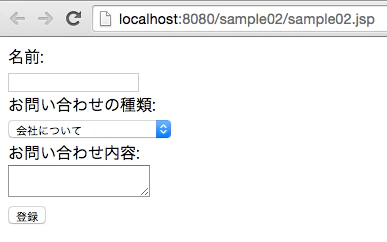
▪️JSPファイルを直接リクエストできないようにする方法
JSPファイルを「WEB-INF」ディレクトリ以下に配置する