
今回はSpire.PDFという無料で使いやすいライブラリを利用して、PDFをPDF/A-1A、2A、 3A、1B、2B及ぼ3Bなどの形式に変換する方法を紹介しましょう。さあ!行きましょう。
下準備
1.E-iceblueの公式サイトからFree Spire.PDF無料版をダウンロードしてください。

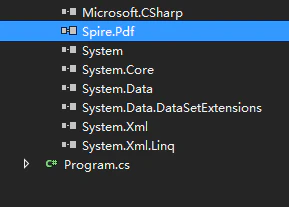
2.Visual Studioを起動して新規プロジェクトを作成してから、インストールされたファイルにあった相応しいSpire. PDF.dllを参照に追加してください。
(Net 4.0を例としたら、デフォルトパスは“Bin→NET4.0→PDF.dll”というようです。)
using System;
using Spire.Pdf.Conversion;
namespace ConvertPdf2PdfA
{
class Program
{
static void Main(string[] args)
{
//エクスポートするパースを指定します。
String inputFile = @"C:\Users\Administrator\Desktop\sample.pdf";
        //保存するパースを指定します。
        String outputFolder = @"C:\Users\Administrator\Desktop\Output\";

        //PdfStandardsConverterオブジェクトを作成します。
        PdfStandardsConverter converter = new PdfStandardsConverter(inputFile);

        //PdfA1Aで保存します。
        converter.ToPdfA1A(outputFolder + "ToPdfA1A.pdf");

        //PdfA1Bで保存します。
        converter.ToPdfA1B(outputFolder + "ToPdfA1B.pdf");

        //PdfA2Aで保存します。
        converter.ToPdfA2A(outputFolder + "ToPdfA2A.pdf");

        //PdfA2Bで保存します。
        converter.ToPdfA2B(outputFolder + "ToPdfA2B.pdf");

        //PdfA3Aで保存します。
        converter.ToPdfA3A(outputFolder + "ToPdfA3A.pdf");

        //PdfA3Bで保存します。
        converter.ToPdfA3B(outputFolder + "ToPdfA3B.pdf");
    }
}
}
<p><strong> </strong></p>
<p><img src="https://cdn-ak.f.st-hatena.com/images/fotolife/l/lendoris/20210707/20210707121942.png" alt="f:id:lendoris:20210707121942p:plain" width="554" height="517" loading="lazy" title="" class="hatena-fotolife" itemprop="image" /></p>
<p><strong> </strong></p>
<p><strong> </strong></p>
<p><strong> </strong></p>
<p><strong> </strong></p>
<p><strong> </strong></p>
<p><strong> </strong></p>