
実際のドキュメント処理の現場では、PDF のページ向きが正しくないという問題は非常によく発生します。たとえば、スキャン時に上下が逆になっているファイルや、複数の PDF を結合した結果、ページの向きがばらばらになるケースなどが挙げられます。
Python を使用すれば、コードによって PDF ページの回転角度を正確に制御でき、現在の回転状態の取得や一括処理にも対応できます。
本記事では、Free Spire.PDF for Python を使用します。以下のコマンドでインストールできます:
pip install spire.pdf
本記事で解説する内容は次のとおりです。
- PDF の特定ページを回転する方法
- ページの現在の回転角度を取得する方法
- 既存の向きを保持したまま増分回転を行う方法
- PDF 内のすべてのページを一括で回転する方法
一、PDF ページ回転の基本的な仕組み
Spire.PDF では、各ページは PdfPageBase オブジェクトとして表され、その Rotation プロパティによってページの回転状態が管理されます。
このプロパティは PdfPageRotateAngle 列挙型で定義されており、内部的には整数値として現在の回転方向を表しています。
| Rotation.value | 実際の角度 |
|---|---|
| 0 | 0°(回転なし) |
| 1 | 90° |
| 2 | 180° |
| 3 | 270° |
以下の点に注意する必要があります。
- PDF ページの回転角度は 360° 以上にはなりません
-
Rotation.valueはintに安全に変換でき、条件分岐などに利用できます - ページの回転は上書き処理であり、角度が自動的に加算されるわけではありません。新しい角度は自分で計算する必要があります
二、指定したページを回転する(基本例)
次の例では、PDF 内の特定ページを回転し、あわせてパラメータの妥当性チェックも行っています。
from spire.pdf.common import *
from spire.pdf import *


def rotate_pdf_page(input_pdf_path, output_pdf_path, page_index, rotation_angle):
    """
    PDF ドキュメント内の指定ページを回転します。

    Args:
        input_pdf_path (str): 入力 PDF のパス
        output_pdf_path (str): 出力 PDF のパス
        page_index (int): ページインデックス(0 から開始)
        rotation_angle (int): 回転角度(90 / 180 / 270)
    """
    document = PdfDocument()
    try:
        document.LoadFromFile(input_pdf_path)

        if page_index < 0 or page_index >= document.Pages.Count:
            raise IndexError("ページインデックスが範囲外です")

        page = document.Pages[page_index]

        if rotation_angle == 90:
            page.Rotation = PdfPageRotateAngle.RotateAngle90
        elif rotation_angle == 180:
            page.Rotation = PdfPageRotateAngle.RotateAngle180
        elif rotation_angle == 270:
            page.Rotation = PdfPageRotateAngle.RotateAngle270
        else:
            raise ValueError("90、180、270 度のみ対応しています")

        document.SaveToFile(output_pdf_path)

    finally:
        document.Close()
この方法は、「1 ページ目を必ず 90° に回転する」といったように、最終的な角度が明確に決まっている場合に適しています。
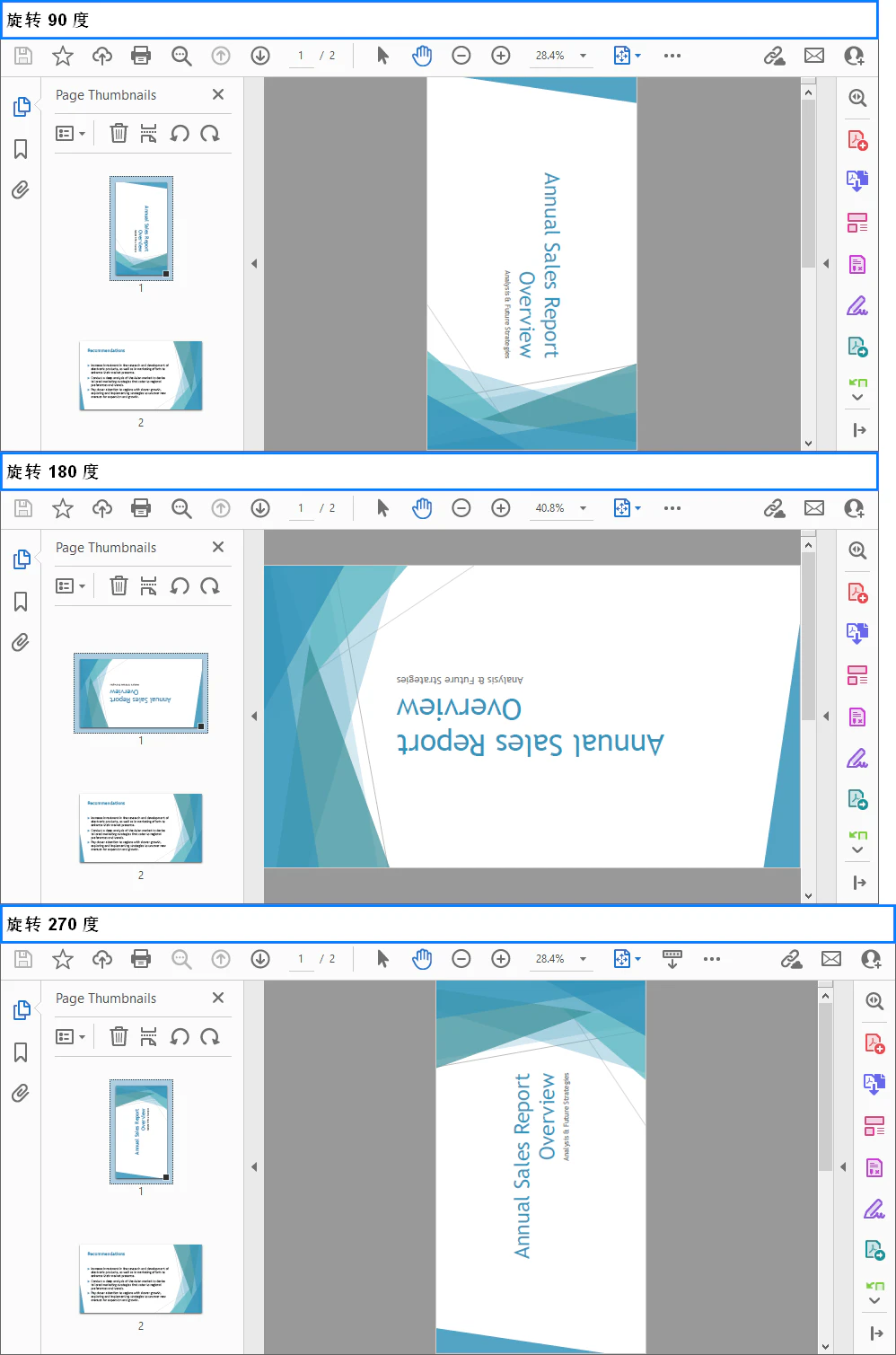
以下は回転後のイメージ例です。
三、PDF ページの現在の回転角度を取得する
実際の処理では、まず現在のページ向きを確認し、その結果に応じて処理を分岐させたいケースが多くあります。
page = document.Pages[0]
current_rotation = page.Rotation.value

print(f"現在のページ回転状態:{current_rotation}")
current_rotation は 0~3 の整数値として返され、以下のように角度へ変換できます。
rotation_map = {
    0: 0,
    1: 90,
    2: 180,
    3: 270
}

print(f"現在の角度は {rotation_map[current_rotation]}° です")
この方法は、次のような用途に適しています。
- スキャン PDF の向きが正しいかどうかの判定
- 現在の角度を考慮した補正回転
- 処理が不要なページの除外
四、既存の角度を維持したまま増分回転する
page.Rotation を直接設定すると、元の回転状態は上書きされます。
現在の角度を基準にしてさらに 90° 回転させたい場合は、次のように処理できます。
current_value = page.Rotation.Value
new_value = (current_value + 1) % 4

rotation_enum_map = {
    0: PdfPageRotateAngle.RotateAngle0,
    1: PdfPageRotateAngle.RotateAngle90,
    2: PdfPageRotateAngle.RotateAngle180,
    3: PdfPageRotateAngle.RotateAngle270,
}

page.Rotation = rotation_enum_map[new_value]
この実装には、次のような利点があります。
- 具体的な角度数値に依存しません
- 270° → 0° の回り込み処理が自動で行われます
- 時計回りに段階的に回転させる業務ロジックに適しています
五、PDF 内のすべてのページを一括で回転する
ドキュメント全体を同じ向きに揃えたい場合は、Pages コレクションを走査します。
def rotate_all_pages(input_pdf_path, output_pdf_path, rotation_angle):
    document = PdfDocument()
    try:
        document.LoadFromFile(input_pdf_path)

        for i in range(document.Pages.Count):
            page = document.Pages[i]
            if rotation_angle == 90:
                page.Rotation = PdfPageRotateAngle.RotateAngle90
            elif rotation_angle == 180:
                page.Rotation = PdfPageRotateAngle.RotateAngle180
            elif rotation_angle == 270:
                page.Rotation = PdfPageRotateAngle.RotateAngle270

        document.SaveToFile(output_pdf_path)
    finally:
        document.Close()
方向が正しくないページのみを回転したい場合は、Rotation.Value を条件として判定することで、不要な変更を避けることができます。
六、よくある注意点と実践的なポイント
-
ページインデックスは 0 から始まります
1 ページ目のインデックスは0です。一括処理では特に注意が必要です。 -
Rotation はページ属性であり、内容の座標は変更されません
回転されるのは表示方向のみで、レイアウト自体が再計算されるわけではありません。 -
PDF の初期角度が必ず 0° とは限りません
多くのスキャン PDF には、最初から回転情報が含まれています。 -
一括処理ではまとめて保存することを推奨します
ループ内でSaveToFileを繰り返し呼び出すと、パフォーマンスが低下します。
まとめ
Spire.PDF for Python を利用すれば、PDF ページの回転は決して難しい処理ではありません。
単純な 1 ページの向き修正から、現在の角度を考慮したインテリジェントな一括処理まで、page.Rotation と Rotation.value を活用することで柔軟に制御できます。
自動化されたドキュメント処理、スキャンファイルの補正、企業向け PDF ワークフローにおいて、こうした機能は非常に重要な基礎要素となります。