
IISにNext.jsやReact Router v7がデプロイできるという事で、TanStack Start v1でも試してみた。
参考サイト
概要
IIS拡張モジュール「HttpPlatformHandler」を使うと、IISからnode.exeを起動してHTTP要求をNodeプロセスに処理させることができる。
NodeプロセスでReact Routerを起動させる設定をすればOK。
HttpPlatformHandler インストール
https://www.iis.net/downloads/microsoft/httpplatformhandler
からダウンロード(httpPlatformHandler_amd64.msiなど)して実行する。
TanStack Start 側の設定
今回はbasedirを / にするので特に設定なし。
以下のコマンドでビルドした。
pnpm build
IISの設定
C:\projects\tss に、上記で作成した.outputフォルダ内のpublicフォルダとserverフォルダとnitro.jsonを配置。logsフォルダを作成した。
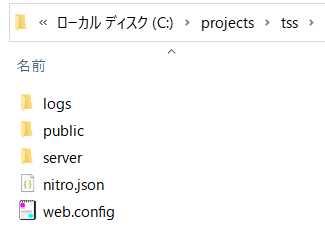
.output\server\node_modules フォルダはコピーするか、C:\projects\tss\server フォルダで npm install して作成しても良い。
pnpm install すると node_module内のハードリンクをIISの実行ユーザでうまく読み込めずエラーとなってしまったため、npm install で node_moduleフォルダを作成した。
また、IISのWebサイトの物理パスを C:\projects\tss に変更した。
web.config
C:\projects\tss フォルダ内にweb.configファイルを作成し、以下の内容とした。
environmentVariable の NODE_ENV に "production" を渡すと、本番ビルドとして起動できる。
他にも.envに記述していたサーバサイド用の環境変数(VITE_始まりでない値)もここに記述すると process.env.~ で読み込める。
この後、IISのサービスを再起動した。
<?xml version="1.0" encoding="UTF-8"?>
<configuration>
    <system.webServer>
        <handlers>
            <add
                name="httpPlatformHandler"
                path="*"
                verb="*"
                modules="httpPlatformHandler"
                resourceType="Unspecified" />
        </handlers>
        <httpPlatform
            processPath="C:\Programs\nodejs\node.exe"
            arguments="C:\projects\tss\server\index.mjs"
            stdoutLogEnabled="true"
            stdoutLogFile="C:\projects\tss\logs\stdout">
            <environmentVariables>
                <environmentVariable name="PORT" value="%HTTP_PLATFORM_PORT%" />
                <environmentVariable name="NODE_ENV" value="production" />
                <environmentVariable name="API_URL" value="http://localhost:8080/api/" />
            </environmentVariables>
        </httpPlatform>
    </system.webServer>
</configuration>
実行確認
ブラウザで、下記にアクセス。
http://localhost/
TanStackの画面が表示されれば成功!