
ライフサイクル
ライフサイクル図 参考:
http://qiita.com/kawachi/items/092bfc281f88e3a6e456
- ライフサイクルメソッドはclass内に直接記述
index.js
import React from 'react'
import {render} from 'react-dom'

class Number extends React.Component {
  constructor(props) {
    super(props);
  }
  componentWillMount(){
    console.log("コンポーネントのマウント前")
  }
  componentDidMount(){
    console.log("コンポーネントのマウント後")
  }
  componentWillReceiveProps(){
    console.log("コンポーネントが受け取るpropsが変化")
  }
  shouldComponentUpdate(){
    console.log("コンポーネント再描画前 trueで再描画 falseで再描画されない")
    return true;
  }
  componentWillUpdate(){
    console.log("コンポーネント再描画前")
  }
  componentDidUpdate(){
    console.log("コンポーネントが再描画された後")
  }
  componentWillUnmount(){
    console.log("コンポーネントがアンマウントされた後")
  }
  render() {
    return (
      <div>コンポーネント</div>
    )
  }
};

render(
    <Number />,
    document.getElementById('root')
  );
index.js
import React from 'react'
import {render} from 'react-dom'

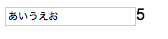
var MyComponent = React.createClass({
    getInitialState:function(){
        return{count:0}
    },
    render:function(){
        return React.DOM.div(
        null,
        React.DOM.input({
            type:'text',
            onChange:this.doChange
        }),
        React.DOM.span( null,this.state.count )
        );
    },
    doChange:function( e ){
        this.setState( {count:e.target.value.length});
    },
    //コンポーネントがマウントされた直後に呼び出される
    componentDidMount:function(){
        console.log( 'マウントされました' );
    },
    //コンポーネントの呼び出し直前に呼び出される
    componentWillUpdate:function( nextProps, nextState ){
        console.log( 'ステート更新:',nextState );
    }
});

render(
    <MyComponent />,
    document.getElementById('root')
  );

サンプル
http://codepen.io/to-r/pen/rjPzmJ
イベント
UI
-
半分は「表示」
-
残り半分は「ユーザーの入力に反応」すること
(ユーザーの入力に応じて、イベントハンドラ記述する)
Reactでイベント処理
-
Reactコンポーネントにイベントハンドラを登録
-
イベントハンドラ内でコンポーネントのstateを変更する
-
stateが変更されたら、コンポーネントが再描画される
-
コンポーネントのrenderメソッド内でthis.stateを参照する
index.js
  import React from 'react'
  import {render} from 'react-dom'

  class MyComponent extends React.Component {
    constructor(props) {
      super(props);
      this.state = {
        myText : null
      };
      this.setMyText = this.setMyText.bind(this);
    }

    setMyText(){
        this.setState({
          myText : this.refs.myText.value
        });
        this.refs.myText.value='';
    }
    render() {
      return (
        <div>
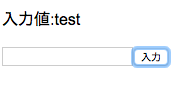
          <p>入力値:{this.state.myText}</p>
          <input type="text" ref="myText"/>
          <input type="button" value="入力" onClick={this.setMyText}/>
        </div>
      )
    }
  };

  render(
    <MyComponent />,
    document.getElementById('root')
  );
- ref属性:入力フィールドの値を参照
- クリック後、setMyTextメソッドが実行。
state.myTextに入力内容が反映され再描画処理。