
はじめに
JSON (JavaScript Object Notation) ってデータフォーマットありますよね?
JSON 代替フォーマットを作る
JSON って、JavaScript から使うには便利ですが、他言語から使うには結局パーサーを書く必要があってそれほど便利じゃありません。なんでかって、それは JSON の文法が JavaScript 由来だからって事に尽きます。
Delphi はコンパイラなので、ObjectPascal の文法に沿ったデータフォーマットを作ったとしても Eval() に食わせるような真似はできませんが、それでも何か楽できる方法はないものかと考えました。
See also:
あるんだな、それが。
Delphi 使いならピンと来たと思うのですが、実は構造化データを読み書きできる機構が Delphi には最初から備わっているのです。そのデータフォーマットとは...フォームファイルです。
例えば、このようなフォームがあったとします。
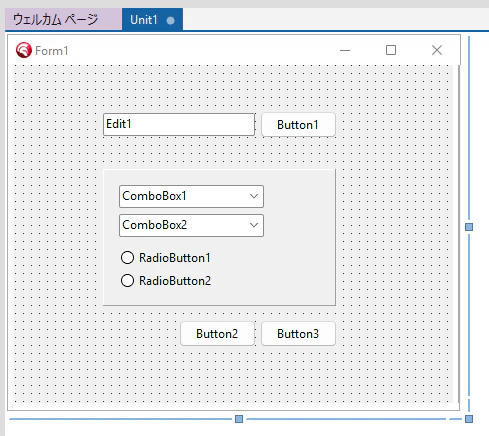
このフォームのフォームファイル (*.dfm) をテキストエディタで開いてみるとこのようになっています 1。
object Form1: TForm1
  Left = 0
  Top = 0
  Caption = 'Form1'
  ClientHeight = 338
  ClientWidth = 438
  Color = clBtnFace
  Font.Charset = DEFAULT_CHARSET
  Font.Color = clWindowText
  Font.Height = -12
  Font.Name = 'Segoe UI'
  Font.Style = []
  TextHeight = 15
  object Panel1: TPanel
    Left = 88
    Top = 104
    Width = 233
    Height = 137
    TabOrder = 0
    object ComboBox1: TComboBox
      Left = 16
      Top = 16
      Width = 145
      Height = 23
      TabOrder = 0
      Text = 'ComboBox1'
      Items.Strings = (
        'AAAAA'
        'BBBBB'
        'CCCCC')
    end
    object ComboBox2: TComboBox
      Left = 16
      Top = 45
      Width = 145
      Height = 23
      TabOrder = 1
      Text = 'ComboBox2'
      Items.Strings = (
        '11111'
        '22222'
        '33333')
    end
    object RadioButton1: TRadioButton
      Left = 16
      Top = 80
      Width = 113
      Height = 17
      Caption = 'RadioButton1'
      TabOrder = 2
    end
    object RadioButton2: TRadioButton
      Left = 16
      Top = 103
      Width = 113
      Height = 17
      Caption = 'RadioButton2'
      TabOrder = 3
    end
  end
  object Edit1: TEdit
    Left = 88
    Top = 48
    Width = 152
    Height = 23
    TabOrder = 1
    Text = 'Edit1'
  end
  object Button1: TButton
    Left = 246
    Top = 47
    Width = 75
    Height = 25
    Caption = 'Button1'
    TabOrder = 2
  end
  object Button2: TButton
    Left = 165
    Top = 256
    Width = 75
    Height = 25
    Caption = 'Button2'
    TabOrder = 3
  end
  object Button3: TButton
    Left = 246
    Top = 256
    Width = 75
    Height = 25
    Caption = 'Button3'
    TabOrder = 4
  end
end
Delphi はこのデータをリソースとして格納し、必要になった時に読み出してフォームを動的作成しています。フォームの読み書きには TReader と TWriiter が使われています。
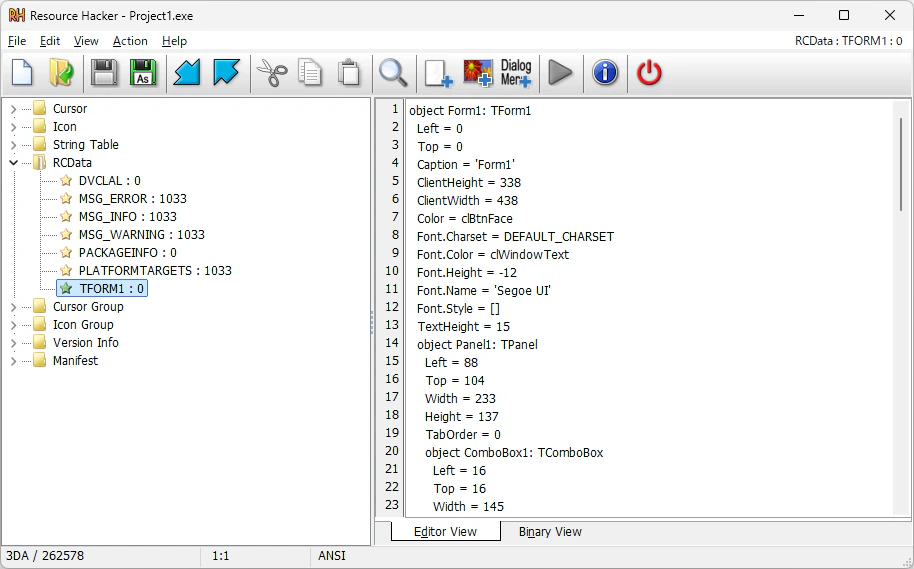
つまり、このフォーム読み書きのためのシリアライズ機構を「もっと汎用的に使ってみようじゃないか?」というのが今回の趣旨となります。
なお、フォームファイルはアプリケーションフレームワークの種類によって拡張子が異なります。
| フォームの種類 | 拡張子 |
|---|---|
| VCL フォーム | *.dfm |
| FireMonkey フォーム | *.fmx |
| CLX フォーム | *.xfm |
| .NET フォーム | *.nfm |
See also:
DFON (Delphi Form Object Notation)
このフォームファイルのフォーマットを汎用データフォーマットに使うものを DFON (Delphi Form Object Notation) と呼ぶ事にします。
DFON を簡単に使うためのユニット
DFON を簡単に扱うためのユニットを作ってみました。枝葉の部分が多いのでリストが少し長くなってしまいましたが、TDFON クラスだけでも充分に使えるかと思います。
unit DFONUtils;

interface

uses
  Classes, SysUtils;

type
  TDFON = class
  public
    class procedure LoadFromFile(const AFileName: string; ARoot: TComponent);
    class procedure LoadFromStream(AStream: TStream; ARoot: TComponent);
    class procedure SaveToFile(const AFileName: string; ARoot: TComponent);
    class procedure SaveToStream(AStream: TStream; ARoot: TComponent);
  end;

  TDFONItem = class(TPersistent)
  private
    FKey: string;
    FValue: string;
  published
    property Key: string read FKey write FKey;
    property Value: string read FValue write FValue;
  end;

  TDFONCollectionItem = class(TCollectionItem)
  private
    FKey: string;
    FValue: string;
  published
    property Key: string read FKey write FKey;
    property Value: string read FValue write FValue;
  end;

  TDFONCollection = class(TOwnedCollection)
  private
    function GetValue(const AKey: string): string;
    procedure SetValue(const AKey, AValue: string);
  public
    constructor Create(AOwner: TPersistent);
    function ContainsKey(const AKey: string): Boolean;
    procedure Delete(const AKey: string);
    property Values[const Key: string]: string read GetValue write SetValue;
  end;

implementation

{ TDFON }

class procedure TDFON.LoadFromFile(const AFileName: string; ARoot: TComponent);
var
  Bin, Txt: TMemoryStream;
  Reader: TReader;
begin
  Txt := TMemoryStream.Create;
  Bin := TMemoryStream.Create;
  try
    Txt.LoadFromFile(AFileName);
    Txt.Position := 0;
    ObjectTextToBinary(Txt, Bin);
    Bin.Position := 0;
    Reader := TReader.Create(Bin, 4096);
    try
      Reader.ReadRootComponent(ARoot);
    finally
      Reader.Free;
    end;
  finally
    Bin.Free;
    Txt.Free;
  end;
end;

class procedure TDFON.SaveToFile(const AFileName: string; ARoot: TComponent);
var
  Bin, Txt: TMemoryStream;
  Writer: TWriter;
begin
  Bin := TMemoryStream.Create;
  Txt := TMemoryStream.Create;
  try
    Writer := TWriter.Create(Bin, 4096);
    try
      Writer.WriteRootComponent(ARoot);
    finally
      Writer.Free;
    end;
    Bin.Position := 0;
    ObjectBinaryToText(Bin, Txt);
    Txt.SaveToFile(AFileName);
  finally
    Txt.Free;
    Bin.Free;
  end;
end;

class procedure TDFON.LoadFromStream(AStream: TStream; ARoot: TComponent);
var
  Bin, Txt: TMemoryStream;
  Reader: TReader;
begin
  Txt := TMemoryStream.Create;
  Bin := TMemoryStream.Create;
  try
    Txt.CopyFrom(AStream, AStream.Size);
    Txt.Position := 0;
    ObjectTextToBinary(Txt, Bin);
    Bin.Position := 0;
    Reader := TReader.Create(Bin, 4096);
    try
      Reader.ReadRootComponent(ARoot);
    finally
      Reader.Free;
    end;
  finally
    Bin.Free;
    Txt.Free;
  end;
end;

class procedure TDFON.SaveToStream(AStream: TStream; ARoot: TComponent);
var
  Bin, Txt: TMemoryStream;
  Writer: TWriter;
begin
  Bin := TMemoryStream.Create;
  Txt := TMemoryStream.Create;
  try
    Writer := TWriter.Create(Bin, 4096);
    try
      Writer.WriteRootComponent(ARoot);
    finally
      Writer.Free;
    end;
    Bin.Position := 0;
    ObjectBinaryToText(Bin, Txt);
    Txt.Position := 0;
    AStream.CopyFrom(Txt, Txt.Size);
  finally
    Txt.Free;
    Bin.Free;
  end;
end;

{ TDFONCollection }

constructor TDFONCollection.Create(AOwner: TPersistent);
begin
  inherited Create(AOwner, TDFONCollectionItem);
end;

function TDFONCollection.ContainsKey(const AKey: string): Boolean;
var
  i: Integer;
begin
  for i:=0 to Count-1 do
    if SameText(TDFONCollectionItem(Items[i]).Key, AKey) then
    begin
      Result := True;
      Exit;
    end;
  Result := False;
end;

procedure TDFONCollection.Delete(const AKey: string);
var
  i: Integer;
begin
  for i:=0 to Count-1 do
    if SameText(TDFONCollectionItem(Items[i]).Key, AKey) then
    begin
      Items[i].Free;
      Exit;
    end;
end;

function TDFONCollection.GetValue(const AKey: string): string;
var
  i: Integer;
  Item: TDFONCollectionItem;
begin
  for i:=0 to Self.Count-1 do
  begin
    Item := TDFONCollectionItem(Self.Items[i]);
    if SameText(Item.Key, AKey) then
    begin
      Result := Item.Value;
      Exit;
    end;
  end;
  Result := '';
end;

procedure TDFONCollection.SetValue(const AKey, AValue: string);
var
  i: Integer;
  Item: TDFONCollectionItem;
begin
  for i:=0 to Self.Count-1 do
  begin
    Item := TDFONCollectionItem(Self.Items[i]);
    if SameText(Item.Key, AKey) then
    begin
      Item.Value := AValue;
      Exit;
    end;
  end;
  Item := Self.Add as TDFONCollectionItem;
  Item.Key := AKey;
  Item.Value := AValue;
end;

end.
インライン変数宣言などを使っていないので、そこそこ古い Delphi でも動作するハズです 2。
使い方
単純な使い方は次のようになります。
フォームには 1 つのエディットボックスと 3 つのボタンを配置してあります。
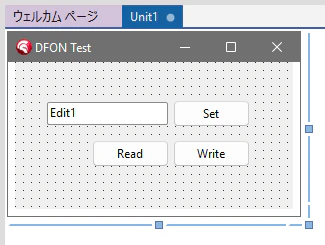
| コントロール | 説明 |
|---|---|
| Edit1 | 値の表示 |
| btnSetValue | Edit1 の値を Config.Value に設定 |
| btnRead |
Config.dfon から値を読み込み、Edit1 に表示 |
| btnWrite | Config.Value を Config.dfon へ書き込み |
unit Unit1;

interface

uses
  Winapi.Windows, Winapi.Messages, System.SysUtils, System.Variants,
  System.Classes, Vcl.Graphics, Vcl.Controls, Vcl.Forms, Vcl.Dialogs,
  Vcl.StdCtrls, System.IOUtils, DFONUtils;

type
  TConfig = class(TComponent)
  private
    FValue: Integer;
  published
    property Value: Integer read FValue write FValue;
  end;

  TForm1 = class(TForm)
    btnRead: TButton;
    btnWrite: TButton;
    btnSetValue: TButton;
    Edit1: TEdit;
    procedure btnSetValueClick(Sender: TObject);
    procedure btnWriteClick(Sender: TObject);
    procedure btnReadClick(Sender: TObject);
    procedure FormCreate(Sender: TObject);
  private
    { Private 宣言 }
    Config: TConfig;
  public
    { Public 宣言 }
  end;

var
  Form1: TForm1;

implementation

{$R *.dfm}

const
  DFON_NAME = 'Config.dfon';

procedure TForm1.FormCreate(Sender: TObject);
begin
  Config := TConfig.Create(Self);
end;

procedure TForm1.btnSetValueClick(Sender: TObject);
begin
  // Config.Value に値をセット
  Config.Value := StrToIntDef(Edit1.Text, 0);
end;

procedure TForm1.btnReadClick(Sender: TObject);
begin
  // 'Config.dfon' から値を読み込み
  if TFile.Exists(DFON_NAME) then
    TDFON.LoadFromFile(DFON_NAME, Config) // dson ファイルがあれば読み込む
  else
    Config.Value := 0;                    // なければ 0

  // Edit1 に値をセット
  Edit1.Text := Config.Value.ToString;
end;

procedure TForm1.btnWriteClick(Sender: TObject);
begin
  // 'Config.dfon' に値を書き込み
  TDFON.SaveToFile(DFON_NAME, Config);
end;

end.
値 50 をセットして書き込んだ時の Config.dfon は次のようになっています。
object TConfig
  Value = 50
end
DFON のデータ読み書きにはいくつかの制約があります。
- 元々フォームファイルのために作られているので、データを保持するクラスは TComponent から派生していなくてはならない
- 公開されたプロパティを RTTI を利用して読み書きするので、プロパティの可視性は published でなくてはならない
- TComponent なプロパティは参照になってしまい、思ったような形で DFON に保存されない
- データを保持するクラスにネストして TComponent 派生クラスを使うと (子コンポーネント)、
LoadFromFile()の際に新しくインスタンスが作られる (保存した子コンポーネントのコピーが作られてしまう)
使い方 (その2)
データを保持するクラスに TDFONItem 型のプロパティを持たせ、
  TConfig = class(TComponent)
  private
    FValue: Integer;
    FItem2: TDFONItem;
    FItem1: TDFONItem;
  public
    constructor Create(AOwner: TComponent); override;
    destructor Destroy; override;
  published
    property Item1: TDFONItem read FItem1 write FItem1;
    property Item2: TDFONItem read FItem2 write FItem2;
    property Value: Integer read FValue write FValue;
  end;

...

constructor TConfig.Create(AOwner: TComponent);
begin
  inherited;
  FItem1 := TDFONItem.Create;
  FItem2 := TDFONItem.Create;
end;

destructor TConfig.Destroy;
begin
  FItem2.Free;
  FItem1.Free;
  inherited;
end;
このように書き込むと、
  Config.Value := 100;
  Config.Item1.Value := 'abc';
  Config.Item2.Value := 'def';

  // 'Config.dfon' に値を書き込み
  TDFON.SaveToFile(DFON_NAME, Config);
config.dson は次のように吐かれます。
object TConfig
  Item1.Value = 'abc'
  Item2.Value = 'def'
  Value = 100
end
使い方 (その3)
データを保持するクラスに TDFONCollection 型のプロパティを持たせ、
type
  TConfig = class(TComponent)
  private
    FValue: Integer;
    FItems: TDFONCollection;
  public
    constructor Create(AOwner: TComponent); override;
    destructor Destroy; override;
  published
    property Items: TDFONCollection read FItems write FItems;
    property Value: Integer read FValue write FValue;
  end;

...

constructor TConfig.Create(AOwner: TComponent);
begin
  inherited;
  FItems := TDFONCollection.Create(Self);
end;

destructor TConfig.Destroy;
begin
  FItems.Free;
  inherited;
end;
このように書き込むと、
  Config.Value := 100;
  Config.Items.Clear;
  with TDFONCollectionItem(Config.Items.Add) do
  begin
    Key := 'Item1';
    Value := 'abc';
  end;
  with TDFONCollectionItem(Config.Items.Add) do
  begin
    Key := 'Item2';
    Value := 'def';
  end;
  Config.Items.Values['Item2'] := 'xyz';

  // 'Config.dfon' に値を書き込み
  TDFON.SaveToFile(DFON_NAME, Config);
config.dson は次のように吐かれます。
object TConfig
  Items = <
    item
      Key = 'Item1'
      Value = 'abc'
    end
    item
      Key = 'Item2'
      Value = 'xyz'
    end>
  Value = 100
end
おわりに
もちろん、真面目に構造化データを扱うなら TJsonSerializer 3 を使うのが正解だと思います。
DFON は「Delphi の仕組みだけでどこまで遊べるか?」という事に主眼を置いたものなので、実用性は置いといて Delphi らしさを楽しむ 事に価値があると思っています。
もし、Delphi だけで完結するジョークフォーマットとしての DFON を楽しんで頂けたのなら幸いです m(_ _)m
See also:
- 130_オブジェクトの保存 (クラス型の保存) (Mr.XRAY)
- System.JSON.Serializers.TJsonSerializer (DocWiki)
- 今更聞けない Delphi のコト (フォームファイル編) (ht-deko.com)
- System.Classes.TStream.ReadComponent (DocWiki)
- System.Classes.TStream.WriteComponent (DocWiki)