
はじめに
WebBroker の記事を書きましたが、nginx (エンジンエックス) のインストールや設定方法は DocWiki にも詳細が (多分) ないので、記事にしてみました。
nginx のインストールと設定
以下、Delphi で作った FastCGI を動かせるようにするための基本的な設定です。
See also:
■ nginx (Windows) のインストール
Windows 向けの実行形式ファイル一式は公式からダウンロードします。

インストール
tar.gz をダウンロードしたら任意のアーカイバで解凍し C:\nginx へ展開します。
■ Web サーバーの開始と終了
Web サーバーを起動するには nginx.exe を実行します。Explorer からダブルクリックで OK です。
正しく動作していれば http://localhost をブラウザで開いた時に

と表示されます。
C:\nginx\html フォルダが静的ページのルートディレクトリ (/) となります。
Web サーバーの操作
起動された Web サーバーの開始 / 停止 / 再起動はコマンドプロンプトから行えます。
nginx.exe
nginx.exe -s quit
nginx.exe -s stop
nginx.exe -s reload
See also:
■ FastCGI を使うための設定
自作の FastCGI サーバーアプリケーションを使うためには conf サブフォルダにある nginx.conf ファイルを書き替える必要があります。
server ブロック内に、
server {
         ...
       }
次の記述を追加します。
        location ~ ^/fcgi(.*)$ {
            include fastcgi_params;
            fastcgi_param SCRIPT_NAME /fcgi;
            fastcgi_param PATH_INFO $1;
            fastcgi_param SCRIPT_FILENAME dummy;
            fastcgi_param PATH_TRANSLATED $document_root$1;
            fastcgi_keep_conn on;
            fastcgi_pass 127.0.0.1:9000;
        }
SCRIPT_NAME に設定した名前が仮想フォルダとなります。location で /fcgi(パラメータ) にマッチするか調べ、マッチすれば (パラメータ) の部分が %1 に入ります。
fastcgi_pass はこの仮想フォルダを処理する FastCGI サーバーの待ち受けポートです。Delphi で作った FastCGI サーバーアプリケーションは nginx と TCP で通信します。

初期待ち受けポートはプロジェクトファイルの RunServer() のパラメータで変更できます。
...

begin
  try
    Application.WebModuleClass := WebModuleClass;
    Application.Initialize;
    RunServer(9000);
  except
    on E: Exception do
      Writeln(E.ClassName, ': ', E.Message);
  end
end.
nginx は FastCGI サーバーアプリケーションを起動しません。FastCGI サーバーは nginx と通信するので事前に起動しておく必要があります。
nginx.conf を書き替えたら、Web サーバーを再起動する必要があります。
■ FastCGI サーバーアプリケーションのテスト
Delphi で作った FastCGI サーバーアプリケーション (*.exe) はどこに置いてあっても大丈夫です。
・動作確認
Delphi で作った FastCGI サーバーアプリケーション (*.exe) を実行します。Start とタイプすると FastCGI を利用可能になります。
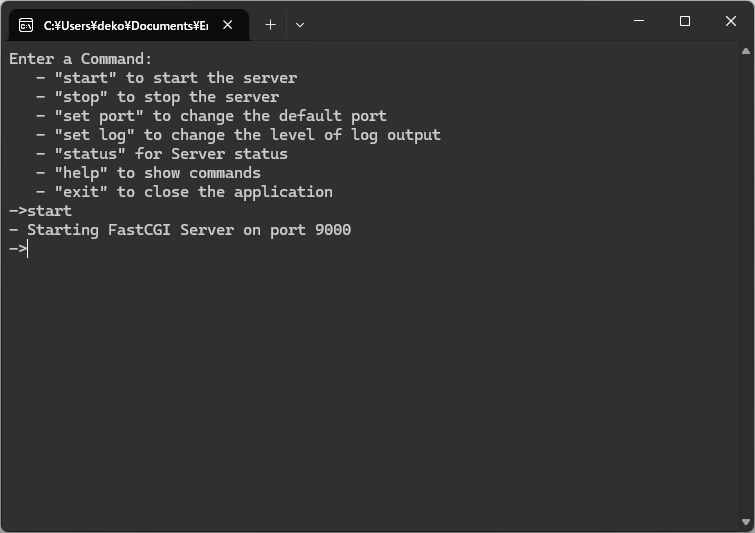
これで nginx と FastCGI サーバーアプリケーションの双方が起動した状態になります。
起動と同時にサーバーを開始したい場合には RunServer() 内を書き替えるしかないような気がします。現状、コマンドラインパラメータは用意されていないようです。
そして (この記事の通りなら) http://localhost/fcgi/ をブラウザで開きます。初期状態のプロジェクトなら、
Web Server Application
とブラウザに表示されたはずです。
おわりに
簡単に nginx のインストール方法と設定を紹介してみました。
書き忘れがあったら後で追記します。