
はじめに
AWSの構成図について苦労したことはありませんか。
アーキテクチャ構成の変更によって図の差し替えが必要になったり、作成した図のアイコンが古いものになっていたり、メンバー間で共有されている図がいつの間にか違うものになっているというようなことを私は経験したことがあります。
このような問題を解消するため、構成図をコードで管理する Diagram-as-code というツールがあります。今回はこちらのツールをインストールして、サンプルコードから構成図を作成してみました。
Diagram-as-code
Diagram-as-codeは構造化されたテキストファイル(YAML)からAWSのアーキテクチャ図を自動生成するCLIツールです。AWS公式が提供するAWS Labs公式によってGitHub上でツールが管理されています。今回はこちらをインストールし、サンプルコードから図を作成してみます。
Diagram-as-codeのインストール
以下のコマンドをmacOSのターミナル上で実行し、Diagram-as-code をインストールします。
$ brew install awsdac
AWS構成図の作成
公式から提供されている以下のサンプルファイルを指定してコマンドを実行します。
alb-ec2.yaml
Diagram:
  DefinitionFiles:
    - Type: URL
      Url: "https://raw.githubusercontent.com/awslabs/diagram-as-code/main/definitions/definition-for-aws-icons-light.yaml"
    #- Type: LocalFile
    #  LocalFile: ./definitions/definition-for-aws-icons-light.yaml

  Resources:
    Canvas:
      Type: AWS::Diagram::Canvas
      Direction: vertical
      Children:
        - AWSCloud
        - User
    AWSCloud:
      Type: AWS::Diagram::Cloud
      Direction: vertical
      Preset: AWSCloudNoLogo
      Align: center
      Children:
        - VPC
    # VPC
    VPC:
      Type: AWS::EC2::VPC
      Direction: vertical
      Children:
        - VPCPublicStack
        - ALB
      BorderChildren:
        - Position: S
          Resource: IGW
    VPCPublicStack:
      Type: AWS::Diagram::HorizontalStack
      Children:
        - VPCPublicSubnet1
        - VPCPublicSubnet2
    VPCPublicSubnet1:
      Type: AWS::EC2::Subnet
      Preset: PublicSubnet
      Children:
        - VPCPublicSubnet1Instance
    VPCPublicSubnet1Instance:
      Type: AWS::EC2::Instance
    VPCPublicSubnet2:
      Type: AWS::EC2::Subnet
      Preset: PublicSubnet
      Children:
        - VPCPublicSubnet2Instance
    VPCPublicSubnet2Instance:
      Type: AWS::EC2::Instance
    ALB:
      Type: AWS::ElasticLoadBalancingV2::LoadBalancer
      Preset: Application Load Balancer
    IGW:
      Type: AWS::EC2::InternetGateway
      IconFill:
        Type: rect
    User:
      Type: AWS::Diagram::Resource
      Preset: User

  Links:
    - Source: ALB
      SourcePosition: NNW
      Target: VPCPublicSubnet1Instance
      TargetPosition: SSE
      TargetArrowHead:
        Type: Open
    - Source: ALB
      SourcePosition: NNE
      Target: VPCPublicSubnet2Instance
      TargetPosition: SSW
      TargetArrowHead:
        Type: Open
    - Source: IGW
      SourcePosition: N
      Target: ALB
      TargetPosition: S
      TargetArrowHead:
        Type: Open
    - Source: User
      SourcePosition: N
      Target: IGW
      TargetPosition: S
      TargetArrowHead:
        Type: Open
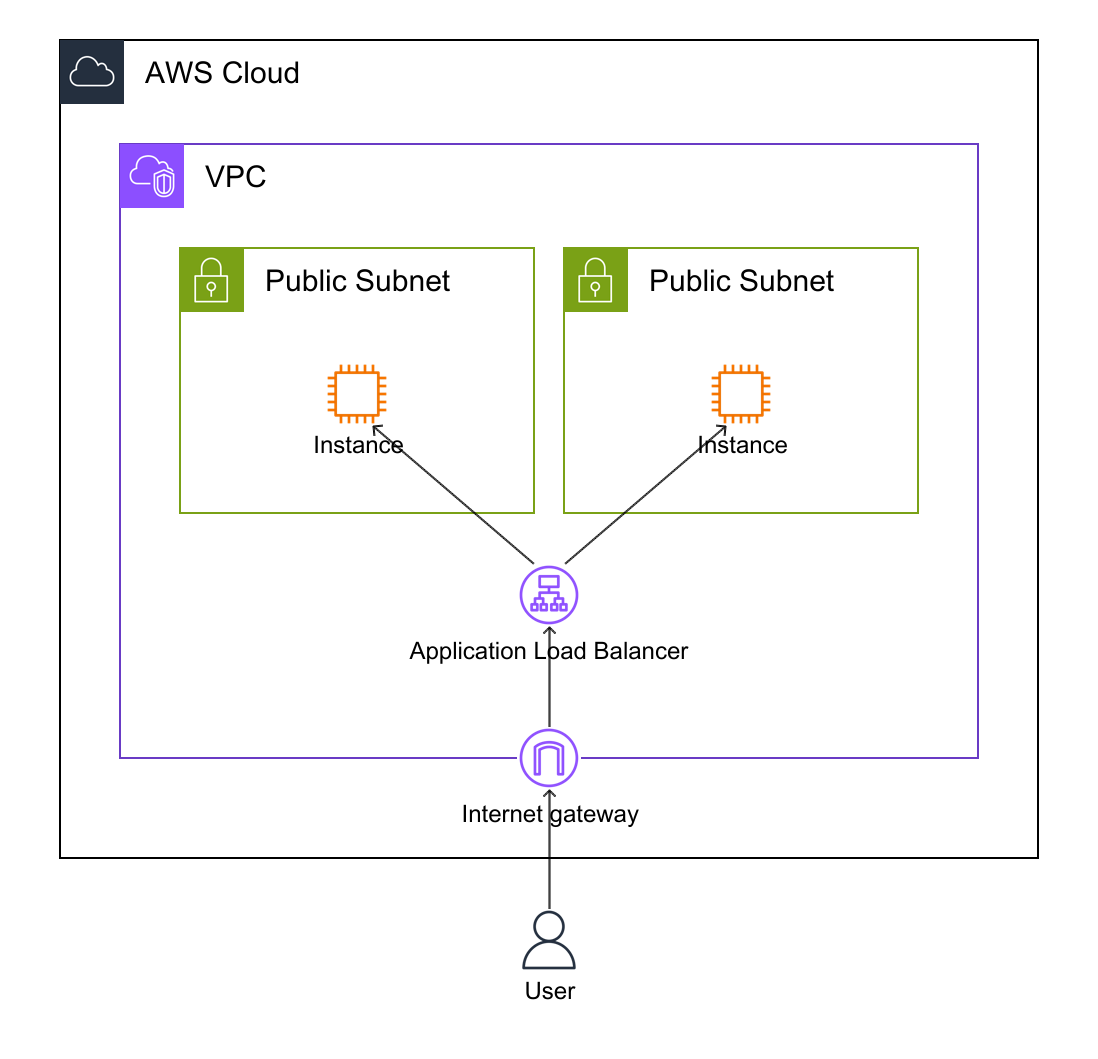
コマンドを実行して構成図を作成すると以下の図が作成されました。
$ awsdac alb-ec2.yaml
おわりに
今回はAWSの構成図をコードで管理する Diagram-as-code を使用しました。
Diagram-as-code を使用することでコードで構成図が管理でき、非常に便利だと感じました。また、以下のように生成AIと連携した使い方もできるようなので試してみたいと思います。