
はじめに
本記事は、著者がROS2のTopic通信の勉強のため、choreonoidに自作Topic通信を実装した時の内容をまとめたものです。
著者が調べた限りでは、Topic通信で実際にロボットを動作させている事例を紹介した資料が少ないと感じたので、本記事が他の方の参考になれば幸いです。
完成形
本記事では、最終的にChoreonoid上のカートを自作Topic通信(Publish)プログラムで走行&停止させることを目指します。
動作環境は下記です。
- Ubuntu 24.04.3 LTS ※ Virtual Box 7.1.10上で起動
- Choreonoid 2.3.0
- ROS2 Jazzy
Topic通信プログラム作成
事前準備
以降の内容を進める前に、まずはChoreonoid公式から出されているROS2モバイルロボットチュートリアルを参照し、Choreonoid-ROS2上でGUIを使ってカートロボットを動かせるところまで進めてください。
実装方針
「事前準備」で示したカートロボットのTopic通信の流れを下図に示します。
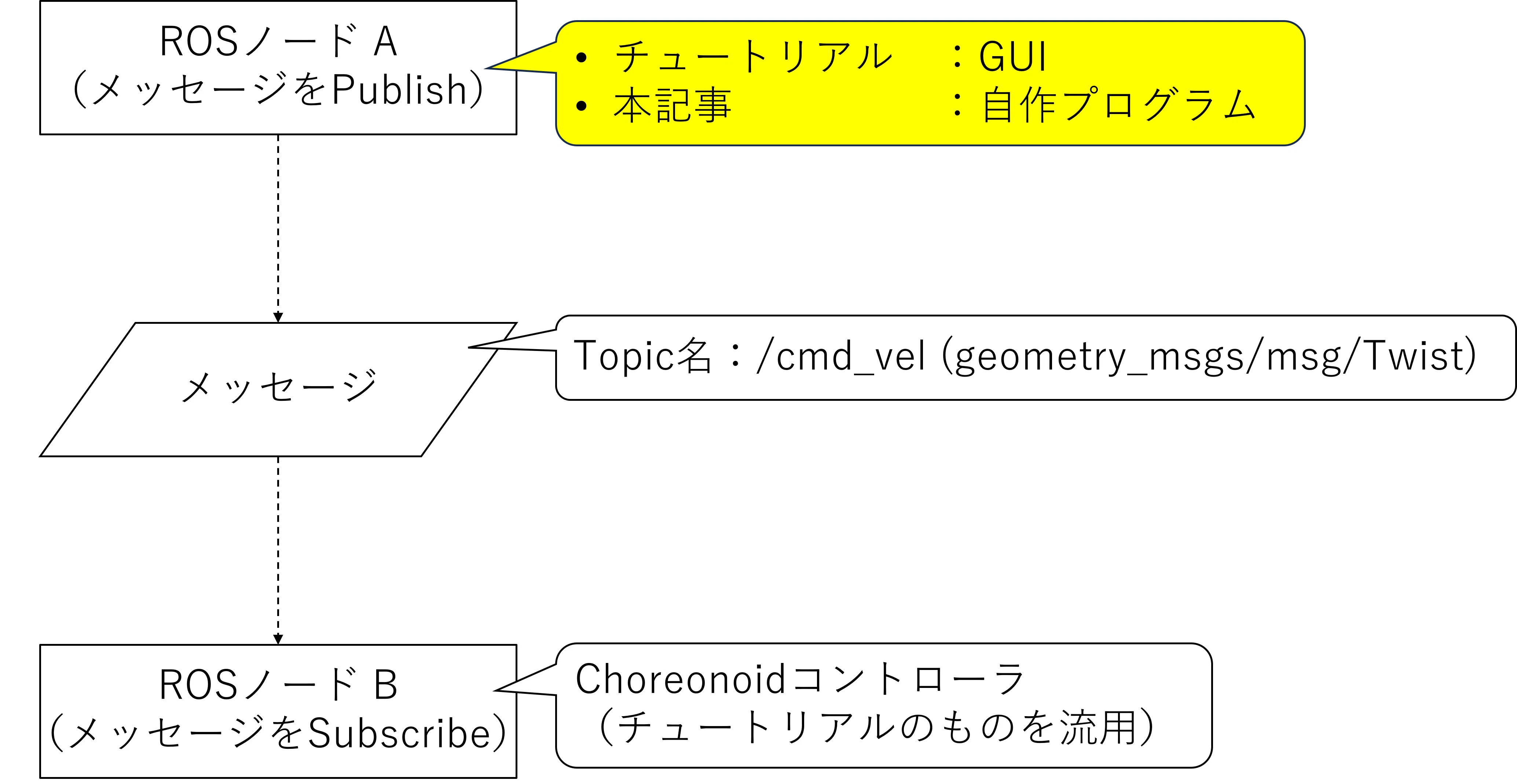
Choreonoid公式のチュートリアルではGUIによってPublishが送られていますので、本記事では自作プログラムでPublishを送ることを目指します。
Topic通信(Publish)プログラム
Topic通信(Publish)プログラムは、talker.cppをベースに下記のように編集します。
talker.cppの作成者の方にはこの場を借りて、お礼を申し上げます。
#include <chrono>
#include <cstdio>
#include <memory>
#include <string>
#include <rclcpp/rclcpp.hpp>
#include <geometry_msgs/msg/twist.hpp> // <- 追加
#include <std_msgs/msg/string.hpp>

using namespace std::chrono_literals;

class Talker : public rclcpp::Node
{
public:
    explicit Talker(const std::string & topic_name)
    : Node("talker")
    {
        auto publish_message =
        [this]() -> void
        {
            // まるごと変更する
            auto msg = std::make_unique<geometry_msgs::msg::Twist>();

            msg->linear.x = 0.5; // カートを停止させたい場合(Stop_command.cpp)はこの値を0にする
            msg->linear.y = 0.0;
            msg->linear.z = 0.0;

            msg->angular.x = 0.0;
            msg->angular.y = 0.0;
            msg->angular.z = 0.0;

            RCLCPP_INFO(this->get_logger(), "Forward_command");
            // まるごと変更の範囲はここまで
            pub_->publish(std::move(msg));
        };

        rclcpp::QoS qos(rclcpp::KeepLast(10));
        pub_ = create_publisher<geometry_msgs::msg::Twist>(topic_name, qos); // 「create_publisher」の中身を変更

        timer_ = create_wall_timer(100ms, publish_message);
    }

private:
    rclcpp::Publisher<geometry_msgs::msg::Twist>::SharedPtr pub_; // 「Publisher」の中身を変更
    rclcpp::TimerBase::SharedPtr timer_;
};

int main(int argc, char * argv[])
{
    setvbuf(stdout, NULL, _IONBF, BUFSIZ);
    rclcpp::init(argc, argv);

    auto node = std::make_shared<Talker>("cmd_vel"); // 「()」の中身を変更
    rclcpp::spin(node);
    rclcpp::shutdown();

    return 0;
}
「CMakeLists.txt」と「package.xml」は下記のように作成します。
cmake_minimum_required(VERSION 3.8)
project(cart_publish)

# Setting C++17
if(NOT CMAKE_CXX_STANDARD)
  set(CMAKE_CXX_STANDARD 17)
  set(CMAKE_CXX_STANDARD_REQUIERED ON)
endif()

# find dependencies
find_package(ament_cmake REQUIRED)
# uncomment the following section in order to fill in
# further dependencies manually.
# find_package(<dependency> REQUIRED)
find_package(rclcpp REQUIRED)
find_package(std_msgs REQUIRED)
find_package(geometry_msgs REQUIRED)

if(CMAKE_COMPILER_IS_GNUCXX OR CMAKE_CXX_COMPILER_ID MATCHES "Clang")
  add_compile_options(-Wall -Wextra -Wpedantic)
endif()

# Convenient function for build setting
function(custome_exeutable target)
  add_executable(${target} src/${target}.cpp)
    ament_target_dependencies(${target}
    "rclcpp"
    "std_msgs"
    "geometry_msgs"
    )
  install(TARGETS ${target} DESTINATION lib/${PROJECT_NAME})
endfunction()

# Build setting fo Node
custome_exeutable(Stop_command)
custome_exeutable(Forward_command)

if(BUILD_TESTING)
  find_package(ament_lint_auto REQUIRED)
  # the following line skips the linter which checks for copyrights
  # comment the line when a copyright and license is added to all source files
  set(ament_cmake_copyright_FOUND TRUE)
  # the following line skips cpplint (only works in a git repo)
  # comment the line when this package is in a git repo and when
  # a copyright and license is added to all source files
  set(ament_cmake_cpplint_FOUND TRUE)
  ament_lint_auto_find_test_dependencies()
endif()

ament_package()
<?xml version="1.0"?>
<?xml-model href="http://download.ros.org/schema/package_format3.xsd" schematypens="http://www.w3.org/2001/XMLSchema"?>
<package format="3">
  <name>cart_publish</name>
  <version>0.0.0</version>
  <description>TODO: Package description</description>
  <maintainer email="hiyo-control@gmail.com">hiyo-control</maintainer>
  <license>TODO: License declaration</license>

  <buildtool_depend>ament_cmake</buildtool_depend>

  <build_depend>rclcpp</build_depend>
  <exec_depend>rclcpp</exec_depend>

  <test_depend>ament_lint_auto</test_depend>
  <test_depend>ament_lint_common</test_depend>

  <export>
    <build_type>ament_cmake</build_type>
  </export>
</package>
動作確認
ビルド
実行環境一式は著者のGithubリンクに保存しております。下記の様なフォルダ構成で保存してください。
└── ros_ws <- Choreonoidチュートリアルを進める過程で作ります
    ├── build
    ├── install
    ├── log
    └── src
        └── cart_publish <- Githubからダウンロードします
            ├── mesh
            ├── model
            ├── project
            ├── src
            │   ├── Forward_command.cpp
            │   └── Stop_command.cpp
            ├── CMakeLists.txt
            └── package.xml
「ros2_ws」ディレクトリ上で端末を起動し、下記コマンドを実行してビルドします。
~/Document/ros2_ws$ colcon build --packages-select cart_publish
ビルドに成功すると、「install」ディレクトリ内にファイルが生成されます。
└── ros_ws <- Choreonoidチュートリアルを進める過程で作ります
    ├── build
    ├── install
    |   └── cart_publish
    |       └── lib
    |           └── cart_publish
    |               ├── Forward_command <- 生成物
    |               └── Stop_command <- 生成物
    ├── log
    └── src
        └── cart_publish <- Githubからダウンロードします
カートロボットの走行実演
Choreonoidチュートリアルで紹介されている方法で「Choreonoid-ROS」を起動し、下記コマンドを実行するとカートロボットを前進&停止させることができます。
~/Document/ros2_ws/install$ source ./setup.bash
~/Document/ros2_ws/install$ ros2 run cart_publish Forward_command
~/Document/ros2_ws/install$ ros2 run cart_publish Stop_command