
必要なページのみ抽出したPDFファイルを生成するPythonプログラム例
下記のPythonプログラムを実行すると,
① 元のファイル選択
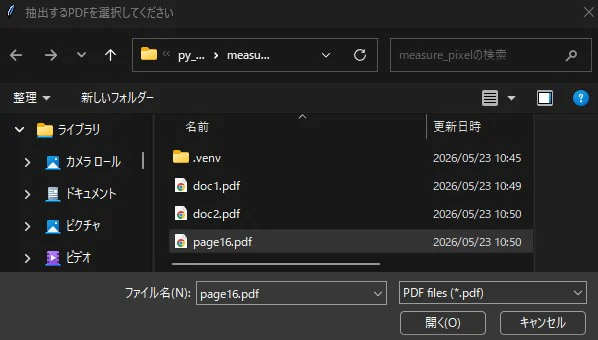
② 必要なページ番号を入力
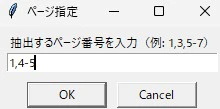
**③ 出力ファイル名を指定
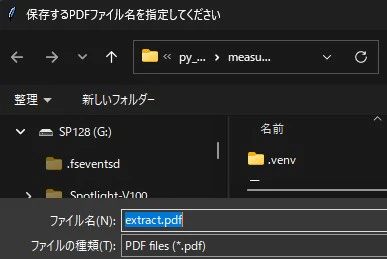
のダイアログボックスに沿って入力すれば,抽出したページのみのPDFファイルが生成される.
extracted_pages_pdf.py
import tkinter as tk
from tkinter import filedialog, simpledialog
from pypdf import PdfReader, PdfWriter

def select_pdf_file():
    root = tk.Tk()
    root.withdraw()

    file_path = filedialog.askopenfilename(
        title="抽出するPDFを選択してください",
        filetypes=[("PDF files", "*.pdf")]
    )
    return file_path

def save_new_pdf():
    root = tk.Tk()
    root.withdraw()

    save_path = filedialog.asksaveasfilename(
        title="保存するPDFファイル名を指定してください",
        defaultextension=".pdf",
        filetypes=[("PDF files", "*.pdf")]
    )
    return save_path

def main():
    # PDF を選択
    pdf_path = select_pdf_file()
    if not pdf_path:
        print("PDF が選択されませんでした")
        return

    # ページ番号を入力(例: 1,3,5-7)
    root = tk.Tk()
    root.withdraw()
    page_input = simpledialog.askstring(
        "ページ指定",
        "抽出するページ番号を入力(例: 1,3,5-7)"
    )
    if not page_input:
        print("ページが指定されませんでした")
        return

    # PDF 読み込み
    reader = PdfReader(pdf_path)
    writer = PdfWriter()

    # ページ指定を解析
    pages_to_extract = []

    for part in page_input.split(","):
        part = part.strip()
        if "-" in part:
            start, end = map(int, part.split("-"))
            pages_to_extract.extend(range(start - 1, end))
        else:
            pages_to_extract.append(int(part) - 1)

    # ページ抽出
    for p in pages_to_extract:
        if 0 <= p < len(reader.pages):
            writer.add_page(reader.pages[p])
        else:
            print(f"ページ {p+1} は存在しません(スキップ)")

    # 保存先を選択
    save_path = save_new_pdf()
    if not save_path:
        print("保存先が選択されませんでした")
        return

    # PDF 書き込み
    with open(save_path, "wb") as f:
        writer.write(f)

    print(f"抽出したPDFを保存しました → {save_path}")

if __name__ == "__main__":
    main()