Pythonで一番つまづくのは
pip コマンドでライブラリ・パッケージモジュールをインストールしたはずなのに,
ライブラリが見つからない(認識できない)というエラーに悩まされる.
せっかく,やる気を出してプログラミングを始めてみたのに,出鼻をくじかれて挫折してしまう...
これは,非常にもったいない.
解決策は簡単です!
やることは2つ.
1.VSCodeにPythonの拡張機能をインストールする.
・日本語環境
・Python Extension Pack
・Python Environments(仮想環境構築)
2.仮想環境を構築する
Pythonには,非常に多くのパッケージ(モジュール)があり,やりたい内容によって,必要・有用なパッケージを追加インストールする必要がある.
ここで問題となるのは,Pythonのバージョンとパッケージのバージョンの依存性とパッケージ同士の関連です.
それぞれが干渉してしまって,うまく実行できなくなったりします.
そこで,私の場合は,
- データ分析/統計処理
- 画像処理
- GUI構築 など
分野ごとに,拡張機能:Python Environmentsを用いて,
仮想環境を構築し,分けて実行するようにしています.
こうすることで,パッケージの依存関係によるエラーをかなり防げると思います.
3.仮想環境での実行例
PySide6というGUIの強力なフレームワークがあるので,それを利用する時の手順を示します.
pipコマンドでPySide6のパッケージをインストールし,以下のサンプルコードをPythonで実行する.すると,多くの場合,エラーが出ると思います.
ですので,PySide6に関するプログラム開発をスムーズに行うために
上記に述べた通り,仮想環境を構築します.
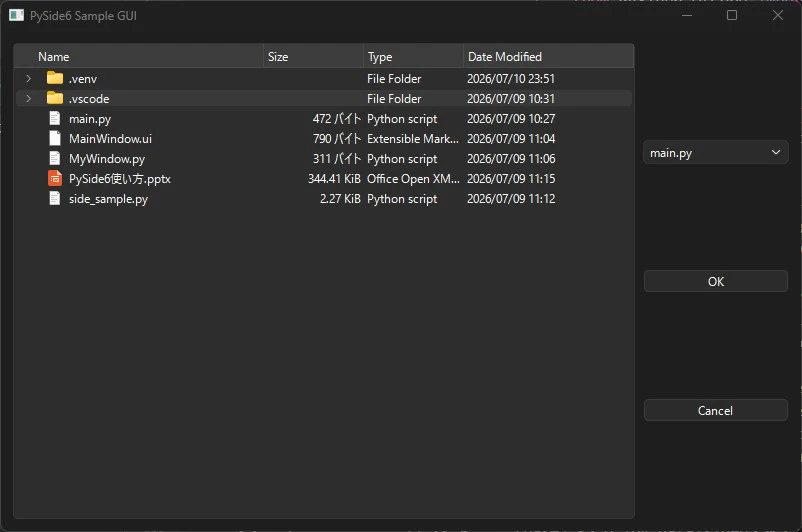
以下のPySide6に関するプログラム例が問題なく実施できるはずです.
pyside6_sample.py
import os
from PySide6.QtWidgets import (
    QApplication, QWidget, QVBoxLayout, QHBoxLayout,
    QTreeView, QFileSystemModel, QComboBox,
    QPushButton, QMessageBox
)
from PySide6.QtCore import QDir


class SampleGUI(QWidget):
    def __init__(self):
        super().__init__()
        self.setWindowTitle("PySide6 Sample GUI")
        self.resize(800, 500)

        # ===== レイアウト =====
        main_layout = QHBoxLayout(self)
        right_layout = QVBoxLayout()

        # ===== 左:ディレクトリツリー =====
        self.model = QFileSystemModel()
        self.model.setRootPath(QDir.currentPath())

        self.tree = QTreeView()
        self.tree.setModel(self.model)
        self.tree.setRootIndex(self.model.index(QDir.currentPath()))
        self.tree.setColumnWidth(0, 250)

        # ===== 右上:ファイルプルダウン =====
        self.combo = QComboBox()
        self.update_file_list()

        # ===== 右下:OK / Cancel ボタン =====
        btn_ok = QPushButton("OK")
        btn_cancel = QPushButton("Cancel")

        btn_ok.clicked.connect(self.on_ok)
        btn_cancel.clicked.connect(self.on_cancel)

        # ===== レイアウト配置 =====
        right_layout.addWidget(self.combo)
        right_layout.addWidget(btn_ok)
        right_layout.addWidget(btn_cancel)

        main_layout.addWidget(self.tree)
        main_layout.addLayout(right_layout)

    def update_file_list(self):
        """現ディレクトリのファイル一覧をプルダウンに追加"""
        self.combo.clear()
        files = [f for f in os.listdir(".") if os.path.isfile(f)]
        self.combo.addItems(files)

    def on_ok(self):
        """OKボタン押下時の処理"""
        selected_file = self.combo.currentText()
        QMessageBox.information(self, "選択結果", f"選択されたファイル: {selected_file}")
        print(f"[OK] Selected file: {selected_file}")

    def on_cancel(self):
        """Cancelボタン押下時の処理"""
        QMessageBox.warning(self, "キャンセル", "処理をキャンセルしました")
        print("[Cancel] Operation canceled")


if __name__ == "__main__":
    app = QApplication([])
    gui = SampleGUI()
    gui.show()
    app.exec()
正常に実行できると,以下に示すようなウィンドウが表示されます.