
Beginning
This technique is based on SQL Puzzle and Answers # 59 MERGING TIME PERIODS
It is better with 『SQL Puzzle and Answers』 to read this article.
It explains the idea of algorithm and
You can check what each puzzle is intended for ・・・
But there is almost no commentary about this puzzle
Like 『part1』・・・
『part2』is also not easy even to follow (。≧д≦。)
but it is a good puzzle to see how to handle data with SQL
What we are going to do is to find
contiguous or overlapping time periods from job table
Let's start !!
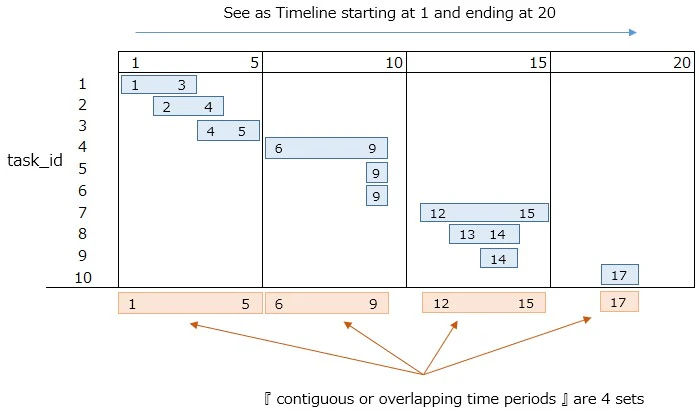
See blue lines as job time
There are 10 jobs(task_id)
⇒ task_id 1 : Starts at 1 and ends at 3
⇒ task_id 2 : Starts at 2 and ends at 4
⇒ task_id 3 : Starts at 4 and ends at 5
⇒ task_id 4 : Starts at 6 and ends at 9
⇒ task_id 5 : Starts at 9 and ends at 9
・ ・ ・ ・ ・
・ ・ ・ ・ ・
⇒ task_id 10 : Starts at 17 and ends at 17
『contiguous or overlapping time periods』 will be orange lines on the bottom
We are going to get start and end date of these orange lines by SQL
I have checked that it works with PostgreSQL
Tablae and Data
CREATE TABLE Timesheets(
	task_id CHAR(10) NOT NULL PRIMARY KEY,
	start_date DATE NOT NULL,
	end_date DATE NOT NULL,
	CHECK(start_date <= end_date)
);

INSERT INTO Timesheets
VALUES (1, '1997-01-01', '1997-01-03'),
       (2, '1997-01-02', '1997-01-04'),
       (3, '1997-01-04', '1997-01-05'),
       (4, '1997-01-06', '1997-01-09'),
       (5, '1997-01-09', '1997-01-09'),
       (6, '1997-01-09', '1997-01-09'),
       (7, '1997-01-12', '1997-01-15'),
       (8, '1997-01-13', '1997-01-14'),
       (9, '1997-01-14', '1997-01-14'),
       (10, '1997-01-17', '1997-01-17');
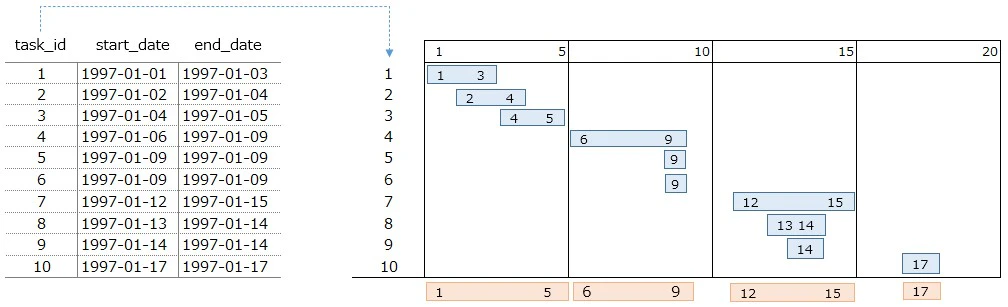
▼ Output(left side of image)
The image used above is displayed by side.
The blue line numbers are the same as the "day" of
start_date and end_date
Creating Original Data
SELECT T1.*, T2.*
FROM Timesheets AS T1, Timesheets AS T2
WHERE T1.end_date <= T2.end_date
We are going to retrive "start & end date"
of『contiguous or overlapping time periods』
from this combination, in the end.
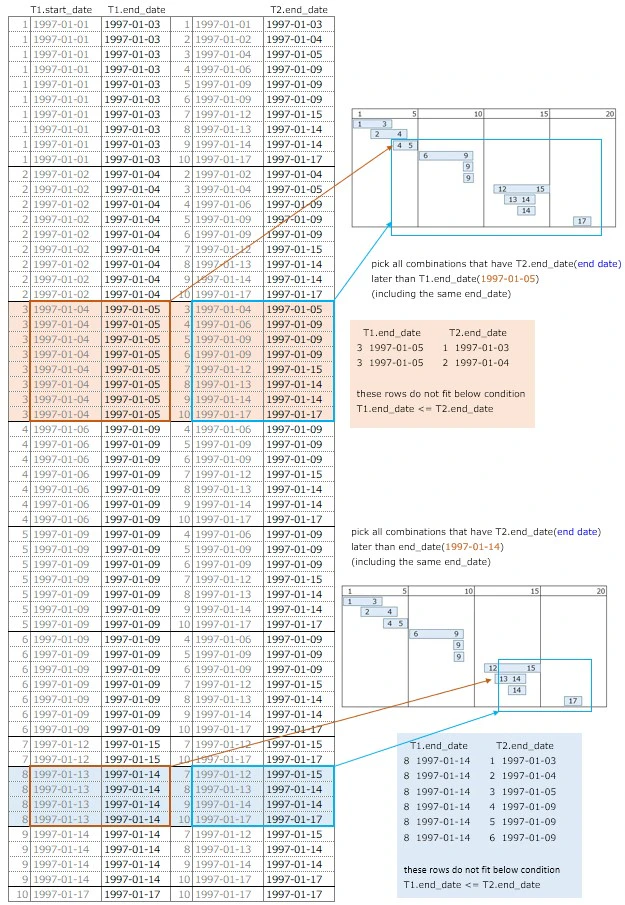
The condition for creating the original data is
⇒ T1.end_date <= T2.end_date
⇒ this condition is focused on end date
Since "start date" is taken from T1 and "end date" from T2
T2 will be later(should be right side)
First looking at T1.end_date, then pick all T2.end_date
that is on the right side of T1.end_date
Do this process from top to bottom against T1.end_date
⇒ pick all combinations that fit the condition
⇒ Exclude unnecessary combinations
please check right side of below image
Like task_id is 5
its start_date and end_date is the same
considering this,comparision operator has 『=』
⇒ T1.end_date <= T2.end_date
▼ Output
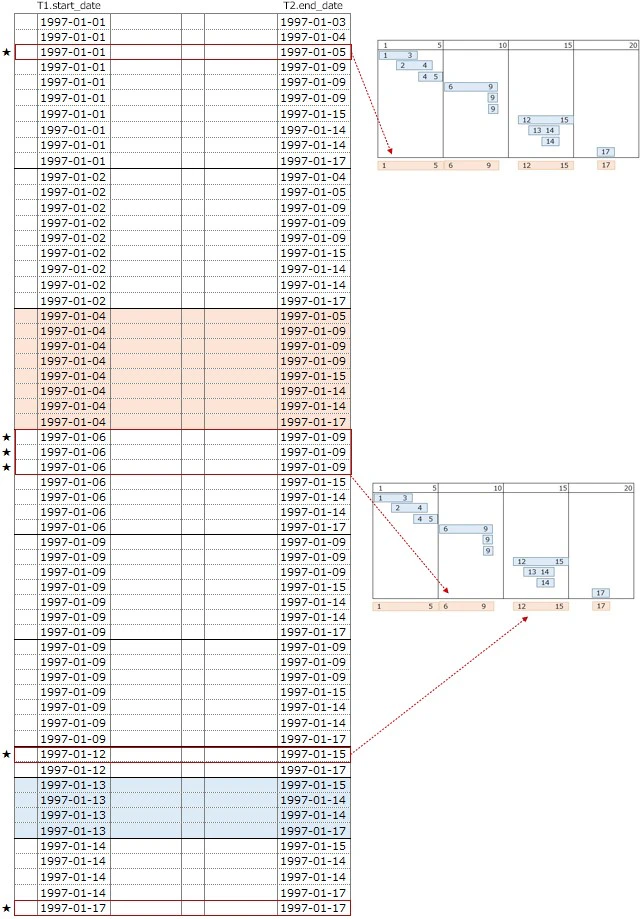
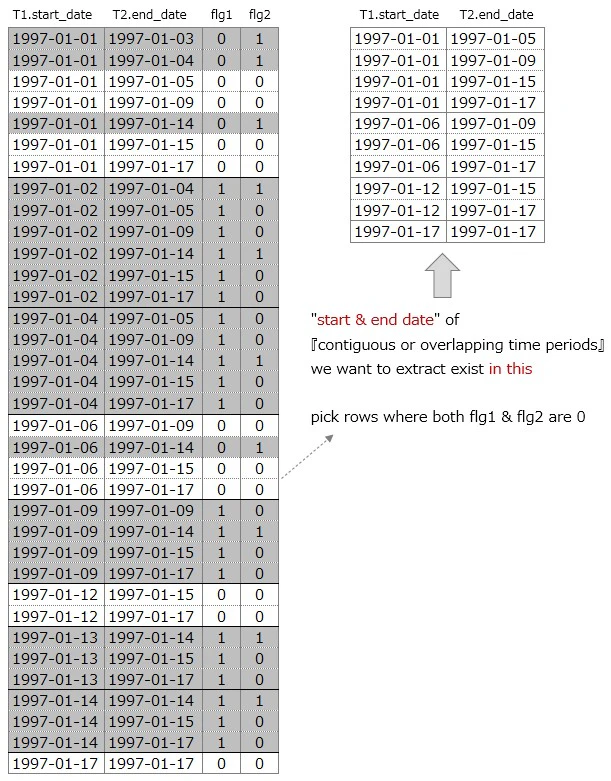
We are going to retrive "start & end date"
from this output・・ but it's pretty tough (x_x;)
⇒ taking out ★ rows in the end
⇒ start date(1997-01-01) end date(1997-01-05)
⇒ start date(1997-01-06) end date(1997-01-09)
⇒ start date(1997-01-12) end date(1997-01-15)
⇒ start date(1997-01-17) end date(1997-01-17)
Edit Original Data ①
SELECT T1.start_date, T2.end_date, T3.*
FROM Timesheets AS T1, Timesheets AS T2, Timesheets AS T3
WHERE T1.end_date <= T2.end_date
CROSS JOIN Timesheet(T3) to "Original Data"
We use T3 for checking if『start & end date』are the days
we want to retrive or not ?
⇒ use T3 to retrieve ★rows
This output will be 590 lines
so we will extract some and check it
Edit Original Data②
SELECT T1.start_date, T2.end_date, T3.*
FROM Timesheets AS T1, Timesheets AS T2, Timesheets AS T3
WHERE T1.end_date <= T2.end_date AND T1.start_date = '1997-01-13'
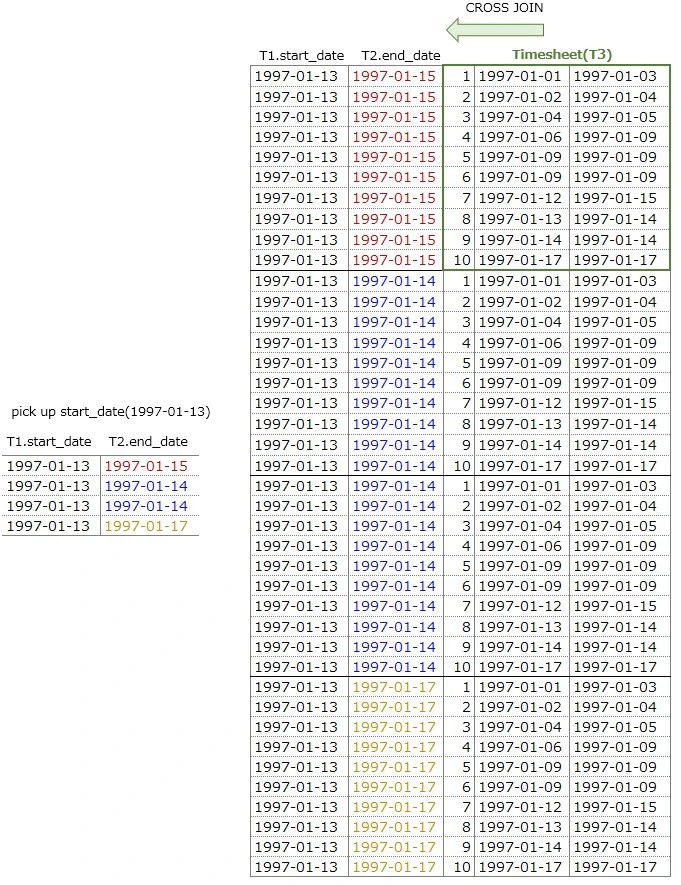
Here we use start_date(1997-01-13) only
then check data
⇒ start_date(1997-01-13) has 4 rows
⇒ there are 10 rows in the Timesheet table
⇒ CROSS JOIN, 4 x 10 = 40 rows
Edit Original Data ② - 1
SELECT T1.start_date, T2.end_date, T3.*,
  CASE
    WHEN (T3.start_date < T1.start_date AND T1.start_date <= T3.end_date) THEN 1
    ELSE 0 END AS flg1
FROM Timesheets AS T1, Timesheets AS T2, Timesheets AS T3
WHERE T1.end_date <= T2.end_date AND T1.start_date = '1997-01-13'
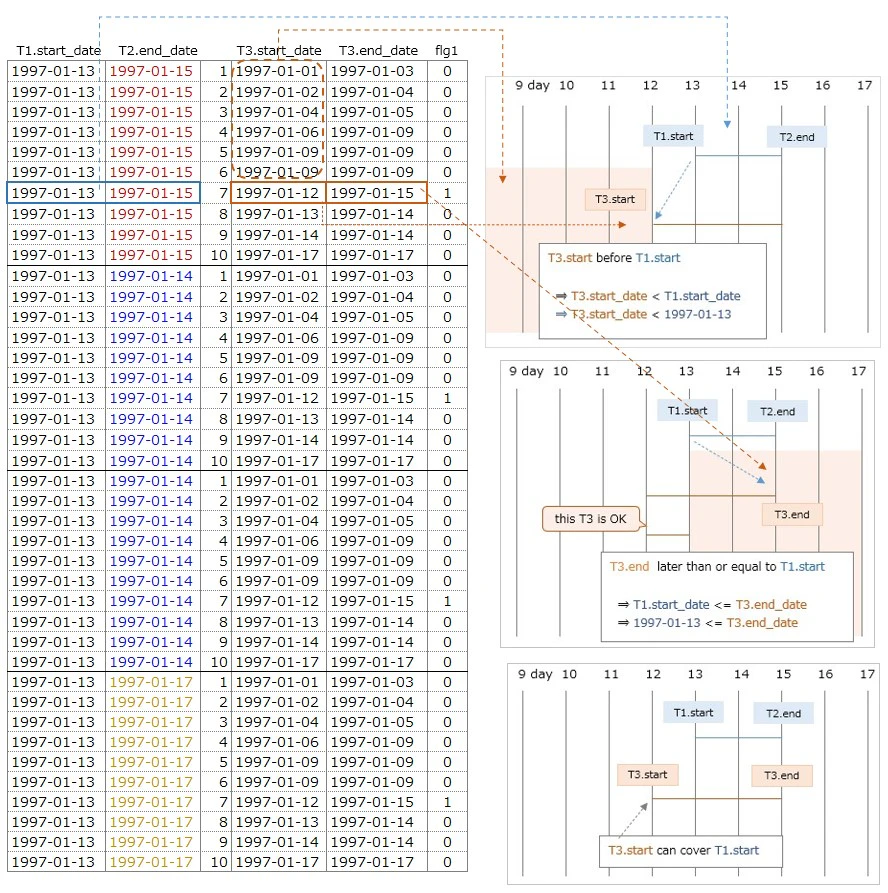
what we are going to do is ・・・
to find T3.start_date that can be before 1997-01-13
⇒ "start date" to the left of 1997-01-13
⇒ that has to overlap with T1 & T2
Add CASE statement in SELECT statement
two conditions are stated with Timesheet(T3) table
If both are satisfied then (flg1 = 1)
[1] T3.start_date < T1.start_date
[2] T1.start_date <= T3.end_date
[1] T3.start_date is before 1997-01-13(not the same day)
Find start date(T3.start_date) to the left of those days
in combinations which start date(T1.start_date) is "1997-01-13"
T3.start_date < T1.start_date
1997-01-01 < 1997-01-13 ・・・・①
1997-01-02 < 1997-01-13 ・・・・②
1997-01-04 < 1997-01-13 ・・・・③
1997-01-06 < 1997-01-13 ・・・・④
1997-01-09 < 1997-01-13 ・・・・⑤
1997-01-09 < 1997-01-13 ・・・・⑥
1997-01-12 < 1997-01-13 ・・・・⑦
this is not enough
must overlap with T1 & T2 combination
⇒ next condition will cover this
[2] T3.end_date is the same or later than 1997-01-13
T1.start_date <= T3.end_date
1997-01-13 <= 1997-01-15
⇒ above⑦ is the start date that satisfies both [1] & [2]
Adding this condition with AND operator guarantees that
T3.start_date overlap with the combination of
T1.start_date & T2.end_date
this means ・・・
T3.start_date(1997-01-12) that satisfies [1][2] can be
the start date to the left of 1997-01-13
⇒ T3 that fits these conditions has (flg1 = 1)
⇒ please check below image
▼ Output
Edit Original Data ② - 2
SELECT T1.start_date, T2.end_date, T3.*,
  CASE
    WHEN (T3.start_date < T1.start_date AND T1.start_date <= T3.end_date) THEN 1
    ELSE 0 END AS flg1,
  CASE
    WHEN (T3.start_date <= T2.end_date AND T2.end_date < T3.end_date) THEN 1
    ELSE 0 END AS flg2
FROM Timesheets AS T1, Timesheets AS T2, Timesheets AS T3
WHERE T1.end_date <= T2.end_date AND T1.start_date = '1997-01-13'
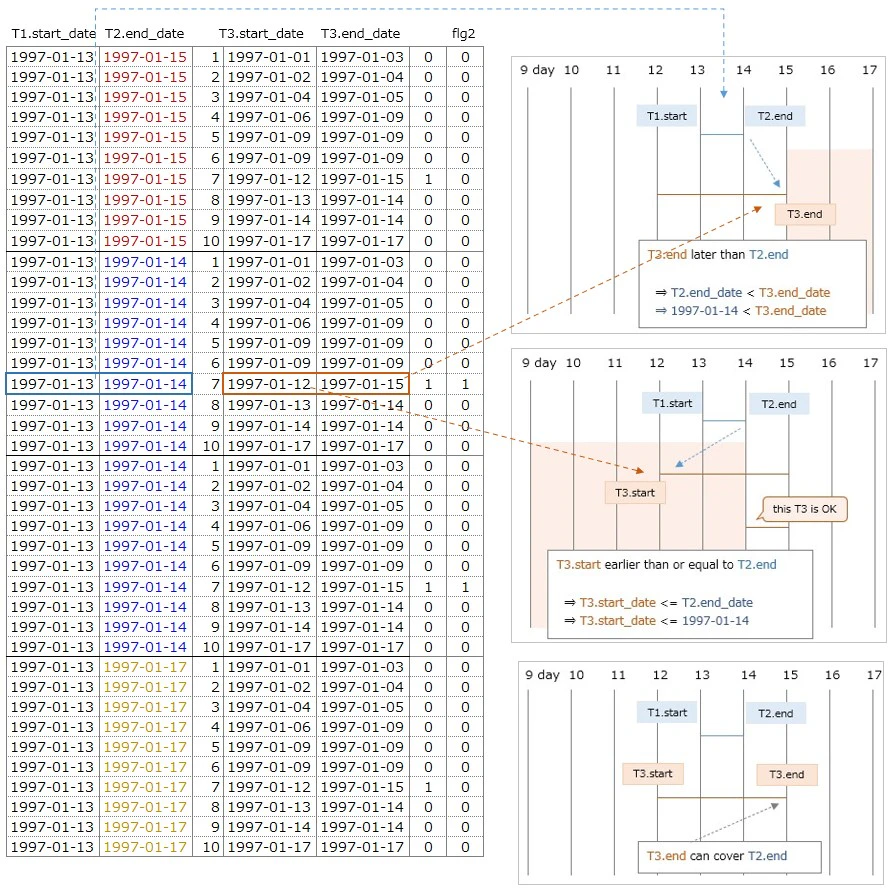
what we are going to do is ・・・
to find T3.end_date that can be after 1997-01-14
⇒ "end date" to the right of T2.end_date
⇒ that has to overlap with T1 & T2
Add CASE statement in SELECT statement
two conditions are stated with Timesheet(T3) table
If both are satisfied then (flg2 = 1)
[2] T2.end_date < T3.end_date
[1] T3.start_date <= T2.end_date
[2] T3.end_date is after 1997-01-14(not the same day)
Find end date(T3.end_date) to the right of those days
in combinations which end date(T2.end_date) is "1997-01-14"
T2.end_date < T3.end_date
1997-01-14 < 1997-01-15 ・・・・①
1997-01-14 < 1997-01-17 ・・・・②
this is not enough
must overlap with T1 & T2 combination
⇒ next condition will cover this
[1] T3.start_date is the same or earlier than 1997-01-14
T3.start_date <= T2.end_date
1997-01-12 <= 1997-01-14
⇒ above② is the end date that satisfies both [1] & [2]
Adding this condition with AND operator guarantees that
T3.end_date overlap with the combination of
T1.start_date & T2.end_date
this means ・・・
T3.end_date(1997-01-15) that satisfies [1][2] can be
the end date to the right of 1997-01-14
⇒ T3 that fits these conditions has (flg2 = 1)
⇒ please check below image
▼ Output
Edit Original Data ② - 3
SELECT T1.start_date, T2.end_date,
  MAX(CASE
       WHEN (T3.start_date < T1.start_date AND T1.start_date <= T3.end_date) THEN 1
       ELSE 0 END) AS flg1,
  MAX(CASE
       WHEN (T3.start_date <= T2.end_date AND T2.end_date < T3.end_date) THEN 1
       ELSE 0 END) AS flg2
FROM Timesheets AS T1, Timesheets AS T2, Timesheets AS T3
WHERE T1.end_date <= T2.end_date AND T1.start_date = '1997-01-13'

GROUP BY T1.start_date, T2.end_date
▼ Output
| T1.start_date | T2.end_date | MAX(flg1) | MAX(flg2) |
|---|---|---|---|
| 1997-01-13 | 1997-01-15 | 1 | 0 |
| 1997-01-13 | 1997-01-14 | 1 | 1 |
| 1997-01-13 | 1997-01-17 | 1 | 0 |
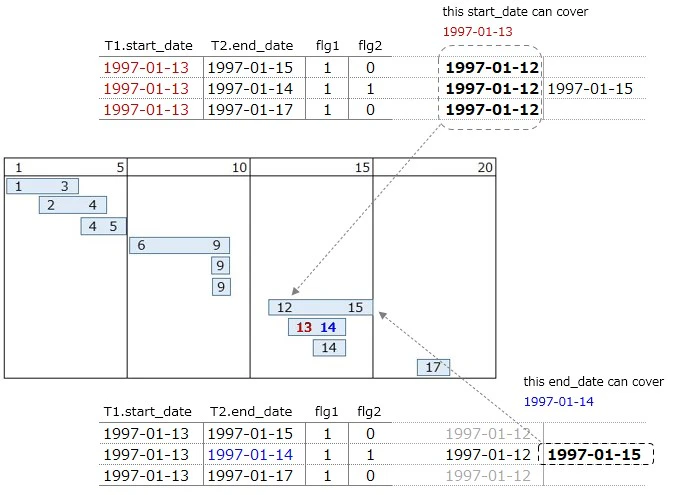
『GROUP BY T1.start_date, T2.end_date』creates
three combinations
start date end date
1997-01-13 1997-01-15
1997-01-13 1997-01-14
1997-01-13 1997-01-17
Checking with MAX function ・・・
Is there any row where flg1, flg2 is 1 in this combination?
case of 『 MAX(flg1) is 1 』
⇒ there is start date to the left of 1997-01-13(red)
⇒ 1997-01-12 can cover 1997-01-13
case of 『 MAX(flg2) is 1 』
⇒ there is end date to the right of 1997-01-14(blue)
⇒ 1997-01-15 can cover 1997-01-14
this means ・・・・
there is another 『contiguous or overlapping date』
that can cover wider range than T1.start_date and T2.end_date
Isn't it necessary those 『start & end date』
where MAX(flg1), MAX(flg2) is 1 ?
⇒ we will check later
We will check the same with a different start date(1997-01-06)
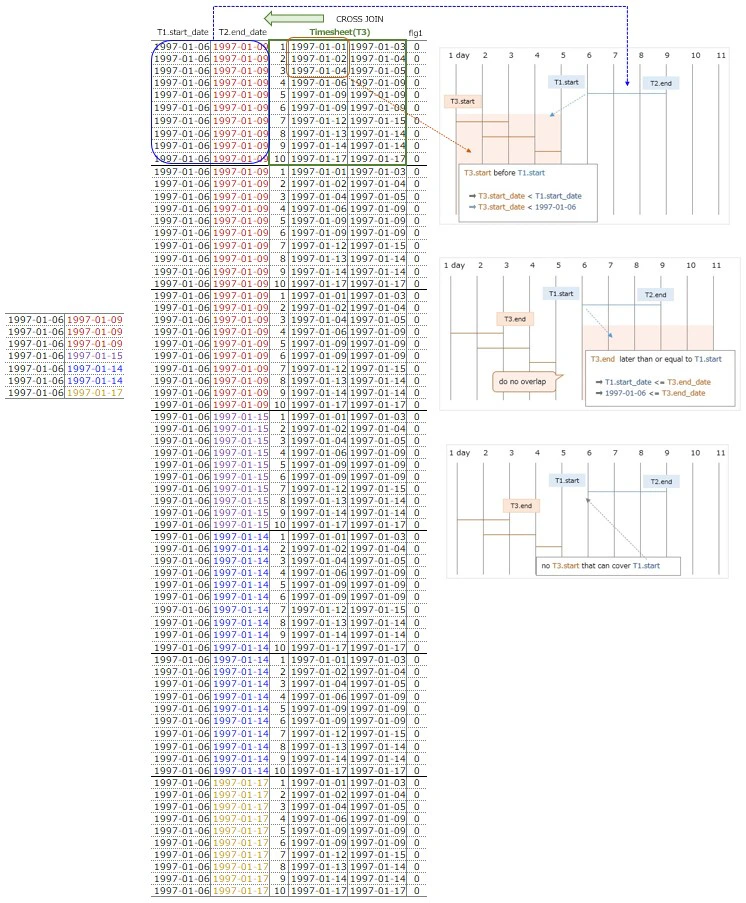
Edit Original Data ③ - 1
SELECT T1.start_date, T2.end_date, T3.*,
  CASE
    WHEN (T3.start_date < T1.start_date AND T1.start_date <= T3.end_date) THEN 1
    ELSE 0 END AS flg1
FROM Timesheets AS T1, Timesheets AS T2, Timesheets AS T3
WHERE T1.end_date <= T2.end_date AND T1.start_date = '1997-01-06'
choose start date(1997-01-06), then check data
⇒ start_date(1997-01-06) has 7 rows
⇒ there are 10 rows in the Timesheet table
⇒ CROSS JOIN, 7 x 10 = 70 rows
what we are going to do is ・・・
to find T3.start_date that can be before 1997-01-06
⇒ "start date" to the left of 1997-01-06
⇒ that has to overlap with T1 & T2
Add CASE statement in SELECT statement
two conditions are stated with Timesheet(T3) table
If both are satisfied then (flg1 = 1)
[1] T3.start_date < T1.start_date
[2] T1.start_date <= T3.end_date
[1] T3.start_date is before 1997-01-06(not the same day)
Find start date(T3.start_date) to the left of those days
in combinations which start date(T1.start_date) is "1997-01-06"
T3.start_date < T1.start_date
⇒ 1997-01-01 < 1997-01-06 ・・・・①
⇒ 1997-01-02 < 1997-01-06 ・・・・②
⇒ 1997-01-04 < 1997-01-06 ・・・・③
there are T3.start_date(1997-01-01,1997-01-02,1997-01-04)
before 1997-01-06
this is not enough
must overlap with T1 & T2 combination
⇒ next condition will cover this
[2] T3.end_date is the same or later than 1997-01-06
T3.end_date that satisfies above[1] are
1997-01-03,1997-01-04,1997-01-05
These end date(T3.end_date) and T1.start_date
do not fit below condition
⇒ T1.start_date <= T3.end_date
⇒ 1997-01-06 <= xxxx-xx-xx
There is no T3.start_date that satisfies [1][2]
in the combination of "start date 1996-01-06"
⇒ do not overlap
⇒ all flg1 are 0
Edit Original Data ③ - 2
SELECT T1.start_date, T2.end_date, T3.*,
  CASE
    WHEN (T3.start_date < T1.start_date AND T1.start_date <= T3.end_date) THEN 1
    ELSE 0 END AS flg1,
  CASE
    WHEN (T3.start_date <= T2.end_date AND T2.end_date < T3.end_date) THEN 1
    ELSE 0 END AS flg2
FROM Timesheets AS T1, Timesheets AS T2, Timesheets AS T3
WHERE T1.end_date <= T2.end_date AND T1.start_date = '1997-01-06'
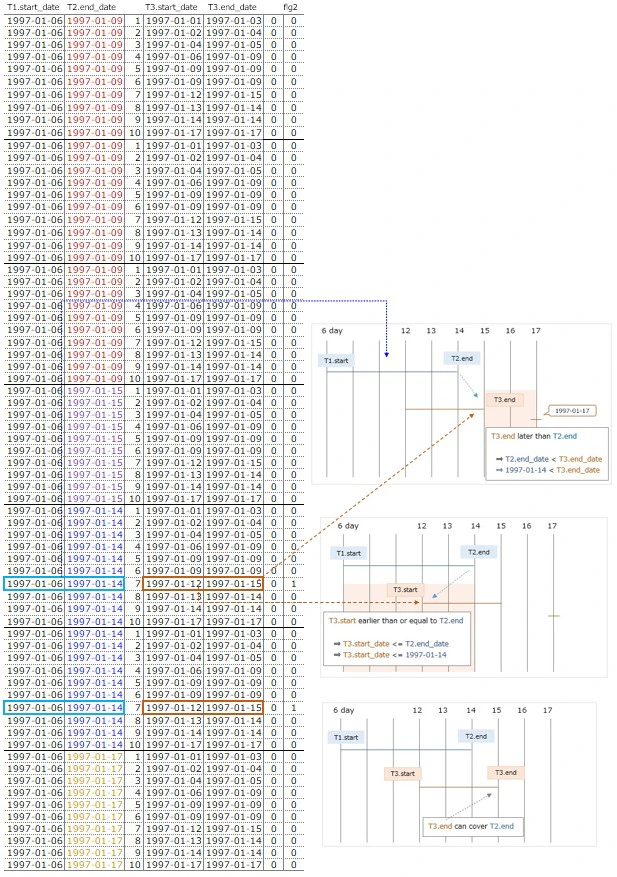
what we are going to do is ・・・
to find T3.end_date that can be after 1997-01-14
⇒ "end date" to the right of T2.end_date
⇒ that has to overlap with T1 & T2
Add CASE statement in SELECT statement
two conditions are stated with Timesheet(T3) table
If both are satisfied then (flg2 = 1)
[2] T2.end_date < T3.end_date
[1] T3.start_date <= T2.end_date
[2] T3.end_date is after 1997-01-14(not the same day)
Find end date(T3.end_date) to the right of those days
in combinations which end date(T2.end_date) is "1997-01-14"
T2.end_date < T3.end_date
⇒ 1997-01-14 < 1997-01-15 ・・・・①
⇒ 1997-01-14 < 1997-01-17 ・・・・②
T3.end_date(1997-01-15,1997-01-17) fit the condition
but is not enough
must overlap with T1 & T2 combination
⇒ next condition will cover this
[1] T3.start_date is the same or earlier than 1997-01-14
T3.start_date that satisfies above[2] are
1997-01-12,1997-01-17
these start date(T3.start_date) and T2.end_date overlap
if the following condition is fit
T3.start_date <= T2.end_date
⇒ 1997-01-12 <= 1997-01-14 ・・・OK
⇒ 1997-01-17 <= 1997-01-14 ・・・NG
Adding this condition with AND operator guarantees that
T3.end_date overlap with the combination of
T1.start_date & T2.end_date
this means ・・・
T3.end_date(1997-01-15) that satisfies [1][2] can be
the end date to the right of 1997-01-14
⇒ T3 that fits these conditions has (flg2 = 1)
⇒ please check below image
▼ Output
Edit Original Data ③ - 3
SELECT T1.start_date, T2.end_date,
  MAX(CASE
       WHEN (T3.start_date < T1.start_date AND T1.start_date <= T3.end_date) THEN 1
       ELSE 0 END) AS flg1,
  MAX(CASE
       WHEN (T3.start_date <= T2.end_date AND T2.end_date < T3.end_date) THEN 1
       ELSE 0 END) AS flg2
FROM Timesheets AS T1, Timesheets AS T2, Timesheets AS T3
WHERE T1.end_date <= T2.end_date AND T1.start_date = '1997-01-06'

GROUP BY T1.start_date, T2.end_date
▼ Output
| T1.start_date | T2.end_date | MAX(flg1) | MAX(flg2) |
|---|---|---|---|
| 1997-01-06 | 1997-01-09 | 0 | 0 |
| 1997-01-06 | 1997-01-15 | 0 | 0 |
| 1997-01-06 | 1997-01-14 | 0 | 1 |
| 1997-01-06 | 1997-01-17 | 0 | 0 |
『GROUP BY T1.start_date, T2.end_date』creates
four combinations
start date end date
1997-01-06 1997-01-09
1997-01-06 1997-01-15
1997-01-06 1997-01-14
1997-01-06 1997-01-17
Checking with MAX function ・・・
Is there any row where flg1, flg2 is 1 in this combination?
case of 『 MAX(flg1) is 0 』
⇒ there are no "start dates" that can cover 1997-01-06
case of 『 MAX(flg2) is 1 』
⇒ there is end date to the right of 1997-01-14(blue)
⇒ 1997-01-15 can cover 1997-01-14
this means ・・・・
there is another 『contiguous or overlapping date』
that can cover wider range than T2.end_date
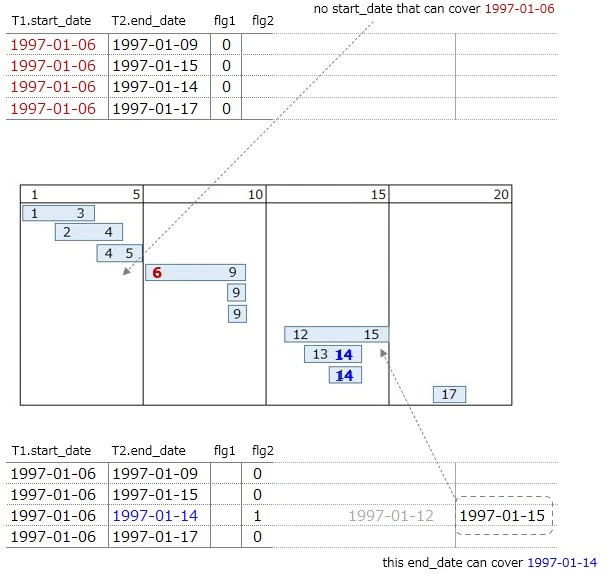
We chose start dates(1997-01-13 & 1997-01-06) then
looked for the start date further to the left and
the end date further to the right・・・so farWe can see from above image that
『start & end date』 were picked roughlywe have not checked
whether jobs are continuous or not yetFrom here is the core of this puzzle
Edit Original Data ④
SELECT T1.start_date, T2.end_date,
  MAX(CASE
       WHEN (T3.start_date < T1.start_date AND T1.start_date <= T3.end_date) THEN 1
       ELSE 0 END) AS flg1,
  MAX(CASE
       WHEN (T3.start_date <= T2.end_date AND T2.end_date < T3.end_date) THEN 1
       ELSE 0 END) AS flg2
FROM Timesheets AS T1, Timesheets AS T2, Timesheets AS T3
WHERE T1.end_date <= T2.end_date -- AND T1.start_date = '1997-01-06'

GROUP BY T1.start_date, T2.end_date

ORDER by T1.start_date, T2.end_date
Doing the same without specifying T1.start_date
then check MAX(flg1) & MAX(flg2)
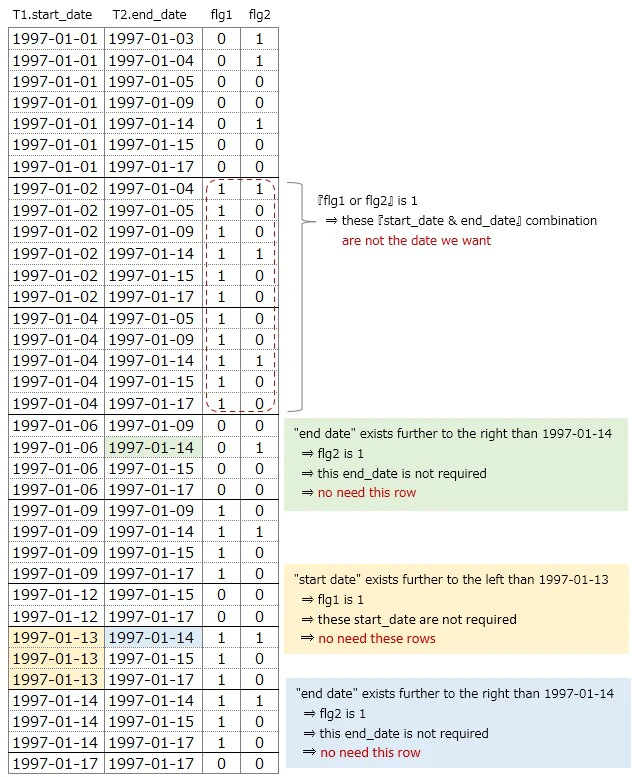
"start date" which flg1 is 1 is ・・・
⇒ there is another "start date" earlier to the left
⇒ this is not the date we want
"end date" which flg2 is 1 is ・・・
⇒ there is another "end date" later to the right
⇒ this is not the date we want
~~~~~~~~~~~~~~~~~~~~~~~~~~~~~~~
The original data we made at the beginning
has all the combinations
Exclude rows with『start & end dates』we don't need from here
⇒ 『flg1 or flg2』 is 1
in the rest of the rows, I mean ・・・
there are 『start & end dates』we want
in the combination where 『flg1 & flg2』 are 0
▼ Output
Edit Original Data ⑤
SELECT T1.start_date, T2.end_date
FROM Timesheets AS T1, Timesheets AS T2, Timesheets AS T3
WHERE T1.end_date <= T2.end_date
GROUP BY T1.start_date, T2.end_date
HAVING MAX(CASE WHEN (T1.start_date > T3.start_date AND T1.start_date <= T3.end_date)
                     OR
                     (T2.end_date >= T3.start_date AND T2.end_date < T3.end_date)
				THEN 1
				ELSE 0 END) = 0

ORDER BY start_date, end_date
The CASE statement that was in the SELECT statement
is written in the HAVING clause
The content of HAVING is ・・・
⇒ when 『flg1 or flg2』is 1, returns 1
⇒ when 『flg1 and flg2』are 0, returns 0
⇒ HAVING MAX(・・・) = 0
⇒ only rows that return 0 are selected
To explain in detail ・・・
If we write it using 『flg1 & flg2』that you used before
it will look like the following
HAVING MAX(CASE WHEN flg1 = 1 OR flg2 = 1 THEN 1 ELSE 0 END) = 0when either flg1 or flg2 is 1
1 is returned from the CASE statementIn the HAVING condition
return value from the CASE statement specifies 0
⇒ HAVING MAX(CASE ・・・) = 0only rows that return 0 are selected
▼ Output(right side of image)
Answer SQL
SELECT X.start_date, MIN(X.end_date) AS end_date
FROM
(
   SELECT T1.start_date, T2.end_date
   FROM Timesheets AS T1, Timesheets AS T2, Timesheets AS T3
   WHERE T1.end_date <= T2.end_date
   GROUP BY T1.start_date, T2.end_date
   HAVING MAX(CASE WHEN (T1.start_date > T3.start_date AND T1.start_date <= T3.end_date)
                        OR
                        (T2.end_date >= T3.start_date AND T2.end_date < T3.end_date)
				   THEN 1
				   ELSE 0 END) = 0
) AS X
GROUP BY X.start_date
▼ Output
| start date(start_date) | end date(end_date) |
|---|---|
| 1997-01-01 | 1997-01-05 |
| 1997-01-06 | 1997-01-09 |
| 1997-01-12 | 1997-01-15 |
| 1997-01-17 | 1997-01-17 |
what we are doing here is ・・・
① to get start date by 『GROUP BY T1.start_date』
② to desice the earliest T2.end_date as end date
I mentioned before
we have not checked
whether jobs are continuous or not yet
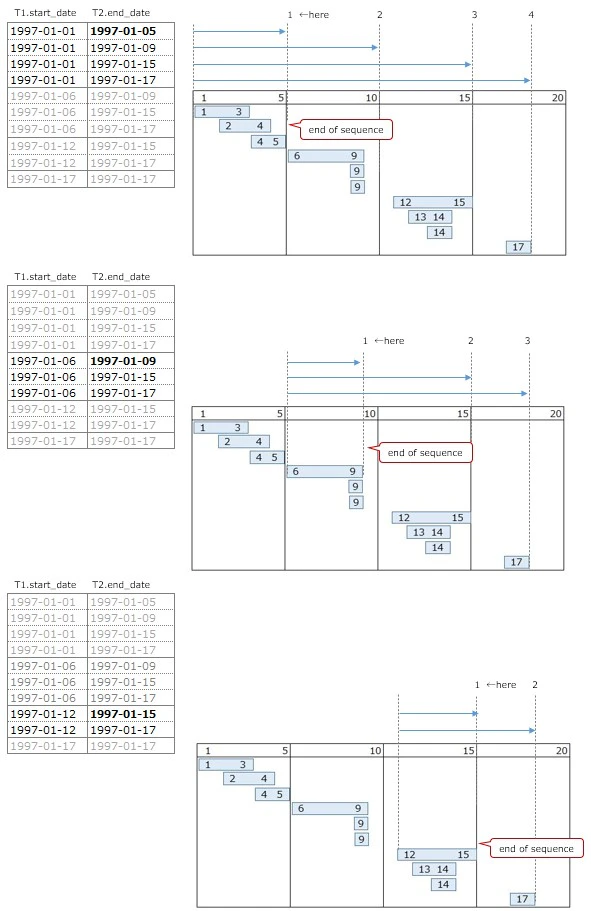
To find the end date ・・・
we need to find where sequence ends
it will help to see how to do it
by checking the image below
~~~~~~~~~~~~~~~~~~~~~~~~~~~~~
Focusing on the start date 1997-01-01
One of 1997-01-05,1997-01-09,1997-01-15,1997-01-17
will be the end date
End date is not consecutive after 1997-01-05
⇒ to retrive 1997-01-05 is
to get the earliest T2.end_date
⇒ MIN(X.end_date)
~~~~~~~~~~~~~~~~~~~~~~~~~~~~~
Focusing on the start date 1997-01-06
One of 1997-01-09,1997-01-15,1997-01-17
will be the end date
End date is not consecutive after 1997-01-09
⇒ to retrive 1997-01-09 is
to get the earliest T2.end_date
⇒ MIN(X.end_date)
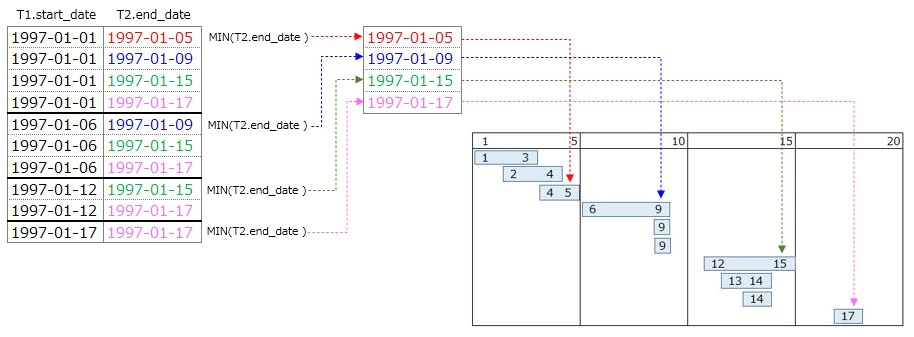
Finally, how to retrieve the end date
Arranging the start and end dates in chronological order
will be the same as the answer ・・ but
1997-01-01 -> 1997-01-06 -> 1997-01-12 -> 1997-01-17
1997-01-05 -> 1997-01-09 -> 1997-01-15 -> 1997-01-17
Since it is aggregated by X.start_date
⇒ 『GROUP BY X.start_date』
taking out the earliest T2.end_date is the same as
taking out "end date" in chronological order
⇒ MIN(X.end_date)
Like Part 1, Part 2 is also quite deep SQL
Personally ・・・
This is a good quiz to see the SQL concept
that treats data as a set
but it is tough one!!
Mr. Joe Celko mentions about this puzzle
quote from the book ・・・
This can be a problem to do in a simple query
so be careful as this is not easy to follow or understandThere are a lot of logic commaned
into that little query