
Beginning
This technique is based on SQL Puzzle and Answers # 62 REPORT FORMATTING
It is better with 『SQL Puzzle and Answers』 to read this article.
It explains the idea of algorithm and
You can check what each puzzle is intended for ・・・
This puzzle is very simple
There is a table of name list
and display names like two across, three across
・・・ it is easy to say
but we do not do this kind of thing with SQL
The author, Mr Joe Celko, also says
quoted from the book
SQL is a data retrieval language and not a report writer
Unfortunately, people do not seem to know this
and are always trying to do things for which
SQL was not intended ・・・・
『part4』 is the last article of this puzzle
This SQL also use MOD function but only once
Taking out the second and third name is very technical・・・
I mean, how come up with this kind of idea!!
I'm just impressed
Let's start
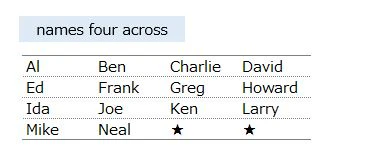
We are going to display 『names four across』 this time
I have checked that it works with PostgreSQL
▼ Output format is like below image
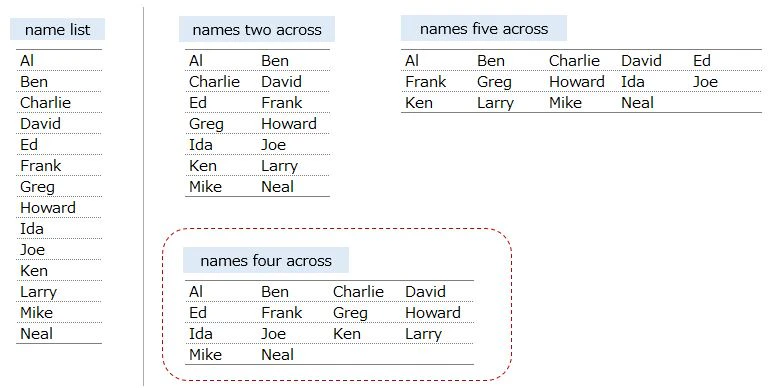
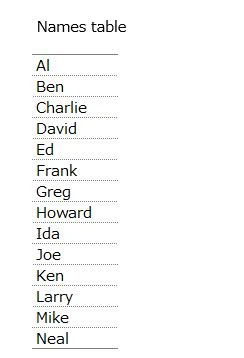
Table and data
CREATE TABLE Names(
	name VARCHAR(15) NOT NULL PRIMARY KEY
);

INSERT INTO Names
VALUES ('Al'),
	   ('Ben'),
	   ('Charlie'),
       ('David'),
	   ('Ed'),
	   ('Frank'),
       ('Greg'),
	   ('Howard'),
	   ('Ida'),
       ('Joe'),
	   ('Ken'),
	   ('Larry'),
       ('Mike'),
	   ('Neal');
▼ Output
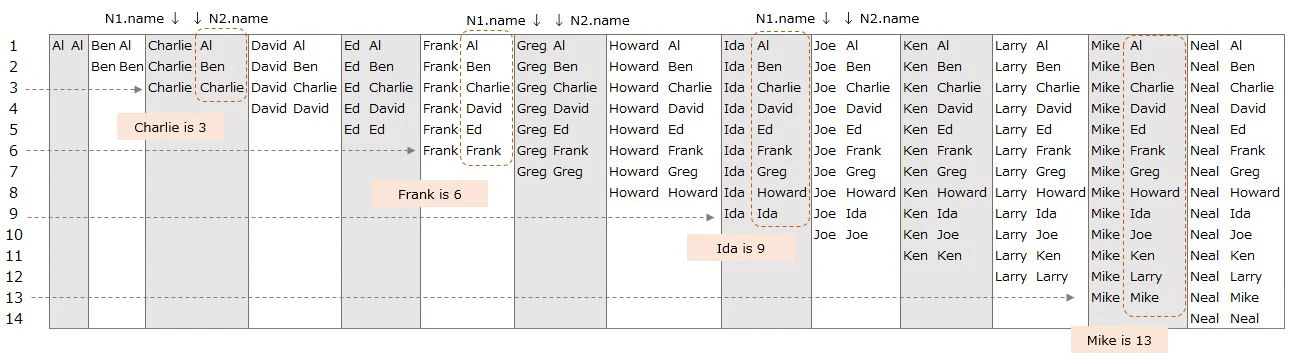
Creating original data ①
SELECT N1.name, N2.name
FROM Names AS N1, Names AS N2
WHERE N1.name >= N2.name
INNER JOIN is used to create original data in 『part2』and『part3』
SELECT N1.name, N2.name
FROM Names AS N1
INNER JOIN Names AS N2 ON N1.name >= N2.name
CROSS JOIN is used to create original data in 『part4』
condition is the same AS 『N1.name >= N2.name』
Same result, but written differently
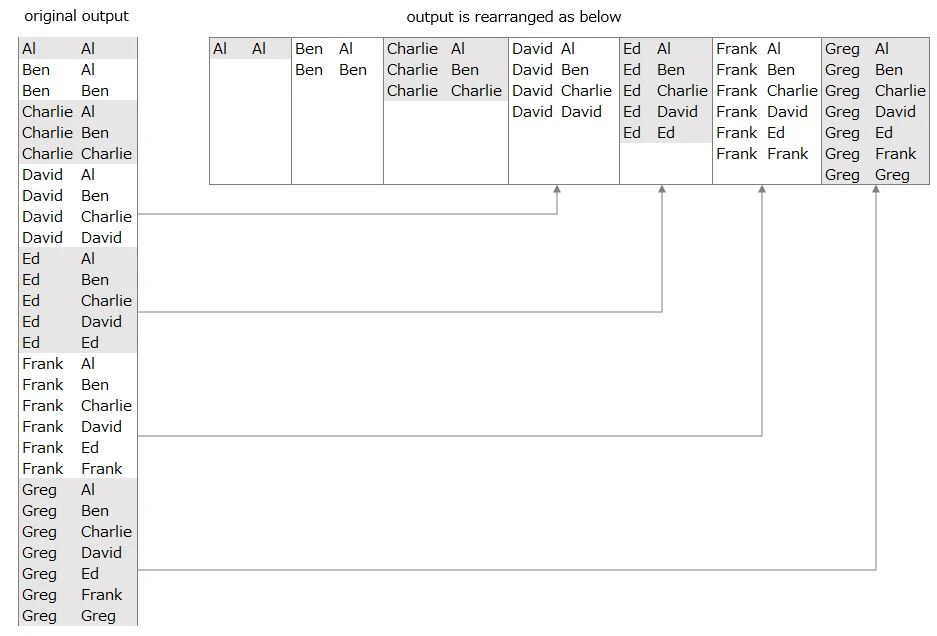
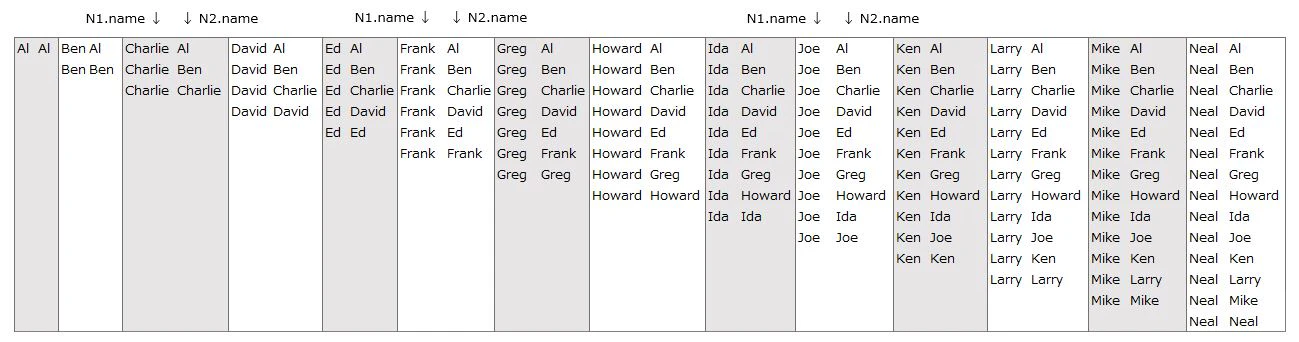
N1.name and N2.name are lined vertically ・・・
but they are rearranged horizontally on purpose
Please check 『part2』and『part3』 for the details of the original data
▼ Output
Edit original data ①
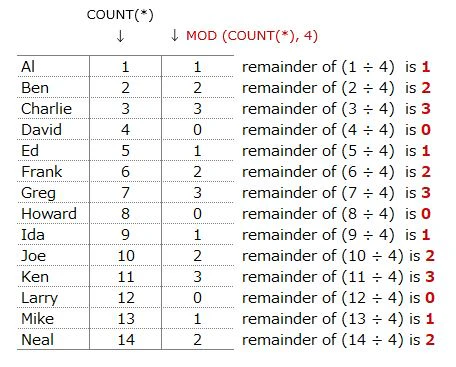
SELECT N1.name,COUNT(*),MOD(COUNT(*), 4)
FROM Names AS N1, Names AS N2
WHERE N1.name >= N2.name
GROUP BY N1.name
Add COUNT(*) in SELECT statement
⇒ N1.name is aggregated (GROUP BY N1.name)
⇒ COUNT(*) is the number of rows that N1.name has
⇒ It is the same as the number of N2.name that are joined to N1.name
Add MOD(COUNT(*), 4) in SELECT statement
⇒ remainder of (COUNT(*) ÷ 4)
▼ Output
Up to this point, it is the same as 『part2』and『part3』
It is a preparation that we have seen
『part4』 changes from here
To take out the 2nd, 3rd and 4th name
we are going to create another original data next
Creating original data2
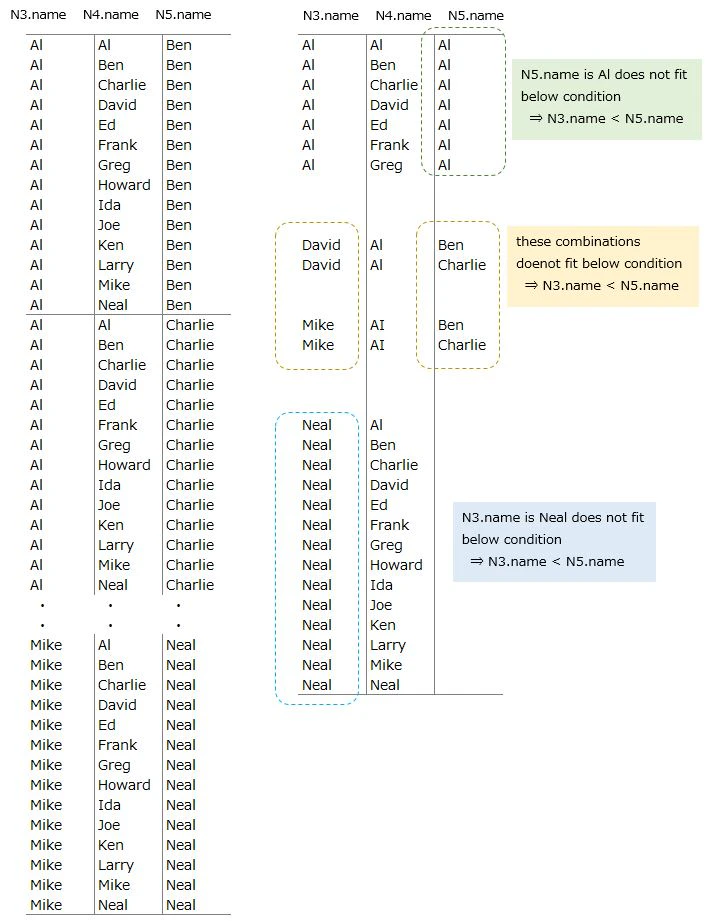
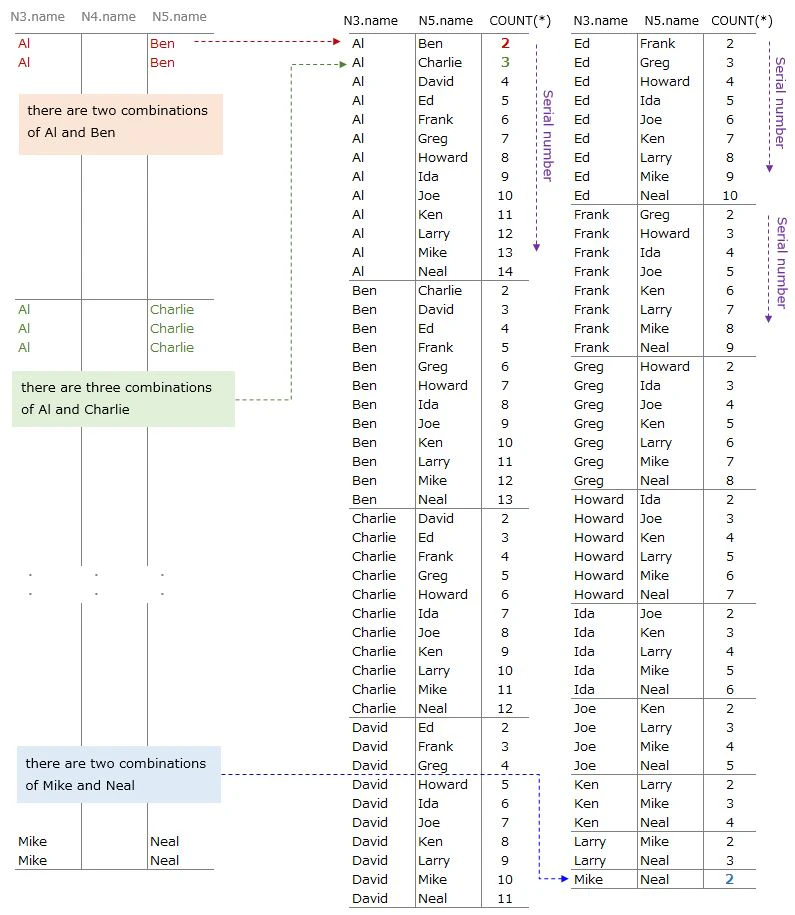
SELECT N3.name, N4.name, N5.name
FROM Names AS N3, Names AS N4, Names AS N5
WHERE N3.name < N5.name
CROSS JOIN 3 Names table
⇒ 14 x 14 x 14 = 2744 rows data are joined
⇒ 1274 rows are left due to 『N3.name < N5.name』condition
Since there are many rows, I will explain using asmall parts
The following rows are excluded(right side of image)
⇒ conbinations of 『N5.name is Al』(green)
⇒ conbinations of 『N3.name is Neal』(blue)
⇒ conbinations of 『N3.name > N5.name』(yellow)
▼ Output(left side of image)
we do not see the purpose of this original data yet ・・・
Edit original data2 ①
SELECT N3.name, N4.name, N5.name
FROM Names AS N3, Names AS N4, Names AS N5
WHERE N3.name < N5.name
  AND N4.name BETWEEN N3.name AND N5.name

order by N3.name, N5.name, N4.name
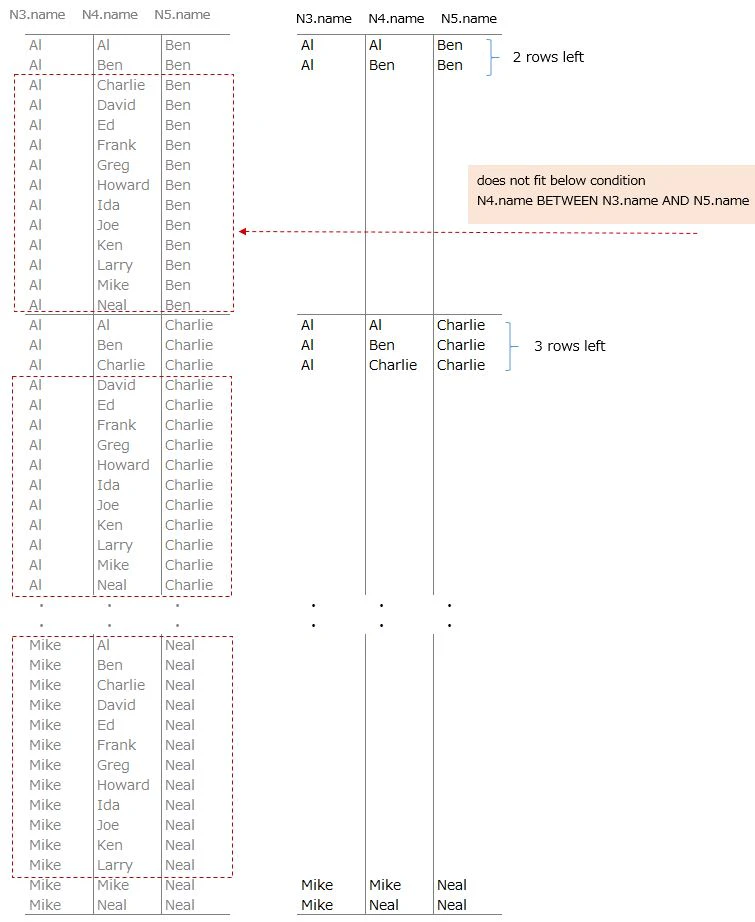
Add another condition
⇒ N4.name BETWEEN N3.name AND N5.name
⇒ names(N4.name) which is between N3.name and N5.name are left
⇒ N4.name is the same as N.3.name or N5.name also fit this condition
▼ Output(right side of image)
We see something like pattern ・・・
It looks N3.name, N4.name, N5.name is lined in alphabetical order
There is a pattern in the number of rows after adding this condition
Al's case, 2 rows -> 3 rows -> 4 rows are left from the top
about N4.name
let's say N3.name is the 1st name
2nd, 3rd and 4th name are taken from N5.name
the number of N5.names joined to N3.name is serial from the top
to make this number use N4.nameI will explain this serial number next
Edit original data2 ②
SELECT N3.name, N5.name, COUNT(*)
FROM Names AS N3, Names AS N4, Names AS N5
WHERE N3.name < N5.name
  AND N4.name BETWEEN N3.name AND N5.name
GROUP BY N3.name, N5.name

order by N3.name,N5.name
Add 『GROUP BY N3.name,N5.name』 then count rows
There is not N4.name because it is not needed
Looking at the whole, there is regularity
COUNT (*) is a serial number
What we want to do with this second original data is ・・・
⇒ to prepar to pick 2nd,3rd and 4th names using N5.name
⇒ to create the serial number to pick the names
Al's case
⇒ Al is picked as 1st name
⇒ the next is Ben. COUNT(*) is 2
⇒ the next is Charlie. COUNT(*) is 3
⇒ the next is David. COUNT(*) is 4
⇒ the next is Frank. COUNT(*) is 5
・ ・ ・ ・ ・
・ ・ ・ ・ ・
Ben's case
⇒ Ben is picked as 1st name
⇒ the next is Charlie. COUNT(*) is 2
⇒ the next is David. COUNT(*) is 3
⇒ the next is Frank. COUNT(*) is 4
⇒ the next is Greg. COUNT(*) is 5
・ ・ ・ ・ ・
・ ・ ・ ・ ・
other names are also the same as Al or Ben
This SQL uses 『CROSS JOIN』 3 times then narrow the rows we need
to create the data which has this regularity
Edit original data2 ③
SELECT FirstCol.name AS name1,
       OtherCols.final_name,
       OtherCols.cnt
FROM
(
  SELECT N1.name
  FROM Names AS N1, Names AS N2
  WHERE N1.name >= N2.name
  GROUP BY N1.name
  HAVING MOD(COUNT(*), 4) = 1
) AS FirstCol(name)
LEFT JOIN
(
  SELECT N3.name, N5.name, COUNT(*)
  FROM Names AS N3, Names AS N4, Names AS N5
  WHERE N3.name < N5.name AND N4.name BETWEEN N3.name AND N5.name
  GROUP BY N3.name, N5.name
) AS OtherCols(name,final_name, cnt)
     ON FirstCol.name = OtherCols.name

order by FirstCol.name,OtherCols.final_name
We are going to join 2 original data that we created before
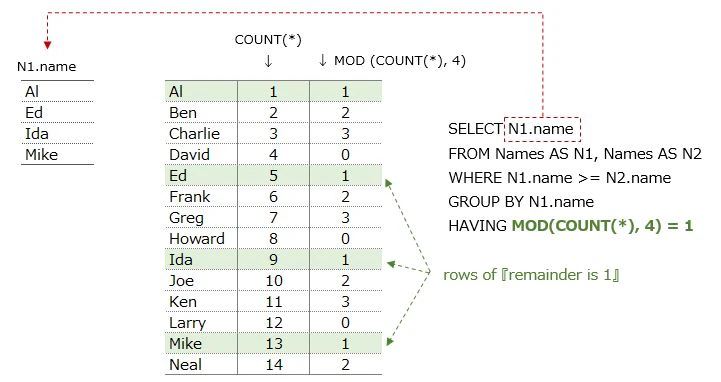
taking out the 1st name from 『Edit original data ①』using HAVING
⇒ subquery: FirstCol
⇒ the rows 『MOD(COUNT(*), 4)』 returns 1
⇒ Al, Ed, Ida, Mike fit this condition
LEFT JOIN 『Edit original data2 ②』 data(OtherCols) to Al, Ed, Ida and Mike
who are taken from FirstCol
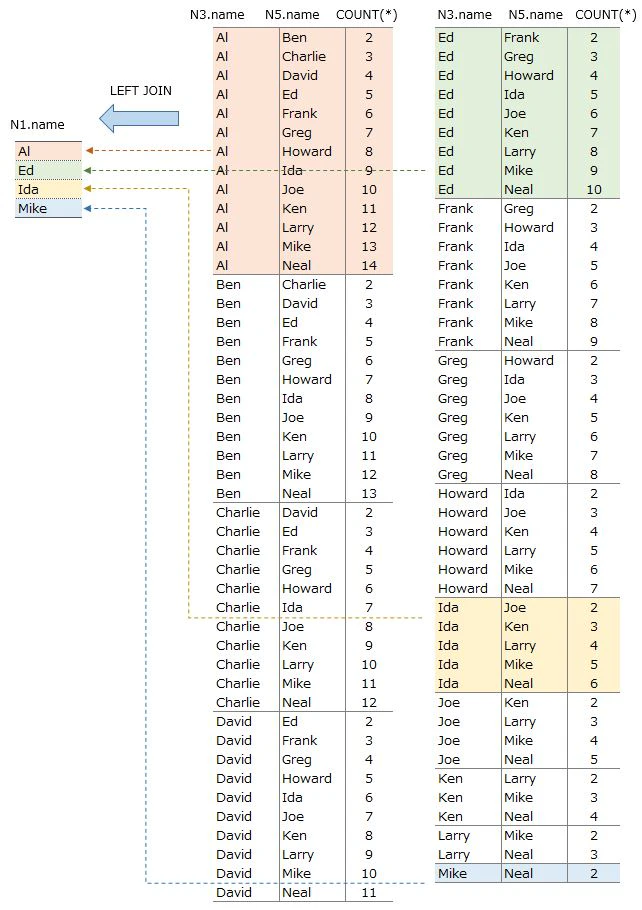
▼ Output(left side of image)
name(name1) which is taken from FirstCol is the 1st name
We are going to take out 2nd, 3rd, 4th name from OtherCols ・・・
but needed to edit this SQL a little more
right side of image is the way to pick other names
we are very close to the goal !!
Answer SQL
SELECT FirstCol.name AS name1,
       MAX(CASE WHEN OtherCols.cnt = 2
                THEN OtherCols.final_name
                ELSE NULL END) AS name2,
       MAX(CASE WHEN OtherCols.cnt = 3
                THEN OtherCols.final_name
                ELSE NULL END) AS name3,
       MAX(CASE WHEN OtherCols.cnt = 4
                THEN OtherCols.final_name
                ELSE NULL END) AS name4
FROM
(
	SELECT N1.name
	FROM Names AS N1, Names AS N2
	WHERE N1.name >= N2.name
	GROUP BY N1.name
	HAVING MOD(COUNT(*), 4) = 1
) AS FirstCol(name)
LEFT JOIN
(
	SELECT N3.name, N5.name, COUNT(*)
	FROM Names AS N3, Names AS N4, Names AS N5
	WHERE N3.name < N5.name AND N4.name BETWEEN N3.name AND N5.name
	GROUP BY N3.name, N5.name
) AS OtherCols(name,final_name, cnt)
     ON FirstCol.name = OtherCols.name
GROUP BY FirstCol.name
▼ Output
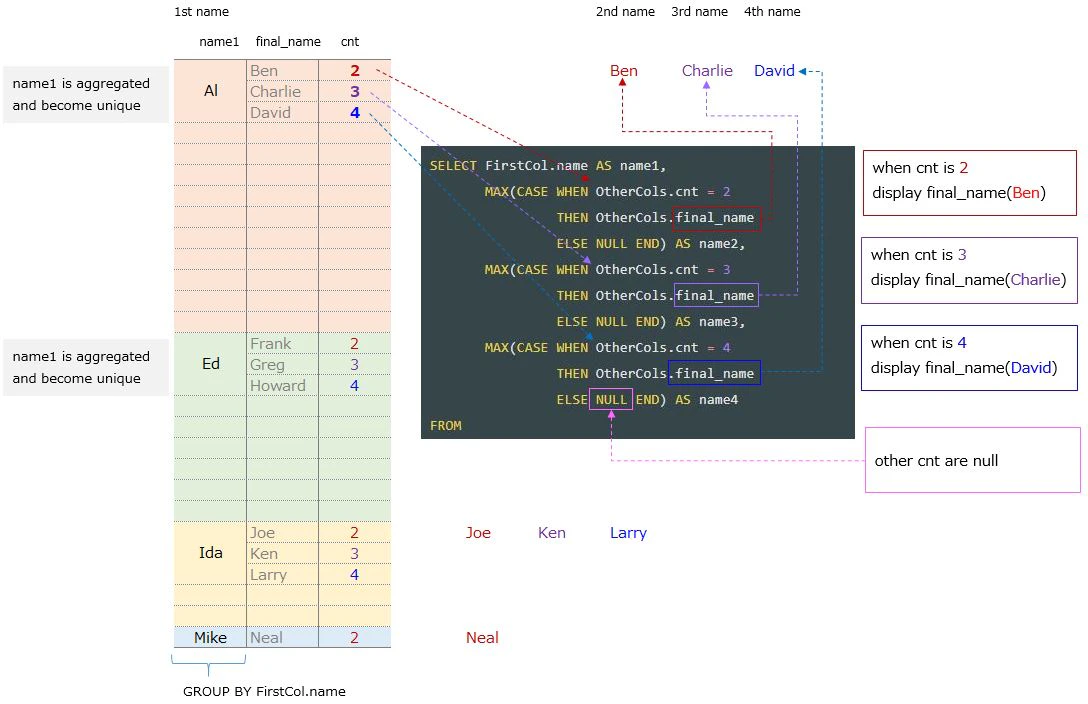
FirstCol.name is aggregated(GROUP BY FirstCol.name)
so it becomes unique name. This is 1st name
2nd, 3rd and 4th names are taken from OtherCols ・・・
but N5.name(final_name) is not the aggregate variable
so use MAX function to take out each name
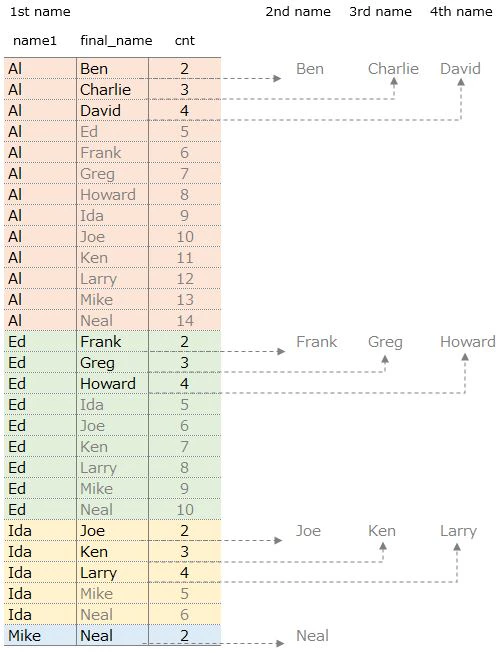
The names that are lined up vertically are changed to horizontally
using CASE statement
Al's case
⇒ 1st name is Al
⇒ 2nd name is Ben(cnt is 2). Display it next to Al
⇒ 3rd name is Charlie(cnt is 3). Display it next to Ben
⇒ 4th name is David(cnt is 4). Display it next to Charlie
⇒ cnt is more than 5, display nothing
below is the image of how to pick names using CASE
Personally ・・・
I could see the author's enthusiasm from 『part4』
OtherCols that takes out 2nd ~ 4th names is wonderfulThis engineer can write this SQL
because he knows how to join data very wellsalute!!