
2026年9月頃から普段使っているノートPCでIntuneが非準拠になる事象が起きました。
その時は
- Windows Updateがあたっていない
- Microsoft Defender for Endpoint(以下、MDfE) の状態がクリアになっていない
のどちらかだと考えていました。
しかし実際に調べてみると違いました。
Microsoft Defender Antivirus の既知の問題
Microsoft Defender Antivirus でMicrosoftも認めたエラーがありました。
私も自身のノートPCで調べましたが、
- 実際の設定としてMicrosoft Defender Antivirusは有効化されている
- フルスキャン、クイックスキャンでも問題ない(何も引っかからない)
実際には以下の通りWindows セキュリティの「セキュリティ プロバイダー」画面では、Microsoft Defender Antivirusが「無効」と表示されていました。
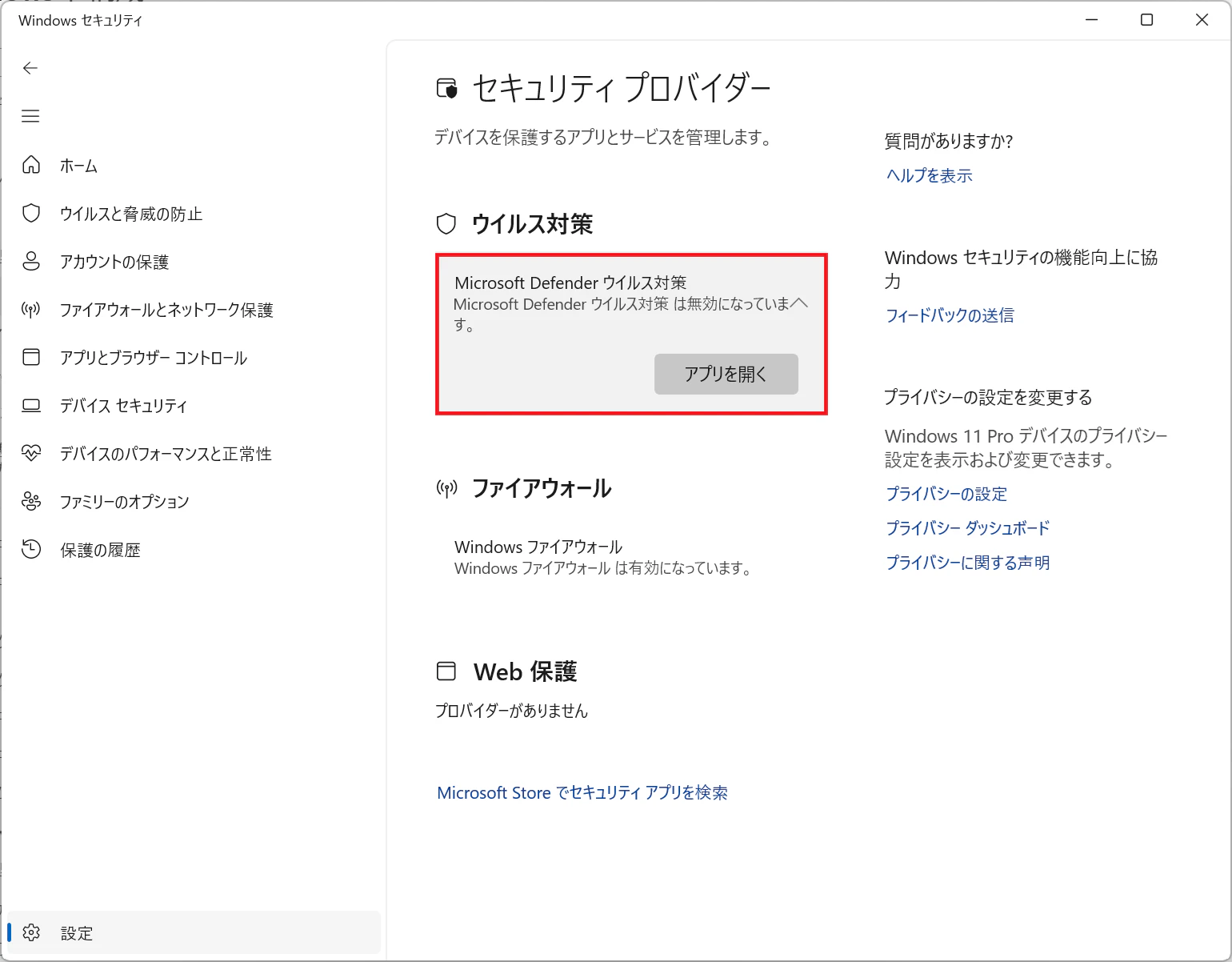
しかし別の画面では
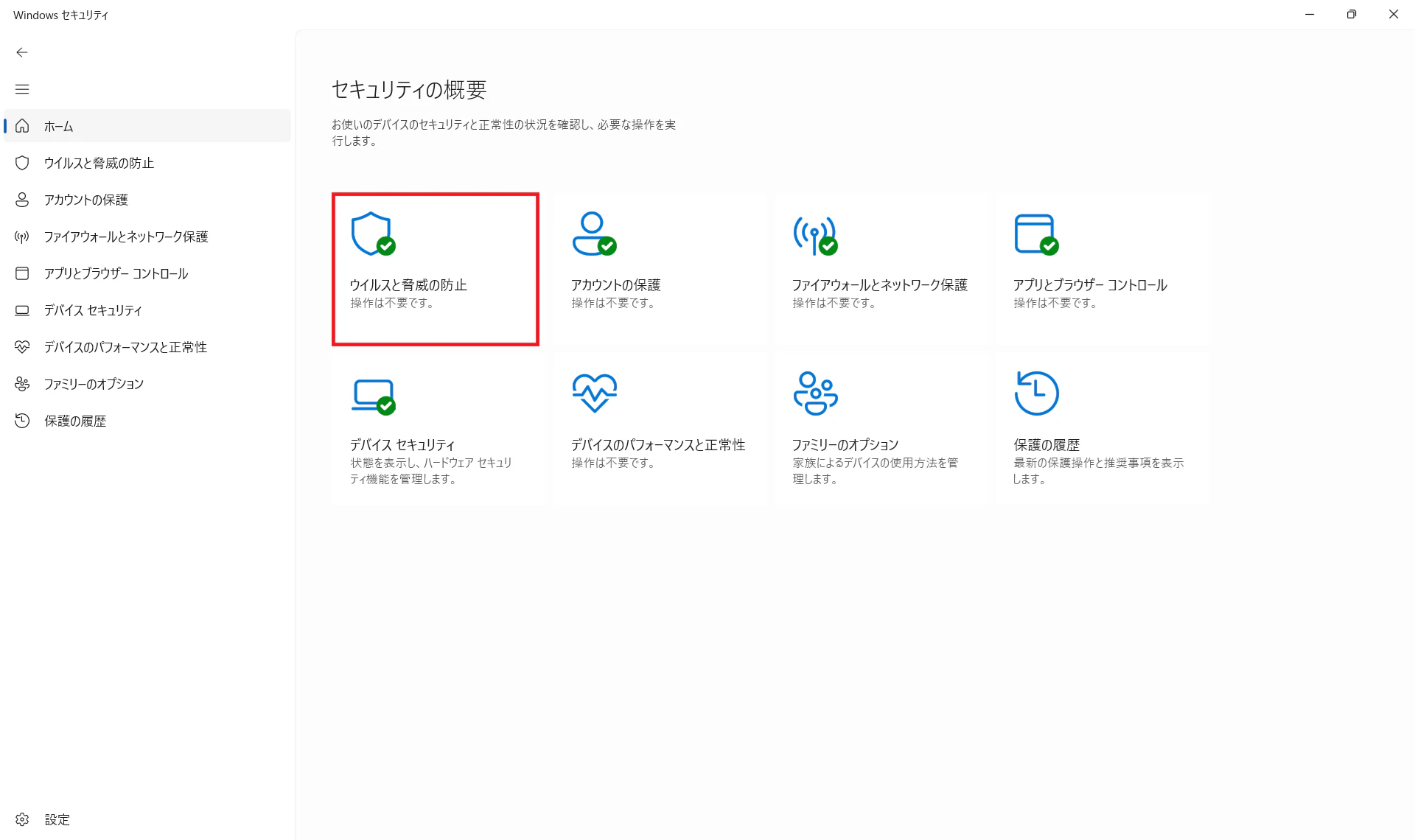
このようになっています。
実際の設定値はどちらか?というとGet-MpComputerStatusで調べて結果は以下の通りです。
Get-MpComputerStatus
AMEngineVersion : 1.1.26080.3
AMProductVersion : 4.18.26080.3
AMRunningMode : Normal
AMServiceEnabled : True
AMServiceVersion : 4.18.26080.3
AntispywareEnabled : True
AntispywareSignatureAge : 0
AntispywareSignatureLastUpdated : 2026/09/13 21:12:18
AntispywareSignatureVersion : 1.459.193.0
AntivirusEnabled : True
AntivirusSignatureAge : 0
AntivirusSignatureLastUpdated : 2026/09/13 21:12:18
AntivirusSignatureVersion : 1.459.193.0
BehaviorMonitorEnabled : True
ComputerID : xxxxxxxx-xxxx-xxxx-xxxx-xxxxxxxxxxxx
ComputerState : 0
ControlledConfigurationState : 0
DefenderSignaturesOutOfDate : False
DeviceControlDefaultEnforcement :
DeviceControlPoliciesLastUpdated : 1601/01/01 9:00:00
DeviceControlState : Disabled
FullScanAge : 4294967295
FullScanEndTime :
FullScanOverdue : False
FullScanRequired : False
FullScanSignatureVersion :
FullScanStartTime :
InitializationProgress :
ServiceStartedSuccessfully IoavProtectionEnabled : True
IsTamperProtected : True
IsVirtualMachine : False
LastFullScanSource : 0
LastQuickScanSource : 2
NISEnabled : True
NISEngineVersion : 1.1.26080.3
NISSignatureAge : 0
NISSignatureLastUpdated : 2026/09/13 21:12:18
NISSignatureVersion : 1.459.193.0
OnAccessProtectionEnabled : True
ProductStatus : 524288
QuickScanAge : 1
QuickScanEndTime : 2026/09/12 12:48:31
QuickScanOverdue : False
QuickScanSignatureVersion : 1.459.168.0
QuickScanStartTime : 2026/09/12 12:23:32
RealTimeProtectionEnabled : True
RealTimeScanDirection : 0
RebootRequired : False
SmartAppControlExpiration :
SmartAppControlState : Off
TamperProtectionSource : ATP
TroubleShootingDailyMaxQuota : 480
TroubleShootingDailyQuotaLeft : 480
TroubleShootingEndTime : INFINITE
TroubleShootingExpirationLeft : INFINITE
TroubleShootingMode : Disabled
TroubleShootingModeSource : Service
TroubleShootingQuotaResetTime : N/A
TroubleShootingStartTime : N/A
PSComputerName :
この時はまだフルスキャンの最中だったのでフルスキャンの結果がまだ出ていないですが、Microsoft Defender Antivirusは有効化されています。
上述のGet-MpComputerStatus_Resultコマンド結果の
AMRunningMode              : Normal
AMServiceEnabled           : True
AntivirusEnabled           : True
DefenderSignaturesOutOfDate: False
RealTimeProtectionEnabled  : True
ですね。
更に以下のコマンドでAntivirusの調査を以下のコマンドで行いました。
Get-WinEvent `

-LogName "Microsoft-Windows-DeviceManagement-Enterprise-Diagnostics-Provider/Admin" `
-MaxEvents 200 |
Where-Object {
$_.Message -match "Antivirus|DeviceStatus|Compliance"
} |
Select-Object TimeCreated, Id, LevelDisplayName, Message |
Format-List
結果は以下の通りです。
PS C:\WINDOWS\system32> Get-WinEvent `

-LogName "Microsoft-Windows-DeviceManagement-Enterprise-Diagnostics-Provider/Admin" `
-MaxEvents 200 |
Where-Object {
$_.Message -match "Antivirus|DeviceStatus|Compliance"
} |
Select-Object TimeCreated, Id, LevelDisplayName, Message |
Format-List

TimeCreated      : 2026/09/14 4:55:08
Id               : 2750
LevelDisplayName : 警告
Message          : DeviceStatus CSP: WscGetSecurityProviderHealth(WSC_SECURITY_PROVIDER_ANTIVIRUS) が状態 0x2 と HRESUL
T この操作を正しく終了しました。  を返しました

以下、同様のログなので省略

TimeCreated      : 2026/08/28 16:59:02
Id               : 2750
LevelDisplayName : 警告
Message          : DeviceStatus CSP: WscGetSecurityProviderHealth(WSC_SECURITY_PROVIDER_FIREWALL) が状態 0x2 と HRESULT
ファンクションが間違っています。  を返しました

以下、同様のログなので省略

TimeCreated      : 2026/08/28 16:57:28
Id               : 2750
LevelDisplayName : 警告
Message          : DeviceStatus CSP: WscGetSecurityProviderHealth(WSC_SECURITY_PROVIDER_ANTIVIRUS) が状態 0x2 と HRESUL
T ファンクションが間違っています。  を返しました

PS C:\WINDOWS\system32>
8月28日16時57分28秒から16時59分02秒まで出ている
DeviceStatus CSP: WscGetSecurityProviderHealth(WSC_SECURITY_PROVIDER_ANTIVIRUS) が状態 0x2 と HRESULT ファンクションが間違っています。 を返しました
これがIntuneで『ウイルス対策』が非準拠となった直接的な原因でした。
この問題が私の環境で厄介だった原因
Microsoft Defender Antivirusの状態がIntuneのコンプライアンス判定にも使用されていたため、Defender Antivirusの誤った状態報告がIntuneの「ウイルス対策:必須」の判定にも波及しました。
Microsoft Defender Antivirusの状態がWindows Security Centerを経由してIntuneのコンプライアンス判定に使用されているのですね。
今回初めて知りました。
このMicrosoft Defender Antivirusの不具合がIntuneに波及し、問題を複雑にしていました。
このDefender自身が報告する状態とWSC経由でMDMが取得した状態の食い違いです。
また事象発生時と修正版のバージョンの違いが明確です。
事象発生時:4.18.26080.3
Microsoft修正版:4.18.26080.4(2026/9/17)
まとめ
IntuneとMicrosoft Defender Antivirusは別の製品・機能ですが、IntuneのコンプライアンスポリシーはWindows Security Centerから報告されるウイルス対策の状態を評価できます。
これは私の環境だけでなく様々なエンタープライズ環境で既に実装済みです。
今回の事象ではMicrosoft Defender Antivirus自体は正常に動作していたものの、Windows Security Centerがその状態を正しく認識できず、その結果Intuneでも「ウイルス対策」が非準拠になりました。
GUI上だけではなく他サービス、今回だとIntuneまで波及しました。
既知のバグで2026年9月のアップデートで改修済みということですが、このバグが起きていた間エンタープライズ企業ではこのデバイスコンプライアンスポリシーやそれに関わる条件付きアクセスを意図的に緩和(弱く)していたのでしょうか?
ポリシーを一時的に緩和するようなバグが出てしまうとこれを狙う悪い人が現れるのではないでしょうか?
これらのことを総合して考えると一時的にこのデバイスコンプライアンスポリシーや条件付きアクセスの緩和だけでなく、これに関するログ分析の強化(今回であればMicrosoft Defender Antivirusの実際の停止やリアルタイム保護の無効化などを別経路で検知・発報する)を検討、実装するのも手ではないでしょうか?
本日はここまで。