
概要
privateなAurora MySQLをLambdaとdrizzleを使ってマイグレーションしてみたメモ。
この時点のソース
フォルダ構造
- apps
  - api
    - drizzle # このディレクトリをlambdaにコピー
      + meta
      - 0000_hoge.sql
    - src
      - db
        - migration.ts # lambda本体
    - package.json # drizzle-kit generate でdrizzleフォルダ配下にマイグレーションファイル作成
    - drizzle.config.ts
- infra
  - lib
    - infra-stack.ts
  - package.json
  - scripts
    - db-migrate.mjs # lambdaをローカル起動させる aws コマンドのバッチ
ソースコード
Lambda handler
DBに接続し、drizzleを使ってマイグレーションを行う。
apps/api/src/db/migration.ts
import { Handler } from 'aws-lambda';
import {
  SecretsManagerClient,
  GetSecretValueCommand,
} from '@aws-sdk/client-secrets-manager';
import { createConnection } from 'mysql2/promise';
import type { Connection } from 'mysql2/promise';
import { drizzle } from 'drizzle-orm/mysql2';
import { migrate } from 'drizzle-orm/mysql2/migrator';
import * as path from 'path';

const secretsClient = new SecretsManagerClient({
  region: process.env.AWS_REGION ?? 'ap-northeast-1',
});

interface DbSecret {
  host: string;
  port: number;
  username: string;
  password: string;
  dbname: string;
}

async function getConnection(): Promise<Connection> {
  const secretArn = process.env.DB_SECRET_ARN;
  if (!secretArn)
    throw new Error('DB_SECRET_ARN environment variable is not set');
  const response = await secretsClient.send(
    new GetSecretValueCommand({ SecretId: secretArn }),
  );
  if (!response.SecretString) throw new Error('SecretString is empty');
  const secret = JSON.parse(response.SecretString) as DbSecret;
  return createConnection({
    host: secret.host,
    port: secret.port,
    user: secret.username,
    password: secret.password,
    database: secret.dbname,
    ssl: { rejectUnauthorized: false },
  });
}

export const handler: Handler = async () => {
  const connection = await getConnection();
  try {
    const db = drizzle(connection);
    await migrate(db, { migrationsFolder: path.join(__dirname, 'migrations') });
    return {
      statusCode: 200,
      body: JSON.stringify({ message: 'Migration compoeted success' }),
    };
  } finally {
    await connection.end();
  }
};
cdk
migrationのlambdaを作成。その際、apps/api/drizzleディレクトリをlambdaに同梱する。
infra/lib/infra-stack.ts
    // 省略
    const lambdaDefaults: Omit<lambdaNodejs.NodejsFunctionProps, 'entry'> = {
      runtime: lambda.Runtime.NODEJS_24_X,
      architecture: isLocal ? undefined : lambda.Architecture.ARM_64,
      handler: 'handler',
      timeout: cdk.Duration.seconds(30),
      vpc,
      vpcSubnets: { subnetGroupName: 'lambda' },
      securityGroups: [lambdaSecurityGroup],
      environment: {
        DB_SECRET_ARN: auroraCluster.secret!.secretArn,
      },
      projectRoot: path.join(__dirname, '../..'),
      bundling: {
        minify: true,
        sourceMap: false,
        target: 'node24',
        externalModules: ['@aws-sdk/*'],
      },
    };
    const migrationFunction = new lambdaNodejs.NodejsFunction(
      this,
      'migrationFunction',
      {
        ...lambdaDefaults,
        entry: path.join(__dirname, '../../apps/api/src/db/migration.ts'),
        timeout: cdk.Duration.seconds(60),
        bundling: {
          ...lambdaDefaults.bundling,
          commandHooks: {
            beforeInstall: () => [],
            beforeBundling: () => [],
            afterBundling: (inputDir: string, outputDir: string) => {
              // Windows / Linux の差異吸収
              const src = inputDir.replace(/\\/g, '/');
              const dst = outputDir.replace(/\\/g, '/');
              return [
                `node -e "const {cpSync}=require('fs');const {join}=require('path');cpSync(join('${src}','apps','api','drizzle'),join('${dst}','migrations'),{recursive:true})"`,
              ];
            },
          },
        },
      },
    );
    auroraCluster.secret!.grantRead(migrationFunction);
    new cdk.CfnOutput(this, 'MigrationFunctionName', {
      value: migrationFunction.functionName,
      description: 'Migration Lambda function name',
    });
    // 省略
infra/package.json
{
  // 省略
  "scripts": {
    "deploy": "cdk deploy",
    "db:migrate": "node scripts/db-migrate.mjs",
  },
  // 省略
}
マイグレーションlambdaの起動用スクリプト
aws invoke。関数名を取得して使うようにしている。
コンソールから手で実行したほうがはやいといえば早いかも
infra/scripts/db-migrate.mjs
import { spawnSync, execSync } from 'child_process';
import { readFileSync, unlinkSync } from 'fs';
import { join } from 'path';
import { tmpdir } from 'os';

const cfnResult = spawnSync(
  'aws',
  [
    'cloudformation', 'describe-stacks',
    '--stack-name', 'InfraStack',
    '--query', 'Stacks[0].Outputs[?OutputKey==`MigrationFunctionName`].OutputValue | [0]',
    '--output', 'text',
  ],
  { encoding: 'utf-8' },
);

if (cfnResult.error || cfnResult.status !== 0) {
  console.error(cfnResult.stderr || cfnResult.error);
  process.exit(1);
}

const functionName = cfnResult.stdout.trim();

if (!functionName) {
  console.error(
    'MigrationFunctionNameが取得できませんでした。InfraStackがデプロイ済か確認してください。',
  );
  process.exit(1);
}

console.log(`Invoking Lambda: ${functionName}`);

const outFile = join(tmpdir(), 'lambda-migrate-out.json');
execSync(
  `aws lambda invoke --function-name ${functionName} --payload "{}" --cli-binary-format raw-in-base64-out "${outFile}"`,
  { stdio: 'inherit' },
);

const result = readFileSync(outFile, 'utf-8');
console.log(result);
unlinkSync(outFile);
npm run deployでpermission エラー
今回のCDKのdeployで下記のエラーがでた。
Done in 24ms
[«FailedToBundleAsset» Failed to bundle asset InfraStack/migrationFunction/Code/Stage, bundle output is located at
 Error: EPERM: operation not permitted, rename
     ...aws-cdk-lib...
    (no user code in 10 frames, use --stack-trace-limit to capture more)
Relates to construct:
    <.> (aws-cdk-lib.App)
     └─ InfraStack (aws-cdk-lib.Stack)
         └─ migrationFunction (aws-cdk-lib.aws_lambda_nodejs.NodejsFunction)
             └─ Code (aws-cdk-lib.aws_s3_assets.Asset)
                 └─ Stage (aws-cdk-lib.AssetStaging)]
npx ts-node --prefer-ts-exts bin/infra.ts: Subprocess exited with error 1
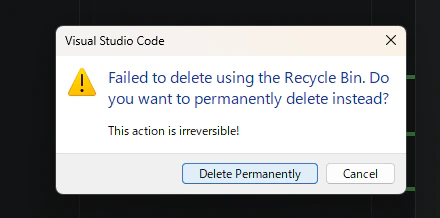
一度、vscodeからcdk.outを削除しようとすると、削除権限を確認される。
これを許可して削除したのち、再度 cdk deployしたところ、このエラーはでなくなった。
]