
前回に引き続き3部作でAIキャラクターに話しかけるだけでロボットアームを動かす記事を書いていきます。
動作環境
- Unity6
- ChatdollKit0.8.0
- ChatdollKit0.8.0-Demo
- ChatdollKit VRM Extension0.8.0
1. 必要なものの入手
こちらからChatdollKit v0.8.0を入手します。また、README.mdに記載されている依存ライブラリも併せて入手します。動かない場合は依存ライブラリのバージョンダウンも必要かもしれません。
以下の依存ライブラリですと私の環境では正常に動作することが確認できました。BurstとJSON.NETについては2026年1月時点で最新だったものでしたら問題ありません。
- uLipSync v2.6.1
- UniTask v2.3.1
- UniVRM v0.89.0
2. バーチャル嫁と話せる状態にする
ChatdollKitのREADME.md(以下README.md)に従って設定を進めても良かったのですが、面倒でしたのでChatdollKit v0.8.0のDemo版もインストールしてバーチャル嫁を動かす実際のシーンに必要なコンポーネントを複製するやり方を取りました。
手順ですが、以下の通りです。
- Assets/ChatdollKit/DemoにあるDemo08のシーンを開く
- ヒエラルキーウィンドウから赤枠で囲ったコンポーネントを複製

- モデルを自分のと差し替え、README.mdに従ってアニメーション設定したりLLM関係の設定やListener, TTS Loaderの設定(この辺は使うAPIによって設定方法変わりますのでREADME.md見るか自分で色々設定いじるかです)
UnityのPlayボタンを押してゲーム画面でキャラクターと話せる状態になりましたらOKです。
3. バーチャル嫁からRPAにリクエストを飛ばすようにChatdollKitに拡張コンポーネントを追加する
バーチャル嫁のメンテナンス半年以上サボってましたのでまたChatdollKitの進化に対して浦島太郎状態でした。過去記事でLooking Glassと連携してた時は最低限の部分しか触ってなくてスキル関係全く解析してなかったりでした。v0.8.0を解析しましたところLLMに関わるスキル関係はAssets/ChatdollKit/Scripts/LLMに入っていました。しかし、スキルを拡張する際の手順に関してはしばらく解析していてもわからず、もう我流でいいやと考え、以下のやり方を取ることにしました。
3.1. RPAにリクエストを飛ばすためのスキルコンポーネント作成
Assets/ChatdollKit/Scripts/LLMにSkillsディレクトリを追加し、その中にRobotController.csを作成します。そして、以下のコードを記述します。
using System.Collections.Generic;
using System.Text.RegularExpressions;
using System.Threading;
using UnityEngine;
using Cysharp.Threading.Tasks;
using ChatdollKit.Network;

namespace ChatdollKit.LLM
{
    public class RobotController : MonoBehaviour
    {
        protected ChatdollHttp client = new ChatdollHttp(debugFunc: Debug.LogWarning);
        private string currentCommand = "";

        public async UniTask ExecuteRobotCommand(string command, CancellationToken token = default)
        {
            if (command == currentCommand)
                return;

            currentCommand = command;

            if (string.IsNullOrEmpty(currentCommand))
                return;

            // コマンドを解析してロボットを制御
            var parameters = ParseCommand(command);

            if (parameters != null)
            {
                try
                {
                    var response = await client.PostJsonAsync<object>(
                        "http://(RPAサーバーを動かしているWindowsPCのIPアドレス)/api/v1/controller",
                        parameters
                    );
                    Debug.Log($"Robot command executed: {command}");
                }
                catch (System.Exception ex)
                {
                    Debug.LogError($"Robot command failed: {ex.Message}");
                }
            }
        }

        private Dictionary<string, string> ParseCommand(string command)
        {
            // コマンド変換([arm:question], [arm:exclamation]のみが渡される前提)
            var parameters = new Dictionary<string, string>();

            // コマンドによって返すJSONを変える
            if (command == "question")
            {
                parameters["servo1"] = "90";
                parameters["servo2"] = "45";
                parameters["servo3"] = "180";
                parameters["servo4"] = "150";
                parameters["servo5"] = "90";
                parameters["servo6"] = "45";
            }
            else if (command == "exclamation")
            {
                parameters["servo1"] = "90";
                parameters["servo2"] = "90";
                parameters["servo3"] = "90";
                parameters["servo4"] = "90";
                parameters["servo5"] = "90";
                parameters["servo6"] = "180";
            }

            return parameters;
        }
    }
}
当初は[arm: 0, 0, 0, 0, 0, 0]のようにLLM側で各サーボのパラメータを返却することを想定してスキルコンポーネント設計してましたが、動かしてみても何故かこの形式のレスポンスを返してきませんでしたのでやり方を変えました。まずは疑問符や感嘆符が使用されるフレーズで[arm:question]や[arm:exclamation]のような形で返答するようにし、いずれかのコマンドによってあらかじめ定義済みのサーボ角度をJSONに変換してリクエストをRPAに送るという形です。
3.2. 既存のコンポーネントに追記
Assets/ChatdollKit/Scripts/LLMにあるLLMContentSkill.csに細工してロボットアームの操作に関わるコマンドもハンドリングするようにします。
using System;
using System.Collections.Generic;
using System.Linq;
using System.Text.RegularExpressions;
using System.Threading;
using UnityEngine;
using Cysharp.Threading.Tasks;
using ChatdollKit.Dialog;
using ChatdollKit.Dialog.Processor;
using ChatdollKit.Model;

namespace ChatdollKit.LLM
{
    public class LLMContentSkill : SkillBase
    {
        [Header("Response stream settings")]
        public List<string> SplitChars = new List<string>() { "。", "!", "?", ".", "!", "?" };
        private List<string> splitCharsWithNewLine;
        public List<string> OptionalSplitChars = new List<string>() { "、", "," };
        public int MaxLengthBeforeOptionalSplit = 0;

        [Header("Robot Control")]
        public RobotController robotController; // 追加箇所 Inspector で設定

        protected ILLMService llmService { get; set; }
        protected List<AnimatedVoiceRequest> responseAnimations { get; set; } = new List<AnimatedVoiceRequest>();
        protected Dictionary<string, Model.Animation> animationsToPerform { get; set; } = new Dictionary<string, Model.Animation>();
        public bool IsParsing { get; protected set; } = false;

        // 中略

        protected virtual async UniTask ParseAnimatedVoiceAsync(ILLMSession llmSession, CancellationToken token)
        {
            IsParsing = true;

            // Split current buffer with the marks that represents the end of a sentence
            splitCharsWithNewLine = new List<string>(SplitChars) { "\n" };

            try
            {
                var facePattern = @"\[face:(.+?)\]";
                var animPattern = @"\[anim:(.+?)\]";
                var armPattern = @"\[arm:(.+?)\]"; // 追加
                var splitIndex = 0;
                var isFirstAnimatedVoice = true;

                while (!token.IsCancellationRequested)
                {
                    // Split current buffer with the marks that represents the end of a sentence
                    var splittedBuffer = SplitString(llmSession.StreamBuffer);

                    if (llmSession.IsResponseDone && splitIndex == splittedBuffer.Count)
                    {
                        // Exit while loop when stream response ends and all sentences has been processed
                        break;
                    }

                    if (splittedBuffer.Count() > splitIndex + 1 || llmSession.IsResponseDone)
                    {
                        // Process each splitted unprocessed sentence
                        foreach (var text in splittedBuffer.Skip(splitIndex).Take(llmSession.IsResponseDone ? splittedBuffer.Count - splitIndex : 1))
                        {
                            splitIndex += 1;
                            if (!string.IsNullOrEmpty(text.Trim()))
                            {
                                var avreq = new AnimatedVoiceRequest(startIdlingOnEnd: isFirstAnimatedVoice);
                                isFirstAnimatedVoice = false;
                                var textToSay = text;
                                var ttsConfig = new TTSConfiguration();

                                // Parse face tags and remove it from text to say
                                var faceMatches = Regex.Matches(textToSay, facePattern);
                                textToSay = Regex.Replace(textToSay, facePattern, "");

                                // Parse animation tags and remove it from text to say
                                var animMatches = Regex.Matches(textToSay, animPattern);
                                textToSay = Regex.Replace(textToSay, animPattern, "");

                                // Parse arm control tags and remove it from text to say
                                var armMatches = Regex.Matches(textToSay, armPattern);
                                textToSay = Regex.Replace(textToSay, armPattern, "");

                                // Remove other tags (sometimes invalid format like `[smile]` remains)
                                textToSay = Regex.Replace(textToSay, @"\[(.+?)\]", "");

                                // Add voice
                                avreq.AddVoiceTTS(textToSay, postGap: textToSay.EndsWith("。") ? 0 : 0.3f);

                                var logMessage = textToSay;

                                if (faceMatches.Count > 0)
                                {
                                    // Add face if face tag included
                                    var face = faceMatches[0].Groups[1].Value;
                                    avreq.AddFace(face, duration: 7.0f);
                                    logMessage = $"[face:{face}]" + logMessage;
                                    // Set face as style parameter to voice
                                    ttsConfig.Params["style"] = face;
                                    avreq.AnimatedVoices.Last().Voices.Last().TTSConfig = ttsConfig;
                                }

                                if (animMatches.Count > 0)
                                {
                                    // Add animation if anim tag included
                                    var anim = animMatches[0].Groups[1].Value;
                                    if (animationsToPerform.ContainsKey(anim))
                                    {
                                        var a = animationsToPerform[anim];
                                        avreq.AddAnimation(a.ParameterKey, a.ParameterValue, a.Duration, a.LayeredAnimationName, a.LayeredAnimationLayerName);
                                        logMessage = $"[anim:{anim}]" + logMessage;
                                    }
                                    else
                                    {
                                        Debug.LogWarning($"Animation {anim} is not registered.");
                                    }
                                }

                                // 追加ここから
                                if (armMatches.Count > 0 && robotController != null)
                                {
                                    // Execute robot control - 現在のテキスト片にarmタグが含まれている場合のみ実行
                                    var armCommand = armMatches[0].Groups[1].Value;
                                    Debug.Log($"Executing arm command for current text: {armCommand}");
                                    await robotController.ExecuteRobotCommand(armCommand, token);
                                    logMessage = $"[arm:{armCommand}]" + logMessage;
                                }
                                else if (armMatches.Count > 0)
                                {
                                    // robotControllerがnullの場合のデバッグ情報
                                    Debug.LogWarning("Arm command detected but robotController is null");
                                }
                                // 追加ここまで

                                Debug.Log($"Assistant: {logMessage}");

                                // Set AnimatedVoiceRequest to queue
                                responseAnimations.Add(avreq);

                                // Prefetch the voice from TTS service
                                _ = modelController.TextToSpeechFunc.Invoke(new Voice(string.Empty, 0.0f, 0.0f, textToSay, string.Empty, ttsConfig, VoiceSource.TTS, true, string.Empty), token);
                            }
                        }
                    }

                    // Wait for a bit before processing buffer next time
                    await UniTask.Delay(100, cancellationToken: token);
                }
            }
            catch (Exception ex)
            {
                Debug.LogError($"Error at ParseAnimatedVoiceAsync: {ex.Message}\n{ex.StackTrace}");
            }
            finally
            {
                IsParsing = false;
            }
        }

            // 以下省略
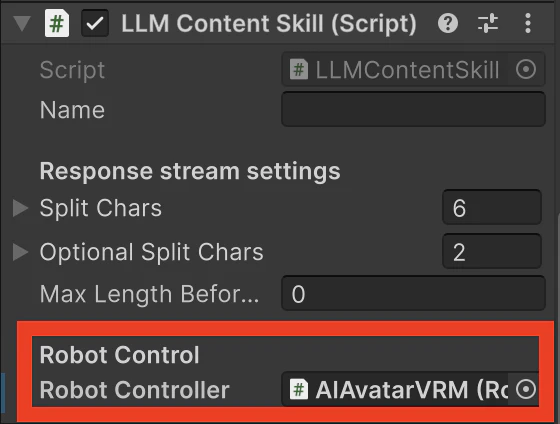
保存してUnityを再読み込みしますとインスペクターウィンドウに以下の形でロボットアーム制御用のコンポーネントをアタッチするための欄ができますのでヒエラルキーウィンドウにあるAIAvatarVRMをドラッグ&ドロップします。
3.3. ロボットアーム操作用のプロンプト追加
プログラム組むよりもこの辺の方が嵌りました。当初は使用するサービス(私の場合はChatGPT)に対応するコンポーネントに以下の形でプロンプトを追加したらいけるのではないかと考えてました。
* You can express your emotions with the user-owned robotic arm.
* Please make sure insert the command into the response message like [arm:0,0,0,0,0,0] if an exclamation mark or question mark between each sentence of the response message.
* Available commands are “question” and “exclamation”.

Example
[arm:90,90,90,90,90,180]Hello, nice to meet you! [arm:90,45,180,150,90,45]How can we help you today?
ですが、実際に動かしてみるとGPTからのレスポンスにこの形式のレスポンスが一切含まれませんでした。そこで、先述のようにまずはシンプルに[arm:question]、[arm:exclamation]のように疑問符や感嘆符使用時にコマンドを返すように修正してみました。修正後のプロンプトは以下の形です。
* You can express your emotions with the user-owned robotic arm.
* Please make sure insert the command into the response message like [arm:question] if an exclamation mark or question mark between each sentence of the response message.
* Available commands are “question” and “exclamation”.

Example
[arm:exclamation]Hello, nice to meet you! [arm:question]How can we help you today?
これで動かして何度か会話してみましたところ、たまに返答に[arm:question]や[arm:exclamation]が含まれるようになりました。ただ、返答にこれらのコマンドが含まれる頻度がこれだけではあまりにも少なく、何回もやり取りを繰り返してようやくロボットアームが疑問符の形を取ったり感嘆符の形を取ったりでした。
ですので、もっと高頻度でアーム制御用のコマンドを返してくれるようにプロンプトをさらに検討し直しました。
修正後のプロンプトは以下の通りです。
* You can express your emotions with the user-owned robotic arm.
* (Most important)Please make sure insert the command into the response message like [arm:question] if an exclamation mark or question mark between each sentence of the response message.
* Available commands are “question” and “exclamation”.

Example
[arm:exclamation]Hello, nice to meet you! [arm:question]How can we help you today?
変更点は項目2に(Most important(最重要))と追記したことです。レスポンスに含まれる項目の中でも制御用コマンドを最重要と位置付けることでレスポンスに高頻度でロボットアーム制御用のコマンドが含まれるようになりました。
そして冒頭のYouTubeに戻る。
4. まとめ
憧れだったロボットアームで遊んでみたかったですので今回の研究で作ったRPAにしてもChatdollKit用拡張スクリプトにしても作り込める要素や改善点はまだ多々ありますが、ひとまず動く状態に持って行けただけでも進歩かなと思います。
ロボットアームのカメラ越しの映像をバーチャル嫁にリアルタイムで送ることができればLLM側でサーボの角度によってアームがどこを向くのかとか学習させることとかもでき、より細かい動きができるかもしれませんが、APIの使用料が気になります。
そのあたりFastMCP使うとコスト抑えられる可能性はありますのでやはりFastMCPへのリプレイスとかは検討したいです。
2/1にGLA中京会館にて友人たちとミニ四駆の話してたらロボットカーの方への興味強まりましたので次のGWの研究用にこれ買うのもいいかもしれないです。
ロボットカーとMCP組み合わせて例えばレースに並走してミニ四駆を撮影するとかコースアウトした機体を拾ってきてコースに戻すロボットカーとか。競争に参加せず道を外れた車を健気に本来の道へと戻し続けるのもまた無償の愛の表現だと思いたい(哲学的な何か)。
ミニ四駆にラズパイPICO乗せられそうならミニ四駆をロボットカーに魔改造もいいなあ。
ないしは方針を変えてバーチャル嫁と話していたらドローンが自動操縦されるというテーマとかでTello Eduとの連携もやってもいいかもしれませんが、最近はXのタイムラインで見かけたバルーン型ドローンが可愛いと感じ、そっち方面の自作とかしてみるのも考えています。が、そもそも個人で自作できるのかどうか気になります。
バルーン型ドローン自作できるとしたら以下のようなビジネスモデルの構築とかも期待できてちょっとワクワクしますけどね…。
- イベントとか屋内警備だけではなく災害対策や独居老人の生存確認での利用可能性
- 屋外に長時間飛行可能なバルーン型ドローンを複数機飛ばしてバルーン型ドローンとMCPとLLMの掛け合わせでAIに地球を観察するための目を提供する事でシンギュラリティを加速させる