
仕事でlangchainに触れる機会が多いエンジニアです。
いろんなことがlangchainを使えばできるのでとても便利なのですが、機能が多様だったり変化が激しいのでエラーにもよく直面します。
あと個人的にちょっとlangchainから離れると細かい使い方を忘れてしまうこともあったりするので、備忘録も含めて記事を書こうと思います。
他のlangchain関連記事一覧
・Langchain の load_and_split()では最終的に何が生成されるのか?
・Langchainでchatモデルを使用する方法は複数ある(←今回の記事)
chatモデルを使う方法は複数ある
今回はChatOpenAIを使ってみます。
from langchain.schema import (
    HumanMessage,
    SystemMessage,
)
from langchain_openai import ChatOpenAI

llm = ChatOpenAI(model="gpt-4o")
①HumanMessage, SystemMessageを使う場合
messages = [
        SystemMessage(content="You are a helpful assistant that translates English to French. Translate the user sentence."),
        HumanMessage(content="I love programming."),
]
print(llm.invoke(messages).content)
【出力結果】
"J'adore la programmation."
messagesのデータ型の確認
print(type(messages), type(messages[0]))
【出力結果】
(list, langchain_core.messages.system.SystemMessage)
引用: https://python.langchain.com/docs/concepts/messages/#langchain-messages
②タプル形式
messages = [
    (
        "system",
        "You are a helpful assistant that translates English to French. Translate the user sentence.",
    ),
    ("human", "I love programming."),
]
print(llm.invoke(messages).content)
【出力結果】
"J'adore la programmation."
messagesのデータ型の確認
print(type(messages), type(messages[0]), type(messages[0][0]))
【出力結果】
(list, tuple, str)
引用: https://python.langchain.com/docs/integrations/chat/openai/
③テンプレートを使う方法
ChatPromptTemplate, FewShotChatMessagePromptTemplateなどがありますが、今回はChatPromptTemplateを使ってみます。
from langchain_core.prompts import ChatPromptTemplate

prompt = ChatPromptTemplate.from_messages(
    [
        (
            "system",
            "You are a helpful assistant that translates {input_language} to {output_language}.",
        ),
        ("human", "{input}"),
    ]
)

chain = prompt | llm
response = chain.invoke(
    {
        "input_language": "English",
        "output_language": "German",
        "input": "I love programming.",
    }
)
print(response.content)
【出力結果】
"Ich liebe das Programmieren."
引用: https://python.langchain.com/docs/integrations/chat/openai/
使い分け
③テンプレートを使う方法
chat全体をテンプレ化できるので、何度もテンプレを呼び出したい時に便利です。上記の例だとinput_language, output_languageを変えて他の言語、inputでも結果を得ることができます。
response = chain.invoke(
    {
        "input_language": "Japanese",
        "output_language": "English",
        "input": "今日は暑いです。",
    }
)
①②
結論から言うと①②の使い分けはイマイチわかりませんでした。
念の為言語モデル側でどんなデータ型が期待されているのか調べてみました↓
langchain_openai.chat_models.base.ChatOpenAI
↓継承
langchain_openai.chat_models.base.BaseChatOpenAI
↓継承
langchain_core.language_models.chat_models.BaseChatModel
と辿っていくと以下のような記載がありました。
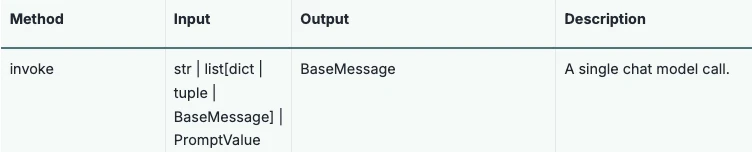
引用: https://python.langchain.com/api_reference/core/language_models/langchain_core.language_models.chat_models.BaseChatModel.html#langchain_core.language_models.chat_models.BaseChatModel
①②でinvokeに与えるmessagesのデータ型も確認しましたが、
①のmessages
→list[BaseMessage](SystemMessageやHumanMessageはBaseMessageのサブクラス)
②のmessages
→list[tuple]
なのでどちらの型も問題なさそうです。