
何かしらの都合でNotionデータベースの数値を巨大に表示したい時があると思います。
今回はそんな時に使えるテクを紹介します。完成図は下のような感じ。
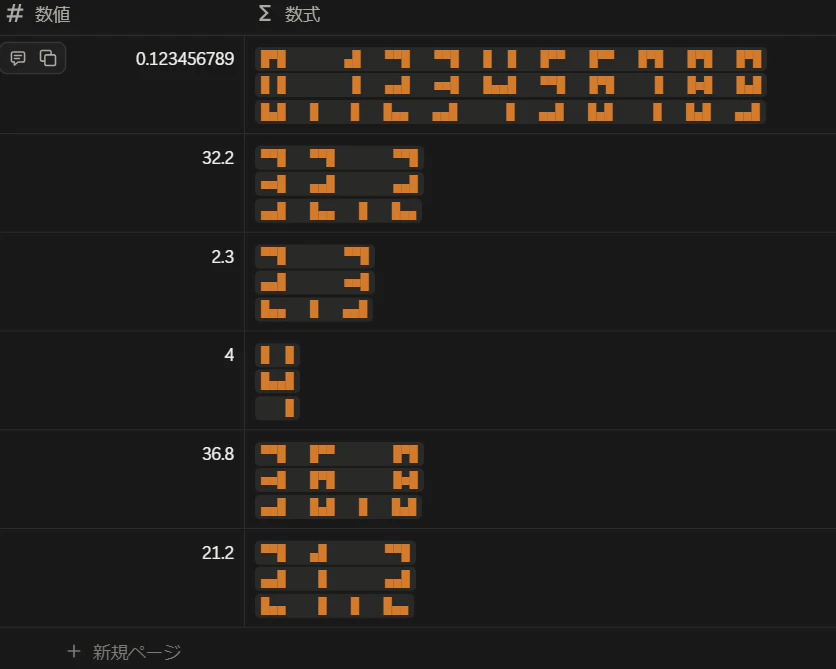
中身としてはアスキーアートを文字列操作によって分割・結合している感じです。
数字一つ一つに対してアスキーアートを文字列として与え、それぞれを改行を区切りとして分割したのち、各行で数値の順番に従って並べて再結合することでこういう感じになります。
表示の折り返しを有効にしないと綺麗に見えないので注意。
数値プロパティから取ってきた値を、以下の数式プロパティで大型のアスキーアートに変換します。
lets(
	digits,
	[/*letter0*/
	"█▀█
█ █
█▄█",
/*letter1*/
	"▄█
 █
 █",
/*letter2*/
  "▀▀█
▄▄█
█▄▄",
 /*letter3*/
  "▀▀█
■■█
▄▄█",
/*letter4*/
	"█  █
█▄▄█
   █",
 /*letter5*/
  "█▀▀
▀▀█
▄▄█",
/*letter6*/
	"█▀▀
█▀█
█▄█",
/*letter7*/
	"█▀█
  █
  █",
/*letter8*/
   "█▀█
█■█
█▄█",
/*letter9*/
	"█▀█
█▄█
▄▄█",
/*periodは10に割り当てる*/
"⠀
⠀
█"
],
	num,map(format(prop("数値")).split(""),replace(current,"\.","10")),
	map(
		[0,1,2],
		let(
			line,current,
			style(map(
				num,
				digits.at(toNumber(current)).split("\n").at(line)
			).join("   "),"b","c","orange")
		)
	).join("\n")
)
style関数のオプションに"c"を渡してコードハイライトをかけている理由は、環境(OSやブラウザ)による表示揺れを防ぐためです。
お試しあれ。
ついでにここで使った数字と小数点のアスキーアートを下に置いておきますね。
█▀█
█ █
█▄█

▄█
 █
 █

▀▀█
▄▄█
█▄▄

▀▀█
■■█
▄▄█

█  █
█▄▄█
   █

█▀▀
▀▀█
▄▄█

█▀▀
█▀█
█▄█

█▀█
  █
  █

█▀█
█■█
█▄█

█▀█
█▄█
▄▄█

⠀
⠀
█
こんな感じで、
https://jp.piliapp.com/symbol/square/
を参考に四角い文字を組み合わせて作ってます。
なお、各種のアスキーアートをあさりましたが個人的にまともに数字に見えるのはこのように最小で3行が限界でした。