
はじめに
こんにちは。はんぺんです。
OpenVINOをpythonで便利に使えるpyvinoを作りましたので、紹介させていただきます。
OpenVINO
OpenVINOはIntel社が出している、機械学習向けのツールキットです。
OpenVINO™ ツールキットは、高性能なコンピューター・ビジョンやディープラーニングを短期間でビジョン・アプリケーションに組み込めるように、開発者やデータ・サイエンティストを支援します。
サポートはIntelのCPUでのみですが、その分パフォーマンスを上げるために徹底的にチューニングされており、推論に特化しております。
主に画像系のモデルが多いですが、最近のアップデートで自然言語処理も扱えるようになり、現在非常に注目を浴びています。
pyvino
OpenVINOは非常に優れたツールキットであるので、それをもっと使いやすくしたらいいのではと考え、pyvinoを作りました。
現在(2019年8月)は顔の検出、感情認識、顔の方向認識、身体の検出、姿勢推定、領域検出の合計6タスクについてサポートしています。
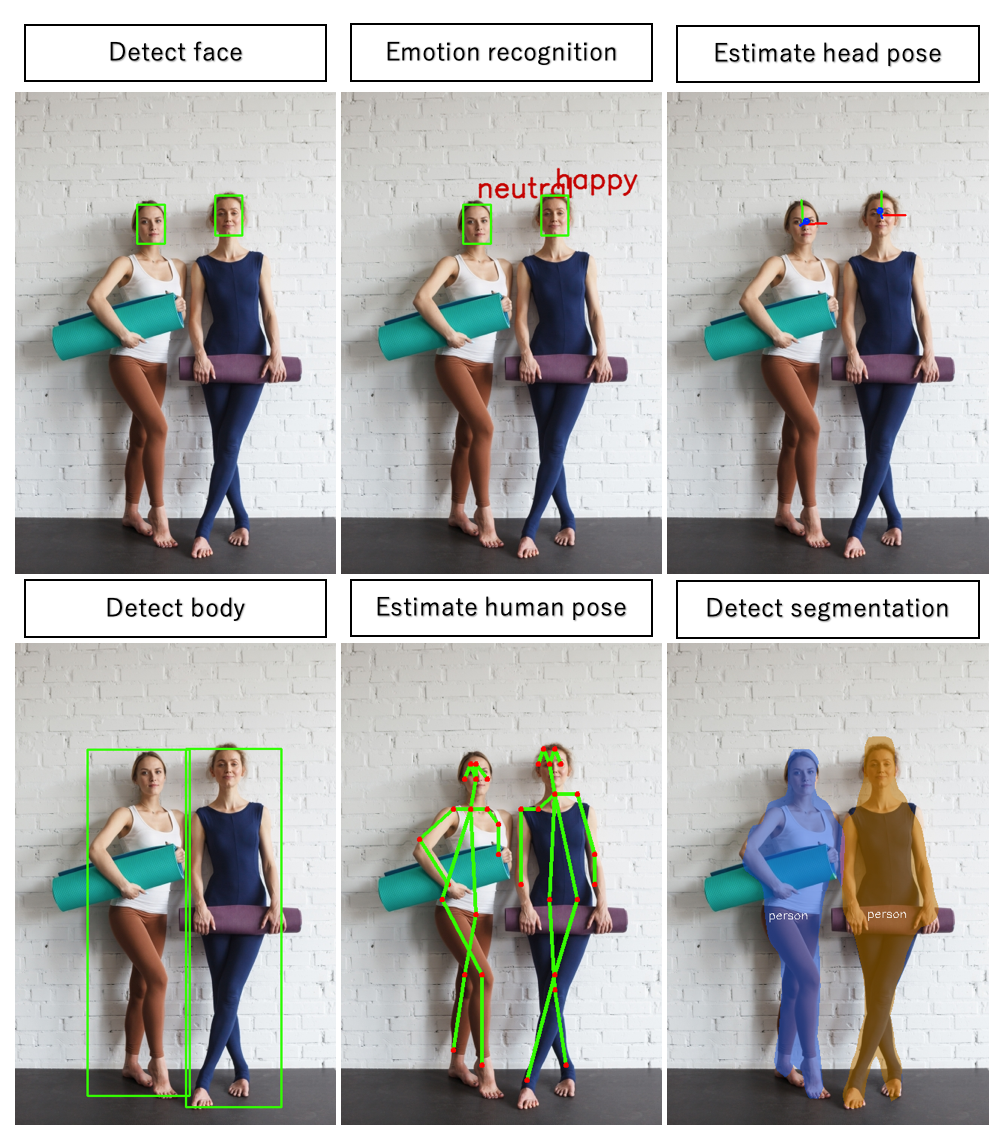
以下がタスクとIntelが公開しているモデルの対応表になります。
| task | model |
|---|---|
| detect_face | face-detection-adas-0001 |
| emotion_recognition | emotions-recognition-retail-0003 |
| estimate_headpose | head-pose-estimation-adas-0001 |
| detect_body | person-detection-retail-0013 |
| estimate_humanpose | human-pose-estimation-0001 |
| detect_segmentation | instance-segmentation-seurity-0050 |
サンプルコードの実行
ではサンプルコードを実行してみましょう。
pyvinoのインストールはこちらを参照してください。
person1.jpgのダウンロードをしてtest_script.pyと同じディレクトリに置きます。
from pyvino.model.model import Model
from pyvino.util.image import imshow, cv2pil
import cv2
import numpy as np

test_image = 'person1.jpg'
# カラータイプはBGRを推奨
frame = cv2.imread(test_image)

# taskの指定とmodelの呼び出し
task = "detect_face"
model = Model(task)
# 画像に対して推論して描画し、結果の画像を返す
new_frame = model.compute(frame)
new_frame = np.asarray(cv2pil(new_frame))
imshow(new_frame)

# 推論結果を返す
# result = model.predict(frame)
# print(result)
スクリプトを実行します。
python test_script.py
推論が成功したら以下の画像が表示されます。
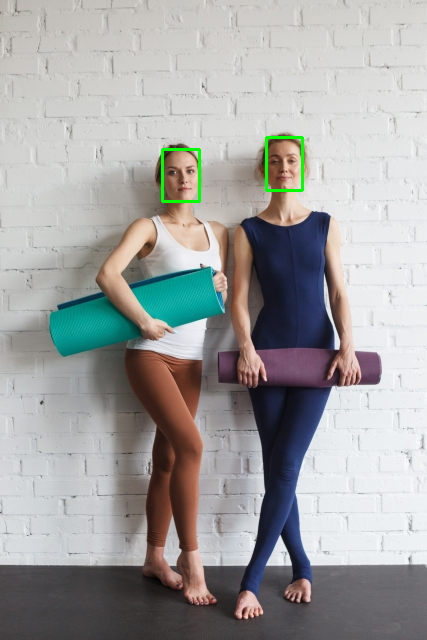
"q"を押して画面を消してください。
task = "detect_face"となっていますが、他にも"emotion_recognition", "estimate_headpose", "detect_body", "estimate_humanpose", "detect_segmentation"と指定することで、他のモデルへと容易に切り替えることができるのが特徴です。
また、画像を表示するだけでなく、predictを用いることで、推論の結果を画像ではなく値として返すこともできます。
# 推論結果を返す
result = model.predict(frame, frame_flag=False)
print(result)
{0: {'label': 1.0, 'conf': 1.0, 'bbox': (162, 149, 199, 201)}, 1: {'label': 1.0, 'conf': 0.9999565, 'bbox': (266, 137, 302, 190)}}
ちなみにframe_flag=Trueにすることで、画像と推論の値の両方を返すようになります。
画像が欲しい、結果の値だけ欲しい、両方欲しいなど、データ分析やモデリングでの要望は多岐に渡りますが、そのどれにも対応できるようにしたため、個人的には使い勝手が良いと思っています。
まとめ
OpenVINOをPythonで便利に使えるpyvinoを作りました。
今回はこちらでは紹介しませんでしたが、GitにJupyter Notebookのサンプルもあげているので、気になる人は確認していただければです。
最後まで読んでいただき、ありがとうございました。