
はじめに
この記事では、AWS上に VPC + Public Subnet + Internet Gateway + Route Table + EC2(SSM Role付き) をTerraformで構築し、その後削除する手順をまとめます。
構成イメージ
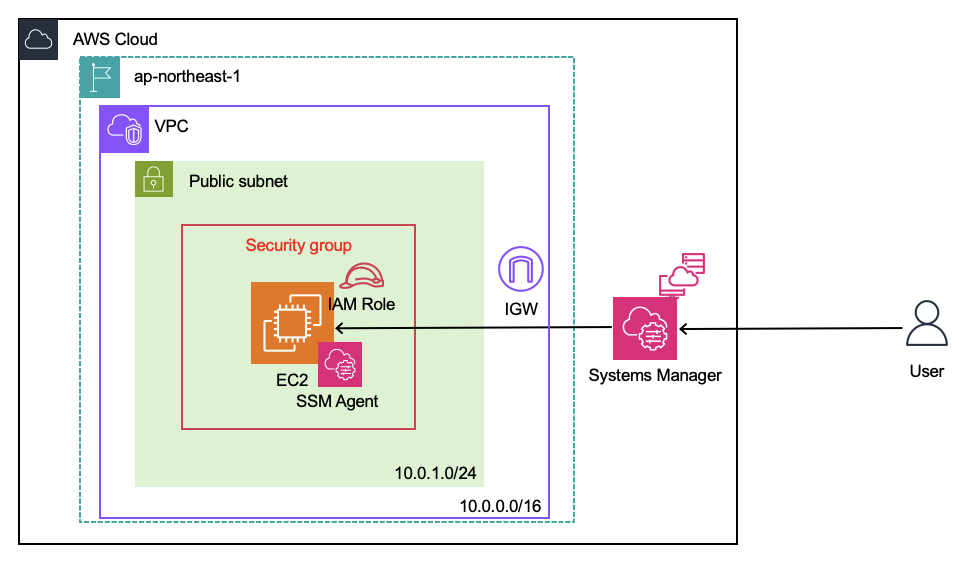
terraformファイル構成
terraform-vpc-ec2/
├── provider.tf
├── variables.tf
├── main.tf
└── outputs.tf
Terraformファイル記載内容
variables.tf
variables.tf
variable "aws_region" {
  description = "AWS Region"
  default     = "ap-northeast-1"
}

variable "vpc_cidr" {
  description = "VPC CIDR block"
  default     = "10.0.0.0/16"
}

variable "public_subnet_cidr" {
  description = "Public Subnet CIDR block"
  default     = "10.0.1.0/24"
}

variable "instance_type" {
  description = "EC2 instance type"
  default     = "t3.micro"
}

variable "instance_name" {
  description = "EC2 instance Name tag"
  default     = "sample-ec2"
}
main.tf
main.tf
# VPC
resource "aws_vpc" "this" {
  cidr_block           = var.vpc_cidr
  enable_dns_support   = true
  enable_dns_hostnames = true

  tags = { Name = "sample-vpc" }
}

# Internet Gateway(IGW)
resource "aws_internet_gateway" "this" {
  vpc_id = aws_vpc.this.id
  tags   = { Name = "sample-igw" }
}

# Public Subnet
resource "aws_subnet" "public" {
  vpc_id                  = aws_vpc.this.id
  cidr_block              = var.public_subnet_cidr
  availability_zone       = "${var.aws_region}a"
  map_public_ip_on_launch = true
  tags                     = { Name = "public-subnet" }
}

# Route Table
resource "aws_route_table" "public" {
  vpc_id = aws_vpc.this.id
  route {
    cidr_block = "0.0.0.0/0"
    gateway_id = aws_internet_gateway.this.id
  }
  tags = { Name = "public-rt" }
}

resource "aws_route_table_association" "public" {
  subnet_id      = aws_subnet.public.id
  route_table_id = aws_route_table.public.id
}

# Security Group(SSM接続用)
resource "aws_security_group" "public_sg" {
  name   = "public-ec2-sg"
  vpc_id = aws_vpc.this.id

  # outbound only
  egress {
    from_port   = 0
    to_port     = 0
    protocol    = "-1"
    cidr_blocks = ["0.0.0.0/0"]
  }

  tags = {
    Name = "public-ec2-sg"
  }
}

# IAM Role + Instance Profile for SSM
resource "aws_iam_role" "ssm_role" {
  name = "ec2-ssm-role"

  assume_role_policy = jsonencode({
    Version = "2012-10-17"
    Statement = [{
      Effect = "Allow"
      Principal = {
        Service = "ec2.amazonaws.com"
      }
      Action = "sts:AssumeRole"
    }]
  })
}

resource "aws_iam_role_policy_attachment" "ssm_attach" {
  role       = aws_iam_role.ssm_role.name
  policy_arn = "arn:aws:iam::aws:policy/AmazonSSMManagedInstanceCore"
}

resource "aws_iam_instance_profile" "ssm_profile" {
  name = "ec2-ssm-profile"
  role = aws_iam_role.ssm_role.name
}

# AMI(Amazon Linux 2023)
data "aws_ami" "amazon_linux" {
  most_recent = true
  owners      = ["amazon"]

  filter {
    name   = "name"
    values = ["al2023-ami-*-x86_64"]
  }
}

# EC2
resource "aws_instance" "public" {
  ami                         = data.aws_ami.amazon_linux.id
  instance_type               = var.instance_type
  subnet_id                   = aws_subnet.public.id
  vpc_security_group_ids      = [aws_security_group.public_sg.id]
  associate_public_ip_address = true
  iam_instance_profile        = aws_iam_instance_profile.ssm_profile.name

  tags = { Name = var.instance_name }
}
provider.tfファイルは前回と同様
outputs.tfは作成後に 参照したい情報を出力
例:VPC IDやEC2 ID、パブリックIPなど
コマンド実行
terraform init
terraform plan
terraform apply
作成確認
EC2の起動やVPC/Subnetの作成が完了していることをAWSコンソールで確認できます。
Security Groupは特にポート開放なし、SSM Roleが付与されている状態です。
※詳細は別記事にまとめる予定です。
リソース削除
terraform destroy