
はじめに
こんにちは、ほうき星 @H0ukiStar です。
皆さんは CloudFormation で ActionAfterCompletion を指定した EventBridge Schedulder を作成したいと思ったことはありませんか?
私はあります。
EventBridge Scheduler を作成出来る AWS::Scheduler::Schedule は、以下のドキュメントの通り ActionAfterCompletion プロパティは存在せずサポートしていません。
これは、ActionAfterCompletion が DELETE の場合、スケジュールが動作を完了した後自動で削除されるため、ドリフト状態にならない様にこのプロパティを指定したスケジュールリソースは作成できないものと想像します。
しかし、この ActionAfterCompletion を指定したスケジュールを CloudFormation で作成したい時もあるでしょう。
例えば、一度だけ実行するスケジュールを CloudFormation で反復的に展開したい場合、実行後に自動削除される ActionAfterCompletion: DELETE を指定できると便利です。
そこで本記事では CloudFormation のカスタムリソースを使用して作成する方法をご紹介します。
カスタムリソース(AWS::CloudFormation::CustomResource)とは
このリソースは、CloudFormation 純正では対応していないリソースの作成や API 等を実行したいときに使用するリソースです。
指定した SNS や Lambda 関数を呼び出すことができ、呼び出し先の Lambda 関数等で以下のような処理をすることができます。
- CloudFormation が純正で対応していない AWS リソースの作成
- 外部サービス等との連携(API 呼び出しなど)
- 特定の初期化処理や登録作業の自動化
今回はこのカスタムリソースと Lambda 関数を使用して、ActionAfterCompletion を指定したスケジュールリソースの作成を行います。
カスタムリソースとして ActionAfterCompletion を指定したスケジュールリソースを作成する Lambda 関数のサンプル
カスタムリソースは ServiceToken プロパティを持っており、ここに処理を行わせたい Lambda 関数の ARN を指定して利用します。
ServiceToken に指定する Lambda 関数はカスタムリソースを定義する CFn テンプレート内にインラインで定義するか、事前に用意した Lambda 関数を指定することができます。
今回は Lambda 関数を事前に用意することとし、以下のコードを SAM でデプロイしました。
SAM テンプレートを含む全ソースは以下のリポジトリに置いていますので、合わせて参考にしてください。
ActionAfterCompletion を指定したスケジュールリソースを作成する Lambda 関数のコード
from __future__ import print_function
import re
import json
from typing import Optional
from datetime import datetime

import boto3
import urllib3
from pydantic import BaseModel, ValidationError


class FlexibleTimeWindowProperty(BaseModel):
    """
    Flexible time window configuration for EventBridge Scheduler.
    """
    MaximumWindowInMinutes: Optional[int] = None
    Mode: Optional[str] = None


class TargetProperty(BaseModel):
    """
    Target configuration for EventBridge Scheduler.
    """
    class DeadLetterConfigProperty(BaseModel):
        """
        Dead letter queue configuration.
        """
        Arn: Optional[str] = None

    class EventBridgeParametersProperty(BaseModel):
        """
        EventBridge event parameters.
        """
        DetailType: Optional[str] = None
        Source: Optional[str] = None

    class KinesisParametersProperty(BaseModel):
        """
        Kinesis stream parameters.
        """
        PartitionKey: Optional[str] = None

    class RetryPolicyProperty(BaseModel):
        """
        Retry policy configuration.
        """
        MaximumEventAgeInSeconds: Optional[int] = None
        MaximumRetryAttempts: Optional[int] = None

    class SageMakerPipelineParametersProperty(BaseModel):
        """
        SageMaker Pipeline parameters.
        """
        class PipelineParameterListItemProperty(BaseModel):
            """
            Individual pipeline parameter.
            """
            Name: Optional[str] = None
            Value: Optional[str] = None

        PipelineParameterList: Optional[list[PipelineParameterListItemProperty]] = None

    class SqsParametersProperty(BaseModel):
        """
        SQS queue parameters.
        """
        MessageGroupId: Optional[str] = None

    Arn: Optional[str] = None
    DeadLetterConfig: Optional[DeadLetterConfigProperty] = None
    # EcsParameters: Optional[dict] = None
    EventBridgeParameters: Optional[EventBridgeParametersProperty] = None
    Input: Optional[str] = None
    KinesisParameters: Optional[KinesisParametersProperty] = None
    RetryPolicy: Optional[RetryPolicyProperty] = None
    RoleArn: Optional[str] = None
    SageMakerPipelineParameters: Optional[SageMakerPipelineParametersProperty] = None
    SqsParameters: Optional[SqsParametersProperty] = None


class ScheduleProperty(BaseModel):
    """
    EventBridge Scheduler schedule configuration.
    """
    ActionAfterCompletion: Optional[str] = None
    Description: Optional[str] = None
    EndDate: Optional[datetime] = None
    FlexibleTimeWindow: Optional[FlexibleTimeWindowProperty] = None
    GroupName: Optional[str] = None
    KmsKeyArn: Optional[str] = None
    Name: str
    ScheduleExpression: Optional[str] = None
    ScheduleExpressionTimezone: Optional[str] = None
    StartDate: Optional[datetime] = None
    State: Optional[str] = None
    Target: Optional[TargetProperty] = None


def lambda_handler(event: dict, context: object) -> None:
    """
    AWS Lambda handler for CloudFormation custom resource managing EventBridge Scheduler schedules.

    Handles Create, Update, and Delete operations for EventBridge Scheduler schedules
    as a CloudFormation custom resource. Supports ActionAfterCompletion property to enable
    automatic schedule actions (e.g., deletion) after completion.

    Parameters
    ----------
    event : dict
        Lambda event object containing CloudFormation request details.
    context : object
        Lambda context object containing runtime information.

    Returns
    -------
    None
        Sends response to CloudFormation via HTTP callback.

    Notes
    -----
    - For Create: Creates a new schedule and returns its ARN
    - For Update: Updates existing schedule or creates new one if Name changed
    - For Delete: Deletes the schedule unless it failed during creation/update
    """
    print(f"{event['ResourceProperties']=}")

    try:
        schedule_property: ScheduleProperty = ScheduleProperty(
            **event["ResourceProperties"]
        )
    except ValidationError as e:
        send(event, context, "FAILED", {}, reason=f"Resource properties pre validation failed: {e.errors()}")
        return

    scheduler_client = boto3.client("scheduler")
    request_type: str = event["RequestType"]
    print(f"{request_type=}")

    if request_type == "Create":
        try:
            response: dict = scheduler_client.create_schedule(
                **schedule_property.model_dump(exclude_none=True)
            )
            send(event, context, "SUCCESS", {"Arn": response["ScheduleArn"]}, physicalResourceId=schedule_property.Name)
        except Exception as e:
            send(event, context, "FAILED", {}, reason=f"{e}", physicalResourceId="CREATE_FAILED")
        return
    elif request_type == "Update":
        try:
            old_schedule_property: ScheduleProperty = ScheduleProperty(
                **event["OldResourceProperties"]
            )
        except ValidationError as e:
            send(event, context, "FAILED", {}, reason=f"Old resource properties pre validation failed: {e.errors()}")
            return

        physical_resource_id: str = event["PhysicalResourceId"]

        # Create a new schedule if Name has changed
        if old_schedule_property.Name != schedule_property.Name:
            try:
                # CloudFormation will automatically delete the old schedule when the physical ID changes, so no explicit deletion is needed in Update.
                response: dict = scheduler_client.create_schedule(
                    **schedule_property.model_dump(exclude_none=True)
                )
                send(event, context, "SUCCESS", {"Arn": response["ScheduleArn"]}, physicalResourceId=schedule_property.Name)
            except Exception as e:
                send(event, context, "FAILED", {}, reason=f"{e}", physicalResourceId="UPDATE_FAILED")
            return

        # Update the schedule if Name is the same
        try:
            existing_schedule: dict = scheduler_client.get_schedule(Name=physical_resource_id)
            existing_schedule_property: ScheduleProperty = ScheduleProperty(**existing_schedule)

            update_params: dict = existing_schedule_property.model_dump(exclude_none=True)
            new_params: dict = schedule_property.model_dump(exclude_none=True)
            update_params.update(new_params)

            response: dict = scheduler_client.update_schedule(**update_params)
            send(event, context, "SUCCESS", {"Arn": response["ScheduleArn"]}, physicalResourceId=schedule_property.Name)
        except Exception as e:
            send(event, context, "FAILED", {}, reason=f"{e}", physicalResourceId=physical_resource_id)
        return
    elif request_type == "Delete":
        physical_resource_id: str = event["PhysicalResourceId"]

        # Skip deletion and return success if CREATE_FAILED (schedule does not exist) or UPDATE_FAILED (should not delete)
        if physical_resource_id == "CREATE_FAILED" or physical_resource_id == "UPDATE_FAILED":
            send(event, context, "SUCCESS", {})
            return

        try:
            scheduler_client.delete_schedule(Name=physical_resource_id)
            send(event, context, "SUCCESS", {})
        except scheduler_client.exceptions.ResourceNotFoundException:
            # If the schedule is already deleted, consider it a success
            send(event, context, "SUCCESS", {})
        except Exception as e:
            send(event, context, "FAILED", {}, reason=f"{e}")
        return
    send(event, context, "FAILED", {}, reason=f"Unsupported request type: {request_type}")
    return


# Copyright Amazon.com, Inc. or its affiliates. All Rights Reserved.
# SPDX-License-Identifier: MIT-0
http = urllib3.PoolManager()


def send(event, context, responseStatus, responseData, physicalResourceId=None, noEcho=False, reason=None):
    responseUrl = event['ResponseURL']

    responseBody = {
        'Status': responseStatus,
        'Reason': reason or "See the details in CloudWatch Log Stream: {}".format(context.log_stream_name),
        'PhysicalResourceId': physicalResourceId or context.log_stream_name,
        'StackId': event['StackId'],
        'RequestId': event['RequestId'],
        'LogicalResourceId': event['LogicalResourceId'],
        'NoEcho': noEcho,
        'Data': responseData
    }

    json_responseBody = json.dumps(responseBody)

    print("Response body:")
    print(json_responseBody)

    headers = {
        'content-type': '',
        'content-length': str(len(json_responseBody))
    }

    try:
        response = http.request('PUT', responseUrl, headers=headers, body=json_responseBody)
        print("Status code:", response.status)

    except Exception as e:
        print("send(..) failed executing http.request(..):", mask_credentials_and_signature(e))


def mask_credentials_and_signature(message):
    """
    Mask AWS credentials and signatures in error messages.

    Redacts sensitive AWS credential and signature information from messages
    before logging to prevent credential exposure.

    Parameters
    ----------
    message : str
        Error message or string that may contain AWS credentials.

    Returns
    -------
    str
        Message with credentials and signatures masked.

    Notes
    -----
    Masks the following AWS authentication parameters:
    - X-Amz-Credential
    - X-Amz-Signature
    """
    message = re.sub(r'X-Amz-Credential=[^&\s]+', 'X-Amz-Credential=*****', message, flags=re.IGNORECASE)
    return re.sub(r'X-Amz-Signature=[^&\s]+', 'X-Amz-Signature=*****', message, flags=re.IGNORECASE)
リソースプロパティのPydanticによるバリデーションは主に datetime や int への変換のために使用しており、スケジュールリソースが許容している文字列や数値範囲等のバリデーションは boto3 に任せる実装としています。
また、EcsParameters プロパティは本サンプルでは実装していない点に注意ください。
動作確認
この Lambda 関数を用いて ActionAfterCompletion が有効なスケジュールを作成するサンプルのテンプレートは以下の通りです。
AWSTemplateFormatVersion: 2010-09-09
Description: Sample template for managing EventBridge Scheduler with ActionAfterCompletion using a CloudFormation custom resource

Resources:
  CustomScheduleWithActionAfterCompletion:
    Type: Custom::ScheduleWithActionAfterCompletion
    Properties:
      ServiceTimeout: 30
      # Replace with the ARN of the deployed custom resource Lambda function
      ServiceToken: arn:aws:lambda:ap-northeast-1:123456789012:function:cfn-custom-resource-schedule-with-aac

      Name: schedule-with-aac
      ActionAfterCompletion: DELETE

      FlexibleTimeWindow:
        Mode: OFF

      # Replace with the desired schedule expression
      ScheduleExpression: at(2026-04-30T00:00:00)

      ScheduleExpressionTimezone: Asia/Tokyo

      Target:
        # Replace with the ARN of the target resource to invoke
        Arn: arn:aws:lambda:ap-northeast-1:123456789012:function:example-function

        # Replace with the ARN of the IAM role that EventBridge Scheduler assumes
        RoleArn: arn:aws:iam::123456789012:role/example-scheduler-role
- ServiceToken には展開した Lambda 関数の ARN を記述してください
- Target には任意のターゲットを記載してください
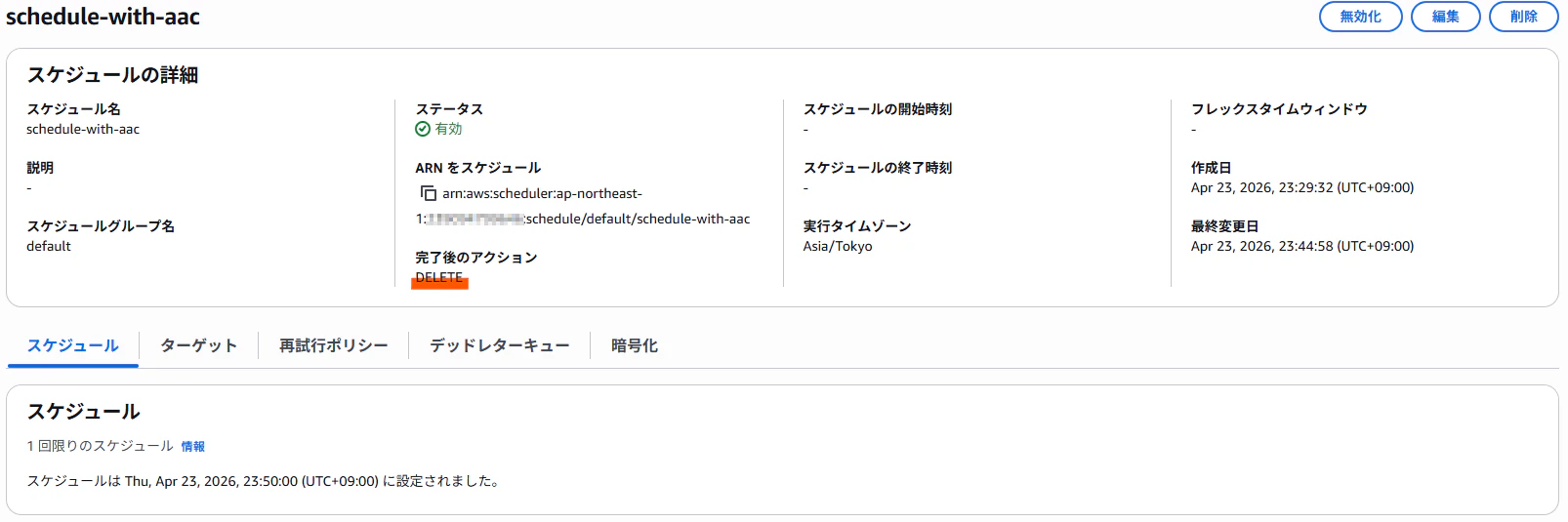
上記サンプルを CloudFormation で展開し、ActionAfterCompletion の指定ができているスケジュールが作成できていれば動作確認は OK です。

注意点
冒頭でも触れましたが ActionAfterCompletion を DELETE に指定したスケジュールは完了した際にリソースそのものが削除されます。
カスタムリソースはドリフトの確認に対応していないため、EventBridge Scheduler 側で削除されても CloudFormation スタックがドリフト状態としてマークされることはありません。
しかし CloudFormation スタックの削除等でリソースを削除する際、RequestType が Delete なイベントが Lambda 関数に渡されますので、削除の際の ResourceNotFoundException のエラーは SUCCESS となるようハンドリングしておくと良いでしょう。
try:
    scheduler_client.delete_schedule(Name=physical_resource_id)
    send(event, context, "SUCCESS", {})
except scheduler_client.exceptions.ResourceNotFoundException:
    # If the schedule is already deleted, consider it a success
    send(event, context, "SUCCESS", {})
except Exception as e:
    send(event, context, "FAILED", {}, reason=f"{e}")
return
さいごに
本記事では ActionAfterCompletion を指定したスケジュールリソースを CloudFormation のカスタムリソースを利用して作成する方法をご紹介しました。
EventBridge Scheduler のように SDK(API) では利用可能でも CloudFormation では未対応なケースは他にもあるため、今回の方法はそのような場面でも応用することが可能です。
本記事が誰かの参考になれば幸いです。