
はじめに
こんにちは、ほうき星 @H0ukiStar です。
皆さんは Lambda Durable Functions を使っていますでしょうか?
Lambda Durable Functions は Lambda 関数単体で Step Functions のようなマルチステップなワークフローを実現できる機能です。
この Lambda Durable Functions を使用した処理の中でログの記録を行いたい場合、context.loggerやstep_context.loggerの使用が推奨されていますが、それはなぜでしょうか?
本記事ではその理由を確認してみましたので、ご紹介します。
通常のログ記録方法の場合
まず、通常の Lambda 関数では Python の場合、以下のように logging モジュールを使用してログ記録をしていることと思います。
import logging

logger: logging.Logger = logging.getLogger()
logger.setLevel(logging.INFO)

logger.info("Loading lambda_function.py")
以下は Lambda Durable Functions の各ステップ内や lambda_handler 内で logging モジュールを使用してログ記録を行うサンプルコードです。
import logging


from aws_durable_execution_sdk_python.config import Duration
from aws_durable_execution_sdk_python.execution import durable_execution
from aws_durable_execution_sdk_python.context import DurableContext, StepContext, durable_step


logger: logging.Logger = logging.getLogger()
logger.setLevel(logging.INFO)


@durable_step
def step_one(step_context: StepContext, arg: int) -> str:
    logger.info("Hello from step_one")
    return f"from step_one: {arg=}"


@durable_step
def step_two(step_context: StepContext, arg: int) -> str:
    logger.info("Hello from step_two")
    return f"from step_two: {arg=}"


@durable_step
def step_three(step_context: StepContext, arg: int) -> str:
    logger.info("Hello from step_three")
    return f"from step_three: {arg=}"


@durable_execution
def lambda_handler(event: dict, context: DurableContext) -> None:
    msg_one: str = context.step(step_one(123))
    logger.info(msg_one)

    msg_two: str = context.step(step_two(456))
    logger.info(msg_two)

    context.wait(Duration.from_seconds(30))

    msg_three: str = context.step(step_three(789))
    logger.info(msg_three)
実行結果
logging モジュールを使用した lambda_function.py サンプルを実行し、CloudWatch でログを確認すると以下のような出力となります。
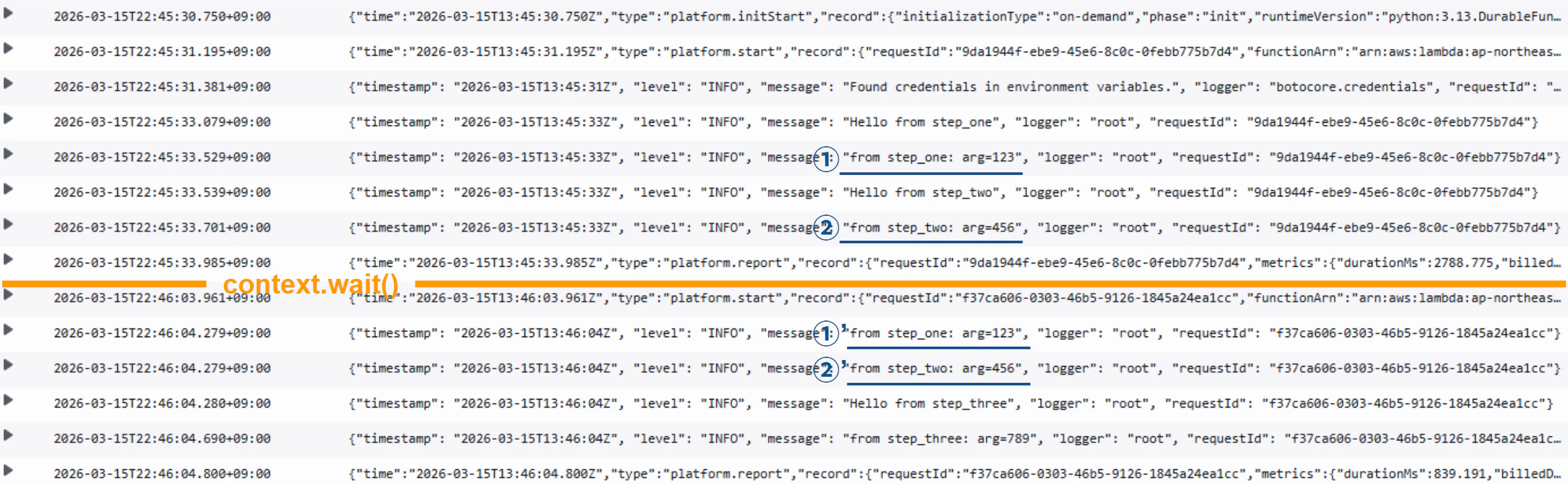
書き下すと以下のようになり、context.wait()の前後で①と①'、②と②'のように同じ内容がロギングされていることが確認できます。
-
step_one()が実行され、Hello from step_oneがロギングされる -
step_one()の戻り値from step_one: arg=123がロギングされる(①) -
step_two()が実行され、Hello from step_twoがロギングされる -
step_two()の戻り値from step_two: arg=456がロギングされる(②) -
context.wait()で30秒後に再開される -
step_one()の戻り値from step_one: arg=123がロギングされる(①') -
step_two()の戻り値from step_two: arg=456がロギングされる(②') -
step_three()が実行され、Hello from step_threeがロギングされる -
step_three()の戻り値from step_three: arg=789がロギングされる
推奨のロギング方法
はじめにでも触れたように、Lambda Durable Functions ではハンドラー内ではcontext.loggerが、各ステップの関数内ではstep_context.loggerの使用が推奨されています。
メインハンドラーには context.logger を使用し、ステップ内では step_context.logger を使用します。コンテキストロガーは再生中の重複ログを抑制します。
通常のログ記録方法の場合に記載したサンプルコードは、context.loggerなどを使用し以下のように書き換えました。
from aws_durable_execution_sdk_python.config import Duration
from aws_durable_execution_sdk_python.execution import durable_execution
from aws_durable_execution_sdk_python.context import DurableContext, StepContext, durable_step


@durable_step
def step_one(step_context: StepContext, arg: int) -> str:
    step_context.logger.info("Hello from step_one")
    return f"from step_one: {arg=}"


@durable_step
def step_two(step_context: StepContext, arg: int) -> str:
    step_context.logger.info("Hello from step_two")
    return f"from step_two: {arg=}"


@durable_step
def step_three(step_context: StepContext, arg: int) -> str:
    step_context.logger.info("Hello from step_three")
    return f"from step_three: {arg=}"


@durable_execution
def lambda_handler(event: dict, context: DurableContext) -> None:
    msg_one: str = context.step(step_one(123))
    context.logger.info(msg_one)

    msg_two: str = context.step(step_two(456))
    context.logger.info(msg_two)

    context.wait(Duration.from_seconds(30))

    msg_three: str = context.step(step_three(789))
    context.logger.info(msg_three)
実行結果
context.logger を使用した lambda_function.py サンプルの実行結果は以下のようになります。
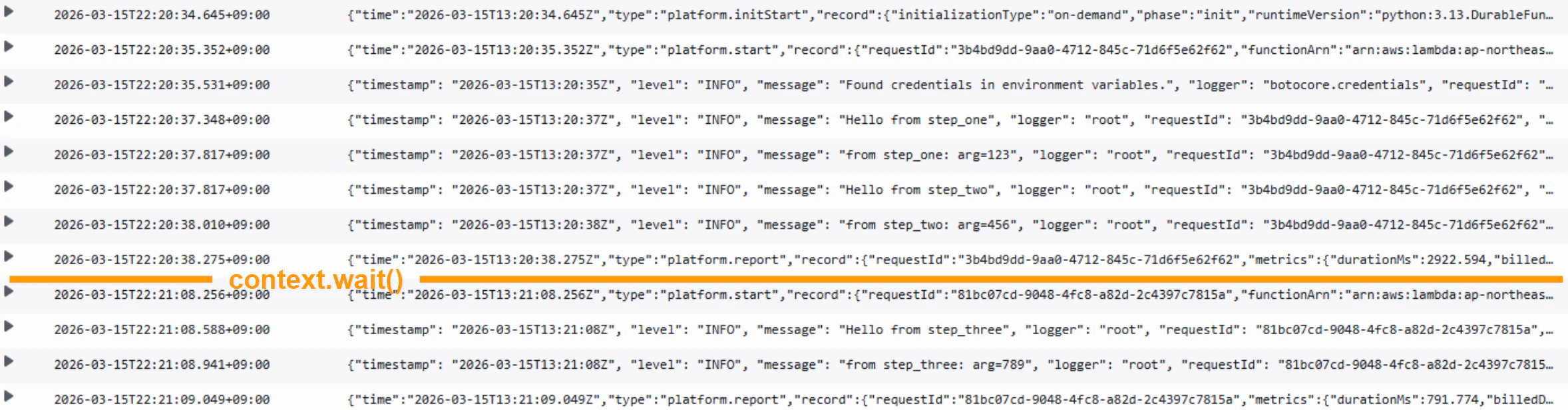
logging モジュールを使用したロギングと異なり、context.wait()の前後で重複したログがないことを確認できます。
-
step_one()が実行され、Hello from step_oneがロギングされる -
step_one()の戻り値from step_one: arg=123がロギングされる -
step_two()が実行され。Hello from step_twoがロギングされる -
step_two()の戻り値from step_two: arg=456がロギングされる -
context.wait()で30秒後に再開される -
step_three()が実行され、Hello from step_threeがロギングされる -
step_three()の戻り値from step_three: arg=789がロギングされる
推奨の理由
ハンドラー内で実施したロギングが重複実行されない
logging モジュールを使用した方法とcontext.logger を使用した方法の2つの実行結果からわかるように、推奨のロギング方法では一度出力したログは再度出力されません。
Lambda Durable Functions はcontext.wait()等を使用して実行を再開(Replay)する際、未実行のステップ関数部分から再開するわけではなく、ハンドラー関数が呼び出されます。
そしてハンドラー関数内では各ステップ関数を実行済みか?のチェックポイントを確認し、実行済みであれば過去の実行結果を利用、未実行であればステップ関数を実行するといった処理が行われます。
When your function resumes after a pause or interruption, the SDK performs replay:
- Load checkpoint log: The SDK retrieves the checkpoint log for this execution from Lambda.
- Run from beginning: The SDK invokes your handler function from the start, not from where it paused.
- Skip completed durable operations: As your code calls durable operations, the SDK checks each against the checkpoint log. For completed durable operations, the SDK returns the stored result without executing the operation code.
そのため通常のログ記録方法の場合での実行結果のようにcontext.wait()からの再開時、ステップ関数内でのロギング内容は重複しなかった(=ステップ関数自体がスキップされた)ものの、ハンドラー関数内のロギングは実行され重複した内容が出力される挙動となりました。
一方で推奨のロギング方法であるcontext.loggerは以下のように、一度ロギングしている場合はスキップするように実装されています。そのため、context.wait()からの再開後も重複した内容はロギングされない挙動となりました。
「永続実行」のマネジメントコンソール上「Logger output」タブにてログを確認できる
上記からハンドラー関数内のロギングにはcontext.loggerを使用した方がいいということは理解できたかと思いますが、ステップ関数内のロギングはstep_context.loggerを使用しなくてもステップ関数自体が実行済みであればスキップされるのだからloggingモジュールでもいいのでは?と思われたかもしれません。
ログの重複を防ぐだけであればそれでも良いのですが、「永続実行」のマネジメントコンソールの「Logger output」タブにはcontext.loggerもしくはstep_context.loggerによってロギングされた内容だけを確認できる機能があります。
CloudWatch 側で確認するのではなく、実行単位毎にタイムスタンプとメッセージ内容を一覧したい場合はこちらが便利でしょう。
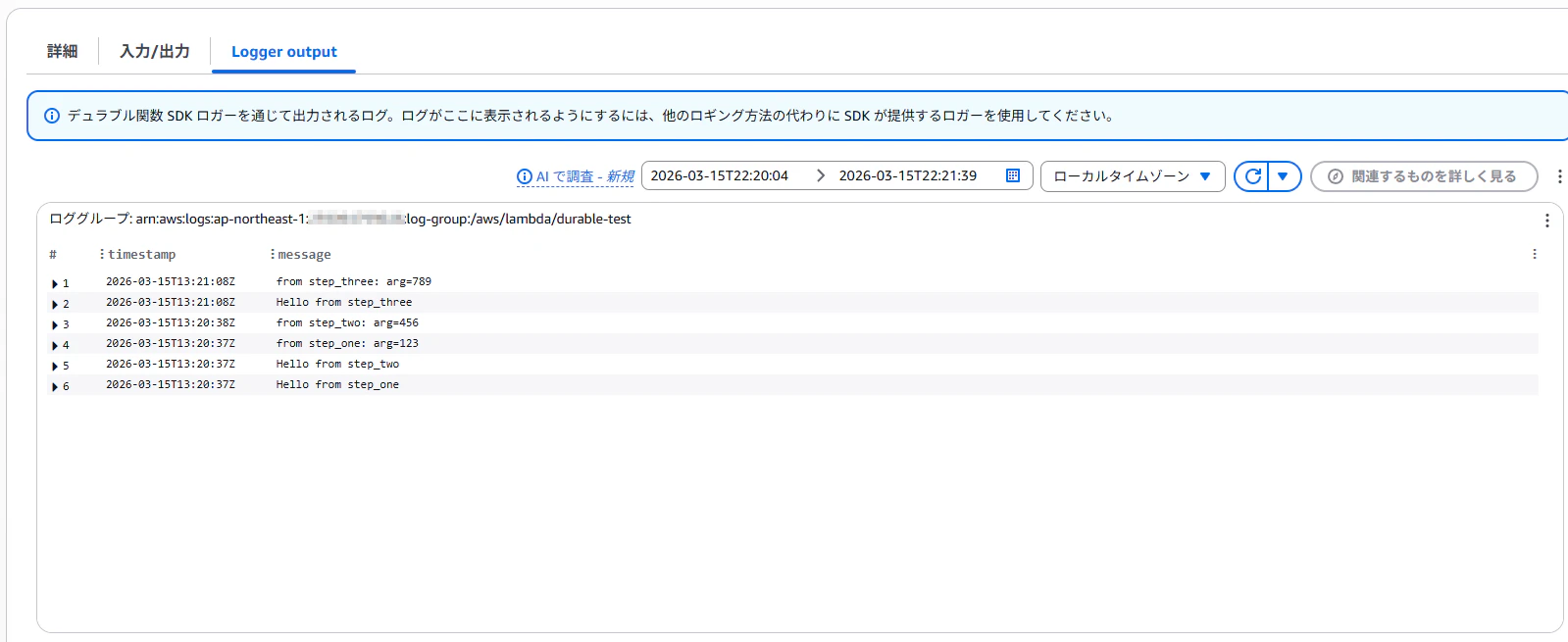
なお実体としてはログのインサイトで以下のクエリが実行されているだけなので、フォーマットを合わせればloggingモジュール利用でも表示させることは可能ですが...大人しくstep_context.loggerを利用しましょう。
fields timestamp, message
    | filter executionArn like "arn:aws:lambda:{region}:{accountId}:function:{functionname}:{version or alias}/durable-execution/{executionId}/{invocationId}"
さいごに
本記事では Lambda Durable Functions では、context.loggerやstep_context.loggerの使用が推奨されている理由を挙動や SDK の実装から確認してみました。
Lambda Durable Functions は Lambda 関数単体でマルチステップなワークフローを構築することができるようになった画期的な機能追加と思います。
Lambda Durable Functions の実装の際に、本記事が何かの役に立てば幸いです。