
はじめに
こんにちは、ほうき星です。
AWS IoT Core に接続した自作 IoT デバイス(Raspberry Pi / ESP32 など)が、
いつの間にかオフラインになっていた…しかも2日前から…という経験、皆さんにもありませんか?
私はこれを何度も経験しており、環境モニタリングのデータ欠損や、デバイスを遠隔から制御出来なかったりと困ることになります。
この対策として IoT デバイス(モノ)の AWS IoT Core との接続が切れた際に、SNSで通知するようにしていました。
しかし、IoT デバイス(モノ)は再接続を試行するように設計しており、接続断の通知を受け取った直後には再接続が出来ている状態であったため、しばらくしてこの通知はオオカミアラート(通知)に成り果て、メールを見ることも実機の状態を確認する事も無くなってしまいました。
このままでは「通知は来ていたが、何も対処せず放置していた」という状況になりかねません…
そこで本記事では、Lambda Durable Function を使用し IoT デバイス(モノ)の接続断をトリガーに、一定時間経過後も接続断のままであれば通知する仕組みをご紹介します。
【参考】IoT デバイス(モノ)の接続断をリアルタイムに通知する方法
こちら参考程度ですが、IoT デバイス(モノ)の接続断は IoT Core から発生する Lifecycle Event をトリガーに SNS 等でリアルタイムに通知させることができます。
先に述べたように、IoT デバイス(モノ)の設計によってはオオカミアラート(通知)になり果てますが、簡単に実装できる点でメリットがあるでしょう。
実装方法詳細
ここではメールへの通知を行います。事前にSNSトピックを作成し、通知を受信したいメールアドレスをサブスクリプションしておいてください。-
マネジメントコンソールにて AWS IoT > メッセージのルーティング > ルール を開き、
ルールを作成を押下します

-
今回ルール名は「IoTThingDisconnectedNotification」としました

-
SQLステートメントには、すべてのモノ(Thing)の接続断イベントをトリガーするように記述します
※特定のモノ(Thing)だけを対象にするには+の部分をそのモノ(Thing)のclientIDにしてくださいSELECT * FROM "$aws/events/presence/disconnected/+"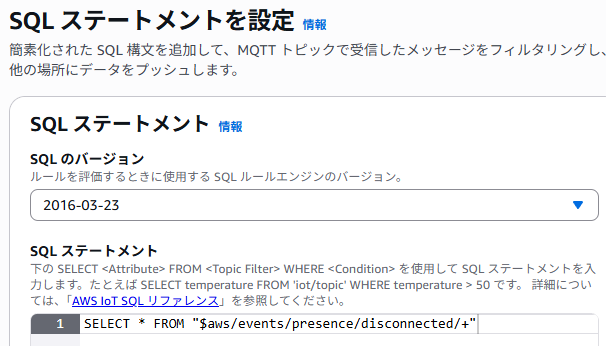
-
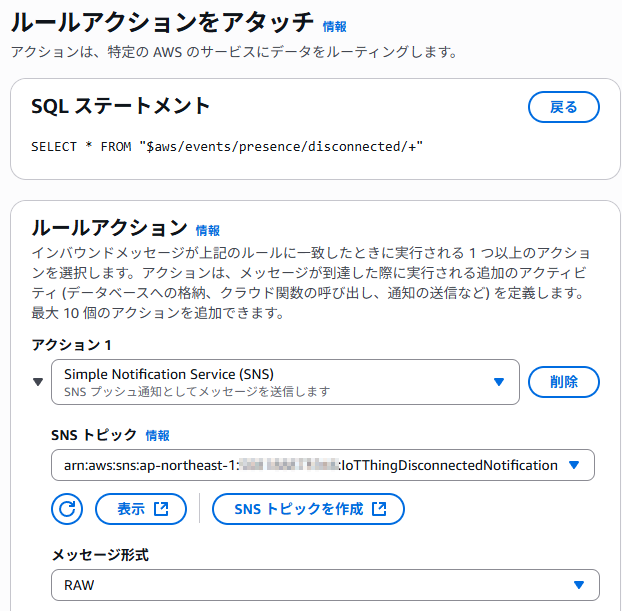
ルールアクションをアタッチの画面でアクション1として、事前に用意したSNSトピックを指定します
-
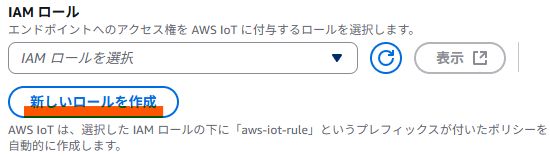
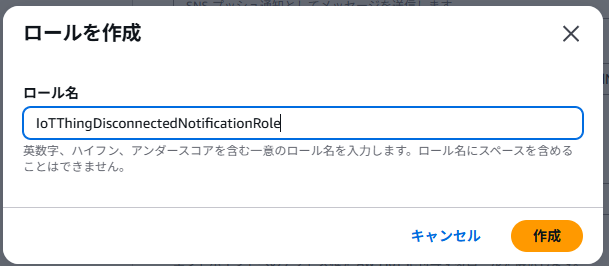
新しいロールを作成から、このIoT Core ルールに割り当てるロールを作成します
-
確認と作成で設定した内容に問題がないかを確認し
作成を押下し設定は完了です
【参考】Lambda Durable Functions とは
今回 Lambda Durable Functions を使用して通知を実装します。
この Lambda Durable Functions とは Lambda 関数だけを使用して、最大1年間実行可能なマルチステップワークフロー処理を実現するための仕組みで、AWS re:Invent 2025 にて発表されました。
この Durable Functions の登場により
- Lambda 関数のタイムアウト(15分)を超過した長時間の処理
- 複数のステップに分かれた業務フロー
- リトライや課金時間に含まれない待機(タイマー)処理
等のこれまでは Step Functions の利用が必須であったケースにおいても、1 つの Lambda 関数だけで実現できるようになりました。
Durable Functions の利用にあたってはコード中で Durable Execution SDK の利用が必要な他、対応しているランタイムが現状 Python 3.13/3.14 または Node.js 22/24 となっている点に注意が必要です。
詳しくは以下のドキュメントをご確認ください。
Lambda Durable Functions を使用した IoT デバイス(モノ)の接続断の遅延評価・通知
オオカミアラート(通知)をなくすため、Lambda Durable Functionsを利用したこの実装では
- IoT デバイス(モノ)の接続断をトリガーにし
- 一定時間経過後に IoT デバイス(モノ)が IoT Core に接続できていない状態が継続していたら
通知するようにしたいです。
しかし、IoT デバイス(モノ)の接続断は前述したように Lifecycle Event をトリガーすることで可能なものの、2 のIoT デバイス(モノ)が IoT Core への接続状態をオンデマンドで確認することや、いつから接続 / 切断していたかの情報を取得するには工夫が必要です。
IoT デバイス(モノ)の接続状態をオンデマンドで確認できるようにする
IoT デバイス(モノ)が IoT Core に接続できているかをオンデマンドで確認するための方法は、過去記事にしています。
今回の実装ではDevice Shadow に IoT Core との接続状態を持たせる方法を前提としていますので、詳しくは以下記事をご確認ください。
実装の全体像
今回の実装のサンプル全体は、以下の SAM テンプレートと lambda_function.py に記載しております。
また以下の github リポジトリにもサンプルを上げておりますので、合わせてご確認ください。
実装サンプル
AWSTemplateFormatVersion: "2010-09-09"
Transform: "AWS::Serverless-2016-10-31"
Description: "IoT Thing Connection Down Notifier"

Parameters:
  SnsTopicArn:
    Type: "String"
    Description: "通知先の SNS トピックの ARN"

Resources:
  IoTThingConnectionDownNotifier:
    Type: "AWS::Serverless::Function"
    Properties:
      AutoPublishAlias: "Alias"
      Description: "IoT Thing の IoT Core との接続が切れた際に通知する Lambda 関数"
      DurableConfig:
        ExecutionTimeout: 3600
      Environment:
        Variables:
          SNS_TOPIC_ARN: !Ref "SnsTopicArn"
      Events:
        IoTThingConnectionDownEvent:
          Type: "IoTRule"
          Properties:
            Sql: "SELECT topic(3) AS thingName, current.state.reported.connected AS connected, current.metadata.reported.connected.timestamp AS timestamp FROM '$aws/things/+/shadow/update/documents' WHERE previous.state.reported.connected = true AND current.state.reported.connected = false"
      FunctionName: "iot-thing-connection-down-notifier"
      Handler: "lambda_function.lambda_handler"
      MemorySize: 128
      PackageType: "Zip"
      Policies:
        - "AWSLambdaBasicExecutionRole"
        - Statement:
            - Effect: "Allow"
              Action: "iot:GetThingShadow"
              Resource: !Sub "arn:aws:iot:${AWS::Region}:${AWS::AccountId}:thing/*"
            - Effect: "Allow"
              Action: "sns:Publish"
              Resource: !Ref "SnsTopicArn"
      Timeout: 30
      Runtime: "python3.13"
import os
import json
from typing import Any
from datetime import datetime, timezone, timedelta

import boto3
from aws_durable_execution_sdk_python.config import Duration
from aws_durable_execution_sdk_python import DurableContext, StepContext, durable_step, durable_execution


@durable_step
def extract_disconnection_info(step_context: StepContext, event: dict[str, Any]) -> tuple[str, bool, int]:
    """
    IoT Thing 切断イベントから情報を抽出する

    Parameters
    ----------
    step_context : StepContext
        StepContext
    event : dict[str, Any]
        IoT Thing の Device Shadow (connected: false) 更新時のイベントデータ

    Returns
    -------
    tuple[str, bool, int]
        IoT Thing 名、接続状態、接続状態変更タイムスタンプのタプル
    """
    thing_name: str = event["thingName"]
    is_connected: bool = event["connected"]
    timestamp: int = event["timestamp"]
    step_context.logger.info(f"Thing Name: {thing_name} の IoT Thing が切断されました。\n5分後に該当の IoT Thing の接続状態を確認します。")
    return thing_name, is_connected, timestamp


@durable_step
def verify_and_notify_disconnection(step_context: StepContext, thing_name: str, event_timestamp: int) -> None:
    """
    IoT Thing の接続状態を検証し、切断が継続している場合に SNS 通知を送信する

    Parameters
    ----------
    step_context : StepContext
        StepContext
    thing_name : str
        IoT Thing 名
    event_timestamp : int
        イベント発生時の接続状態変更タイムスタンプ

    Returns
    -------
    None
    """
    def get_device_shadow(thing_name: str) -> dict[str, Any]:
        """
        Device Shadow を取得する

        Parameters
        ----------
        thing_name : str
            IoT Thing 名

        Returns
        -------
        dict[str, Any]
            取得した Device Shadow のデータ
        """
        iot_data_client = boto3.client('iot-data')
        response: dict = iot_data_client.get_thing_shadow(thingName=thing_name)
        shadow: str = response['payload'].read().decode('utf-8')
        return json.loads(shadow)

    def send_sns_notification(message: str) -> None:
        """
        SNS 通知を送信する

        Parameters
        ----------
        message : str
            送信するメッセージ内容

        Returns
        -------
        None
        """
        sns_client = boto3.client('sns')
        topic_arn: str = os.environ['SNS_TOPIC_ARN']

        sns_client.publish(
            TopicArn=topic_arn,
            Subject='IoT Thing 切断通知',
            Message=message
        )

    # 現在の Device Shadow を取得
    shadow: dict[str, Any] = get_device_shadow(thing_name)

    # Device Shadow から接続状態とその timestamp を取得
    current_timestamp: int = shadow["metadata"]["reported"]["connected"]["timestamp"]
    is_currently_connected: bool = shadow["state"]["reported"]["connected"]

    # timestamp を JST (日本標準時)に変換
    last_change_datetime: datetime = datetime.fromtimestamp(current_timestamp, tz=timezone(timedelta(hours=9)))
    last_change_time_str: str = last_change_datetime.strftime('%Y年%m月%d日 %H時%M分')

    # 取得した Device Shadow 及びトリガー時の timestamp を元に通知を実施
    if is_currently_connected is True:
        step_context.logger.info(f"{last_change_time_str} に Thing Name: {thing_name} は IoT Core に接続されているため通知しません。")
    elif current_timestamp != event_timestamp:
        step_context.logger.info(f"Thing Name: {thing_name} はトリガー以降の {last_change_time_str} に接続状態が変更されているため通知をスキップします。")
    elif is_currently_connected is False:
        send_sns_notification(f"{last_change_time_str}より Thing Name: {thing_name} は IoT Core に接続されていない状態が継続しています。")
        step_context.logger.info(f"{last_change_time_str}より Thing Name: {thing_name} は IoT Core に接続されていない状態が継続しているため通知を送信しました。")


@durable_execution
def lambda_handler(event: dict[str, Any], context: DurableContext) -> None:
    """
    lambda handler

    Parameters
    ----------
    event : dict[str, Any]
        Iot thing の Device Shadow (connected: false) 更新時のイベントデータ
    context : DurableContext
        DurableContext

    Returns
    -------
    None
    """
    thing_name: str
    timestamp: int

    thing_name, _, timestamp = context.step(extract_disconnection_info(event))
    context.wait(Duration.from_minutes(5))
    context.step(verify_and_notify_disconnection(thing_name, timestamp))
1. IoT デバイス(モノ)の接続断をトリガーする
IoT デバイス(モノ)の接続断は前述したように、IoT Core の Lifecycle Events で検知できます。
しかし、今回は IoT デバイス(モノ)の IoT Core との接続状態を Device Shadow の reported に connected ステートとして持たせていますので、このステートが connected: false になったことをトリガーさせる実装とします。
IoT Rule での SQL 文は以下となります。
SELECT
  topic(3) AS thingName,
  current.state.reported.connected AS connected,
  current.metadata.reported.connected.timestamp AS timestamp
FROM
  '$aws/things/+/shadow/update/documents'
WHERE
  previous.state.reported.connected = true
  AND current.state.reported.connected = false
2. 一定時間経過後に IoT デバイス(モノ)が IoT Core に接続できていない状態が継続しているかを確認し通知する
1. IoT デバイス(モノ)の接続断をトリガーするで Lambda 関数をトリガーした後、Lambda Durable Functions の context.wait() を使用して、一定時間計算料金なしで実行を一時停止させます。
この例では 5 分としました。
context.wait(Duration.from_minutes(5))
上記の一定時間経過後に実行が再開されます。
この時、既に実行済みである context.wait(Duration.from_minutes(5)) 等はスキップされ、未実行である context.step(verify_and_notify_disconnection(thing_name, timestamp)) が実行されます。
thing_name, _, timestamp = context.step(extract_disconnection_info(event))
context.wait(Duration.from_minutes(5))
context.step(verify_and_notify_disconnection(thing_name, timestamp))
verify_and_notify_disconnection 関数では、該当の IoT デバイス(モノ)の Device Shadow を取得し、connected ステートの状態と connected ステートが更新されたタイムスタンプを取得します。
# 現在の Device Shadow を取得
shadow: dict[str, Any] = get_device_shadow(thing_name)

# Device Shadow から接続状態とその timestamp を取得
current_timestamp: int = shadow["metadata"]["reported"]["connected"]["timestamp"]
is_currently_connected: bool = shadow["state"]["reported"]["connected"]
- Lambda 関数トリガー時の connected ステートのタイムスタンプ
- 一定時間待機後に取得した Device Shadow の connected ステートのタイムスタンプ
- 一定時間待機後に取得した Device Shadow の connected ステート
これらを使用することで、一定時間経過後に IoT デバイス(モノ)が IoT Core に接続できていない状態が継続しているかを判断して通知させることができます。
# 取得した Device Shadow 及びトリガー時の timestamp を元に通知を実施
if is_currently_connected is True:
    step_context.logger.info(f"{last_change_time_str} に Thing Name: {thing_name} は IoT Core に接続されているため通知しません。")
elif current_timestamp != event_timestamp:
    step_context.logger.info(f"Thing Name: {thing_name} はトリガー以降の {last_change_time_str} に接続状態が変更されているため通知をスキップします。")
elif is_currently_connected is False:
    send_sns_notification(f"{last_change_time_str}より Thing Name: {thing_name} は IoT Core に接続されていない状態が継続しています。")
    step_context.logger.info(f"{last_change_time_str}より Thing Name: {thing_name} は IoT Core に接続されていない状態が継続しているため通知を送信しました。")
動作確認
サンプルコードでは5分間接続断が継続していたら通知するようにしています。
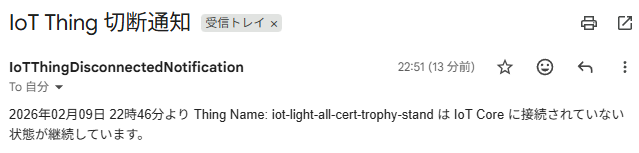
IoT デバイス(モノ)を IoT Core から切断し、5分経過後に以下のような通知を受信できれば動作確認は完了です。
また、5分経過前に再接続できた場合等は通知はされないことも確認することができます。
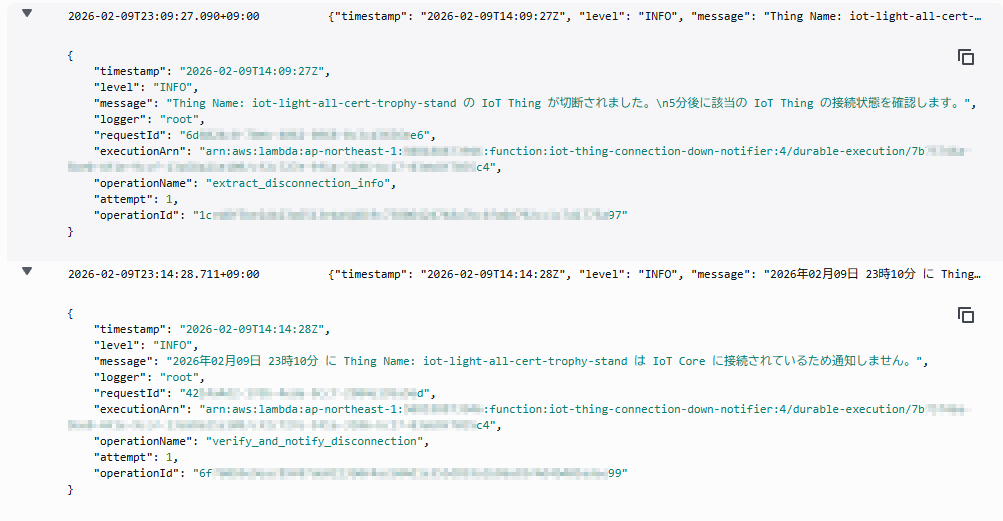
その場合 Durable Functions 中の context.wait(Duration.from_minutes(5)) での待機復帰後、以下のような「正常に再接続できていたから通知しない」旨のログを確認することができます。
さいごに
本記事では IoT デバイス(モノ)の接続断を Lambda Durable Function を使用して遅延評価・通知する方法をご紹介しました。
遅延評価・通知することで、IoT デバイス(モノ)の再接続を前提にしつつ、再接続が上手く出来ていない状態を検知・通知することが出来ます。
また、遅延させる手法としては SQS の遅延キューを利用する事も可能ですが、遅延させる事ができる時間は最大15分となっており、15分以上遅延させたい場合は今回の様に Lambda Durable Functions を採用するのが楽な選択肢となるかと思います。
これは IoT デバイス関連だけではなく、「一定時間後に状態を再確認する」様なユースケースにおいても応用可能でしょう。
本記事が誰かの IoT ライフの助けになれば幸いです。