
Raspberry Pi4にUbuntu24.04をインストールしていたのですが、最近ターミナルログインをしていなかった(WinSCPでデータを見るだけだった)ので気が付かなかったのですが、ログインすると以下のメッセージが出ていました。
- Expanded Security Maintenance for Applicationsが無効化されています。
- (英語のとき)Expanded Security Maintenance for Applications is not enabled.
これは何ぞやのメモ。#自分の忘備録40
Ubuntu ESM Appsとは何だ?
ちょっと検索したら、~あの個人なら無料で5台使えるやつね~ということで、まだ働いている頃にネットニュースで見たような記憶が蘇って来ました。
その頃はほとんどCentOSで、Ubuntuはテスト環境を作っておく程度だったので、すっかり忘れていましたが、Raspberry Pi4のUbuntuで思い起こされました。
ESM(Expanded Security Maintenance)のライフサイクルを見るとスゴいですね。LTSの標準5年+拡張5年、さらにレガシーアドオン5年で、最長15年のセキュリティを保ってくれるとは。
あのWindows10もあれこれリリースから10年くらいサポートされて、今ESUになっているのと似ていますね。法人は最大3年、個人は1年+1年延長。。。
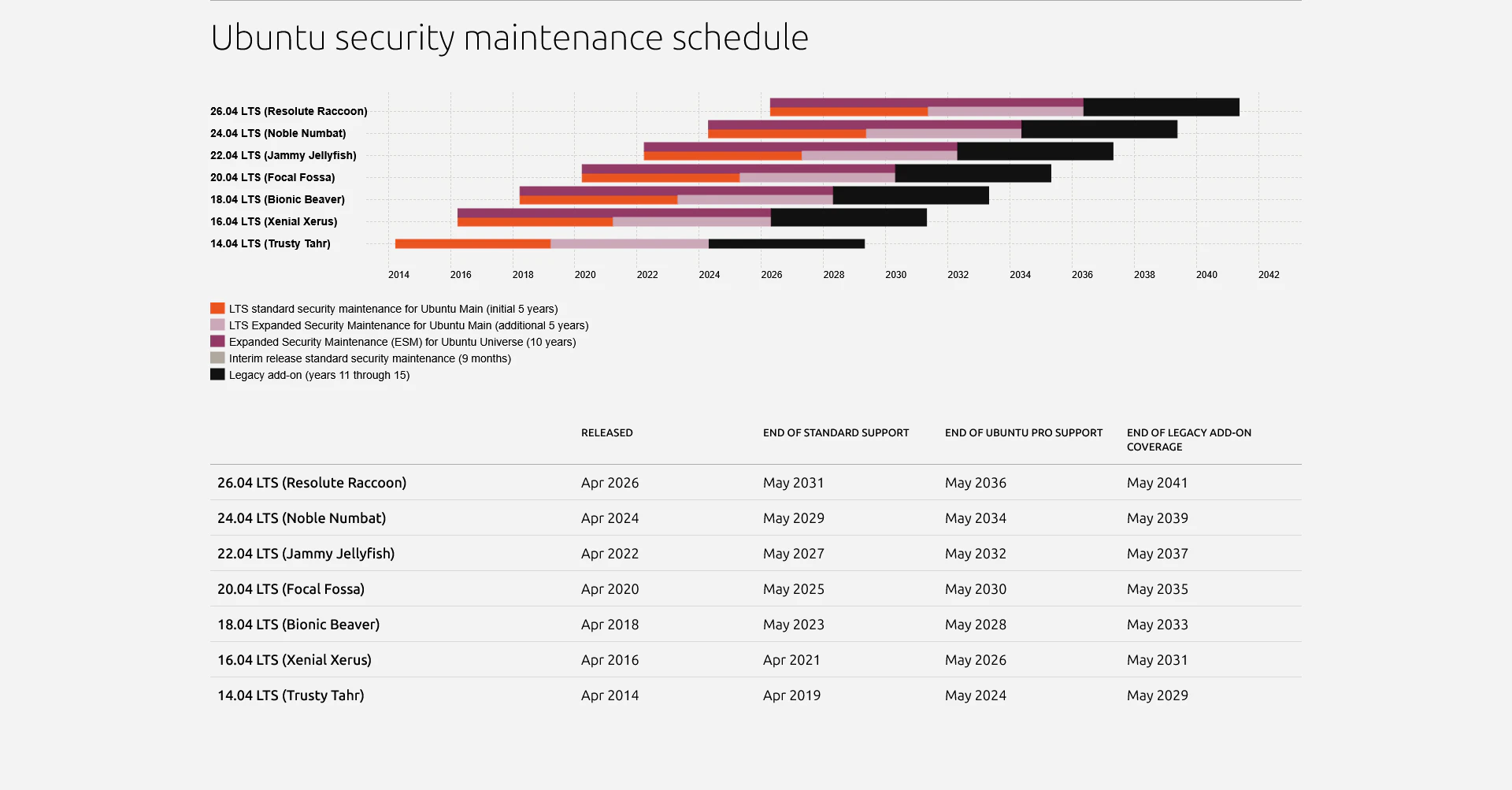
ソフトウェアというのはソフトなので柔らかいのかと思いきやなかなか。どんどん機能や構成が複雑怪奇になって、どこがソフトなのかと思ったりもします。ハードウェアは直すのにその昔ジャンパー線を使っていましたが、ソフトウェアではプログラムの修正で切った貼ったのジャンパーは必要ないですね。
ただ大昔はソフトウェア(まぁプログラムですが)を配線で変更していたという時代(真空管やリレーのコンピュータ)もあったようなので、やっぱソフトウェアは十分柔軟ですかね。
ESM Appsのメッセージは。。。
Ubuntu24.04は、現在LTSの標準5年の範囲ですが、Ubuntu ProからESMを有効にすれば、更なる追加のアップデートが使用出来るみたいです。
Raspberry Pi4にログインするとESMが無効になっているメッセージが出ていました。
apt upgradeを実行したら、9個のアップデートモジュールが確認出来ました。
Welcome to Ubuntu 24.04.4 LTS (GNU/Linux 6.8.0-1063-raspi aarch64)

 * Documentation:  https://help.ubuntu.com
 * Management:     https://landscape.canonical.com
 * Support:        https://ubuntu.com/pro

Expanded Security Maintenance for Applicationsが<font color="red">無効化</font>されています。

0のアップデートはすぐに適用されます。

9個の追加のセキュリティアップデートが、ESM Appsによって適用できます。
ESM Appsの有効化方法についてはこちらを参照してください: at https://ubuntu.com/esm

Last login: Tue Sep  1 21:34:28 2026 from 192.168.50.170
xxxx@xxxx-ubuntu:~$ sudo apt upgrade
パッケージリストを読み込んでいます... 完了
依存関係ツリーを作成しています... 完了
状態情報を読み取っています... 完了
アップグレードパッケージを検出しています... 完了
Get more security updates through Ubuntu Pro with 'esm-apps' enabled:
  python3-pip-whl python3-wheel libqt5gui5t64 libqt5widgets5t64 xrdp
  python3-pip libqt5dbus5t64 libqt5network5t64 libqt5core5t64
Learn more about Ubuntu Pro at https://ubuntu.com/pro
アップグレード: 0 個、新規インストール: 0 個、削除: 0 個、保留: 0 個。
xxxx@xxxx-ubuntu:~$
試しにWSLのUbuntu24.04でも以下のように、esm-appsを有効にするとより多くのセキュリティアップデートが入手出来ると出ていました。
xxxx@DESKTOP-XXXXXXX:~$ cat /etc/lsb-release
DISTRIB_ID=Ubuntu
DISTRIB_RELEASE=24.04
DISTRIB_CODENAME=noble
DISTRIB_DESCRIPTION="Ubuntu 24.04.4 LTS"
xxxx@DESKTOP-XXXXXXX:~$ sudo apt upgrade
Reading package lists... Done
Building dependency tree... Done
Reading state information... Done
Calculating upgrade... Done
Get more security updates through Ubuntu Pro with 'esm-apps' enabled:
  libzvbi-common libcjson1 libavdevice60 ffmpeg libpostproc57
  libmbedcrypto7t64 libavcodec60 libzvbi0t64 libavutil58 libswscale7
  libswresample4 libavformat60 libavfilter9
Learn more about Ubuntu Pro at https://ubuntu.com/pro
0 upgraded, 0 newly installed, 0 to remove and 0 not upgraded.
xxxx@DESKTOP-XXXXXXX:~$
Ubuntu Proの登録
Get Ubuntu ProからMyselfで登録を進めます(Ubuntu Oneのアカウントが必要なので作成する)。
登録後のダッシュボードは以下の通り。

Ubuntu Proの適用(有効化)
Free Personal Tokenが作成されたので、Raspberry Pi4のUbuntu24.04に適用して見ました。
xxxx@xxxx-ubuntu:~$ sudo pro attach XXXXXXXXXXXXXXXXXXXXXXXXXXXXXX
Enabling Ubuntu Pro: ESM Apps
Ubuntu Pro: ESM Apps enabled
Enabling Ubuntu Pro: ESM Infra
Ubuntu Pro: ESM Infra enabled
This machine is now attached to 'Ubuntu Pro - free personal subscription'

SERVICE          ENTITLED  STATUS       DESCRIPTION
anbox-cloud      yes       disabled     Scalable Android in the cloud
esm-apps         yes       enabled      Expanded Security Maintenance for Applications
esm-infra        yes       enabled      Expanded Security Maintenance for Infrastructure
fips-updates     yes       disabled     FIPS compliant crypto packages with stable security updates
landscape        yes       disabled     Management and administration tool for Ubuntu
realtime-kernel* yes       disabled     Ubuntu kernel with PREEMPT_RT patches integrated
usg              yes       disabled     Security compliance and audit tools

 * Service has variants

NOTICES
Operation in progress: pro attach

For a list of all Ubuntu Pro services and variants, run 'pro status --all'
Enable services with: pro enable <service>

     Account: xxxx.xxxx@gmail.com
Subscription: Ubuntu Pro - free personal subscription
xxxx@xxxx-ubuntu:~$
ダッシュボードのActive machinesが1つカウントアップしました。

Raspberry Pi4に改めてログインするとESMが有効になっているとメッセージが変化しました。
apt upgradeを実行すると、その追加の9個のアップデートモジュールが実際にアップグレードされました。
Welcome to Ubuntu 24.04.4 LTS (GNU/Linux 6.8.0-1063-raspi aarch64)

 * Documentation:  https://help.ubuntu.com
 * Management:     https://landscape.canonical.com
 * Support:        https://ubuntu.com/pro

Expanded Security Maintenance for Applicationsが<font color="green">有効化</font>されています。

9のアップデートはすぐに適用されます。
これらの更新のうち9個はESM Appsのセキュリティアップデートです。
これらの追加アップデートを確認するには次を実行してください: apt list --upgradable

Last login: Wed Sep  2 09:01:37 2026 from 192.168.50.170
xxxx@xxxx-ubuntu:~$ sudo apt upgrade
パッケージリストを読み込んでいます... 完了
依存関係ツリーを作成しています... 完了
状態情報を読み取っています... 完了
アップグレードパッケージを検出しています... 完了
以下のパッケージはアップグレードされます:
  libqt5core5t64 libqt5dbus5t64 libqt5gui5t64 libqt5network5t64 libqt5widgets5t64 python3-pip python3-pip-whl python3-wheel xrdp
アップグレード: 9 個、新規インストール: 0 個、削除: 0 個、保留: 0 個。
<font color="green">9 esm-apps security updates</font>
12.7 MB のアーカイブを取得する必要があります。
この操作後に追加で 84.0 kB のディスク容量が消費されます。
続行しますか? [Y/n]
・・・
python3-wheel (0.42.0-2ubuntu0.1~esm1) を設定しています ...
libqt5core5t64:arm64 (5.15.13+dfsg-1ubuntu1+esm1) を設定しています ...
python3-pip (24.0+dfsg-1ubuntu1.3+esm3) を設定しています ...
libqt5dbus5t64:arm64 (5.15.13+dfsg-1ubuntu1+esm1) を設定しています ...
libqt5network5t64:arm64 (5.15.13+dfsg-1ubuntu1+esm1) を設定しています ...
libqt5gui5t64:arm64 (5.15.13+dfsg-1ubuntu1+esm1) を設定しています ...
libqt5widgets5t64:arm64 (5.15.13+dfsg-1ubuntu1+esm1) を設定しています ...
man-db (2.12.0-4build2) のトリガを処理しています ...
libc-bin (2.39-0ubuntu8.8) のトリガを処理しています ...
xxxx@xxxx-ubuntu:~$
Ubuntu Proの除外(無効化)
Raspberry Pi4のUbuntu24.04からESMを除外して見ました。
xxxx@xxxx-ubuntu:~$ sudo pro detach
Detach will disable the following services:
    esm-apps
    esm-infra
Are you sure? (y/N) y
Removing APT access to Ubuntu Pro: ESM Apps
Updating package lists
Removing APT access to Ubuntu Pro: ESM Infra
Updating package lists
This machine is now detached.
xxxx@xxxx-ubuntu:~$
ダッシュボードのActive machinesは1のままで、すぐには変化しないようです。
その他、WSLのUbuntu Proなど
WSL上で動くUbuntuにも適用出来るようです。
またWSLの場合はWindows側にUbuntu Pro for WSLをMicrosoftストアなどからインストールすることによって、WSLで実行するUbuntuに一括して適用することも出来るようです。
私の場合はWSLをいくつも作ったりするので、個別に行ってみようかと思います。
xxxx@DESKTOP-XXXXXXX:~$ sudo pro attach XXXXXXXXXXXXXXXXXXXXXXXXXXXXXX
[sudo] password for xxxx:
Enabling Ubuntu Pro: ESM Apps
Ubuntu Pro: ESM Apps enabled
Enabling Ubuntu Pro: ESM Infra
Ubuntu Pro: ESM Infra enabled
This machine is now attached to 'Ubuntu Pro - free personal subscription'

SERVICE          ENTITLED  STATUS       DESCRIPTION
esm-apps         yes       enabled      Expanded Security Maintenance for Applications
esm-infra        yes       enabled      Expanded Security Maintenance for Infrastructure
landscape        yes       disabled     Management and administration tool for Ubuntu

NOTICES
Operation in progress: pro attach

For a list of all Ubuntu Pro services, run 'pro status --all'
Enable services with: pro enable <service>

     Account: xxxx.xxxx@gmail.com
Subscription: Ubuntu Pro - free personal subscription
xxxx@DESKTOP-XXXXXXX:~$ sudo apt upgrade
WSLの場合、物理マシンとは違って適用されるSERVICEも異なるようです。詳細はよくわかりません。
Ubuntu24.04でESMが本当の効果が出る頃までに考えようかと思います
Ubuntu ProダッシュボードのActive machines数の変化(20260907追記)
- Ubuntu Proを無効化したRaspberry Pi4も1日以上経ったら、ダッシュボードのActive machinesはカウントダウンした(タイミングはよくわからないが、概ね1日以上)
-
WSLのUbuntu Proも同様に1日以上Ubuntuを起動していない状態にするとActive machinesはカウントダウンする(こちらも直ぐには落ちない)
- WSLのUbunntuは起動状態にすると、比較的すぐにActive machinesはカウントアップする(数分程度後にはカウントアップした)