
WSL2 + Windows 10 + ruby + rails
バージョンの確認
wsl -l -v
zsh
sudo apt update
sudo apt install zsh powerline fonts-powerline
which zsh
chsh -s /usr/bin/zsh

git clone https://github.com/robbyrussell/oh-my-zsh.git ~/.oh-my-zsh
cp ~/.oh-my-zsh/templates/zshrc.zsh-template ~/.zshrc
gedit .zshrc
rbenv
sudo apt update
sudo apt install autoconf bison build-essential libssl-dev libyaml-dev libreadline-dev zlib1g zlib1g-dev sqlite3 libsqlite3-dev nodejs npm imagemagick git
sudo npm install -g yarn
git clone https://github.com/rbenv/rbenv.git ~/.rbenv

# bash の場合 wsl Ubuntu
echo 'export PATH="$HOME/.rbenv/bin:$PATH"' >> ~/.bashrc
# zshの場合
echo 'export PATH="$HOME/.rbenv/bin:$PATH"' >> ~/.zshrc
~/.rbenv/bin/rbenv init
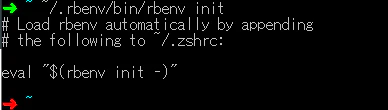
.zshrcに書き込めと表示さるので下記のコマンドを実行
echo 'eval "$(rbenv init -)"' >> ~/.zshrc
rbenv -v
ruby-buildインストール
ruby-buildがインストールされているかを確認する
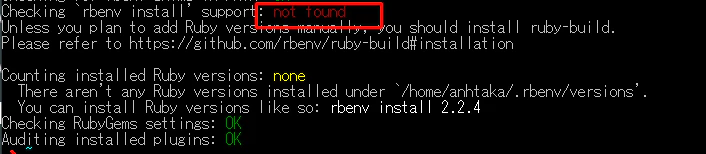
curl -fsSL https://github.com/rbenv/rbenv-installer/raw/master/bin/rbenv-doctor | bash
下記のメッセージが表示された場合インストールされてない。
mkdir -p "$(rbenv root)"/plugins
git clone https://github.com/rbenv/ruby-build.git "$(rbenv root)"/plugins/ruby-build
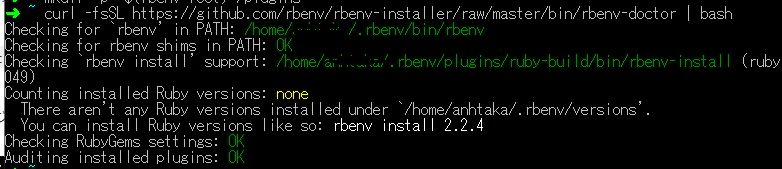
curl -fsSL https://github.com/rbenv/rbenv-installer/raw/master/bin/rbenv-doctor | bash
これでOK
Rubyのインストール
rbenv install -l
rbenv install 2.6.6
rbenv versions
rbenv global 2.6.6
rbby -v
rails インストール
gem install rails -v 6.0.3
rails -v
rails new hello_rails
メモ
・yarnのインストール
https://classic.yarnpkg.com/en/docs/install/#debian-stable
・webpackerのエラー
https://qiita.com/libertyu/items/1eb74adc817ab8971100
Docker
docker build -t myrailsapp .
docker run -p 3000:3000 myrailsapp
Termの操作
ショートカット
//ショートカットキー
Ctrl + a    //行頭へ移動
Ctrl + e
Ctrl + u      //行頭まで削除
Ctrl + k
Ctrl + _
Ctrl + /
コマンド
//ファイルの表示
cat
less
head
tail
scp
rsync

>   //上書き
>>   // 追記
Termの設定
test
tmux
選択
Prefix+[で文字列選択モードに入る
vimの操作方法で選択したい文字列へとカーソル移動
Spaceで選択開始
Enter / Returnで文字列コピー
Prefix+]で文字列貼り付け
vim
test
NERDTree
heroku
heroku login
heroku run bash -a APPNAME
$ cd app