

0.はじめに
こんにちは。都内でエンジニアをしている、@gkzvoiceです。
今回は、AnsibleのplaybookでAnsibleっぽい?プログラマブルなエラーハンドリングを知ったので、早速アウトプットしていきます。
1.やりたかったこと
- 実行結果に応じてどのタスクを行うか決めたい
- 具体的には、直前に行われたタスクの成否問わず、必ず実行結果をslackに通知する
- Ansibleでは直前のタスクが失敗した場合、後続タスクは実行されないですが、これは避けたい!!
- 直前のタスクが失敗した場合、実行結果を通知する際
@hereをつけて、try-catch的にエラーキャッチしたい
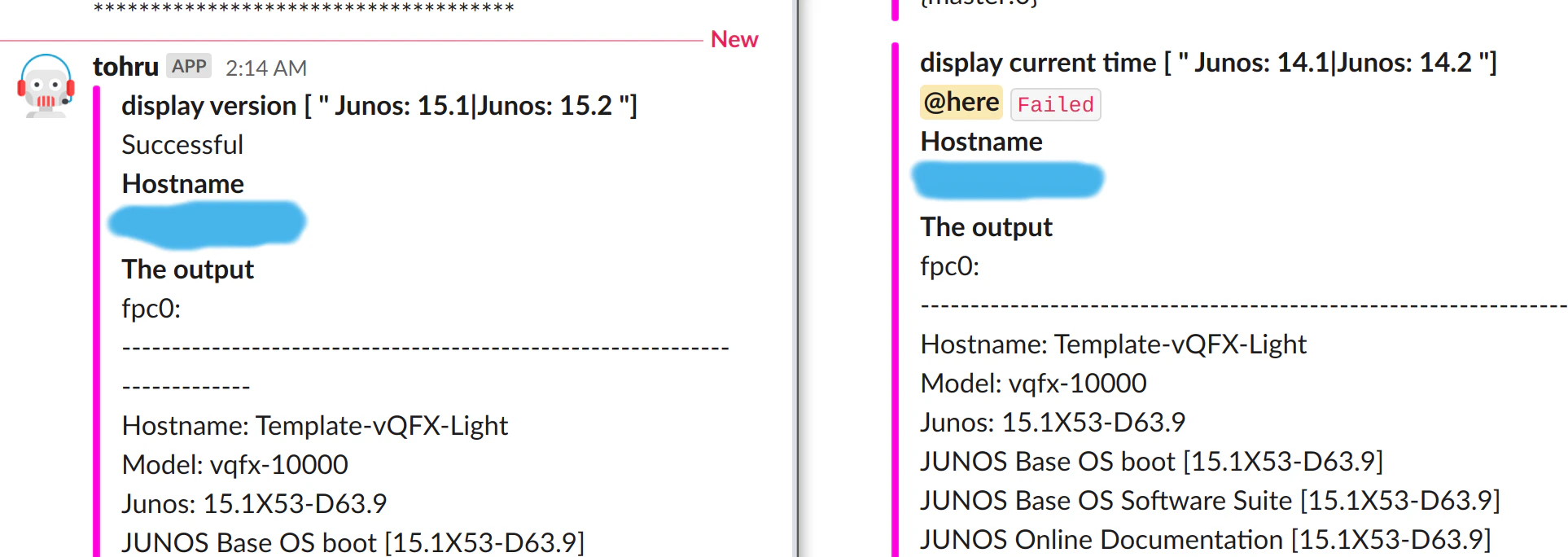
こんなかんじ!
- 異常時のみ
@hereとグレーがかったFailedがついている
2. 環境/バージョン情報
- Ansible実行環境(ローカル)
- ubuntu20.04
- ansible 2.9.6
- python 3.8.2
- Ansibleでコマンドを流す対象機器
- Junos 15.1X53-D63.9
※Juniper社のvlabsを使って検証した。
Juniper Vlabsホームページ
3. playbookで実行するコマンドを実行した様子とそのコマンドの成否判定
- コマンドの出力結果のサンプル
jcluser@Template-vQFX-Light> show version | no-more
fpc0:
--------------------------------------------------------------------------
Hostname: Template-vQFX-Light
Model: vqfx-10000
Junos: 15.1X53-D63.9
JUNOS Base OS boot [15.1X53-D63.9]
JUNOS Base OS Software Suite [15.1X53-D63.9]
JUNOS Online Documentation [15.1X53-D63.9]
JUNOS Crypto Software Suite [15.1X53-D63.9]
JUNOS Packet Forwarding Engine Support (qfx-10-f) [15.1X53-D63.9]
JUNOS Kernel Software Suite [15.1X53-D63.9]
JUNOS Web Management [15.1X53-D63.9]
JUNOS Enterprise Software Suite [15.1X53-D63.9]
JUNOS SDN Software Suite [15.1X53-D63.9]
JUNOS Routing Software Suite [15.1X53-D63.9]
JUNOS py-base-i386 [15.1X53-D63.9]

{master:0}
jcluser@Template-vQFX-Light>
- コマンドの成否判定
-
"Junos: 15.1|Junos: 15.2 "であれば成功 - 異なる場合、失敗とする
-
jcluser@Template-vQFX-Light> show version | match "Junos: 15.1|Junos: 15.2 "
Junos: 15.1X53-D63.9

{master:0}
jcluser@Template-vQFX-Light>
4.学んだこと
- 4-1. コマンドの結果を判定するときに使うのはwhenではなく
failed_when: ${OR条件} - 4-2. ${コマンドの実行結果}.stdoutは文字列ではなく
リスト型 - 4-3. エラーキャッチをするなら
Block/Rescue/Alwaysディレクティブ- 今回は
Block/Rescueを使用
- 今回は
4-1. コマンドの実行実行結果を判定するときに使うのはwhenではなくfailed_when: ${OR条件}
※resultはコマンドの実行結果を格納した変数
- when: "{{ result is search("xxx|aaa") }}"
+ failed_when: result.stdout[0] is not search("xxx|aaa")
@akira6592 さんに教えていただきました。
ありがとうございます。
when は、そのタスクを実行するかの条件なので、まだ register: result が評価されておらず、result が未定義になっている、ということだと思います。
when ではなく、failed_when でいかがでしょうか。
whenは、変数の値確認のときに使う
vars:
  url: "http://example.com/users/foo/resources/bar"

tasks:
    - debug:
        msg: "matched pattern 1"
      when: url is match("http://example.com/users/.*/resources/.*")

    - debug:
        msg: "matched pattern 2"
      when: url is search("/users/.*/resources/.*")

    - debug:
        msg: "matched pattern 3"
      when: url is search("/users/")

    - debug:
        msg: "matched pattern 4"
      when: url is regex("example.com/\w+/foo")
出所:Tests — Ansible Documentation
4-2. ${コマンドの実行結果}.stdoutは文字列ではなくリスト型
- {{ result.stdout }}"
- {{ result.stdout_lines }}"
+ {{ result.stdout[0] }}"
こちらも@akira6592 さんに教えていただきました。
ありがとうございます。
result.stdout の値は文字列ではなくリストなので、うまく解釈できなかったのかもしれません。
参考:junos commandモジュールで実行した結果をslackに通知出来ない
Ansibleの公式ドキュメントにもリスト形式で返却と書いてありました。
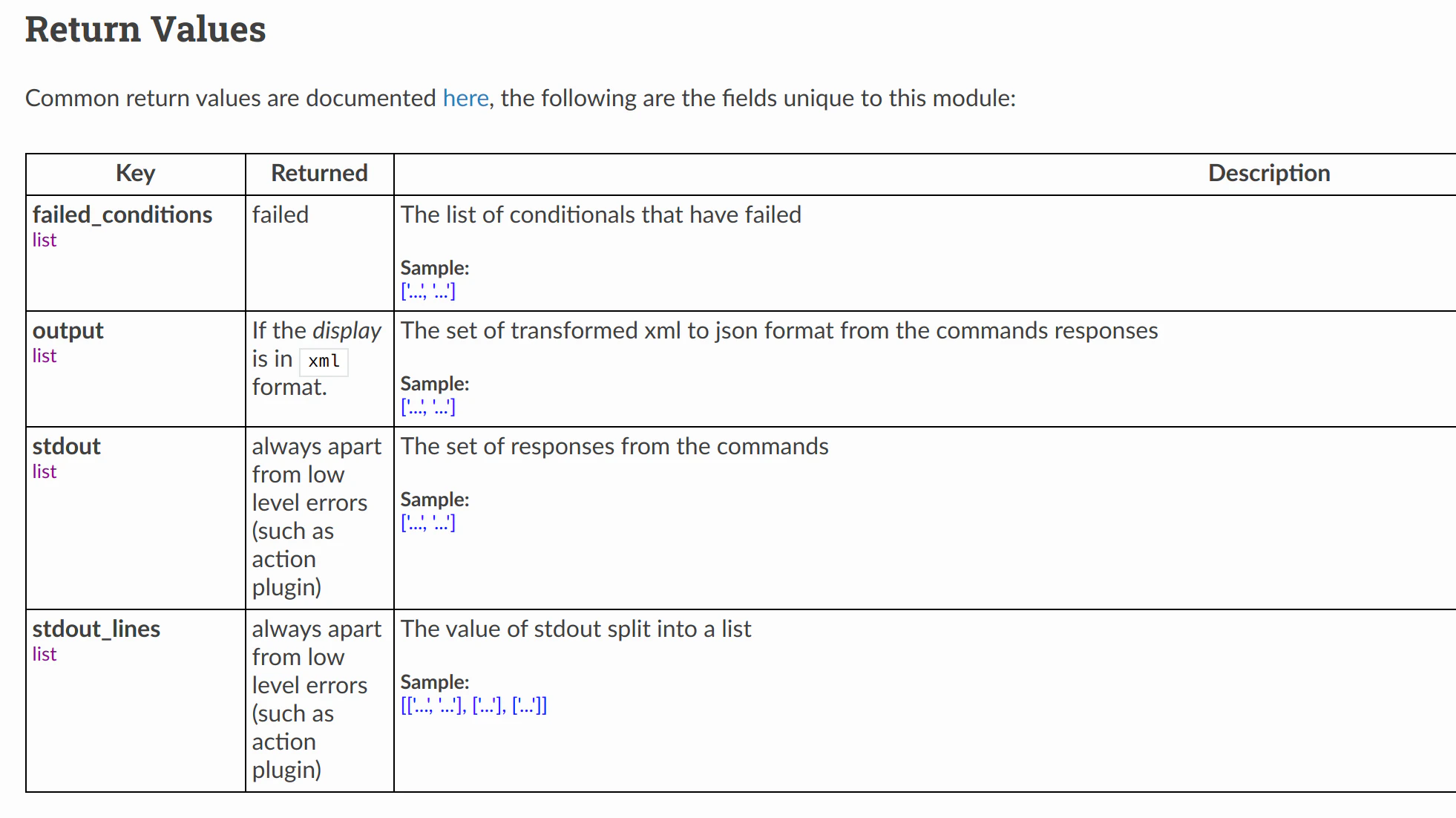
出所:junos_command – Run arbitrary commands on an Juniper JUNOS device — Ansible Documentation
※ ↑で使っているslackモジュールや"{{ result.stdout[0] | default('None', true)}}" の書き方については、手前味噌ですが、こちらの記事をご参照ください。
Ansibleのslackモジュールを使う際に必要な"token"でハマった話他[token/トークンの取り扱いと変数のdefault値など]
4-3.エラーキャッチをするならBlock/Rescue/Alwaysディレクティブ
-
try-catch的?に、エラーハンドリングをすることがBlock/Rescue/Alwaysディレクティブでは可能です。
Blocks also introduce the ability
to handle errors in a way similar to exceptionsin most programming languages.
tasks:
 - name: Handle the error
   block:
     - debug:
         msg: 'I execute normally'
     - name: i force a failure
       command: /bin/false
     - debug:
         msg: 'I never execute, due to the above task failing, :-('
   rescue:
     - debug:
         msg: 'I caught an error, can do stuff here to fix it, :-)'
出所:Blocks — Ansible Documentation
注意点
- Block/Rescue/Alwaysディレクティブがエラーハンドリングできるタスクは、
failedとなるタスクのみです。 - 未定義なタスクや不到達なホストがあるためにエラーとなった場合、Block/Rescue/Alwaysディレクティブでもエラーハンドリングすることはできません。
Blocks only deal with
‘failed’ status of a task.A bad task definition or an unreachable host are not ‘rescuable’ errors.
出所:Blocks — Ansible Documentation
Block/Rescue/Alwaysディレクティブ v.s. try-catch
| Block/Rescue/Always | try-catch |
|---|---|
| Block | try |
| rescue | except |
| always | finally |
なお、Block/Rescue/Alwaysディレクティブについても @akira6592 さんに教えていただきました。
@akira6592 さんすごすぎです。
ありがとうございます!
五月雨ですみません。
block/rescue/always 使うのも Ansible っぽくていいかもしれません。
https://docs.ansible.com/ansible/latest/user_guide/playbooks_blocks.html#blocks-error-handling
5.サンプルコードとplaybookの実行コマンド
- invetntoryファイル各種とplaybookのサンプルコードです。
inventory
[junos]
***.***.***.***
↑対象機器のipアドレス
---
# file: group_vars/junos
ansible_connection: network_cli
ansible_network_os: junos
ansible_port: <JUNOS_PORT>
ansible_ssh_user: <JUNOS_USERNAME>
ansible_ssh_pass: <JUNOS_PASSWORD>
---
- hosts: junos
  connection: local
  gather_facts: no
  become: yes

  vars:
    ptn: "Junos: 15.1|Junos: 15.2"
    #ptn: "Junos: 14.1|Junos: 14.2"

  tasks:
    - name: main
      block:
        - name: display version
          junos_command:
            commands:
              - show version | no-more
          when: ansible_network_os == "junos"
          register: result
          failed_when: result.stdout[0] is not search(ptn)
          changed_when: false
        - name: debug result.stdout_lines
          debug:
            msg: "{{ result.stdout_lines }}"

        - name: Use the attachments API
          slack:
            username: "{{ lookup('env', 'SLACKBOT_NAME') | default('ansibleBot')  }}"
            token: "{{ lookup('env', 'INCOMING_WEBHOOK_URL_SLACKFORMAT') }}"
            channel: "{{ lookup('env', 'DST_CHANNEL') }}"
            attachments:
            - title: display version [ " {{ ptn }} "]
              text: "Successful"
              color: "#ff00dd"
              fields:
              - title: Hostname
                value: "{{ inventory_hostname }}"
                short: False
              - title: "The output"
                value: "{{ result.stdout[0] | default('None', true)}}"
                short: False

      rescue:
        - name: Use the attachments API
          slack:
            username: "{{ lookup('env', 'SLACKBOT_NAME') | default('ansibleBot')  }}"
            token: "{{ lookup('env', 'INCOMING_WEBHOOK_URL_SLACKFORMAT') }}"
            channel: "{{ lookup('env', 'DST_CHANNEL') }}"
            attachments:
            - title: display current time [ " {{ ptn }} "]
              text: <!here> `Failed`
              color: "#ff00dd"
              fields:
              - title: Hostname
                value: "{{ inventory_hostname }}"
                short: False
              - title: "The output"
                value: "{{ result.stdout[0] | default('None', true)}}"
                short: False
※サンプルコードは、Githubでも公開しております。
ansible-sample
- playbookの実行コマンド
$ ansible-playbook -i inventory/hosts playbook/show_varsion.yaml
- デバッグしたい場合は
-vオプション - vの数だけデバッグの量が増える点はsshの-
vオプションと同じ
$ ansible-playbook -v -i inventory/hosts playbook/show_varsion.yaml
6. 要改善点
-
slackモジュールがblockディレクティブとrescueディレクティブの2箇所に書いてあるところ。
- うまいことひとつにまとめられないか。
- Ansibleがタスクの成否の結果によって、どのように通知するテキストを変えるか。
-
slackモジュールがblockディレクティブとrescueディレクティブの2箇所に書いてある理由
- タスクが成功すれば、Successful、失敗すれば<!here> Failedとslackに通知したいので、blockディレクティブとrescueディレクティブそれぞれにテキストでベタ書きとした。
P.S. Twitterもやってるのでフォローしていただけると泣いて喜びます:)
@gkzvoice