
この記事では、TypeProfをEmacsで活用する、小さめの例を示します。
これにより、以下のことができるようになります。
- 簡単な型の検査
- 賢い補完
動作確認に使ったバージョンは次の通りです。
- GNU Emacs 30.2
- TypeProf 0.30.1
参考資料
- Good first issues of TypeProfの特に15ページ目
-
typeprof.conf.json: TypeProfの構成ファイルの例です。
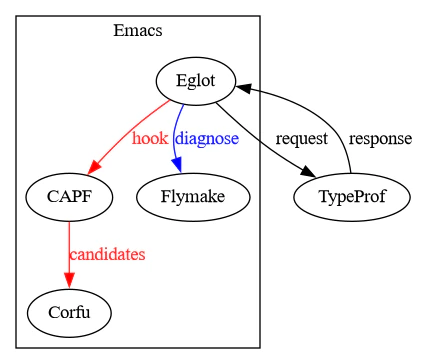
概観
この記事で使っているツールの概観を示します。
一旦動かしてから眺めてみると、少しだけわかりやすいかもしれません。
サンプルプロジェクト
以下の内容のmain.rbがGitリポジトリにあるとします。
1 + "hello"

class Human
  attr_reader :name, :age

  def hello
    "hi"
  end
end

me = Human.new
me.name
me.age
me.hey
整数と文字列を足しているところと、me.heyしているところがおかしいですね。
このプログラムをいい感じにEmacsで閲覧・編集したいとします。
なお、ここではRBSファイルなしで、とりあえず動くことを確認します。
Emacsのパッケージと構成
ここでは次のEmacsのパッケージを使います。
-
Eglot: Language Server Protocol (LSP) の機能を提供します。
他にlsp-modeなどがあります。 - Flymake: 警告が出ているところに下線を引いてくれます。
- Corfu: いい感じに補完を表示してくれます。
実はEglotとFlymakeは比較的新しいEmacsには付属しています。
Corfuはなければインストールする必要があります。
Corfuは次の手順でインストールできるはずです。
-
M-x package-installと入力してエンター。 -
corfuと入力してエンター。
これらがインストールされた状態で、次のような構成を適用します。
(require 'eglot)

(add-to-list 'eglot-server-programs
             '((ruby-mode ruby-ts-mode)
               "typeprof" "--lsp" "--stdio"))

(setq corfu-auto t)
どうやって構成を適用するの?
Emacsユーザーはよく、頻繁に使う構成内容をファイルに保存しています。
しかし簡単に試すだけなら、次のような手順でできます。
-
M-x eval-expressionと入力してエンター。 - 上記の内容を1つずつ貼り付けてエンター。
変数eglot-server-programsの中身は次の手順で確認できます。
-
M-x describe-variableと入力してエンター。 -
eglot-server-programsと入力してエンター。 -
*Help*バッファの最後の方にこんな内容があれば大丈夫。
...
Value:
(((ruby-mode ruby-ts-mode) "typeprof" "--lsp" "--stdio")
 ((rust-ts-mode rust-mode) "rust-analyzer")
 ((cmake-mode cmake-ts-mode) "cmake-language-server")
 ...
セキュリティ上の理由から、corfu-autoは必要なときのみ有効にするべきです。
TypeProfの構成
TypeProfをLSPとして動かすには、TypeProfの構成ファイルが必要です。
ここではJSON形式のtypeprof.conf.jsonファイルを以下の内容で作ります。
{
    "typeprof_version": "experimental",
    "analysis_unit_dirs": ["."]
}
なお、新しいバージョンではJSONC形式のtypeprof.conf.jsoncも使えるようです。
ここでは./main.rbのみを対象とするため、"analysis_unit_dirs": ["."]としています。
もしlibディレクトリ以下を対象にしたいときは"analysis_unit_dirs": ["lib/"]となります。
動かしてみる
それでは実際に動かしてみましょう。
main.rbを開いて、M-x eglotとします。
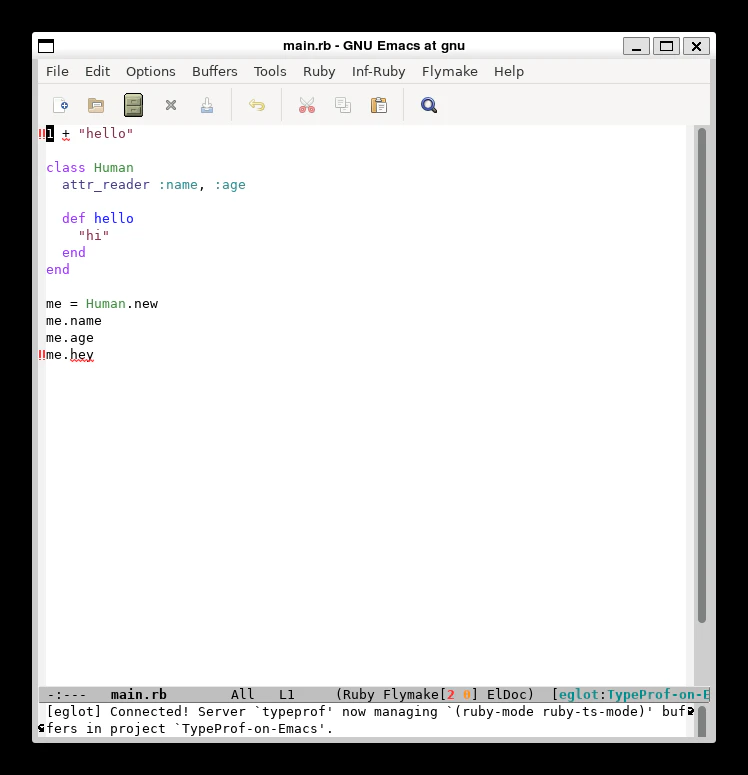
Eglotは既定でFlymakeを使うため、既に怪しいところに下線が表示されています。
この例では、整数に文字列を+できないこと、Humanクラスにheyインスタンスメソッドがないことが示されています。
下線が付いたところにポイントを持ってくると、ミニバッファに詳しい内容が表示されます。
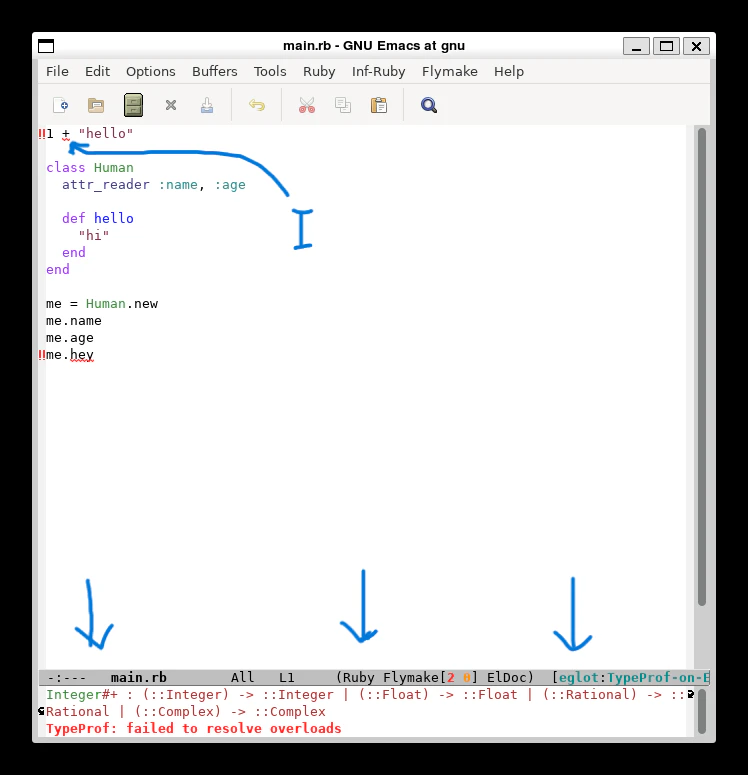
続いて補完を試してみましょう。
M-x corfu-modeとして、Humanクラスのhelloインスタンスメソッドが出てくるか試してみます。
me.と入力すると……
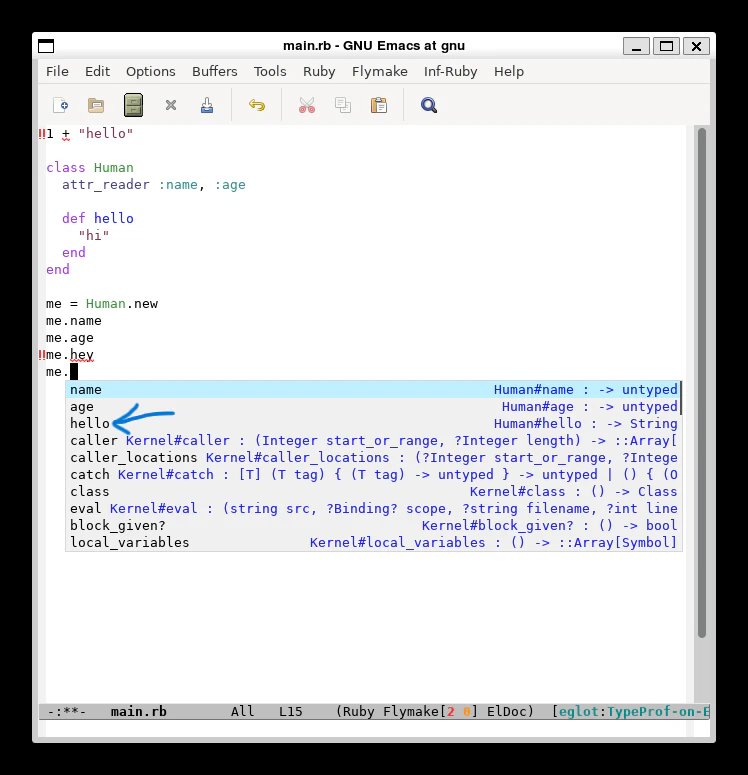
うまくいきました。
まとめ
この記事ではEmacsでTypeProfのLSP機能を活用する方法を見ました。
コードの警告が表示されたり、入力時に補完が効くことを確認しました。
Copyright (c)  2025 gemmaro.
Permission is granted to copy, distribute and/or modify this document
under the terms of the GNU Free Documentation License, Version 1.3
or any later version published by the Free Software Foundation;
with no Invariant Sections, no Front-Cover Texts, and no Back-Cover Texts.
The license is located at <https://www.gnu.org/licenses/fdl-1.3.html>.