
はじめに
Claude Desktopを使用して、Zabbixを簡単に運用できないかなという
考察のもと、ClaudeからZabbixへ監視設定してみようという記事です!
目次
環境
事前作業
Claude DesktopからZabbixのAPIを呼び出すためのpythonファイルの準備
Claude Desktopの設定
試してみよう
おまけ
環境
■Zabbixサーバ
Redhat Enterprise Linux 9.7
Zabbix 7.0
■Claude環境
Windows Server 2022
Claude Desktop
事前作業
①Claude Desktopをインストール
https://claude.ai/

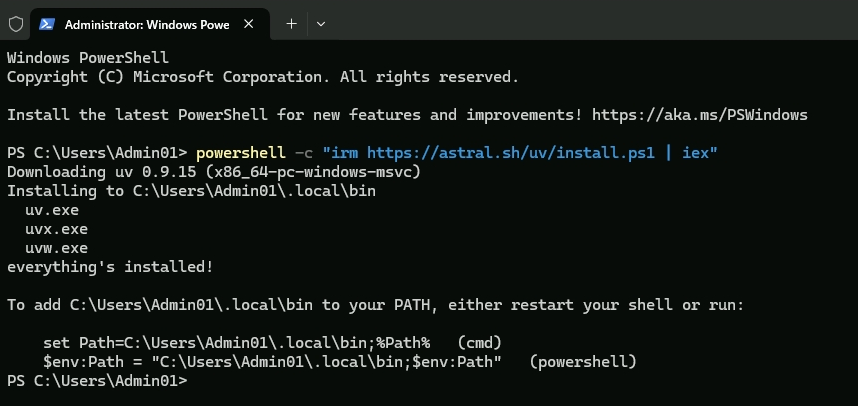
②uvのインストール
uvのインストール後、uvがインストールされた環境変数へのパス追加を実施してください。
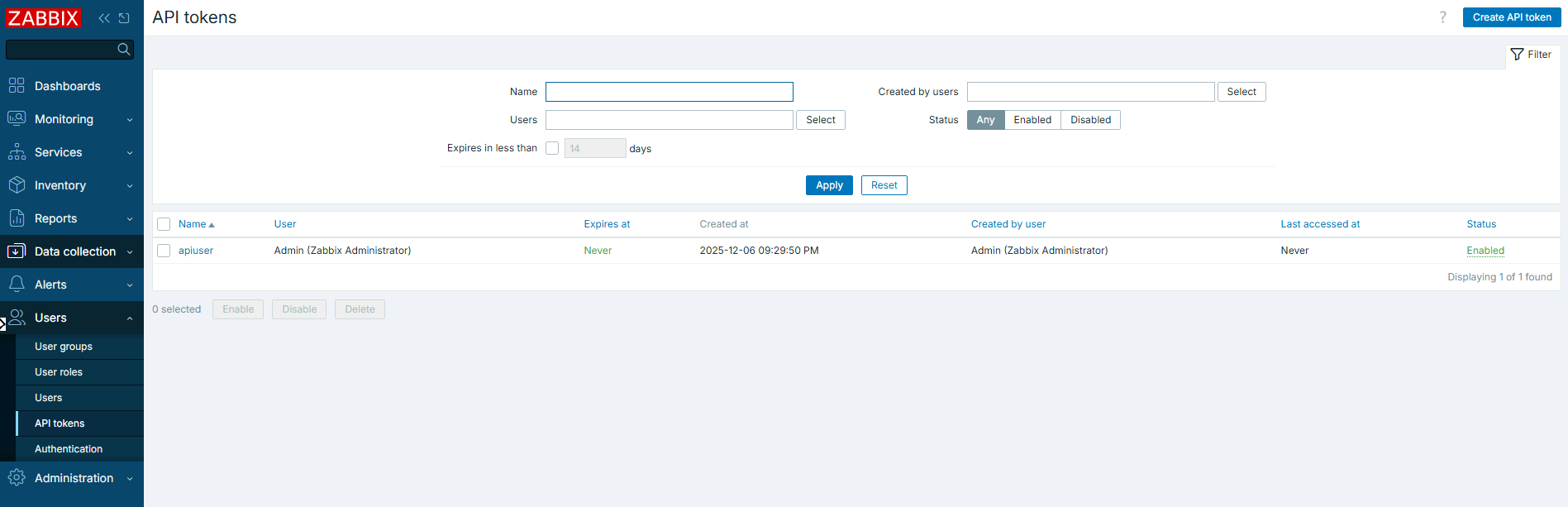
③ZabbixでAPI Tokenを取得します。
Claude DesktopからZabbixのAPIを呼び出すためのpythonファイルの準備
①カレントディレクトリをプロジェクトを作成するフォルダに移動し
コマンドプロンプトにて以下のコマンドを実行します。
uvx create-mcp-server --path zabbix_claude_service
②以下の項目を入力していきます。
それ以外の項目については、Enterキーでスキップします。
Project name(required): zabbix_cluade_service
③Claude.appの中にインストールするか質問されるので「Y」を入力し、Enterキーを押します。
Claude.app detected. Would you like to install the server into Claude.app now? [Y/n]:
④上記の作業により、作成された「zabbix_cluade_service」フォルダを開きます。
zabbix_cluade_service.py(拡張子変更します)を開きます。
以下のコードで、ZabbixのAPI Tokenを環境に合わせて設定します。
コードの中では以下のzabbix apiの処理ができるように定義しています。
apiinfo.version
host.get
template.get
host.create
import os
import traceback
import httpx
from typing import Any
from mcp.server.fastmcp import FastMCP

# Initialize FastMCP server
mcp = FastMCP("zabbix_mcp")

# Constants
ZABBIX_API_URL = "http://10.2.0.15/zabbix/api_jsonrpc.php"
#Zabbix API Token
AUTH = "<ZabbixのAPI Token>"

async def make_zabbix_request(request_data: dict) -> dict[str, Any] | None:
    """Make a request to the NWS API with proper error handling."""
    headers = {
        "Content-Type": "application/json-rpc"
    }
    async with httpx.AsyncClient() as client:
        try:
            response = await client.post(
                ZABBIX_API_URL,
                json=request_data,
                headers=headers,
                timeout=30.0
            )
            response.raise_for_status()
            result = response.json()

            if "error" in result:
                print("{}: error: message={}, data={}, code={}".format(
                    os.path.basename(__file__),
                    result["error"]["message"],
                    result["error"]["data"],
                    result["error"]["code"])
                )
                return None

            return result
        except Exception as e:
            print("{}: exception: {}".format(
                os.path.basename(__file__),
                traceback.format_exc())
            )
            return None

#ホスト名のフォーマット
def format_host(host: dict) -> str:
    """Format a host feature into a readable string."""
    interfaces = host.get('interfaces', [])
    ip_addresses = ", ".join([interface.get('ip', 'Unknown IP') for interface in interfaces]) if interfaces else "No interfaces"

    return f"""
Name: {host.get('name', 'Unknown')}
HostID: {host.get('hostid', 'Unknown')}
IP Addresses: {ip_addresses}
"""

#テンプレート名のフォーマット
def format_template(template: dict) -> str:
    """テンプレート情報を読みやすい文字列にフォーマットする"""
    return f"""
Name: {template.get('name', 'Unknown')}
TemplateID: {template.get('templateid', 'Unknown')}
Description: {template.get('description', 'No description')}
"""

#ホストグループ名のフォーマット
def format_hostgroup(group: dict) -> str:
    """ホストグループ情報を読みやすい文字列にフォーマットする"""
    return f"""
Group Name: {group.get('name', 'Unknown')}
Group ID: {group.get('groupid', 'Unknown')}
"""

#ユーザー情報のフォーマット
def format_user(user: dict) -> str:
    """ユーザー情報を読みやすい文字列にフォーマットする"""

    # ユーザータイプの変換
    user_type = "Regular User"
    if user.get('type') == '3':
        user_type = "Super Admin"
    elif user.get('type') == '2':
        user_type = "Admin"

    # ユーザーグループ名の取得
    groups = user.get('usrgrps', [])
    group_names = [group.get('name', 'Unknown') for group in groups]

    # メディア(通知方法)の情報整理
    medias = user.get('medias', [])
    media_info = []
    for media in medias:
        media_type = media.get('mediatypeid', 'Unknown')
        send_to = media.get('sendto', '')
        active = "Active" if media.get('active') == '0' else "Disabled"
        media_info.append(f"Type: {media_type}, To: {send_to}, Status: {active}")

    media_str = "\n  ".join(media_info) if media_info else "None configured"

    return f"""
Username: {user.get('username', 'Unknown')}
Full Name: {user.get('name', '')} {user.get('surname', '')}
User ID: {user.get('userid', 'Unknown')}
Type: {user_type}
User Groups: {', '.join(group_names)}
Medias:
  {media_str}
"""

#APIバージョンの取得
@mcp.tool()
async def get_api_version() -> str:
    # まず、APIのバージョンを確認する例
    version_request = {
        "jsonrpc": "2.0",
        "method": "apiinfo.version",
        "params": [],
        "id": 1
    }

    version_data = await make_zabbix_request(version_request)
    if not version_data:
        return "Unable to fetch Zabbix API version."

    version = version_data.get("result", "Unknown")
    print(f"Zabbix Version = {version}")

    return f"Zabbix API Version: {version}"

#ホスト情報の取得
@mcp.tool()
async def host_get(hostname: str) -> str:

    # 実際のホスト情報を取得するリクエスト
    # stateパラメータを使用してフィルタリングする例
    hosts_request = {
        "jsonrpc": "2.0",
        "method": "host.get",
        "params": {
            "output": ["hostid", "name"],
            "selectInterfaces": ["ip"],
            "search": {
                "name": hostname  # 部分一致で検索する場合は"search"を使用
            },
            "searchWildcardsEnabled": True  # ワイルドカード検索を有効にする
        },
        "auth": AUTH,  # 認証トークンを使用
        "id": 2
    }

    #
    hosts_data = await make_zabbix_request(hosts_request)
    if not hosts_data or "result" not in hosts_data:
        return "Unable to fetch alerts or no alerts found."

    if not hosts_data["result"]:
        return f"No hosts found for hostname: {hostname}"

    hosts = [format_host(host) for host in hosts_data["result"]]
    return "\n---\n".join(hosts)

#テンプレート情報の取得
@mcp.tool()
async def template_get(template_name: str) -> str:

    # 実際のホスト情報を取得するリクエスト
    # stateパラメータを使用してフィルタリングする例
    template_request = {
        "jsonrpc": "2.0",
        "method": "template.get",
        "params": {
            "output": "extend",
            "selectInterfaces": ["ip"],
            "search": {
                "name": template_name  # 部分一致で検索する場合は"search"を使用
            },
            "searchWildcardsEnabled": True  # ワイルドカード検索を有効にする
        },
        "auth": AUTH,  # 認証トークンを使用
        "id": 2
    }

    #
    template_data = await make_zabbix_request(template_request)
    if not template_data or "result" not in template_data:
        return "Unable to fetch alerts or no alerts found."

    if not template_data["result"]:
        return f"No hosts found for hostname: {template_name}"

    templates = [format_template(template_item) for template_item in template_data["result"]]
    return "\n---\n".join(templates)

#テンプレートIDの取得
@mcp.tool()
async def search_templates(template_pattern: str) -> str:
    # テンプレート検索リクエスト
    template_request = {
        "jsonrpc": "2.0",
        "method": "template.get",
        "params": {
            "output": ["templateid", "name", "description"],
            "search": {
                "name": template_pattern
            },
            "searchWildcardsEnabled": True,
            "sortfield": "name"
        },
        "auth": AUTH,
        "id": 8
    }

    # Zabbix APIにリクエスト送信
    template_data = await make_zabbix_request(template_request)

    if not template_data or "result" not in template_data:
        return f"Unable to search templates matching '{template_pattern}'."

    if not template_data["result"]:
        return f"No templates found matching pattern: {template_pattern}"

    # 結果を整形
    templates = [format_template(template) for template in template_data["result"]]
    return "\n---\n".join(templates)

# テンプレートIDの取得(複数テンプレート対応、カンマ区切り)
@mcp.tool()
async def get_template_ids(template_names_str: str) -> str:
    # カンマ区切りの文字列をリストに変換
    template_names = [name.strip() for name in template_names_str.split(',') if name.strip()]

    if not template_names:
        return "No template names provided."

    # テンプレート取得リクエスト
    template_request = {
        "jsonrpc": "2.0",
        "method": "template.get",
        "params": {
            "output": ["templateid", "name"],
            "filter": {
                "name": template_names
            }
        },
        "auth": AUTH,
        "id": 7
    }

    # Zabbix APIにリクエスト送信
    template_data = await make_zabbix_request(template_request)

    if not template_data or "result" not in template_data:
        return "Unable to fetch template information."

    if not template_data["result"]:
        return f"No matching templates found for the provided names: {template_names_str}"

    # 結果を整形
    result = "Template ID mapping:\n"
    for template in template_data["result"]:
        result += f"{template['name']}: {template['templateid']}\n"

    # 見つからなかったテンプレートも表示
    found_templates = [t["name"] for t in template_data["result"]]
    not_found = [name for name in template_names if name not in found_templates]

    if not_found:
        result += "\nTemplates not found:\n"
        for name in not_found:
            result += f"- {name}\n"

    return result

#ホストの登録
@mcp.tool()
async def host_create(hostname: str, ip_address: str, group_id: str, template_ids: list = None) -> str:

    # テンプレートIDがない場合は空リストを設定
    if template_ids is None:
        template_ids = []

    # テンプレートリンク設定の準備
    templates = [{"templateid": template_id} for template_id in template_ids]

    # ホスト作成リクエスト
    host_create_request = {
        "jsonrpc": "2.0",
        "method": "host.create",
        "params": {
            "host": hostname,
            "name": hostname,  # 表示名としても同じ名前を使用
            "interfaces": [
                {
                    "type": 1,  # 1=Zabbixエージェント
                    "main": 1,
                    "useip": 1,
                    "ip": ip_address,
                    "dns": "",
                    "port": "10050"
                }
            ],
            "groups": [
                {
                    "groupid": group_id
                }
            ],
            "templates": templates,
            "inventory_mode": 0  # 0=無効, 1=手動, 2=自動
        },
        "auth": AUTH,
        "id": 3
    }

    # Zabbix APIにリクエスト送信
    create_result = await make_zabbix_request(host_create_request)

    if not create_result or "result" not in create_result:
        return "Failed to create host. Check server logs for details."

    # 成功した場合はホストIDを含む情報を返す
    hostids = create_result["result"]["hostids"]
    return f"Host '{hostname}' created successfully with ID: {hostids[0]}"

#ホストグループの取得
@mcp.tool()
async def hostgroup_get(group_name: str = None) -> str:
    # ホストグループ取得リクエスト作成
    hostgroup_request = {
        "jsonrpc": "2.0",
        "method": "hostgroup.get",
        "params": {
            "output": ["groupid", "name"],
            "sortfield": "name"
        },
        "auth": AUTH,
        "id": 4
    }

    # グループ名で検索する場合
    if group_name:
        hostgroup_request["params"]["search"] = {
            "name": group_name
        }
        hostgroup_request["params"]["searchWildcardsEnabled"] = True

    # Zabbix APIにリクエスト送信
    hostgroup_data = await make_zabbix_request(hostgroup_request)

    if not hostgroup_data or "result" not in hostgroup_data:
        return "Unable to fetch host groups. Check server logs for details."

    if not hostgroup_data["result"]:
        return f"No host groups found" + (f" matching '{group_name}'" if group_name else "")

    # 結果をフォーマット
    groups = [format_hostgroup(group) for group in hostgroup_data["result"]]
    return "\n---\n".join(groups)

# 直接実行された場合の処理
if __name__ == "__main__":
    # Initialize and run the server
    mcp.run(transport='stdio')
Claude Desktopの設定
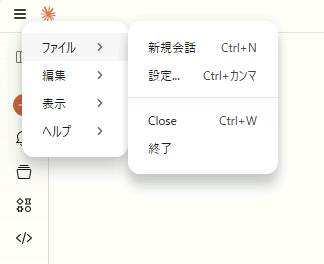
(1)左上のメニューより、[ファイル]-[設定]をクリックします。
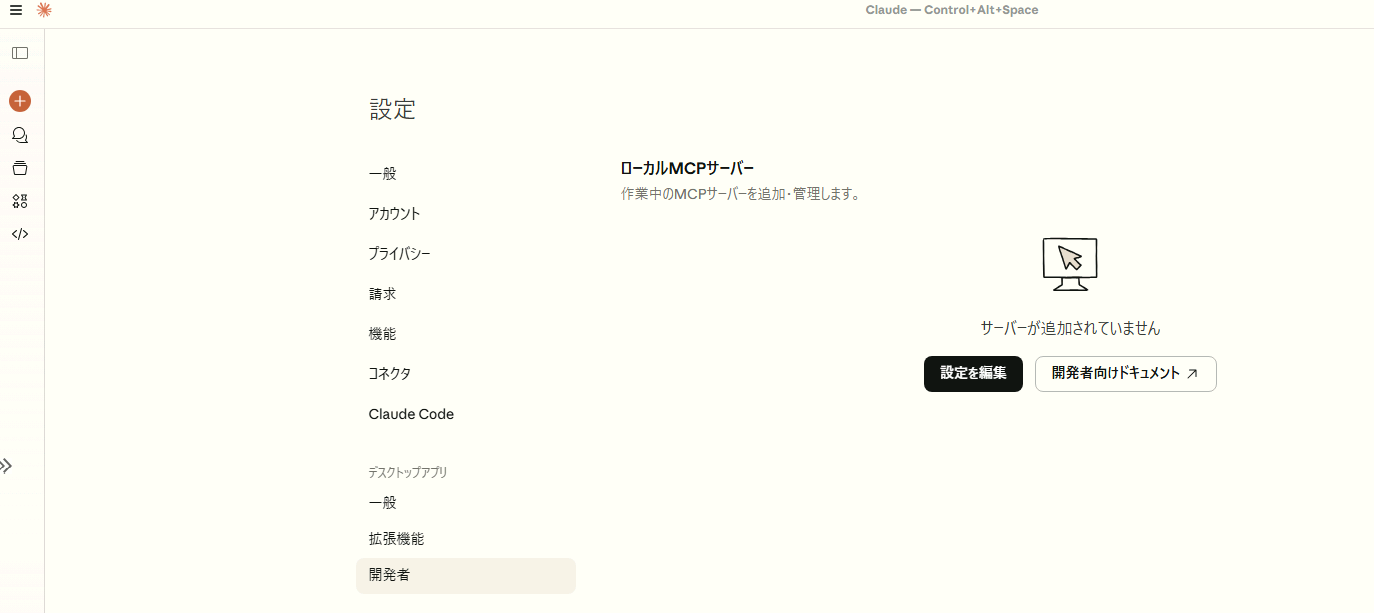
(2)「開発者」をクリックし、「設定を編集」をクリックします。
(3)開いたフォルダ内より「claude_desktop_config.json」を右クリックし編集します。
今回は、VSCODE開きます。
(4)以下のコードを貼り付けます。
{
  "mcpServers": {
    "zabbix": {
      "command": "C:\\Users\\AppData\\Admin01\\.local\\bin\\uv.exe",
      "args": [
        "--directory",
        "C:\\Users\\Admin01\\AppData\\zabbix_claude_service",
        "run",
        "zabbix_claude_service.py"
      ]
    }
  }
}
(5)設定後、Claude Desktopを再起動します。
Windowsを閉じてもタスクバーに常駐しているので。タスクバーのアイコンを右クリックっして
終了後、再度、Cluade Deskopを起動します。
試してみよう
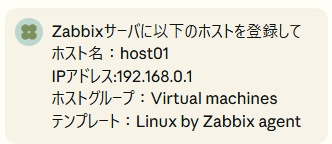
①ホスト登録の依頼をしてみます。
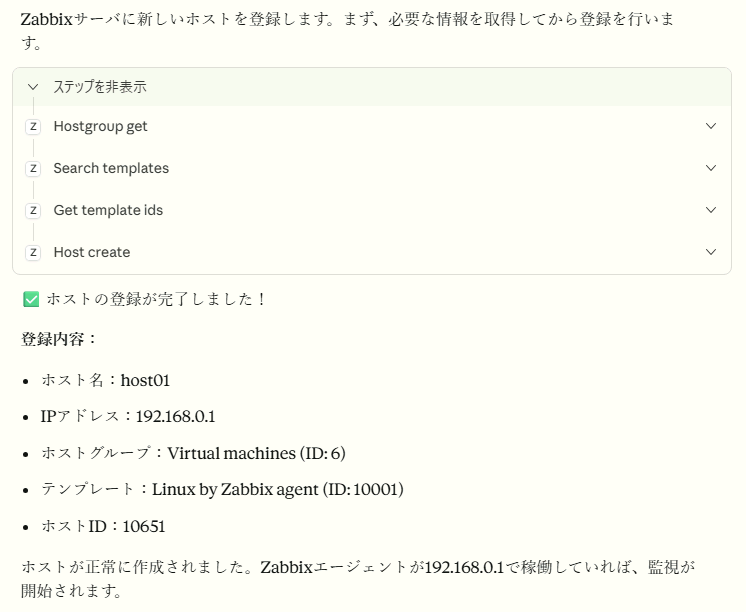
②Claudeが考えて登録処理を行ってくれます。
おまけ
今回、無料のClaudeで行ったため、本当は、ZabbixのAPIを全部登録
しようと思って試したのですが、Claudeに処理を1つリクエストするだけで
トークン上限に達してしまい、できませんでした。
いろいろやろうとすると有料じゃないと使えないのかもしれないです。