0
0

Delete article

Deleted articles cannot be recovered.

Draft of this article would be also deleted.

Are you sure you want to delete this article?

【Unity】AnimationのウィンドウでAnimationEventの作成やクリップの編集ができないの解決方法

Last updated at Posted at 2025-12-23

はじめに

この記事はHamster Output Advent Calendar 2025の7日目の記事です。

Assetで利用しているアニメーションのクリップにAnimationEventをつけようとしたところ、画像のように灰色の状態で選択できなくなっており、クリップ内のキーフレームの編集などもできない状態だったので、原因を調査することにしました。

image.png

参考リンク

原因

アニメーションの編集ができない原因は対象のアニメーションクリップが、FBXに格納されていることが原因でした。※FBXに格納されているAnimationClipはReadonlyのため編集不可

image.png

解決方法

解決方法が2つあります。

1.AnimationClipを複製する
ctlr+DでFBXに格納されているクリップを複製で解決します

2.文字列からAnimationEventを設定をする
FBXでAnimationが選択されている時に、Eventsという項目があります。ここから文字列でメソッド名を書くとイベント発火します。
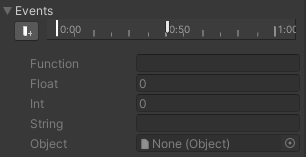
image.png

2の方法の場合、下の内容を守る必要があります
・Animatorとスクリプトが同じオブジェクトについていること
・メソッドがPublicであること

若干使うのに手間があるので1の方法をおすすめします

0
0
0

Register as a new user and use Qiita more conveniently

  1. You get articles that match your needs
  2. You can efficiently read back useful information
  3. You can use dark theme
What you can do with signing up
0
0

Delete article

Deleted articles cannot be recovered.

Draft of this article would be also deleted.

Are you sure you want to delete this article?